title: Bug Hunter
description: >
Install and use the measurable adversarial code-audit skill with scan-only
defaults and explicit permission before source edits.
prompt: |
Explain and use the current Bug Hunter protocol accurately. Keep scan-only
and single-pass defaults unless the user explicitly requests loop coverage or
mutation. Prefer canonical JSON artifacts, evidence-backed adversarial review,
bounded adaptive/retrieval context, and fail-closed verification.
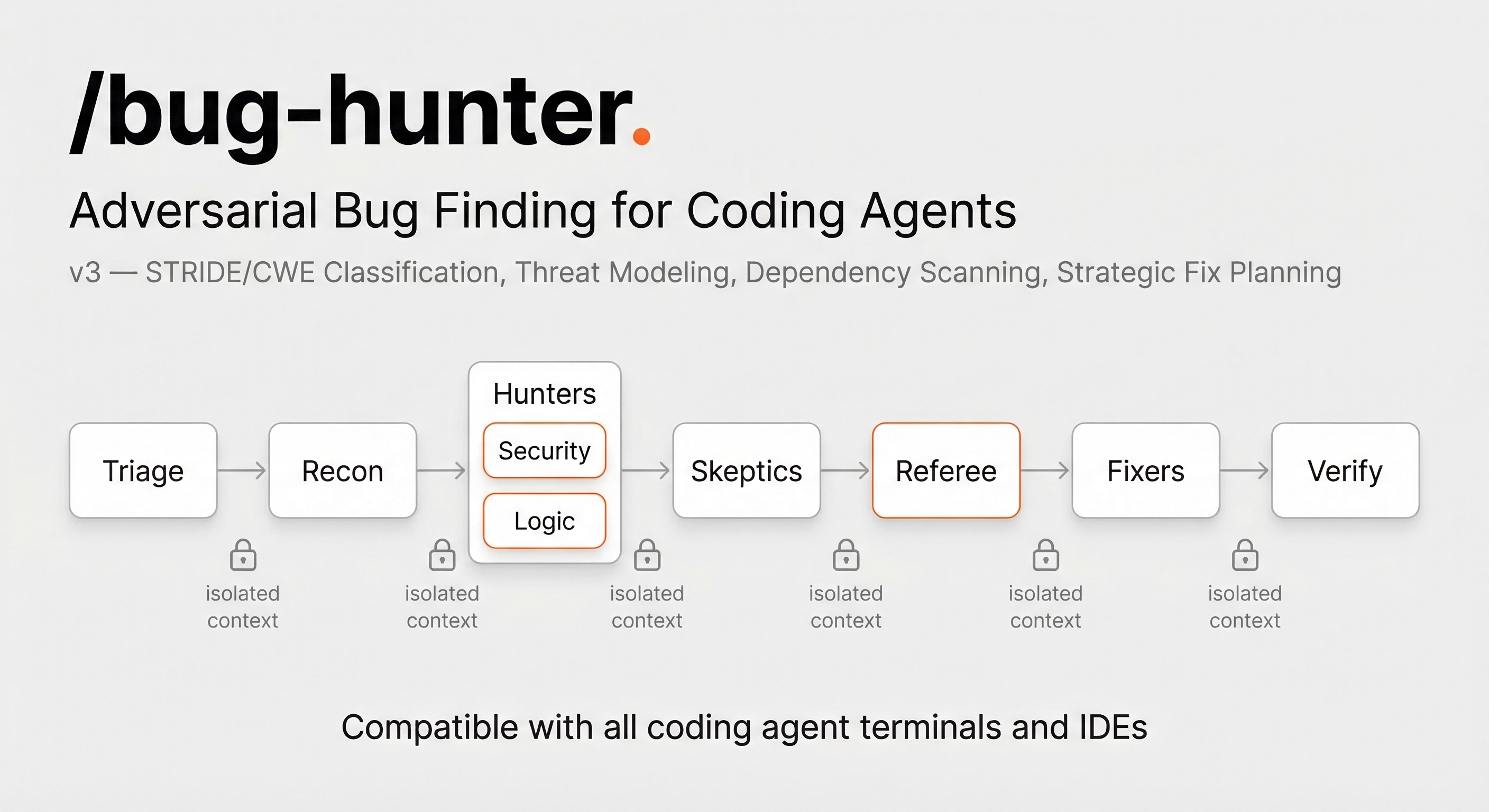
Bug Hunter
Adversarial code auditing for AI coding agents.
Bug Hunter is an AI-agent skill for code review and security auditing. A Hunter finds possible bugs, a Skeptic challenges each claim, and a Referee decides what the evidence supports. The default run only scans and reports. It is single-pass unless --loop is explicitly requested. Editing, autonomous fixing, and commits each require explicit permission.
v3.2.0 source — measurable, adaptive bug hunting
The current v3.2.0 source makes the precision-first pipeline measurable and adaptive while preserving the scan-only default and fail-closed safety boundaries. The latest published npm release may lag GitHub main; use the current-source command below when you need the exact implementation documented on this page.
- Measurable benchmark quality gate scores one-to-one finding matches, precision, recall, F1, severity-weighted recall, false positives per KLOC, calibration, repeat stability, token usage, latency, and cost data when supplied.
- Adaptive execution profiles select
fast, balanced, or assurance behavior from triage risk, security scope, benchmark evidence, stability, calibration, and token efficiency.
- Hybrid verification safely runs argv-only tests, type checks, static checks, fuzz checks, and security-static checks, and fails closed when required verification fails or is unavailable.
- Exact evidence caching reuses evidence only when source content, protocol identity, role, and relevant configuration match exactly; changed source cannot inherit stale conclusions.
- Hypothesis-driven retrieval prioritizes direct files, symbols, dependencies, dependents, cross-references, and trust boundaries under hard context budgets.
- Stronger source integrity keeps scan scope, source hashes, resume identity, coverage state, and Fixer authorization explicit and rejects source drift.
- Permanent CI quality gates verify Node.js 22 and 24; the Node.js 24 lane also runs the benchmark quality gate and package inventory verification.
- Bundled security workflows cover PR-focused security review, full repository security review, STRIDE threat modeling, vulnerability validation, and supported dependency CVE scanning.
The bundled deterministic regression fixture currently records precision 1.00, recall 1.00, F1 1.00, repeat stability 1.00, zero false positives, median 12,090 tokens per true positive, p95 duration 61.3s, and expected calibration error about 0.048. These figures validate the bundled harness and fixture; they are not an independent benchmark of every repository or model.
See the measurable world-class protocol for the full architecture, artifact contracts, quality thresholds, and verification design.
TL;DR
Install the exact current GitHub source documented here. Replace codex with a target from the table below.
npx --yes https://github.com/codexstar69/bug-hunter/archive/refs/heads/main.tar.gz install --agent codex
npx --yes https://github.com/codexstar69/bug-hunter/archive/refs/heads/main.tar.gz doctor --agent codex
For the latest published npm release—which may lag current GitHub source—use:
npm exec --yes --package=@codexstar/bug-hunter@latest -- bug-hunter install --agent codex
npm exec --yes --package=@codexstar/bug-hunter@latest -- bug-hunter doctor --agent codex
Restart the agent if it was open during installation. Then send this prompt from the repository you want to audit:
Use the bug-hunter skill to scan this repository. Do not edit files.
Return the final report and call out every item that needs manual review.
That is the recommended first run. It is scan-only and single-pass. Request --loop when complete queued coverage is required.
Choose your agent
| Agent |
Install target |
| Claude Code |
claude-code |
| Codex |
codex |
| Cursor |
cursor |
| GitHub Copilot |
copilot |
| Kiro |
kiro |
| Windsurf |
windsurf |
| OpenCode |
opencode |
| Factory Droid CLI |
droid |
| Other file-based agents |
agents |
Always pass --agent when more than one coding agent is installed. Auto-detection is available, but an explicit target prevents installation into the wrong skill directory.
Factory Droid CLI (droid) installs into ~/.factory/skills/bug-hunter and loads the skill for every repository. Use --path "$PWD/.factory/skills/bug-hunter" instead when the skill should be checked into a single repository. Droid also reads the legacy ~/.agents/skills location, so an existing --agent agents install already works there.
See agent installation for paths, source installs, updates, removal, and custom targets.
Use it with any agent
Natural language is the portable interface:
Use the bug-hunter skill to scan src/auth. Do not edit files.
Agents that expose skill commands may also accept:
/bug-hunter src/auth
For a reviewed fix run:
Use the bug-hunter skill to scan this repository. Build a fix plan.
Ask for approval before every edit. Do not commit.
The closest flag-based mode is:
/bug-hunter --fix --approve
--approve requests the host agent's reviewed/default permission mode. The
host decides when approval prompts appear. Use --plan or --preview when
source edits must be impossible.
For a plan without edits:
/bug-hunter --plan
Do not use --autonomous or --auto-commit unless you intend to grant those permissions.
See usage guide for common human and agent prompts.
What happens during a scan
your code
  -> risk triage
  -> optional adaptive plan
  -> architecture recon
  -> hypothesis-driven retrieval
  -> Hunter findings
  -> documentation checks
  -> Skeptic challenges
  -> Referee verdicts
  -> optional hybrid verification
  -> report
  -> optional approved fix plan
  -> optional approved fixes and verification
The pipeline:
- prioritizes high-risk files before lower-risk files
- keeps adaptive/retrieval context within explicit file and token budgets
- records claims with file evidence and runtime triggers
- checks version-sensitive behavior against available documentation
- challenges findings before reporting them as confirmed
- separates confirmed, dismissed, unreviewed, and manual-review results
- validates canonical JSON artifacts between phases
- fails closed on assigned-source drift and required verification failure
- keeps source edits disabled unless fixing is requested
Read how it works for the full model and safety boundaries.
Common workflows
| Goal |
Skill request |
| Scan the whole repository once |
/bug-hunter |
| Complete queued coverage |
/bug-hunter --loop |
| Scan one path |
/bug-hunter src/auth |
| Review staged changes |
/bug-hunter --staged |
| Review the current pull request |
/bug-hunter --pr |
| Run a pull-request security review |
/bug-hunter --pr-security |
| Add Node.js dependency scanning |
/bug-hunter --deps |
| Generate a STRIDE threat model |
/bug-hunter --threat-model |
| Create a fix plan without edits |
/bug-hunter --plan |
| Request host-interactive fixing |
/bug-hunter --fix --approve |
| Build a no-edit remediation preview |
/bug-hunter --preview |
| Allow unattended fixing |
/bug-hunter --autonomous |
The executable bug-hunter command installs and verifies the skill. Scans are started through your coding agent, not by running bug-hunter scan in a shell.
See CLI reference for installer commands and skill arguments.
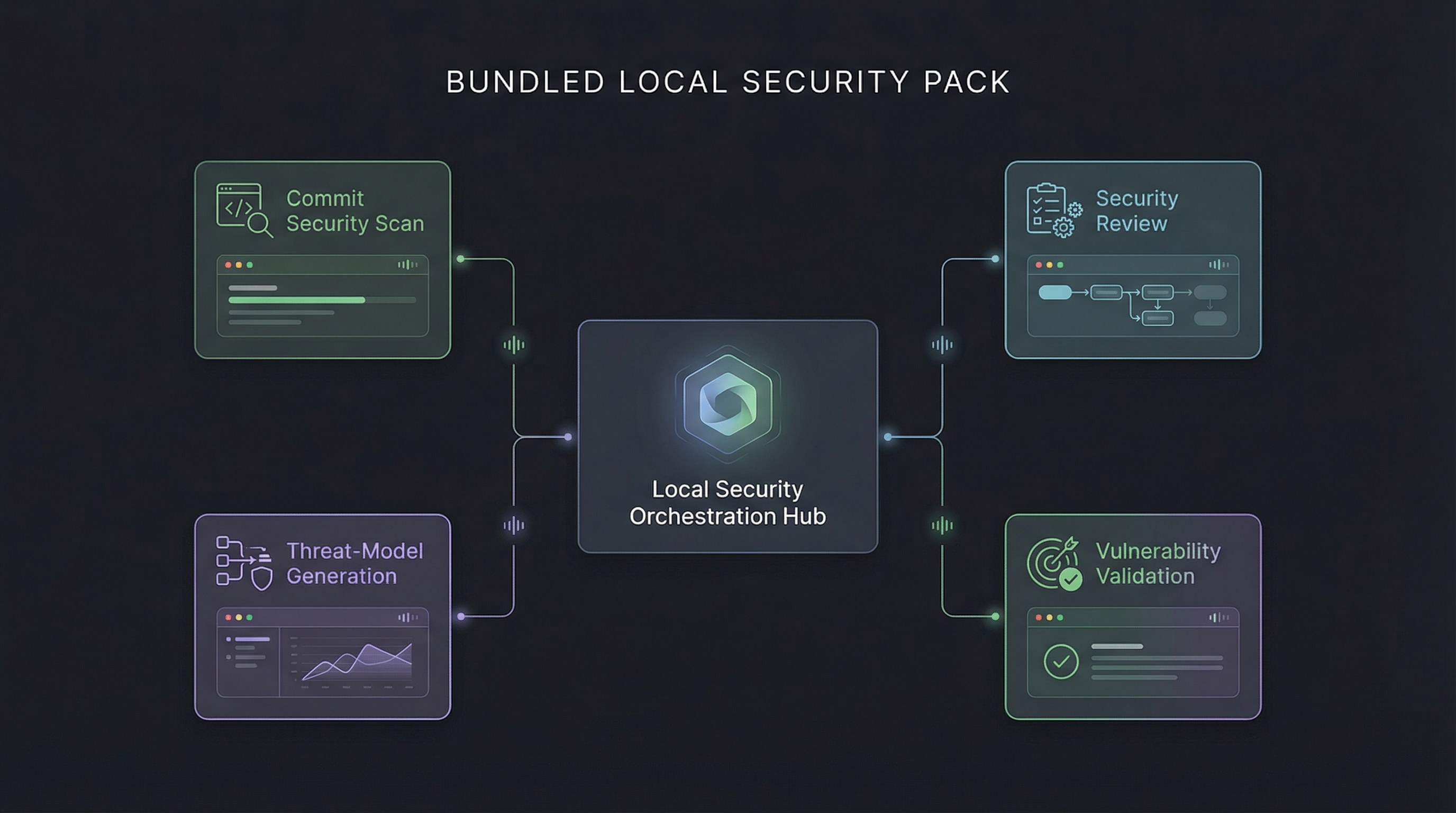
Security skill routing
The security flags use bundled local skills:
- PR-focused security review routes into
commit-security-scan through
--pr-security.
--threat-model routes into threat-model-generation.- enterprise/full security review routes into
security-review through
--security-review.
--validate-security routes into vulnerability-validation.
These skills are part of the managed runtime. They do not require separate
installation.
Complete product guide
Why adversarial AI code review
Many AI code-review tools produce a long list of possible issues but leave the
developer to discover which claims are real. A plausible explanation is not
proof that a runtime bug is reachable. Framework behavior, middleware,
validation in another file, and language guarantees can turn an alarming
finding into a false positive.
Bug Hunter treats a finding as a claim that must survive opposition:
- The Hunter explains the exact runtime failure, source evidence, trigger,
severity, and cross-file dependencies.
- The Skeptic tries to disprove the claim by tracing the same code and checking
protections the Hunter may have missed.
- The Referee compares both sides, independently checks the strongest or most
serious claims, and issues the final verdict.
For teams comparing an AI code-review tool, security code scanner,
vulnerability scanner, or static-analysis assistant, this separation matters:
automated code review stays useful only when the evidence and uncertainty are
visible.
This adversarial code review is designed to reduce false-positive overload
without hiding uncertainty. Results that cannot be settled become
MANUAL_REVIEW or unreviewed; they are not silently presented as clean.
The system focuses on behavioral correctness and security. It is not a style
linter. Naming preferences, formatting, unused code, missing comments, and
general refactoring suggestions are outside the Hunter's reporting scope unless
they create a reachable runtime problem.
How the code-audit pipeline works
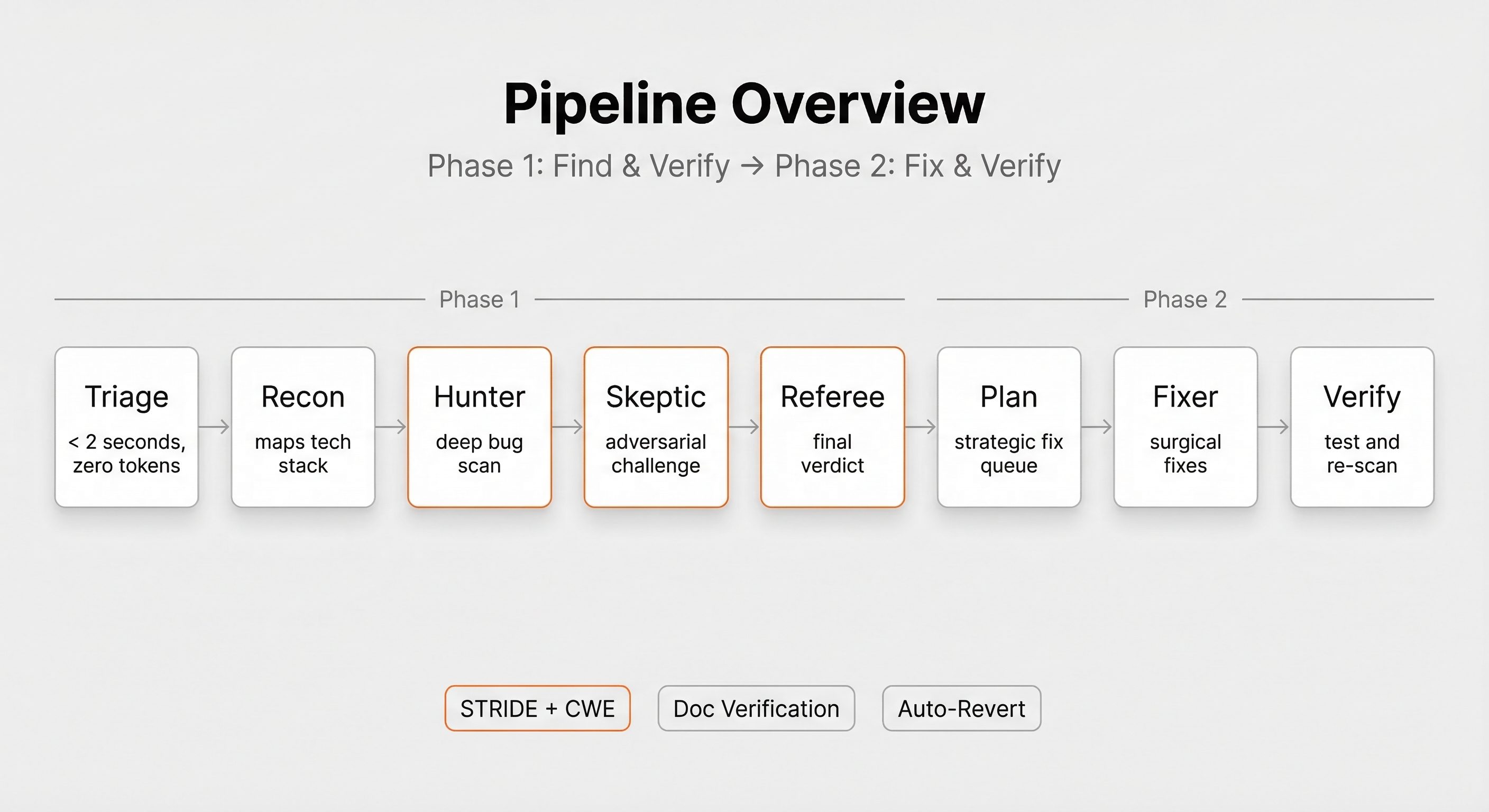
Every phase has a separate job. Role, report, coverage, fix, adaptive, retrieval, verification, and benchmark artifacts use schema-validated JSON; triage JSON is deterministic pipeline input.
| Stage |
What it does |
Main evidence |
| Risk triage |
Classifies source files and selects risk-ordered scan scope without an AI model |
triage.json |
| Adaptive policy |
Chooses bounded fast, balanced, or assurance context/review/verification policy when requested or supplied |
adaptive-plan.json |
| Recon |
Adds stack, architecture, and trust-boundary context for multi-file scans |
recon.json |