ECC
The agent harness performance optimization system. Skills, instincts, memory, security, and research-first development for Claude Code, Codex, Opencode, Cursor and beyond.
- 310k
- JavaScript
- MIT
- 22 h ago
Context-central multi-agent framework with PyTorch-like API. Build intelligent agent systems with minimal code.
Repo context-machine-lab/ContextAgent, read from GitHub 4 h ago. context-machine-lab has not joined Take My Repo.
context-machine-lab/ContextAgent is a public repo on GitHub by context-machine-lab. Context-central multi-agent framework with PyTorch-like API. Build intelligent agent systems with minimal code. It declares the MIT license on GitHub. It is written mainly in Python, has 78 stars and last changed on 2025-10-26. Nobody has reviewed it on Take My Repo yet, which says nothing about its quality. Read from GitHub on 2026-11-23.
The agent harness performance optimization system. Skills, instincts, memory, security, and research-first development for Claude Code, Codex, Opencode, Cursor and beyond.
A Context-Central Multi-Agent Framework
ContextAgent is a lightweight, context-central multi-agent systems framework designed for easy context engineering. It focuses on efficiently managing the context of each agent and binds all agents through simplified, centralized context operations. Unlike traditional multi-agent frameworks, ContextAgent treats agents simply as LLMs with different contexts, eliminating unnecessary complexity. Built with a PyTorch-like API, developers can create sophisticated multi-agent systems with minimal code.
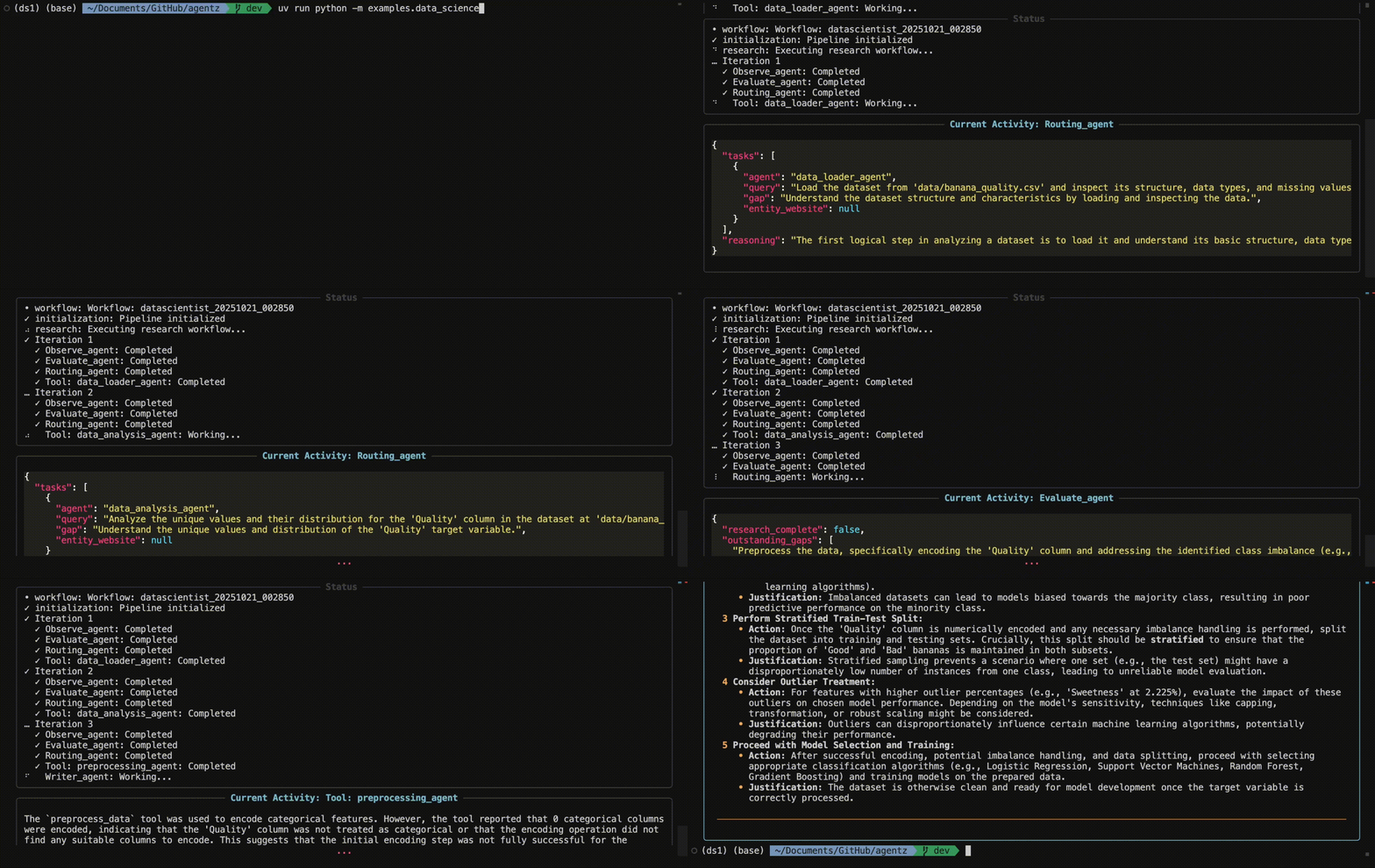
BasePipeline, define async run(), use @autotracing for tracing.Data Science Pipeline
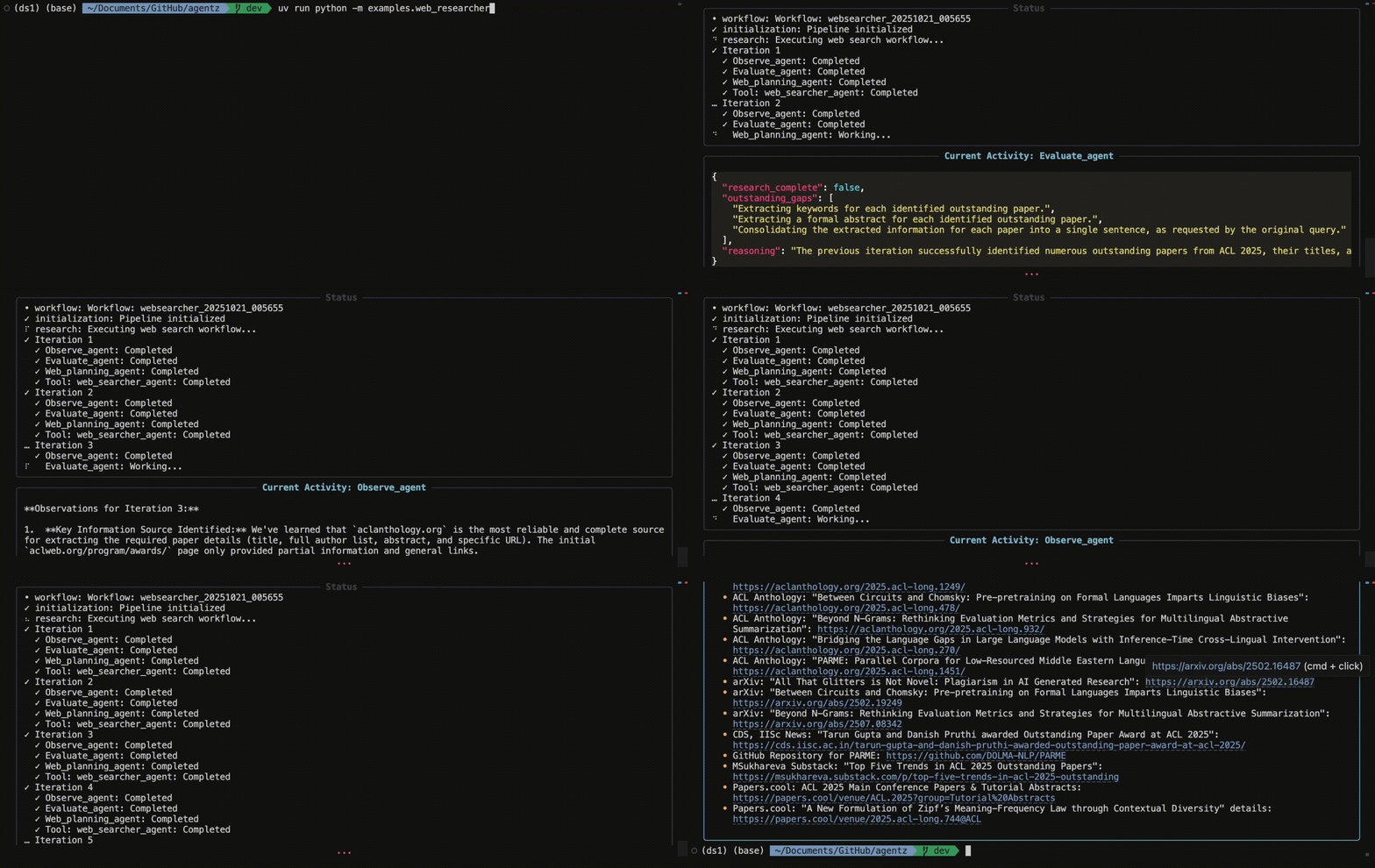
Web Research Pipeline
GUI Control Panel
This project uses uv for fast, reliable package management.
# macOS/Linux
curl -LsSf https://astral.sh/uv/install.sh | sh
See the uv installation guide for more options.
# Clone the repository
git clone https://github.com/context-machine-lab/contextagent.git
cd contextagent

# Sync dependencies
uv sync
ContextAgent requires API keys for LLM providers. Set up your environment in .env file:
# Copy the example environment file
cp .env.example .env
# Edit .env and add your API keys
See .env.example for complete configuration options.
You can also install ContextAgent directly from PyPI without cloning the repository:
pip install contextagent
Note: You'll still need to configure API keys in a .env file for LLM providers.
Try out ContextAgent with pre-configured example pipelines:
Data Science Pipeline - Automated ML pipeline for data analysis and model building:
uv run python -m examples.data_science
Web Research Pipeline - Search-based research with information extraction:
uv run python -m examples.web_researcher
Here's how to use ContextAgent in your own code:
from pipelines.data_scientist import DataScientistPipeline, DataScienceQuery

# Initialize pipeline with config
pipe = DataScientistPipeline("pipelines/configs/data_science.yaml")

# Create a query
query = DataScienceQuery(
    prompt="Analyze the dataset and build a predictive model",
    data_path="data/banana_quality.csv"
)

# Execute
pipe.run_sync(query)
Run the lightweight Flask web UI to submit and monitor pipelines with live logs:
uv run python frontend/app.py --host localhost --port 9090 --debug
Then open http://localhost:9090 in your browser. The UI streams live status and panels from the running pipeline and lets you stop active runs.
ContextAgent uses a PyTorch-like API for building multi-agent systems. Follow these steps to create your own pipeline:
Inherit from BasePipeline and call super().__init__(config):
from pipelines.base import BasePipeline
from pydantic import BaseModel

class YourPipeline(BasePipeline):
    def __init__(self, config):
        super().__init__(config)
        # Your initialization here
Create a centralized Context, get the LLM, and bind agents:
from contextagent.agent import ContextAgent
from contextagent.context import Context

class YourPipeline(BasePipeline):
    def __init__(self, config):
        super().__init__(config)

        self.context = Context(["profiles", "states"])
        llm = self.config.llm.main_model

        # Manager agent example
        self.routing_agent = ContextAgent(self.context, profile="routing", llm=llm)

        # Tool agents example
        self.tool_agents = {
            "data_loader": ContextAgent(self.context, profile="data_loader", llm=llm),
            "analyzer": ContextAgent(self.context, profile="analyzer", llm=llm),
            # ... add more agents
        }
        self.context.state.register_tool_agents(self.tool_agents)
Define your workflow in an async run() method:
import asyncio
from pipelines.base import autotracing

class YourPipeline(BasePipeline):
    @autotracing()
    async def run(self, query: YourQuery):
        self.context.state.set_query(query)

        while self.iteration < self.max_iterations:
            self.iterate()

            # Call agents directly
            routing_result = await self.routing_agent(query)
Create a Pydantic model and run your pipeline:
class YourQuery(BaseModel):
    prompt: str
    # Add your custom fields

# Execute
pipe = YourPipeline("pipelines/configs/your_config.yaml")
query = YourQuery(prompt="Your task here")
result = pipe.run_sync(query)
See complete implementations in:
ContextAgent is organized around a central conversation state and a profile-driven agent system. All agents are coordinated through a unified Context that manages iteration state and shared information.
pipelines/ – Workflow orchestration and configuration managementcontextagent/agent/ – ContextAgent implementation with context awareness and execution trackingcontextagent/context/ – Centralized conversation state and coordinationcontextagent/profiles/ – Agent profiles defining capabilities (manager, data, web, code, etc.)contextagent/tools/ – Tool implementations for data processing, web operations, and code executionexamples/ – Example pipelines demonstrating usagefrontend/ – Web UI for pipeline management and monitoringcontextagent/
├── pipelines/ # Workflow orchestration
├── contextagent/
│ ├── agent/ # ContextAgent implementation
│ ├── context/ # Conversation state management
│ ├── profiles/ # Agent profiles (manager, data, web, code)
│ ├── tools/ # Tool implementations
│ └── artifacts/ # Output formatting
├── examples/ # Example pipelines
└── frontend/ # Web UI
For more details, see the docs portal.
ContextAgent's context-central design has been validated on multiple research benchmarks:
Detailed benchmark results and comparisons coming soon.
uv sync --extra docs
uv run mkdocs serve
uv run mkdocs build
ContextAgent's context-central design is inspired by the multi-agent systems research community and best practices in distributed state management. We are particularly grateful to:
We thank the developers of these frameworks and the broader LLM community whose work informed this architecture.
We welcome contributions! ContextAgent is designed to be a community resource for multi-agent research. Please open an issue or submit a pull request.
This project is licensed under the MIT License - see the LICENSE file for details.
If you use ContextAgent in your research, please cite:
@misc{contextagent2025,
  title={ContextAgent: Lightweight Context-Driven Multi-Agent System Design},
  author={Zhimeng Guo, Hangfan Zhang, Siyuan Xu, Huaisheng Zhu, Teng Xiao, Jingyi Chen, Minhao Cheng},
  year={2025},
  publisher = {GitHub},
  journal = {GitHub repository},
  url={https://github.com/context-machine-lab/contextagent}
}
context-machine-lab/ContextAgent is a public repo on GitHub by context-machine-lab. Context-central multi-agent framework with PyTorch-like API. Build intelligent agent systems with minimal code.
It declares the MIT license on GitHub.
Its maker has not tagged a system, so it is unknown here. Its README says what it needs.
Open "Take it" on its page: Take My Repo writes an install plan for your machine and hands it to your AI agent (Claude Code, Codex or Cursor), which asks you before each step. Take My Repo has not tested it on any machine.
AutoGPT is the vision of accessible AI for everyone, to use and to build on. Our mission is to provide the tools, so that you can focus on what matters.
Its last change on GitHub was on 2025-10-26. Take My Repo does not judge from that whether it is maintained.
Nobody has reviewed it on Take My Repo yet, which says nothing about its quality.
Take My Repo cannot say: it does not audit code and has not run ContextAgent. What is known comes from GitHub. It declares the MIT license on GitHub. Its last change was on 2025-10-26. It has 78 stars, which measure popularity, not safety. Nobody has reviewed it on Take My Repo yet, which says nothing about its quality. Read the source before you run it. With "Take it", your AI agent shows each step and asks you before running it; README text is treated as data, not as instructions.