
joplin
Joplin - the privacy-focused note taking app with sync capabilities for Windows, macOS, Linux, Android and iOS.
- 57k
- TypeScript
- 7 h ago
Nextcloud Docker image
Repo crazy-max/docker-nextcloud, read from GitHub 2 d ago. crazy-max has not joined Take My Repo.
crazy-max/docker-nextcloud is a public repo on GitHub by crazy-max. Nextcloud Docker image. It declares the MIT license on GitHub. It is written mainly in Dockerfile, has 269 stars and last changed on 2026-11-14. Nobody has reviewed it on Take My Repo yet, which says nothing about its quality. Read from GitHub on 2026-11-24.
Joplin - the privacy-focused note taking app with sync capabilities for Windows, macOS, Linux, Android and iOS.
An open-source, self-hostable PaaS alternative to Vercel, Heroku & Netlify that lets you easily deploy static sites, databases, full-stack applications and 360+ one-click services on your own servers.

Nextcloud Docker image with advanced features.
[!TIP] Want to be notified of new releases? Check out 🔔 Diun (Docker Image Update Notifier) project!
git clone https://github.com/crazy-max/docker-nextcloud.git
cd docker-nextcloud

# Build image and output to docker (default)
docker buildx bake

# Build multi-platform image
docker buildx bake image-all
| Registry | Image |
|---|---|
| Docker Hub | crazymax/nextcloud |
| GitHub Container Registry | ghcr.io/crazy-max/nextcloud |
Following platforms for this image are available:
$ docker buildx imagetools inspect crazymax/nextcloud --format "{{json .Manifest}}" | \
  jq -r '.manifests[] | select(.platform.os != null and .platform.os != "unknown") | .platform | "\(.os)/\(.architecture)\(if .variant then "/" + .variant else "" end)"'

linux/amd64
linux/arm64
linux/ppc64le
linux/riscv64
linux/s390x
TZ: The timezone assigned to the container (default UTC)PUID: Nextcloud user id (default 1000)PGID: Nextcloud group id (default 1000)MEMORY_LIMIT: PHP memory limit (default 512M)UPLOAD_MAX_SIZE: Upload max size (default 512M)PM_MAX_CHILDREN: Maximum number of child processes to be created for PHP-FPM (default 20)NGINX_WORKER_PROCESSES: Number of Nginx worker processes (default auto)BODY_TIMEOUT: Defines a timeout for reading client request body (default 300s)CLEAR_ENV: Clear environment in FPM workers (default yes)OPCACHE_MEM_SIZE: PHP OpCache memory consumption (default 128)LISTEN_IPV6: Enable IPv6 for Nginx (default true)APC_SHM_SIZE: APCu memory size (default 128M)REAL_IP_FROM: Trusted addresses that are known to send correct replacement addresses (default 0.0.0.0/32)REAL_IP_HEADER: Request header field whose value will be used to replace the client address (default X-Forwarded-For)LOG_IP_VAR: Use another variable to retrieve the remote IP address for access log_format on Nginx. (default remote_addr)HSTS_HEADER: HTTP Strict Transport Security header value (default max-age=15768000; includeSubDomains)XFRAME_OPTS_HEADER: X-Frame-Options header value (default SAMEORIGIN)RP_HEADER: Referrer Policy header value (default strict-origin)DB_TYPE: Database type (mysql, pgsql or sqlite) (default sqlite)DB_NAME: Database name (default nextcloud)DB_USER: Username for database (default nextcloud)DB_PASSWORD: Password for database userDB_HOST: Database host (default db)DB_TIMEOUT: Time in seconds after which we stop trying to reach the database server. Only used for mysql and pgsql db type (default 60)[!NOTE]
DB_PASSWORD_FILEcan be used to fill in the value from a file, especially for Docker's secrets feature.
[!WARNING] Only used if you enable and run a sidecar cron container
SIDECAR_CRON: Set to 1 to enable sidecar cron mode (default 0)CRON_PERIOD: Periodically execute Nextcloud cron (eg. */5 * * * *)[!WARNING] Only used if you enable and run a sidecar previews generator container
SIDECAR_PREVIEWGEN: Set to 1 to enable sidecar previews generator mode (default 0)PREVIEWGEN_PERIOD: Periodically execute pre-generation of previews (eg. 0 * * * *)/data: Contains config, data folders, installed user apps (not core ones), session, themes, tmp folders/data/config/*.config.php: Additional Nextcloud configuration files loaded from the persistent config directory[!WARNING] Note that the volume should be owned by the user/group with the specified
PUIDandPGID. If you don't give the volume correct permissions, the container may not start.
8000: HTTP portDocker compose is the recommended way to run this image. Copy the content of
folder examples/compose in /var/nextcloud/ on your host
for example. Edit the compose and env files with your preferences and run the
following commands:
docker compose up -d
docker compose logs -f
You can also use the following minimal command:
docker run -d -p 8000:8000 --name nextcloud \
  -v "$(pwd)/data:/data" \
  crazymax/nextcloud:latest
To upgrade to the latest version of Nextcloud, pull the newer image and launch the container. Nextcloud will upgrade automatically:
docker compose pull
docker compose up -d
If you run the container for the first time, the installation will be automatic
using the DB_* environment variables. Then open your browser to configure
your admin account.
If you want to use the occ command to perform common server operations like manage users, encryption, passwords, LDAP setting, and more, type:
docker compose exec nextcloud occ
If you want to enable the cronjob, you have to run a "sidecar" container (see cron service in compose.yml example) or run a simple container like this:
docker run -d --name nextcloud_cron \
  --env-file $(pwd)/nextcloud.env \
  -e "SIDECAR_CRON=1" \
  -e "CRON_PERIOD=*/5 * * * *" \
  -v "$(pwd)/data:/data" \
  crazymax/nextcloud:latest
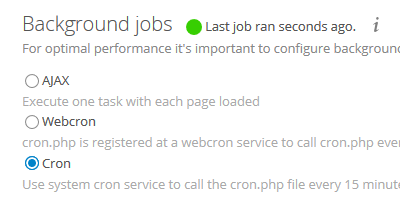
And do not forget to choose Cron as background jobs:
To execute pre-generation of previews through the Preview Generator plugin, you have to run a "sidecar" container (see cron service in compose.yml example) or run a simple container like this:
docker run -d --name nextcloud_previewgen \
  --env-file $(pwd)/nextcloud.env \
  -e "SIDECAR_PREVIEWGEN=1" \
  -e "PREVIEWGEN_PERIOD=0 * * * *" \
  -v "$(pwd)/data:/data" \
  crazymax/nextcloud:latest
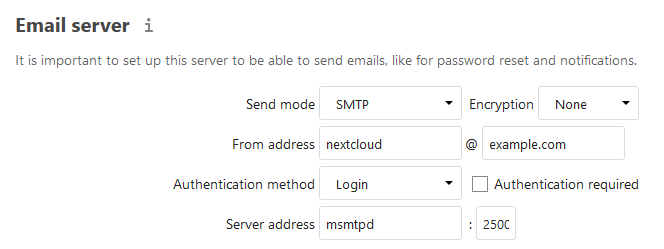
You can use our SMTP relay msmtpd service published on port 2500 and
declared in our compose.yml:
Nextcloud can load additional
*.config.php files
from its config directory.
Use /data/config/<name>.config.php for custom settings instead of editing
/data/config/config.php, which is managed by Nextcloud and this image.
These files are merged with config.php and take precedence over values defined
there. You can inspect the merged configuration with:
docker compose exec nextcloud occ config:list system --private
Do not store backup files ending with .config.php in /data/config, because
Nextcloud will load them as active configuration.
Redis is recommended, alongside APCu to make Nextcloud faster. If you want to
enable Redis, deploy a redis container (see compose file)
and create /data/config/redis.config.php:
<?php

$CONFIG = [
    'memcache.local' => '\OC\Memcache\APCu',
    'memcache.distributed' => '\OC\Memcache\Redis',
    'memcache.locking' => '\OC\Memcache\Redis',
    'redis' => [
        'host' => 'redis',
        'port' => 6379,
    ],
];
This image does not rewrite requests for subdir deployments. The bundled Nginx configuration expects requests to arrive at the root path it serves and emits root-relative redirects.
crazy-max/docker-nextcloud is a public repo on GitHub by crazy-max. Nextcloud Docker image.
It declares the MIT license on GitHub.
Its maker tagged it for macOS, Windows and Linux, or as Docker or cross-platform. That is declared by the maker; Take My Repo has not tested it.
Open "Take it" on its page: Take My Repo writes an install plan for your machine and hands it to your AI agent (Claude Code, Codex or Cursor), which asks you before each step. Take My Repo has not tested it on any machine.
A list of Free Software network services and web applications which can be hosted on your own servers
Its last change on GitHub was on 2026-11-14. Take My Repo does not judge from that whether it is maintained.
Nobody has reviewed it on Take My Repo yet, which says nothing about its quality.
Take My Repo cannot say: it does not audit code and has not run docker-nextcloud. What is known comes from GitHub. It declares the MIT license on GitHub. Its last change was on 2026-11-14. It has 269 stars, which measure popularity, not safety. Nobody has reviewed it on Take My Repo yet, which says nothing about its quality. Read the source before you run it. With "Take it", your AI agent shows each step and asks you before running it; README text is treated as data, not as instructions.




