

AutoGPT
AutoGPT is the vision of accessible AI for everyone, to use and to build on. Our mission is to provide the tools, so that you can focus on what matters.
- 188k
- Python
- 5 h ago
Framework for orchestrating role-playing, autonomous AI agents. By fostering collaborative intelligence, CrewAI empowers agents to work together seamlessly, tackling complex tasks.
Repo crewAIInc/crewAI, read from GitHub 9 h ago. crewAIInc has not joined Take My Repo.
crewAIInc/crewAI is a public repo on GitHub by crewAIInc. Framework for orchestrating role-playing, autonomous AI agents. By fostering collaborative intelligence, CrewAI empowers agents to work together seamlessly, tackling complex tasks. It declares the MIT license on GitHub. It is written mainly in Python, has 61,239 stars and last changed on 2026-11-25. Nobody has reviewed it on Take My Repo yet, which says nothing about its quality. Read from GitHub on 2026-11-25.
AutoGPT is the vision of accessible AI for everyone, to use and to build on. Our mission is to provide the tools, so that you can focus on what matters.

Homepage · Open Source · Docs · Start Cloud Trial · Blog · Forum
CrewAI is an open-source Python framework with high-level abstractions and low-level APIs for building production-ready multi-agent workflows. It gives developers autonomous agent collaboration through Crews and precise, event-driven control through Flows.
With over 100,000 developers certified through our community courses at learn.crewai.com, CrewAI is rapidly becoming the standard for production-ready agentic automation.
For organizations that need a commercial control plane around CrewAI, CrewAI AMP Suite adds managed deployment, observability, governance, security, and enterprise support.
You can try one part of the suite, the Crew Control Plane, for free.
CrewAI AMP is designed for enterprises seeking a powerful, reliable solution to transform complex business processes into efficient, intelligent automations.
Using an AI coding agent? Teach it CrewAI best practices in one command:
Claude Code:
/plugin marketplace add crewAIInc/skills
/plugin install crewai-skills@crewai-plugins
/reload-plugins
Four skills that activate automatically when you ask relevant CrewAI questions:
| Skill | When it runs |
|---|---|
getting-started |
Scaffolding new projects, choosing between LLM.call() / Agent / Crew / Flow, wiring crew.jsonc / main.py |
design-agent |
Configuring agents — role, goal, backstory, tools, LLMs, memory, guardrails |
design-task |
Writing task descriptions, dependencies, structured output (output_pydantic, output_json), human review |
ask-docs |
Querying the live CrewAI docs MCP server for up-to-date API details |
Cursor, Codex, Windsurf, and others (skills.sh):
npx skills add crewaiinc/skills
This installs the official CrewAI Skills — structured instructions that teach coding agents how to scaffold Flows, configure Crews, design agents and tasks, and follow CrewAI patterns.
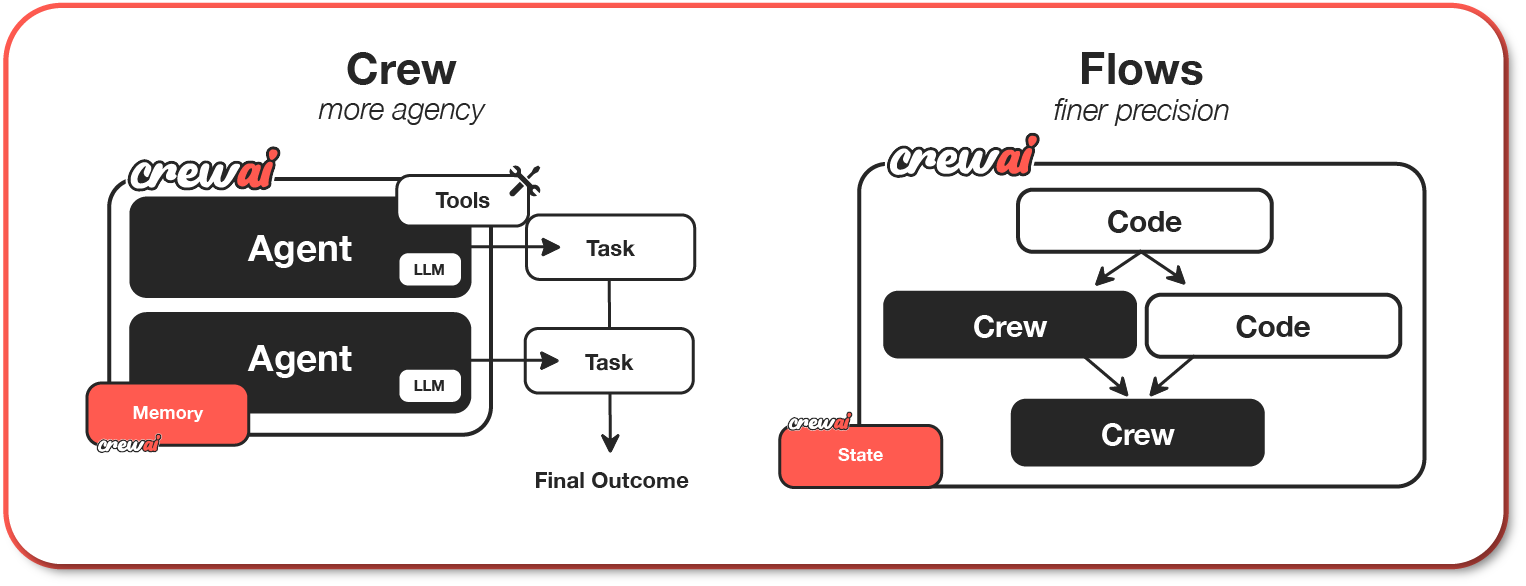
CrewAI unlocks the true potential of multi-agent automation, delivering speed, flexibility, and control through Crews of AI agents and event-driven Flows:
CrewAI empowers developers and teams to build intelligent automations that balance simplicity, flexibility, and production-grade control.
Setup and run your first CrewAI agents by following this tutorial.

Learn CrewAI through our comprehensive courses:
CrewAI offers two powerful, complementary approaches that work seamlessly together to build sophisticated AI applications:
Crews: Teams of AI agents with true autonomy and agency, working together to accomplish complex tasks through role-based collaboration. Crews enable:
Flows: Production-ready, event-driven workflows that deliver precise control over complex automations. Flows provide:
The true power of CrewAI emerges when combining Crews and Flows. This synergy allows you to:
To get started with CrewAI, follow these simple steps. The full walkthrough lives in the installation guide.
CrewAI requires Python >=3.10 and <3.14. Check your version with:
python3 --version
CrewAI uses UV for dependency management and package handling. If you haven't installed uv yet, install it first.
macOS/Linux:
curl -LsSf https://astral.sh/uv/install.sh | sh
If your system doesn't have curl, you can use wget:
wget -qO- https://astral.sh/uv/install.sh | sh
Windows:
powershell -ExecutionPolicy ByPass -c "irm https://astral.sh/uv/install.ps1 | iex"
If you run into any issues, refer to UV's installation guide.
Then install the CrewAI CLI:
uv tool install crewai
If you encounter a PATH warning, run:
uv tool update-shell
Verify the install:
uv tool list
You should see something like:
crewai v0.102.0
- crewai
To upgrade the global CLI later:
uv tool install crewai --upgrade
This upgrades the global crewai CLI tool only. To upgrade the crewai version inside a project's virtual environment, see Upgrading CrewAI in a project.
crewai create crew creates a JSON-first crew project. Agents live in agents/*.jsonc, tasks and crew-level settings live in crew.jsonc, and crewai run loads that JSON definition directly.
crewai create crew <project_name>
This command creates a new project folder with the following structure:
my_project/
├── .gitignore
├── .env
├── agents/
│   └── researcher.jsonc
├── crew.jsonc
├── knowledge/
├── pyproject.toml
├── README.md
├── skills/
└── tools/
If you need the older Python/YAML scaffold with crew.py, config/agents.yaml, and config/tasks.yaml, run:
crewai create crew <project_name> --classic
See Using Annotations for the classic pattern.
agents/*.jsonc to define each agent's role, goal, backstory, LLM, tools, and behavior.crew.jsonc to define tasks, process, and input defaults.tools/ and reference them as "custom:<name>".knowledge/ and skill files in skills/..env file.Use {placeholder} values in agent and task text, then set defaults in crew.jsonc under inputs. When you run crewai run, the CLI prompts for any missing values.
crewai create crew latest-ai-development
cd latest_ai_development
Then edit the generated files:
agents/researcher.jsonc
{
  "role": "{topic} Senior Data Researcher",
  "goal": "Uncover cutting-edge developments in {topic}",
  "backstory": "You're a seasoned researcher who finds relevant information and presents it clearly.",
  "llm": "openai/gpt-4o",
  "tools": ["SerperDevTool"],
  "settings": {
    "verbose": true
  }
}
agents/reporting_analyst.jsonc
{
  "role": "{topic} Reporting Analyst",
  "goal": "Create detailed reports based on {topic} data analysis and research findings",
  "backstory": "You're a meticulous analyst who turns complex data into clear, concise reports.",
  "llm": "openai/gpt-4o",
  "settings": {
    "verbose": true
  }
}
crew.jsonc
crewAIInc/crewAI is a public repo on GitHub by crewAIInc. Framework for orchestrating role-playing, autonomous AI agents. By fostering collaborative intelligence, CrewAI empowers agents to work together seamlessly, tackling complex tasks.
It declares the MIT license on GitHub.
Its maker tagged it for macOS, Windows and Linux, or as Docker or cross-platform. That is declared by the maker; Take My Repo has not tested it.
The agent harness performance optimization system. Skills, instincts, memory, security, and research-first development for Claude Code, Codex, Opencode, Cursor and beyond.
Get up and running with Kimi, GLM, MiniMax, DeepSeek, gpt-oss, Qwen, Gemma and other models.
Reverse engineer anything with agents, from app behavior down to native binaries.
Langflow is a powerful tool for building and deploying AI-powered agents and workflows.
Open "Take it" on its page: Take My Repo writes an install plan for your machine and hands it to your AI agent (Claude Code, Codex or Cursor), which asks you before each step. Take My Repo has not tested it on any machine.
Its last change on GitHub was on 2026-11-25. GitHub counts 1,273 open issues and pull requests. Take My Repo does not judge from that whether it is maintained.
Nobody has reviewed it on Take My Repo yet, which says nothing about its quality.
Take My Repo cannot say: it does not audit code and has not run crewAI. What is known comes from GitHub. It declares the MIT license on GitHub. Its last change was on 2026-11-25. It has 61,239 stars, which measure popularity, not safety. Nobody has reviewed it on Take My Repo yet, which says nothing about its quality. Read the source before you run it. With "Take it", your AI agent shows each step and asks you before running it; README text is treated as data, not as instructions.




