cocoAPI
Simple, efficient and convenient!
- 8
- 22 mo ago
Repo cuixing158/cocoAPI, read from GitHub 23 h ago. cuixing158 has not joined Take My Repo.
In short
cuixing158/cocoAPI is a public repo on GitHub by cuixing158. Simple, efficient and convenient! It declares no license on GitHub. Public does not mean open source: without a license, nobody is granted the right to reuse it. It is written mainly in MATLAB, has 8 stars and last changed on 2025-02-02. Nobody has reviewed it on Take My Repo yet, which says nothing about its quality. Read from GitHub on 2026-11-23.
Similar repos


COCO-API


OverView
As we all know, the COCO2014/2017 dataset is widely used for object detection, instance segmentation, image description, key point detection,panoramic segmentation and many other tasks, the official has provided cocoapi's python, matlab, lua language interface, but in matlab using the interface provided by the program is very poor readability, not easy to intuitively clear. This program makes full use of the characteristics of the table type to enrich the expression of coco datasets, with only about 100 lines of code to achieve the "instances", "keypoints" ,"captions" level of API, without any third-party libraries, can be customized to modify the API, code readability.
Syntax
- [allCOCOdata,cocoDatastore,cocoNames]=cocoInstancesAPI(imagesDir,annotationFile,categoryNames)
功能:优雅的实现coco2014,coco2017数据集instances新接口
输入:
imagesDir,string类型,1*1大小,输入COCO图像文件根目录
annotationFile,string类型,1*1大小,与之对应的标注json文件
categoryNames,(可选项)string类型,1*N大小,物体类别,默认所有类别
输出:
allCOCOdata, table类型,所有带有标注的完整信息,每行代表一副图像
cocoDatastore,TransformedDatastore object,可就地迭代对象
cocoNames,categorical类型,80个类别`
- [allCOCOdata,cocoDatastore,keyPtsNames,skeleton]=cocoKeyPointsAPI(imagesDir,annotationFile)
功能:优雅的实现coco2014,coco2017数据集keypoints新接口
输入:
imagesDir,string类型,输入COCO图像文件根目录
annotationFile,string类型,与之对应的标注json文件
输出:
allCOCOdata, table类型,所有带有标注的完整信息,每行代表一副图像
cocoDatastore,TransformedDatastore object,可就地迭代对象
keyPtsNames,categorical类型数组,长度为17,分别为人体各个部位id顺序名字
skeleton,double类型数组,M*2大小,人体部位各个id连接情况,第一列与第二列id进行连接
- [allCOCOdata,cocoDatastore] = cocoCaptionsAPI(imagesDir,annotationFile)
功能:优雅的实现coco2014,coco2017数据集Captions新接口
输入:
imagesDir,string类型,输入COCO图像文件根目录
annotationFile,string类型,与之对应的标注json文件
输出:
allCOCOdata, table类型,所有带有标注的完整信息,每行代表一副图像
cocoDatastore,TransformedDatastore object,可就地迭代对象
Requirements
MatlabR2020b or higher
How to use
一般做object detection/segmention/keypoints/captions,训练任务都会用到可迭代的datasets,比如对上述三类API返回数据cocoDatastore进行迭代使用,read会从内存中读取部分数据,读取的数据直观上应当有以下返回形式数据格式:
data = read(cocoDatastore)
根据不同任务的API,返回元胞数组data中的元素有如下直观形式。
- RGB images (H x W x 3)
- Bounding boxes (NumObjects x 4, arranged as [x y w h])
- Labels (NumObjects x 1), categorical
- Masks (H x W x NumObjects)
- KeyPoints (17×3×NumObjects)
- Captions(NumSentences x 1 cell array)
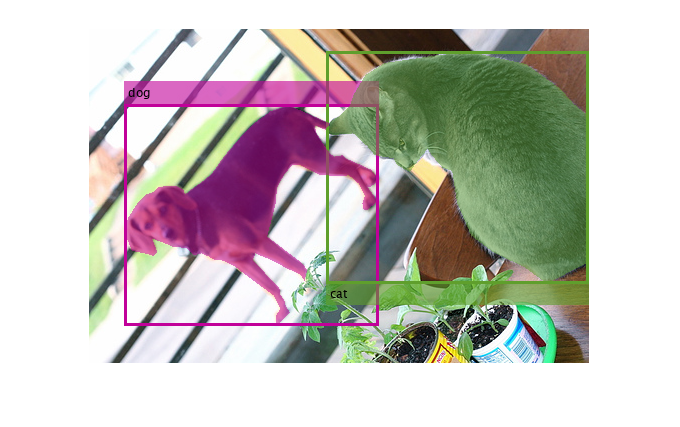
Example1, instance
% coco path
imagesDir = '\\192.168.1.103\dataSets\coco2017\val2017\val2017';
annotationFile = '\\192.168.1.103\dataSets\coco2017\annotations_trainval2017\annotations\instances_val2017.json';
yourNames = ["dog","cat"]; % optional
% coco-api
[allCOCOdata,cocoDatastore,coconames] = cocoInstancesAPI(imagesDir,...
    annotationFile,yourNames);

head(allCOCOdata) % preview,Get top rows of table
| image_id | license | file_name | coco_url | height | width | date_captured | flickr_url | GroupCount | segments | iscrowd | bbox | category_id | |
|---|---|---|---|---|---|---|---|---|---|---|---|---|---|
| 1 | 1675 | 1 | '000000001675.jpg' | 'http://images.cocod... | 480 | 640 | '2013-11-18 00:14:32... | 'http://farm1.static... | 1 | 1x1 cell | 0 | [0,14.0100,640,293.5... | 17 |
| 2 | 4795 | 1 | '000000004795.jpg' | 'http://images.cocod... | 480 | 640 | '2013-11-17 21:07:53... | 'http://farm1.static... | 1 | 1x1 cell | 0 | [152.7700,113.5500,3... | 17 |
| 3 | 7386 | 3 | '000000007386.jpg' | 'http://images.cocod... | 400 | 600 | '2013-11-15 12:44:58... | 'http://farm5.static... | 1 | 1x1 cell | 0 | [180.9100,281.1400,3... | 18 |
| 4 | 10363 | 1 | '000000010363.jpg' | 'http://images.cocod... | 361 | 640 | '2013-11-15 07:08:52... | 'http://farm4.static... | 1 | 1x1 cell | 0 | [245.5100,108.3000,2... | 17 |
| 5 | 14007 | 3 | '000000014007.jpg' | 'http://images.cocod... | 426 | 640 | '2013-11-24 11:03:51... | 'http://farm8.static... | 1 | 1x1 cell | 0 | [340.2500,153.3800,7... | 17 |
| 6 | 14831 | 1 | '000000014831.jpg' | 'http://images.cocod... | 640 | 480 | '2013-11-17 19:58:56... | 'http://farm9.static... | 1 | 1x1 cell | 0 | [1.4400,232.9900,478... | 17 |
| 7 | 15497 | 1 | '000000015497.jpg' | 'http://images.cocod... | 480 | 640 | '2013-11-18 00:19:02... | 'http://farm3.static... | 1 | 1x1 cell | 0 | [32.3600,20.4900,451... | 17 |
| 8 | 17029 | 4 | '000000017029.jpg' | 'http://images.cocod... | 640 | 640 | '2013-11-18 14:33:10... | 'http://farm8.static... | 1 | 1x1 cell | 0 | [154.8400,105.8100,2... | 18 |
colormap = randi(255,length(coconames),3);
cocoDatastore = shuffle(cocoDatastore); % random
while cocoDatastore.hasdata()
    data = read(cocoDatastore);
    img = data{1};  % origin image(H×W×C)
    bboxs = data{2}; % Bounding boxes (NumObjects x 4,  arranged as [x y w h])
    labels = data{3};% Labels (NumObjects x 1), categorical
    masks = data{4}; % Masks (H x W x NumObjects)

    colors = colormap(arrayfun(@(x)find(x==coconames),labels),:);
    draw = insertObjectAnnotation(img,'rectangle',bboxs,labels,...
        'LineWidth',3,...
        'Color',colors);
    for i = 1:size(masks,3)
        draw = labeloverlay(draw,masks(:,:,i),...
            'Colormap',colors(i,:)/255,...
            'Transparency' , 0.5);
    end

    imshow(draw)
    break;
end
Example2, keypoints
imagesDir='\\192.168.1.103\dataSets\coco2017\val2017\val2017';
annotationFile = '\\192.168.1.103\dataSets\coco2017\annotations_trainval2017\annotations\person_keypoints_val2017.json';
[allCOCOdata,cocoDatastore,keyPtsNames,skeleton] = ...
    cocoKeyPointsAPI(imagesDir,annotationFile);
head(allCOCOdata) % preview,Get top rows of table
| image_id | license | file_name | coco_url | height | width | date_captured | flickr_url | GroupCount | segments | bbox | keypoints | |
|---|---|---|---|---|---|---|---|---|---|---|---|---|
| 1 | 139 | 2 | '000000000139.jpg' | 'http://images.cocod... | 426 | 640 | '2013-11-21 01:34:01... | 'http://farm9.static... | 1 | 1x1 cell | [412.8000,157.6100,5... | 17x3 double |
| 2 | 785 | 4 | '000000000785.jpg' | 'http://images.cocod... | 425 | 640 | '2013-11-19 21:22:42... | 'http://farm8.static... | 1 | 1x1 cell | [280.7900,44.7300,21... | 17x3 double |
| 3 | 872 | 4 | '000000000872.jpg' | 'http://images.cocod... | 640 | 621 | '2013-11-23 00:37:47... | 'http://farm9.static... | 2 | [{3x1,cell,};{1x9... | [145.2600,100.6700,2... | 17x3x2 double |
| 4 | 885 | 4 | '000000000885.jpg' | 'http://images.cocod... | 427 | 640 | '2013-11-21 02:00:45... | 'http://farm4.static... | 3 | [{1x90,double};{1... | 3x4 double | 17x3x3 double |
Questions
What is cocoAPI?
cuixing158/cocoAPI is a public repo on GitHub by cuixing158. Simple, efficient and convenient!
Is cocoAPI open source?
It declares no license on GitHub. Public does not mean open source: without a license, nobody is granted the right to reuse it.
Does cocoAPI run on macOS, Windows or Linux?
Its maker has not tagged a system, so it is unknown here. Its README says what it needs.
How do I install cocoAPI?
Open "Take it" on its page: Take My Repo writes an install plan for your machine and hands it to your AI agent (Claude Code, Codex or Cursor), which asks you before each step. Take My Repo has not tested it on any machine.