
Unity-QuestVisionStream
A Unity package that enables real-time computer vision operations on Meta Quest headsets using the Passthrough Camera API (PCA) with WebRTC streaming to external servers for AI inference.
- 50
- MIT
- 15 mo ago
Repo danieloquelis/Unity-QuestVisionStream, read from GitHub 10 min ago. danieloquelis has not joined Take My Repo.
In short
danieloquelis/Unity-QuestVisionStream is a public repo on GitHub by danieloquelis. A Unity package that enables real-time computer vision operations on Meta Quest headsets using the Passthrough Camera API (PCA) with WebRTC streaming to external servers for AI inference. It declares the MIT license on GitHub. It is written mainly in C#, has 50 stars and last changed on 2025-08-25. Nobody has reviewed it on Take My Repo yet, which says nothing about its quality. Read from GitHub on 2026-11-24.

Unity QuestVisionStream
🚧 Beta Notice
This package is currently in beta.
I'm actively looking for feedback — please open an issue or discussion if you have suggestions!
A Unity package that enables real-time computer vision operations on Meta Quest headsets using the Passthrough Camera API (PCA) with WebRTC streaming to external GPU servers for AI inference. This solution bypasses traditional HTTP request bottlenecks, delivering seamless real-time performance.
Overview
QuestVisionStream solves the performance limitations of running GPU-intensive computer vision operations directly on Meta Quest devices. Instead of processing AI models locally on the headset, it streams the passthrough camera feed in real-time to external machines (local or cloud) where powerful GPUs can run inference models. The results are sent back to the headset for spatial operations and interactive experiences.
This approach eliminates the delays and server overload issues that come with traditional HTTP request-based solutions, providing truly real-time performance.
This approach provides:
- Real-time performance: Minimal latency with continuous streaming pipeline
- GPU-agnostic: Works with both Vulkan and OpenGLES3 graphics APIs (fully tested with Vulkan)
- OpenXR compatible: Unlike other solutions that require Oculus SDK
Demos
This is just an example use case for the library and is not intended to be limited to object detection. The 3D tags are inspired by the amazing work of Lucas Martinic
| YOLO XL | Florence2 (Zero-shot) |
|---|---|
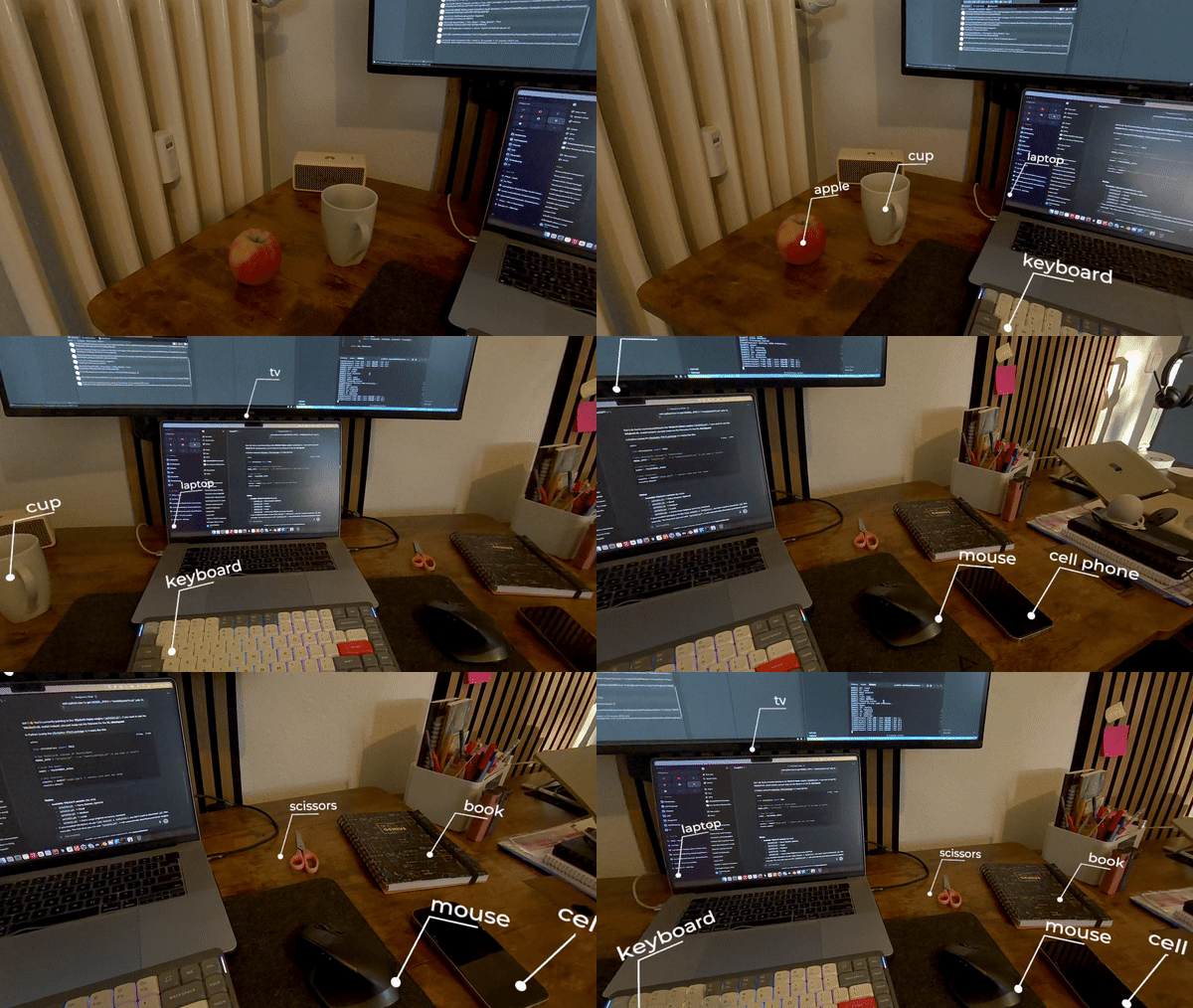 |
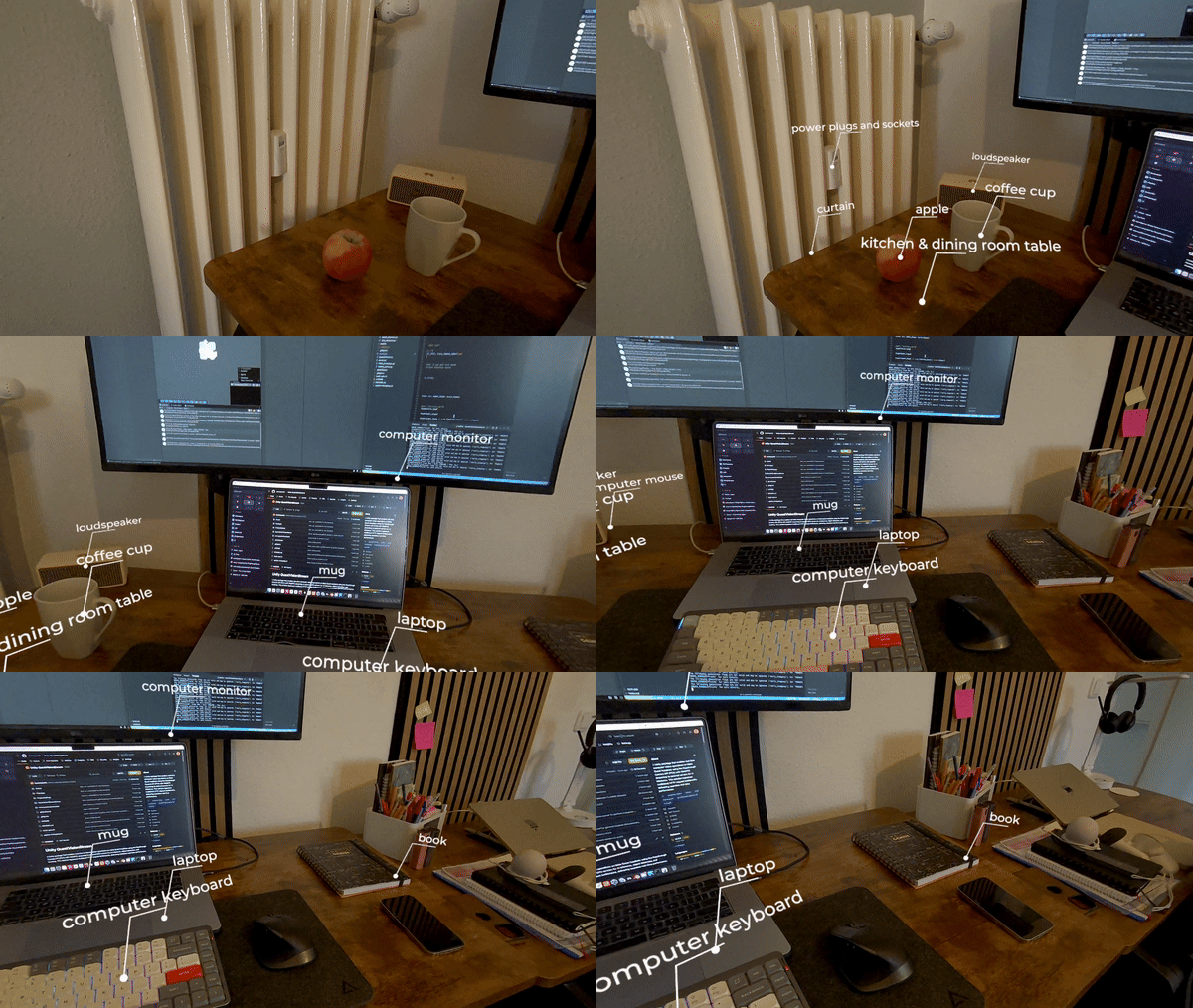 |
Problem Solved
Traditional approaches for computer vision on Meta Quest have several limitations:
- Performance constraints: Limited GPU power on mobile devices
- SDK restrictions: Some solutions require Oculus SDK instead of OpenXR
- Graphics API limitations: Vulkan compatibility issues with existing solutions
- Real-time bottlenecks: HTTP request delays for inference operations
QuestVisionStream addresses these by:
- Native Android Plugin: Built specifically for Meta Quest with graphics API agnosticism
- WebRTC Streaming: Real-time video streaming to external processing units
- OpenXR Compatibility: Works with modern XR development workflows
- Optimized Pipeline: GPU compute shaders for efficient frame processing
Architecture
┌─────────────────┐    WebRTC Stream    ┌─────────────────────┐
│   Meta Quest    │ ──────────────────► │  External Server    │
│   (Headset)     │                     │  (GPU Processing)   │
│                 │                     │                     │
│ ┌─────────────┐ │                     │ ┌─────────────────┐ │
│ │ PCA Camera  │ │                     │ │ AI Models       │ │
│ │ WebRTC      │ │                     │ │ • YOLO          │ │
│ │ Unity App   │ │                     │ │ • Florence2     │ │
│ └─────────────┘ │                     │ │ • GroundingDINO │ │
│                 │                     │ └─────────────────┘ │
│ ┌─────────────┐ │                     │ ┌─────────────────┐ │
│ │ Spatial     │ │ ◄────────────────── │ │ Results         │ │
│ │ Operations  │ │   Detection Data    │ │ Processing      │ │
│ └─────────────┘ │                     │ └─────────────────┘ │
└─────────────────┘                     └─────────────────────┘
Components
Unity Package (
com.questvisionstream)- PCAVideoStreamer prefab for camera streaming
- QuestVisionStreamBridge for native plugin communication
- Frame processing utilities and compute shaders
Native Android Plugin
- WebRTC implementation for video streaming
- Pixel data capture and YUV conversion
- Signaling server communication
Requirements
Unity Project
- Meta SDK: v77 or higher
- Android API: Minimum API Level 34, Target API Level 34 (Android 14.0)
- PassthroughCameraApiSamples: Import from Oculus Samples Repository
Getting Started
Note: Make sure to have the PassthroughCameraApiSamples imported in your project. Check the Requirements section for details.
Method 1: Unity Package Manager
Add Package: Use the Git URL in Unity Package Manager:
https://github.com/danieloquelis/Unity-QuestVisionStream.git?path=com.questvisionstreamImport Core Assets: A dialog will appear prompting to import the core assets. Make sure to click "Import" when prompted.
Optional: You can also import the "Static Object Detection" sample from the Package Manager's Samples section for a complete demo.
Configure Android Settings:
- Set Minimum API Level to 34
- Set Target API Level to 34
- Add network permission to
AndroidManifest.xml:<uses-permission android:name="android.permission.ACCESS_NETWORK_STATE" />
Setup Scene:
- Add
PCAVideoStreamerprefab to your scene - Ensure
EnvironmentRaycastPrefabandWebCamTextureManagerPrefabfrom PCA Samples are present - Assign them to the PCAVideoStreamer prefab
- Add
Method 2: Clone Repository
Clone the repository:
git clone https://github.com/danieloquelis/Unity-QuestVisionStream.gitOpen in Unity and navigate to any Sample Scene
Build and run on your Meta Quest headset
Server Setup
Note: This is just an example implementation. You can create your own signaling server using any technology as long as it follows the WebRTC contract. Check webrtc_server.py for more implementation details.
Navigate to server directory:
cd QuestVisionStreamServerPython Environment: It's recommended to create a virtual environment with Python 3.10. I experimented with pyenv to handle virtual environments, but you can use any method or none at all. As long as you have Python 3.10, you're good to go.
Install dependencies:
pip install -r requirements.txtRun server:
# Default YOLO detector
python server.py

# Specific detector
python server.py --detector florence2
python server.py --detector grounding_dino
Expose via web (required):
Note: The PCAVideoStreamer prefab only accepts
wss://(secure WebSocket) URLs due to Android WebRTC library constraints. For testing purposes, you can use ngrok or any other reverse proxy solution.# Install ngrok from https://ngrok.com/ ngrok http 3000Copy the public domain (e.g.,
wss://feecf7c13b68.ngrok-free.app) to the PCAVideoStreamer's "Signaling Server URL" field.
Usage
Basic Setup
Scene Configuration:
- Ensure PCA samples are imported and configured
- Add PCAVideoStreamer prefab to your scene
- Configure the signaling server URL (local or ngrok)
Event Handling:
- Hook into UnityEvents on the PCAVideoStreamer prefab
- Use the
OnDetectionsevent to receive AI inference results - Implement spatial operations based on detection data
Custom Logic:
- Extend the detection handling for your specific use case
- Use the StaticObjectDetection sample as a reference
- Implement custom object spawning and interaction logic
Advanced Configuration
- Frame Rate: Adjust target FPS and frame skipping for performance
- Resolution: Configure stream resolution for quality vs. performance balance
- GPU Compute: Enable compute shaders for YUV conversion optimization
- TURN Servers: Configure for NAT traversal in production environments
Development
Building the Android Plugin
Prerequisites:
- Java 17
- Android Studio
- Kotlin knowledge
Build Process:
- Fork the repository
- Open in Unity
- Go to Build Profiles
- Build with "Export Project" and "Symlink Resources" enabled
- Export to
android/folder
Android Studio:
- Open the exported
android/folder in Android Studio - Wait for Gradle build completion
- Modify the plugin in
QuestVisionStreamManager.kt
- Open the exported
Key Files
- QuestVisionStreamManager.kt: Main Android plugin implementation
- PCAVideoStreamer.cs: Unity streaming controller
- QuestVisionStreamBridge.cs: Unity-native communication bridge
- server.py: Python WebRTC server
- detectors/: AI model implementations
Troubleshooting
Common Issues
Connection Failures:
- Verify signaling server URL format (must use wss:// as ws:// is not supported due to Android WebRTC library constraints)
- Check network permissions in AndroidManifest.xml
- Ensure server is running and accessible
Performance Issues:
- Adjust frame rate and resolution settings
- Enable GPU compute shaders if available
- Monitor frame processing in Unity console
Graphics API Issues:
- Verify OpenXR configuration
- Check Vulkan/OpenGLES3 compatibility
- Ensure proper PCA sample setup
Debug Information
- Unity console shows frame processing statistics
- Android logs display WebRTC connection status
- Server console shows inference processing details
Contributing
- Fork the repository
- Create a feature branch
- Make your changes
- Test thoroughly on Meta Quest hardware
- Submit a pull request
License
This project is licensed under the MIT License. See the LICENSE file for details.
Acknowledgments
- Meta: For the Passthrough Camera API
- Oculus Samples: For the PCA reference implementation
- WebRTC Community: For the streaming technology foundation
- AI Model Developers: For the inference models used in the server
Support
For questions, issues, or contributions:
- Open an issue on GitHub
- Check the existing samples and documentation
- Review the code structure and implementation details
QuestVisionStream enables truly real-time computer vision on Meta Quest, opening new possibilities for AR/VR applications that require advanced AI capabilities.
Questions
What is Unity-QuestVisionStream?
danieloquelis/Unity-QuestVisionStream is a public repo on GitHub by danieloquelis. A Unity package that enables real-time computer vision operations on Meta Quest headsets using the Passthrough Camera API (PCA) with WebRTC streaming to external servers for AI inference.
Is Unity-QuestVisionStream open source?
It declares the MIT license on GitHub.
Does Unity-QuestVisionStream run on macOS, Windows or Linux?
Its maker has not tagged a system, so it is unknown here. Its README says what it needs.


