
github-classroom-utils
Python tools for instructors working with GitHub Classroom
- 91
- Python
- Apache-2.0
- 4 y ago
Android WearOS watch face app, displays your day's events on your wrist
Repo danwallach/CalWatch, read from GitHub 16 min ago. danwallach has not joined Take My Repo.
danwallach/CalWatch is a public repo on GitHub by danwallach. Android WearOS watch face app, displays your day's events on your wrist. It declares the GPL-3.0 license on GitHub. It is written mainly in Kotlin, has 30 stars and last changed on 2022-07-12. Nobody has reviewed it on Take My Repo yet, which says nothing about its quality. Read from GitHub on 2026-11-22.
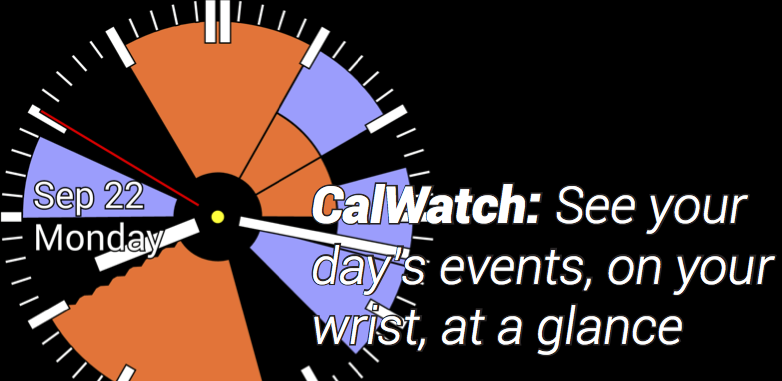
CalWatch2 is an open-source WearOS watchface, compatible with WearOS 1.x and 2.x, that reads your calendar and renders the next twelve hours of your schedule around the face of the watch. CalWatch2 is mostly implemented in the Kotlin programming language.
notes.txt -- ongoing work, notes, to-do items, etc.
/images -- screen dumps and assorted graphics
note: "resample.csh", at the top level, starts from a high-resolution screen dump and generates preview images at all the correct resolutions; these downstream dependencies are all checked in, so unless you're changing the the icon, you don't need to rerun this csh script. Also note that you'll need the Imagemagick package installed to run it.)
For most things, I'm now using the vector / scalable image types supported by Android. You'll find PDFs (drawn in Illustrator) here, and SVG output from that, which is then digestible by Android Studio.
/app -- the unifed app that runs on Wear watches
src/androidTest/java/ -- some old unit tests for event layout
src/main/kotlin/ -- CalWatch source-code files
src/main/java/EDU.Washington.grad.gjb.cassowary -- the Cassowary linear constraint solver
The original version of CalWatch was engineered for the original version of Android Wear, which originally shipped without any documented support for Android Wear watchfaces. You can see this in the release1 code from November 2014.
Then, Google announced decent APIs for building watchfaces, which did all the hard work for you. This allowed release2 to simplify many things.
For release3, I added in support for an external stopwatch and timer app that would send messages to CalWatch to display their state on the watchface. (This was before Android Wear supported complications.) Also, in the earlier versions I was reading calendar events on the phone and sending them over to the watch. By this time, the watch finally had a working local calendar database, greatly simplifying things.
For release4, I ported everything to Kotlin. I wrote up the engineering process on the Kotlin discussion board.
For release5, I rewrote the phone-side configuration panel, using all the newest Material Design style.
Shortly thereafter, at Google I/O 2016, Google announced WearOS 2 which, of course, completely changed how the phone and the watch relate to one another, making it easier for a WearOS watch to interoperate with an iOS phone, but killing off the idea that every Wear app is embedded in an Android phone app. Fast forward to I/O 2017 and Google announced they were providing sample code and libraries to make it much easier to support complications, plus they began rolling out Wear 2 to more watches. If you rummage through the commit history, you'll see that I had the watch running with complications, but without a particularly usable configuration UI on the watch.
I finally got everything working and pushed proper Wear1.x and 2.x-compatible APKs to the Play Store in December 2018/January 2019. The current release also uses the latest Kotlin coroutine support to do the expensive calendar processing asynchronously, and has a bunch of other small tweaks to use more of the Kotlin stdlib features that didn't exist in earlier Kotlin releases. There seems to be a bug in how we get notified about calendar changes that impacts the Android 8.1 Oreo variant of WearOS that's running on WearOS devices, but it seems to be fixed in the "Wear H" variant based on Android 9.0.
Otherwise, what's notable about release6 relative to earlier releases is how much code is now gone. With the new complication support, I threw out CalWatch's support for external stopwatches and timers, since you can just connect to those things using WearOS complications. I similarly threw out the step-count complication for the same reasons. I did keep my battery gauge dot in the center of the watch and my day/date rendering on the left -- both because I felt I could render those better with custom code than the general-purpose complication libraries do.
Cassowary linear constraint solver by Greg J. Badros and Alan Borning https://constraints.cs.washington.edu/cassowary/
"Unavailable calendar" icon by Björn Andersson http://www.flaticon.com/authors/google
danwallach/CalWatch is a public repo on GitHub by danwallach. Android WearOS watch face app, displays your day's events on your wrist.
It declares the GPL-3.0 license on GitHub.
Its maker has not tagged a system, so it is unknown here. Its README says what it needs.
Open "Take it" on its page: Take My Repo writes an install plan for your machine and hands it to your AI agent (Claude Code, Codex or Cursor), which asks you before each step. Take My Repo has not tested it on any machine.
Its last change on GitHub was on 2022-07-12. Take My Repo does not judge from that whether it is maintained.
Nobody has reviewed it on Take My Repo yet, which says nothing about its quality.
Python tools for instructors working with GitHub Classroom
Activates Travis-CI builds for all repos in a given GitHub project
simple tool to clone all repos in a project that share a common prefix
