ViewPipeSteps
Create tabs of View() output for each chained pipe
- 244
- 5 y ago
Repo daranzolin/ViewPipeSteps, read from GitHub 17 min ago. daranzolin has not joined Take My Repo.
In short
daranzolin/ViewPipeSteps is a public repo on GitHub by daranzolin. Create tabs of View() output for each chained pipe. It declares no license on GitHub. Public does not mean open source: without a license, nobody is granted the right to reuse it. It is written mainly in R, has 244 stars and last changed on 2021-12-15. Nobody has reviewed it on Take My Repo yet, which says nothing about its quality. Read from GitHub on 2026-11-24.
Similar repos
Sloth
Mac app that shows all open files, directories, sockets, pipes and devices in use by all running processes. Nice GUI for lsof.



ViewPipeSteps 
Installation
You can install the released version of ViewPipeSteps from CRAN with:
install.packages("ViewPipeSteps")
Or install the development version from GitHub with:
remotes::install_github("daranzolin/ViewPipeSteps")
Overview
ViewPipeSteps helps to debug pipe chains in a slightly more elegant
fashion. Print/View debugging isn’t sexy, but instead of manually
inserting %>% View() after each step, spice it up a bit by, e.g.,
highlighting the entire chain and calling the viewPipeChain addin:
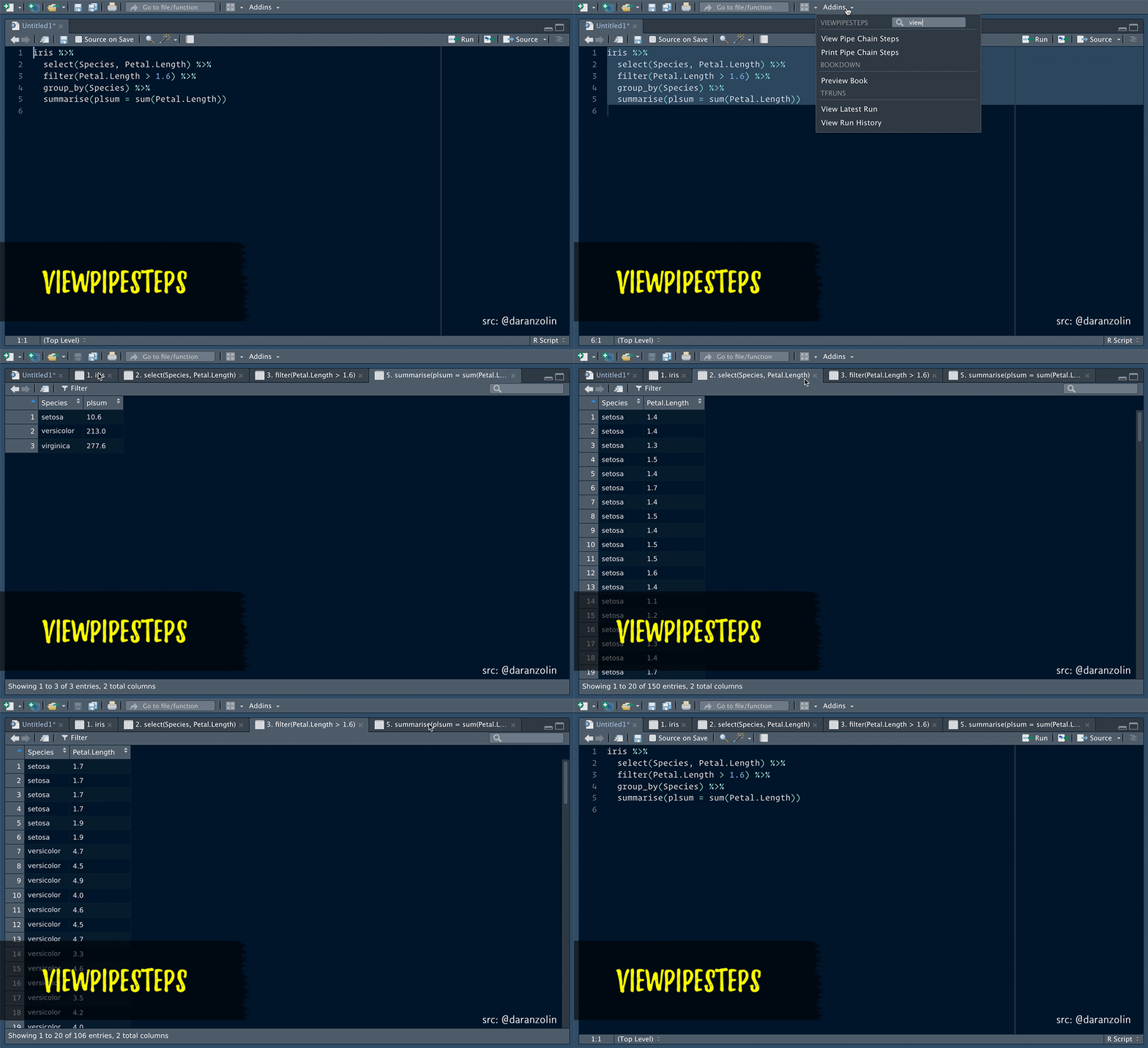
Thanks to @batpigandme for the the gif!
Alternatively, you can:
- Print each pipe step of the selction to the console by using the
printPipeChainaddin. - Print all pipe steps to the console by adding a print_pipe_steps() call to your pipe.
diamonds %>%
  select(carat, cut, color, clarity, price) %>%
  group_by(color) %>%
  summarise(n = n(), price = mean(price)) %>%
  arrange(desc(color)) %>%
  print_pipe_steps() -> result
## 1. diamonds

## # A tibble: 53,940 x 10
##    carat cut       color clarity depth table price     x     y     z
##    <dbl> <ord>     <ord> <ord>   <dbl> <dbl> <int> <dbl> <dbl> <dbl>
##  1 0.23  Ideal     E     SI2      61.5    55   326  3.95  3.98  2.43
##  2 0.21  Premium   E     SI1      59.8    61   326  3.89  3.84  2.31
##  3 0.23  Good      E     VS1      56.9    65   327  4.05  4.07  2.31
##  4 0.290 Premium   I     VS2      62.4    58   334  4.2   4.23  2.63
##  5 0.31  Good      J     SI2      63.3    58   335  4.34  4.35  2.75
##  6 0.24  Very Good J     VVS2     62.8    57   336  3.94  3.96  2.48
##  7 0.24  Very Good I     VVS1     62.3    57   336  3.95  3.98  2.47
##  8 0.26  Very Good H     SI1      61.9    55   337  4.07  4.11  2.53
##  9 0.22  Fair      E     VS2      65.1    61   337  3.87  3.78  2.49
## 10 0.23  Very Good H     VS1      59.4    61   338  4     4.05  2.39
## # … with 53,930 more rows

## 2. select(carat, cut, color, clarity, price)

## # A tibble: 53,940 x 5
##    carat cut       color clarity price
##    <dbl> <ord>     <ord> <ord>   <int>
##  1 0.23  Ideal     E     SI2       326
##  2 0.21  Premium   E     SI1       326
##  3 0.23  Good      E     VS1       327
##  4 0.290 Premium   I     VS2       334
##  5 0.31  Good      J     SI2       335
##  6 0.24  Very Good J     VVS2      336
##  7 0.24  Very Good I     VVS1      336
##  8 0.26  Very Good H     SI1       337
##  9 0.22  Fair      E     VS2       337
## 10 0.23  Very Good H     VS1       338
## # … with 53,930 more rows

## 4. summarise(n = n(), price = mean(price))

## # A tibble: 7 x 3
##   color     n price
##   <ord> <int> <dbl>
## 1 D      6775 3170.
## 2 E      9797 3077.
## 3 F      9542 3725.
## 4 G     11292 3999.
## 5 H      8304 4487.
## 6 I      5422 5092.
## 7 J      2808 5324.

## 5. arrange(desc(color))

## # A tibble: 7 x 3
##   color     n price
##   <ord> <int> <dbl>
## 1 J      2808 5324.
## 2 I      5422 5092.
## 3 H      8304 4487.
## 4 G     11292 3999.
## 5 F      9542 3725.
## 6 E      9797 3077.
## 7 D      6775 3170.
- Try your luck with the experimental
%P>%pipe variant that prints the output of the pipe’s left hand side prior to piping it to the right hand side.
diamonds %>%
  select(carat, cut, color, clarity, price) %>%
  group_by(color) %>%
  summarise(n = n(), price = mean(price)) %P>%
  arrange(desc(color)) -> result
## Printing diamonds %>% select(carat, cut, color, clarity, price) %>% group_by(color) %>% summarise(n = n(), price = mean(price))

## # A tibble: 7 x 3
##   color     n price
##   <ord> <int> <dbl>
## 1 D      6775 3170.
## 2 E      9797 3077.
## 3 F      9542 3725.
## 4 G     11292 3999.
## 5 H      8304 4487.
## 6 I      5422 5092.
## 7 J      2808 5324.
Installation
devtools::install_github("daranzolin/ViewPipeSteps")
More Examples
Check tools/test_cases.R for more elaborate examples.
Future Work
- Verify that %P>% is implemented in a useful way and does it what it is supposed to do.
Questions
What is ViewPipeSteps?
daranzolin/ViewPipeSteps is a public repo on GitHub by daranzolin. Create tabs of View() output for each chained pipe.
Is ViewPipeSteps open source?
It declares no license on GitHub. Public does not mean open source: without a license, nobody is granted the right to reuse it.
Does ViewPipeSteps run on macOS, Windows or Linux?
Its maker has not tagged a system, so it is unknown here. Its README says what it needs.
How do I install ViewPipeSteps?
Open "Take it" on its page: Take My Repo writes an install plan for your machine and hands it to your AI agent (Claude Code, Codex or Cursor), which asks you before each step. Take My Repo has not tested it on any machine.