Approaches For Overlaying Images On TAK Client Map Using KML/KMZ And COT Data Packages
This repo is an example on how to overlay images on a TAK (Team Awareness Kit) client like WinTak or ATAK.
Requirements
- Python 3.5+
- TAK Client. Tested with WinTak v4.6.
- TAK Server (Only required for Data Package relay). Tested with FreeTak Server.
- Install python dependencies
pip install -r requirements.txt
1. KML/KMZ Overlay
KML (Keyhole Markup Language) is an XML notation for expressing geographic annotation and visualization within two-dimensional maps and three-dimensional Earth browsers.
A KMZ file consists of a main KML file and zero or more supporting files that are packaged using a Zip utility into one unit, called an archive.
WinTak supports adding KML layers to the map can even automatically pull it from the http server and refresh it every X number of seconds.
In this example, we generate an image every second, create a KMZ file and host it via a simple http server running on port 8000.
- Open a terminal to the root of the repo and start the KMZ generation script. It will create a new image overlay every second.
- Start the simple http server in
kmz-server-root
cd kmz-server-root
python3 -m http.server 8000
- Open WinTak.
- Go to
Menu (Hamburger Menu)
- Import Manager
- KML Network Link
- Manage Network Links
- In the side panel that appears on the right, click the [+] button to add a new link.
- Enter the following details
- Name:
Example
- URL:
http://localhost:8000/kmz/plt.kmz
- Auto Refresh (Ticked)
- Interval: 1 second(s)
- Click
Add
- You should now be able to see an image overlay at the
lat -72.953233112081065 long 41.636485101307905 (Around Springfield, New York, USA) coordinates that updates roughly every second.
Note: You might have to delete and re-add the KML layer and network link manually when you restart WInTak as there is a bug in 4.6 that stops the image overlay refreshing upon restart.
2. COT Data Packages
Another approach is to utilize COT Data Packages. The advantage of this approach is that it relays the messages through a TAK Server rather than having the client fetch/pull it like the KML/KMZ approach before.
This method requires more orchestration though. The python client needs to upload the zipped up data package, hash and finally send a COT message to TAK Server initiate the relaying. Once this is done, WinTak will prompt the user that there is a data package available for download. When the user accepts it, WinTak will download and display the data package.
- To begin, update the
test_datapackage.py to point to your TAK Server hosts, REST API (8080) and TCP (8087) ports.
  takServerHost = "localhost"
  takServerTcpPort = 8087
  takServerUrl = "localhost:8080"
- open the
data-package-template/FILES/message.cot and update the start/time/stale to current values. Start date needs to be earlier than now while stale time needs to be later then now.
<event version="2.0" uid="{uid}" type="a-h-S-C" time="2022-08-03T02:20:13.00Z" start="2022-08-03T02:25:11.95Z" stale="2023-10-24T02:25:11.95Z" how="h-g-i-g-o">
- Make sure your TAK client (WinTak) is connected to the TAK Server.
- Run the following from the repo root
python3 ./test_datapackage.py
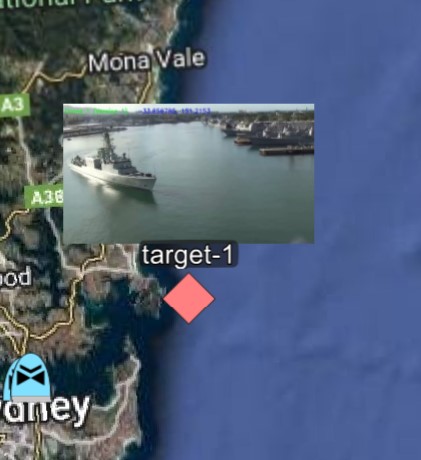
WinTak should now prompt you to download a data package. Accept it. Navigate to the LAT/LONG of the cot message payload lat="41.9545621" lon="-73.12329" and you should see the point appear. Hovering/Clicking on it will display the image overlay.
Important: The filenames are case sensitive and cot messages are very sensitive to new line/line feed/carriage return characters. We highly recommend you minify the cot/xml files.
Instructions to manually generate and publish a data-package can be found here. The python script simply implements the steps there.
Contributing
Please raise an issue here or create a fork PR to fix as required. You can contact me via twitter @dasiths.