
awesome-scalability
The Patterns of Scalable, Reliable, and Performant Large-Scale Systems
- 76k
- MIT
- 11 mo ago
Free, open-source CAD-BIM editor in Rust that your AI can drive: drafts with Apply, IFC in/out, MCP, Lua, ERP link.
Repo datadrivenconstruction/OpenConstructionDesign, read from GitHub 1 h ago. datadrivenconstruction has not joined Take My Repo.
datadrivenconstruction/OpenConstructionDesign is a public repo on GitHub by datadrivenconstruction. Free, open-source CAD-BIM editor in Rust that your AI can drive: drafts with Apply, IFC in/out, MCP, Lua, ERP link. It declares the AGPL-3.0 license on GitHub. It is written mainly in Rust, has 64 stars and last changed on 2026-11-25. Nobody has reviewed it on Take My Repo yet, which says nothing about its quality. Read from GitHub on 2026-11-26.
The Patterns of Scalable, Reliable, and Performant Large-Scale Systems

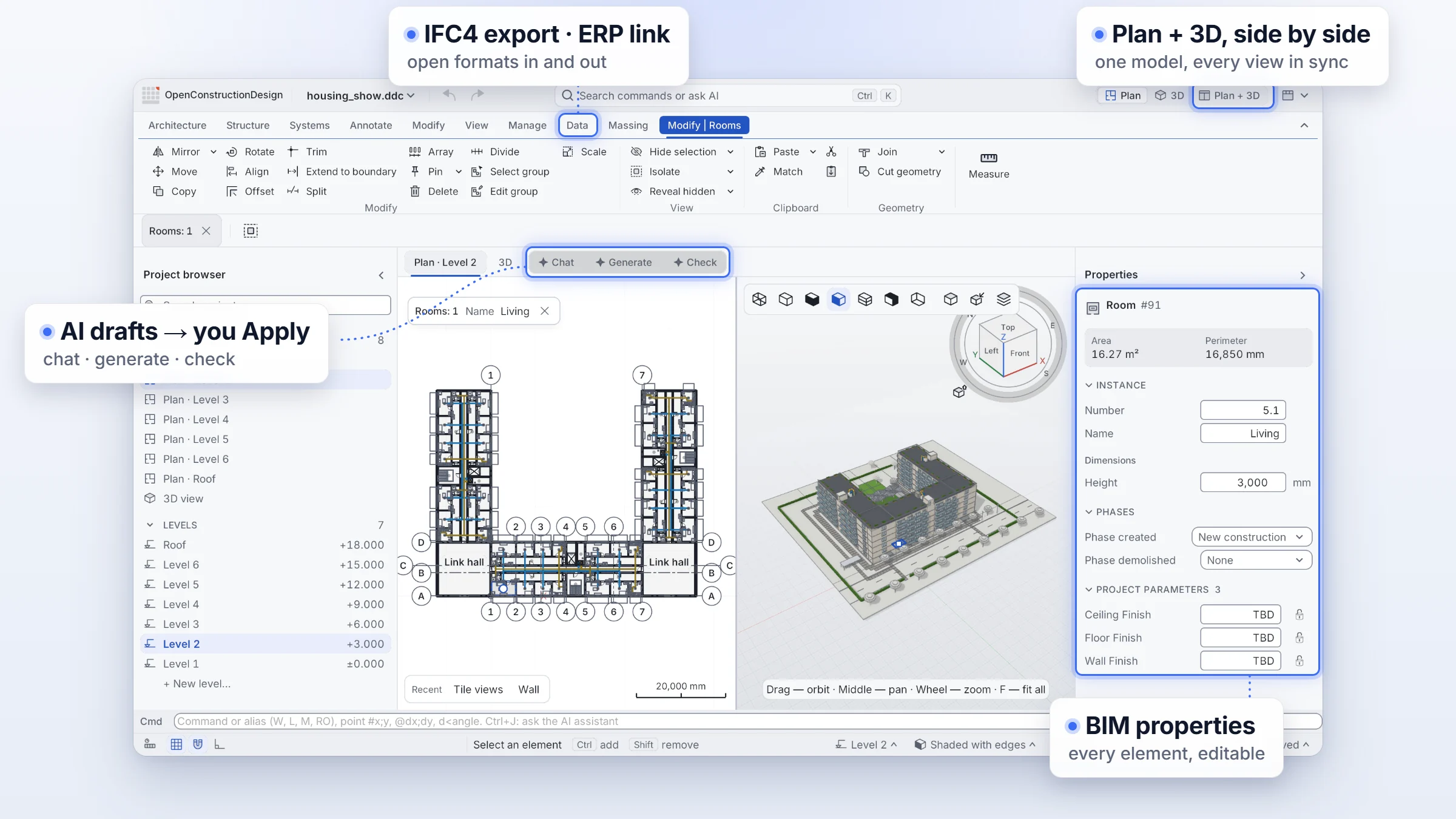
A free, open-source CAD-BIM editor that your AI can drive.
Download · Install · ERP link · Quickstart · Gallery · Editor · AI and MCP · MEP · Export · Lua · Build

v1.2.0 · Windows 10/11 x64 · Linux x64 · 8 GB RAM · works offline · no account
| Platform | Get it | Notes |
|---|---|---|
| Windows 10/11 x64 | Download the zip | Full editor. Unzip and run ddc-app.exe. |
| Browser | Open the online demo | Full editor in a browser tab with sample projects, nothing to install. Register with your email, then the editor opens right away. |
| Linux x64 | Download the tar.gz (71 MB) | Editor ddc-app and ddc CLI. Ubuntu 22.04+, Debian 12+ (glibc 2.35), X11 or Wayland. |
| macOS | Build from source | No release build; untested. |
All releases · Website · User guide
If OpenConstructionDesign is useful to you, a ⭐ on GitHub helps a lot. It is the easiest way to help the project grow and reach more people who build.
OpenConstructionDesign is a CAD-BIM editor written in Rust, with its own geometry kernel and file readers. You describe a building in the built-in chat, over MCP or as a JSON brief; the editor produces real walls, rooms, doors, stairs and building services as a highlighted preview, and nothing changes in your model until you press Apply. Bring a cloud model with your own key, or run a local model through Ollama. The model and its full change history live in one SQLite file on your machine, and IFC goes in and out.
[!NOTE] The latest release is v1.2.0. The project file format, the APIs and the interface can still change between releases. Keep the original of every model you open and keep an IFC export for long-term storage. See Current limits.
…-windows-x64.zip) (62 MB).ddc-app.exe. Nothing is installed in the system and no account is
needed. The build is not code-signed yet, so Windows SmartScreen may warn once: choose
More info → Run anyway, and check the SHA-256 on the release page if you want to be sure.
If the window does not open or rendering is broken, start ddc-app.exe --safe-graphics.brief.de-residential.json
(see Quickstart).Needs Git, the MSVC build tools and Rust 1.89+ via rustup; details in Build from source and docs/BUILDING.md.
git clone https://github.com/datadrivenconstruction/OpenConstructionDesign.git
cd OpenConstructionDesign
cargo build --release -p ddc-app -p ddc-cli
cargo run --release -p ddc-app
ddc gen is compiled in with the link feature (cargo build --release -p ddc-cli --features link).
ddc gen --brief crates/io/contract/examples/brief.de-residential.json --out housing.ddc
ddc info housing.ddc
ddc open housing.ddc --export ifc4 housing.ifc
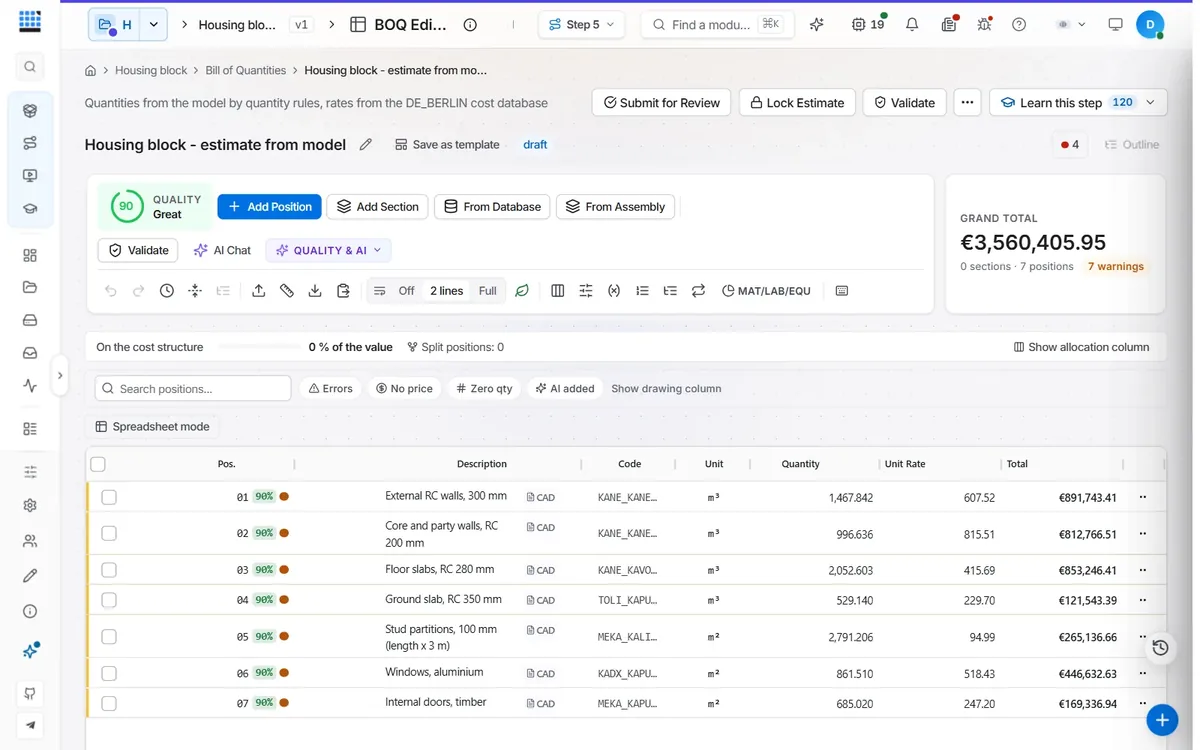 |
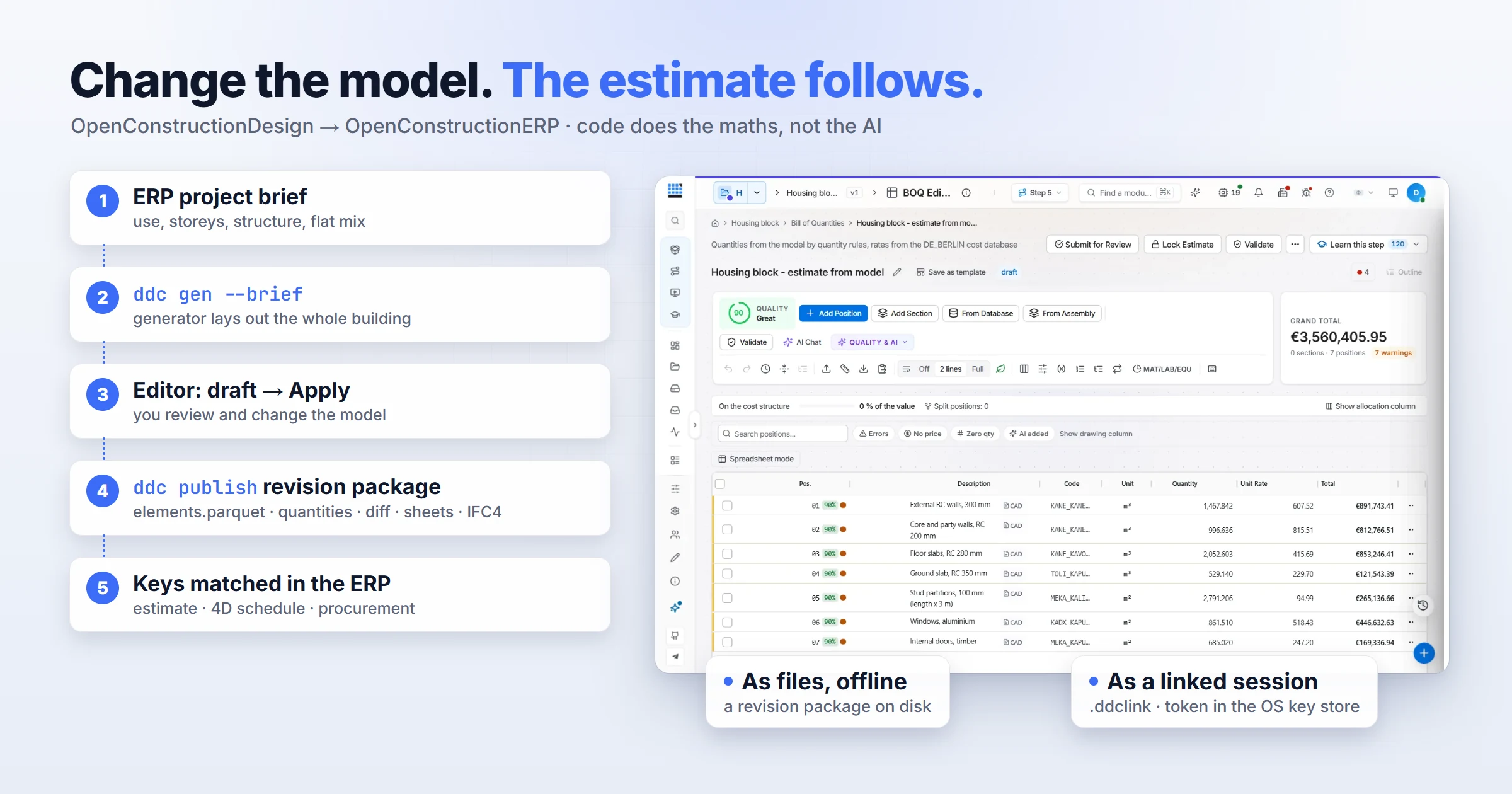
€3,560,405.95Estimate of the 6-storey housing block, priced straight from the model.7 positions · 6,730 elements · 7 levels · quantities from the model, rates from the DE_BERLIN cost database. Move a wall, add a floor or change a type in the editor, publish, and the quantities, the estimate, the 4D schedule and procurement in OpenConstructionERP update with it. |
OpenConstructionERP is the open construction ERP from the same team. The editor hands it every element with a stable key, its quantities and its level.
ddc gen --brief; you review the
preview in the editor and press Apply.ddc publish writes elements.parquet, quantities, the diff to the
last revision, sheets and IFC4; the ERP matches keys and updates the estimate, 4D schedule and
procurement..ddclink file with the token in the OS key store. Code does the maths, not the AI. An ERP
edition with the editor built in is in preparation.OpenConstructionERP on GitHub · openconstructionerp.com · ERP link on the website · Details below
ddc-app.exe.For a new building, write a short JSON brief (use, storeys, structure, flat mix) and let the
generator lay it out. The schema is crates/io/contract/schemas/brief.schema.json;
a full example is brief.de-residential.json.
ddc gen --brief brief.json --out housing.ddc
ddc info housing.ddc
ddc open housing.ddc --export ifc4 housing.ifc
brief.de-residential.json){
"schema": "ddc-brief/1",
"name": "Wohnhaus Beispielstraße",
"norm_pack": "de",
"use": { "category": "residential_multi", "detail": "Mehrfamilienhaus, ein Treppenhaus" },
"massing": {
"floors_above": 5, "floors_below": 1, "floor_height_m": 3.0,
"footprint": { "width_m": 34.0, "depth_m": 12.0 }, "lift": true
},
"programme": {
"units": [
{ "name": "2-Zimmer", "count": 10, "area_m2": 52,
"rooms": [{ "kind": "living" }, { "kind": "bedroom" }, { "kind": "kitchen" }, { "kind": "bath" }, { "kind": "hall" }] },
{ "name": "3-Zimmer", "count": 10, "area_m2": 74,
"rooms": [{ "kind": "living" }, { "kind": "bedroom", "count": 2 }, { "kind": "kitchen" }, { "kind": "bath" },
{ "kind": "hall" }, { "kind": "storage" }] }
],
"spaces": [{ "kind": "technical", "name": "Technik", "floors": [-1], "area_m2": 40 }]
},
"structure": { "system": "masonry", "foundation": "raft" },
"envelope": { "roof": "flat" }
}
[!NOTE]
ddc genandddc publishbelong to the ERP link and are compiled in with thelinkfeature:cargo build --release -p ddc-cli --features link.
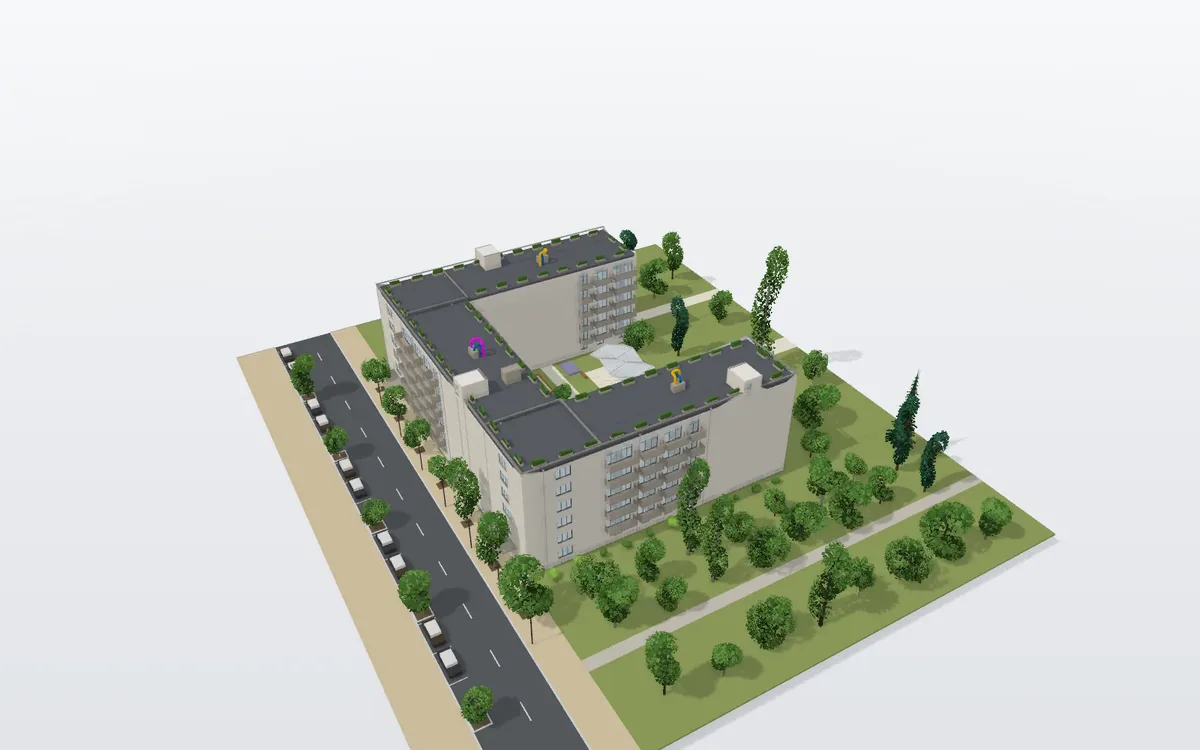
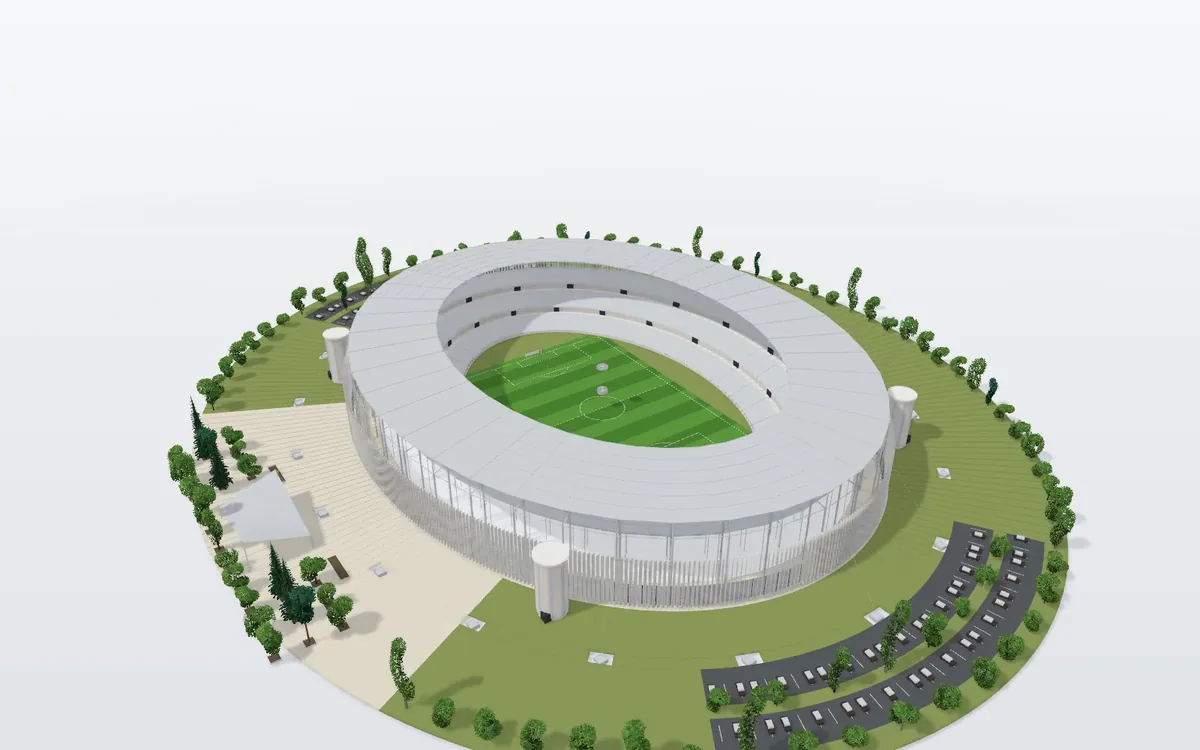
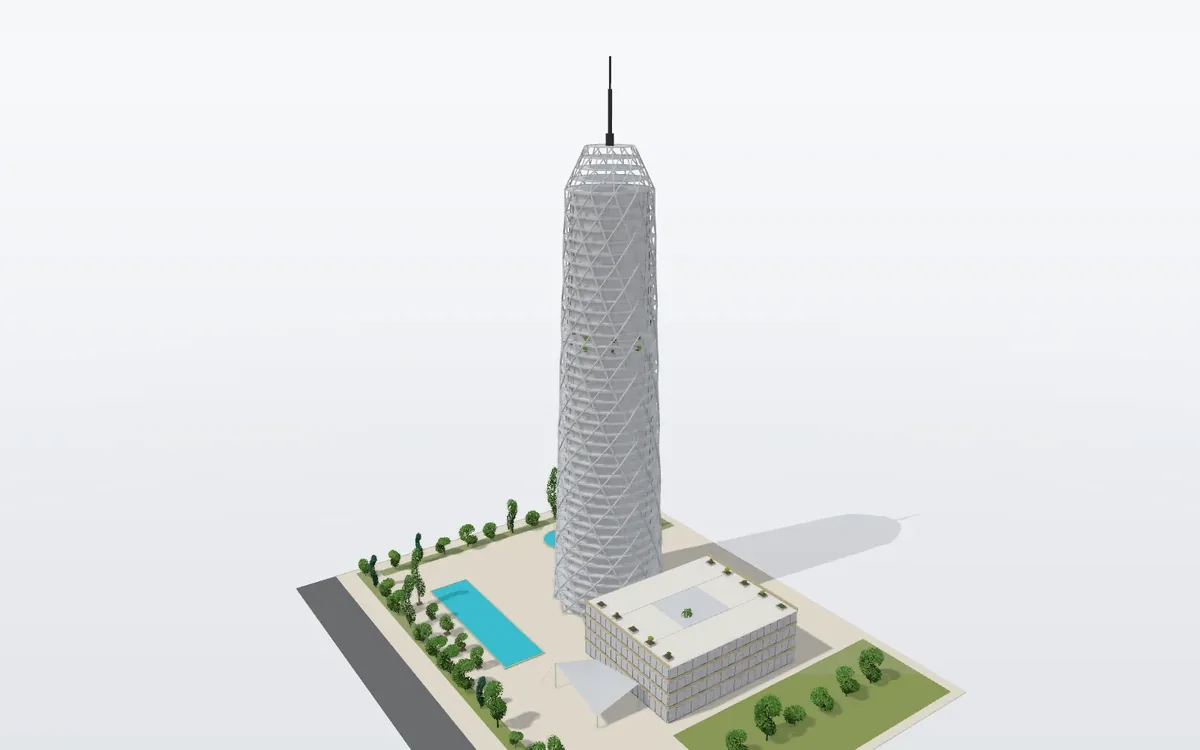
Each model is regenerated from its source in one command: a brief for the housing block, a Lua script for the stadium and the tower. Times are wall-clock generation on one laptop with release 0.10; figures come from each run's own summary.
 |
 |
 |
6-storey housing block (brief → ddc gen)U-shaped block around a garden court with HVAC, water, drainage and electrical. 10,274 elements · 504 walls · 354 rooms · 4,521 MEP runs · 412 circuits · 0 audit errors · 7 min |
Football stadium (Lua) A bowl under a ring roof, with site, parking and planting. Structure and envelope only. 6,441 elements · 12 min |
Diagrid tower (Lua) A steel diagrid tower on a podium, with a mast and a landscaped site. Structure and envelope only. 6,203 elements · 13 min |
Known gap in the housing block: 30 kitchen taps are not yet connected to the water network.
The recipes live in crates/script/data/recipes (24 files). Six of
them, rendered as they run with their default parameters:
datadrivenconstruction/OpenConstructionDesign is a public repo on GitHub by datadrivenconstruction. Free, open-source CAD-BIM editor in Rust that your AI can drive: drafts with Apply, IFC in/out, MCP, Lua, ERP link.
It declares the AGPL-3.0 license on GitHub.
Its maker tagged it for macOS, Windows and Linux, or as Docker or cross-platform. That is declared by the maker; Take My Repo has not tested it.
Official source code of FreeCAD, a free and opensource multiplatform 3D parametric modeler.
The agent harness performance optimization system. Skills, instincts, memory, security, and research-first development for Claude Code, Codex, Opencode, Cursor and beyond.
Reverse engineer anything with agents, from app behavior down to native binaries.
A collection of learning resources for curious software engineers
Open "Take it" on its page: Take My Repo writes an install plan for your machine and hands it to your AI agent (Claude Code, Codex or Cursor), which asks you before each step. Take My Repo has not tested it on any machine.
Its last change on GitHub was on 2026-11-25. GitHub counts 2 open issues and pull requests. Take My Repo does not judge from that whether it is maintained.
Nobody has reviewed it on Take My Repo yet, which says nothing about its quality.
Take My Repo cannot say: it does not audit code and has not run OpenConstructionDesign. What is known comes from GitHub. It declares the AGPL-3.0 license on GitHub. Its last change was on 2026-11-25. It has 64 stars, which measure popularity, not safety. Nobody has reviewed it on Take My Repo yet, which says nothing about its quality. Read the source before you run it. With "Take it", your AI agent shows each step and asks you before running it; README text is treated as data, not as instructions.





