ECC
The agent harness performance optimization system. Skills, instincts, memory, security, and research-first development for Claude Code, Codex, Opencode, Cursor and beyond.
- 309k
- JavaScript
- MIT
- 11 h ago
🤖 👨💻 Agent Codemode — Generate programmatic tools from MCP Servers and Skills.
Repo datalayer/agent-codemode, read from GitHub 1 d ago. datalayer has not joined Take My Repo.
datalayer/agent-codemode is a public repo on GitHub by datalayer. 🤖 👨💻 Agent Codemode — Generate programmatic tools from MCP Servers and Skills. It declares the BSD-3-Clause license on GitHub. It is written mainly in Python, has 8 stars and last changed on 2026-11-21. Nobody has reviewed it on Take My Repo yet, which says nothing about its quality. Read from GitHub on 2026-11-22.

Generate programmatic tools from MCP Servers and Skills.
Agent Codemode generates programmatic tools from two sources:
These programmatic tools can be:
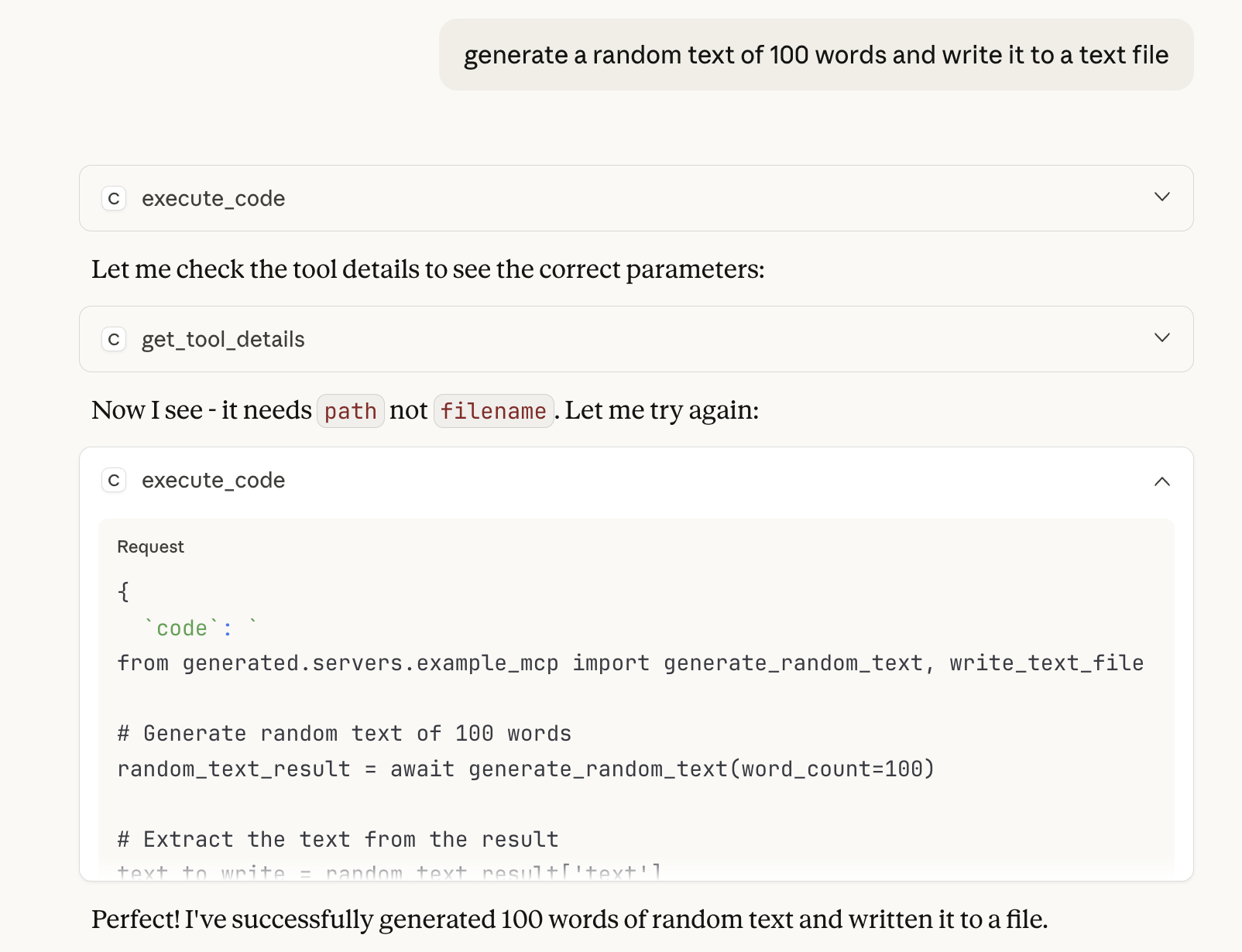
Traditional AI agents call tools one at a time through LLM inference. Agent Codemode enables a "Code Mode" pattern where agents write Python code that orchestrates multiple tool calls:
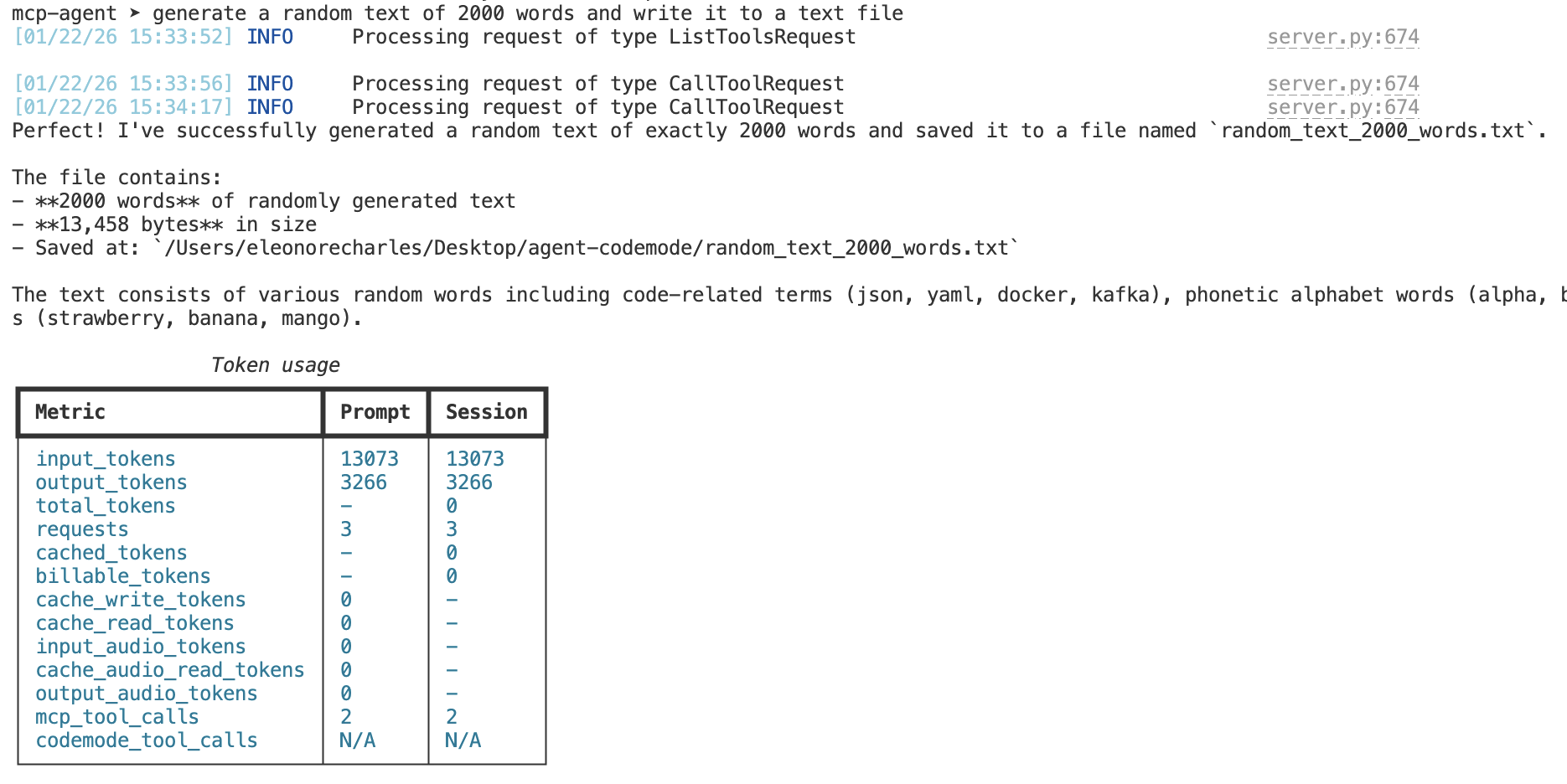
Same task, same MCP server — Code Mode uses significantly fewer tokens by composing tools in code instead of multiple LLM round-trips.
| Without Code Mode | With Code Mode |
|---|---|
 |
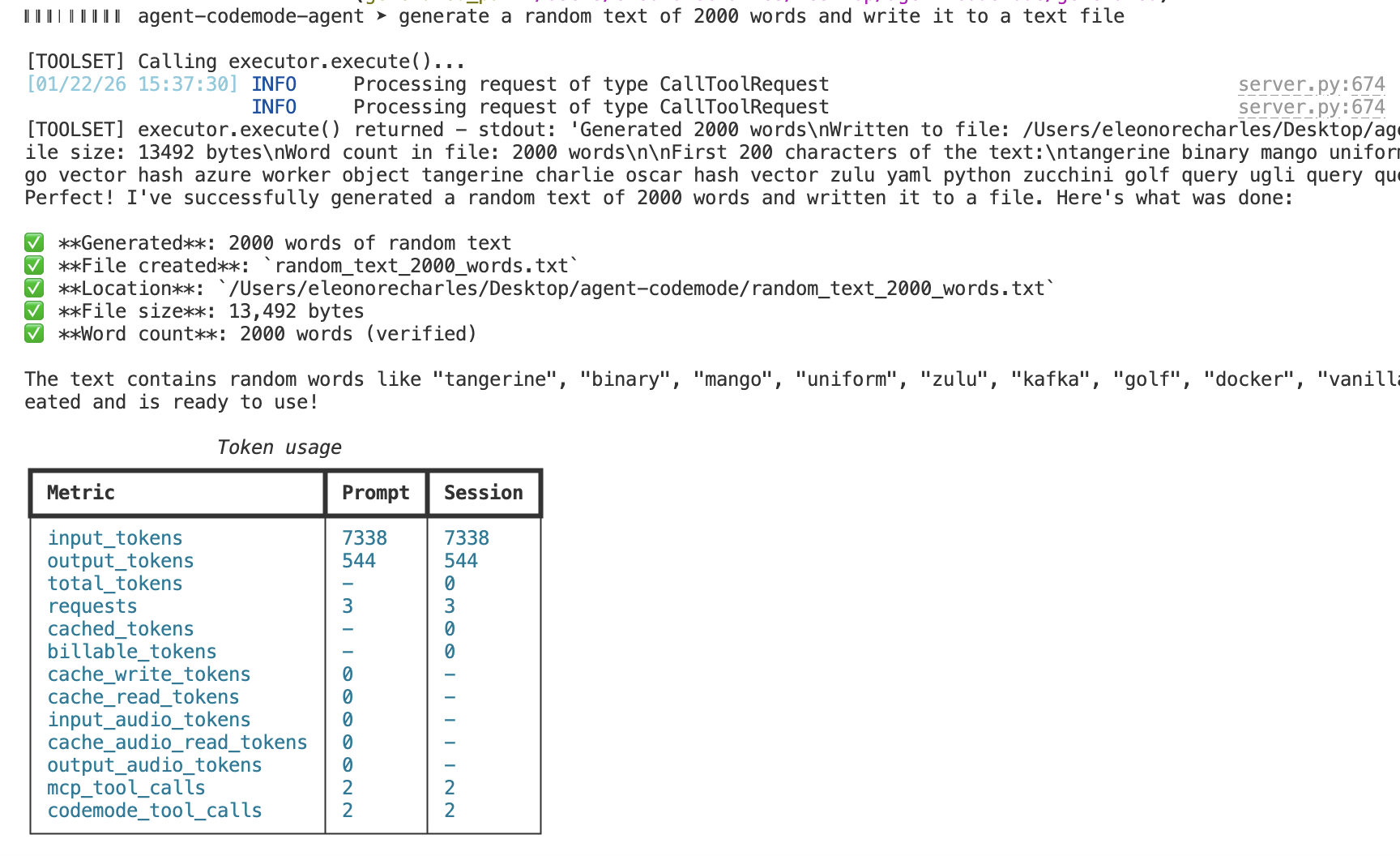 |
Prompt: "Generate 2000 words of random text and write to a file"
| Option | Description |
|---|---|
allow_direct_tool_calls |
When False (default), call_tool is hidden; all execution flows through execute_code |
max_tool_calls |
Safety cap limiting tool invocations per execute_code run |
sandbox_variant |
Sandbox type for code execution (default: "eval"). One of eval, monty, docker, jupyter, colab, kaggle, modal, datalayer |
sandbox_gpu |
Optional GPU flavor / accelerator for supported variants (Modal/Datalayer examples: T4, A10G, A100, H100; Kaggle batch examples: NvidiaTeslaT4, NvidiaTeslaP100, T4, P100) |
workspace_path |
Working directory for sandbox execution |
generated_path |
Path where tool bindings are generated |
skills_path |
Path for saved skills |
When using cloud notebook variants via code-sandboxes:
colab reuses an already-running Colab kernel (from explicit runtime values or a channels URL).kaggle defaults to batch execution via Kaggle's API when no runtime URL/channels are provided; it can also create/attach interactive kernels when runtime values are provided.kaggle accelerator selection is available in batch mode via gpu / accelerator (for example T4, P100, NvidiaTeslaT4).list_tool_names: Fast listing with server, keywords, limit filters. include_deferred=False by defaultsearch_tools: Natural language search with query, server, limit. include_deferred=True by defaultget_tool_details: Get full schema and documentation for a specific toolTools include output_schema and input_examples to improve parameter accuracy. Tools marked with defer_loading=True are excluded from default listings but included in search results.
pip install agent-codemode
from agent_codemode import ToolRegistry, CodeModeExecutor, MCPServerConfig

# Set up registry with MCP servers
registry = ToolRegistry()

# Add an MCP server (stdio transport - uses command/args)
registry.add_server(MCPServerConfig(
    name="filesystem",
    command="npx",
    args=["-y", "@anthropic/mcp-server-filesystem", "/tmp"]
))

# Or add an HTTP-based server
# registry.add_server(MCPServerConfig(name="web", url="http://localhost:8001"))

await registry.discover_all()

# Execute code that composes tools
async with CodeModeExecutor(registry) as executor:
    result = await executor.execute("""
        from generated.mcp.filesystem import read_file, write_file

        # Read multiple files
        content1 = await read_file({"path": "/tmp/file1.txt"})
        content2 = await read_file({"path": "/tmp/file2.txt"})

        # Process and combine
        combined = content1 + "\\n---\\n" + content2

        # Write result
        await write_file({"path": "/tmp/combined.txt", "content": combined})
    """)
Use the Tool Search Tool to discover relevant tools without loading all definitions upfront:
# Search for tools matching a description (includes deferred tools by default)
result = await registry.search_tools("file operations", limit=10)

for tool in result.tools:
    print(f"{tool.name}: {tool.description}")

# Fast listing (deferred tools excluded by default)
names = registry.list_tool_names(limit=50)

# Include deferred tools explicitly
names_all = registry.list_tool_names(limit=50, include_deferred=True)
Execute Python code in an isolated sandbox with auto-generated tool bindings:
async with CodeModeExecutor(registry) as executor:
    execution = await executor.execute("""
        import asyncio
        from generated.mcp.filesystem import ls, read_file

        # List all files
        files = await ls({"path": "/data"})

        # Read all files in parallel
        contents = await asyncio.gather(*[
            read_file({"path": f}) for f in files
        ])
    """, timeout=30.0)

# Outputs are available on the execution object
print(execution.stdout)
print(execution.stderr)
print(execution.text)
print(execution.success)
print(execution.execution_ok)
print(execution.execution_error)
print(execution.code_error)
Skills are Python files that compose tools into reusable operations. This allows agents to evolve their own toolbox by saving useful code patterns. Skills functionality is provided by the agent-skills package.
Note: Skills APIs are owned by agent-skills. Import skill utilities from agent_skills.
The primary pattern is skills as Python files in a skills/ directory:
# skills/batch_process.py
"""Process all files in a directory."""

async def batch_process(input_dir: str, output_dir: str) -> dict:
    """Process all files in a directory.

    Args:
        input_dir: Input directory path.
        output_dir: Output directory path.

    Returns:
        Processing statistics.
    """
    from generated.mcp.filesystem import list_directory, read_file, write_file

    entries = await list_directory({"path": input_dir})
    processed = 0

    for entry in entries.get("entries", []):
        content = await read_file({"path": f"{input_dir}/{entry}"})
        # Process content...
        await write_file({"path": f"{output_dir}/{entry}", "content": content.upper()})
        processed += 1

    return {"processed": processed}
Skills are imported and called like any Python module:
# In executed code
from skills.batch_process import batch_process

result = await batch_process("/data/input", "/data/output")
print(f"Processed {result['processed']} files")
For programmatic skill management, use the SimpleSkillsManager:
from agent_skills import SimpleSkillsManager, SimpleSkill

# Create a skills manager
manager = SimpleSkillsManager("./skills")

# Save a skill
skill = SimpleSkill(
    name="batch_process",
    description="Process files in a directory",
    code='''
async def batch_process(input_dir, output_dir):
    entries = await list_directory({"path": input_dir})
    for entry in entries.get("entries", []):
        content = await read_file({"path": f"{input_dir}/{entry}"})
        await write_file({"path": f"{output_dir}/{entry}", "content": content.upper()})
''',
    tags=["file", "batch"],
)
manager.save_skill(skill)

# Load and use a skill
loaded = manager.load_skill("batch_process")
print(loaded.code)
See the runnable examples in examples/.
python examples/simple/codemode_example.py
python examples/simple/codemode_patterns_example.py
Interactive CLI agent with Agent Codemode support:
# Standard mode
python examples/agent/agent_cli.py

# Codemode variant (code-first tool composition)
python examples/agent/agent_cli.py --codemode
Use the CodemodeToolset for direct integration with Pydantic AI agents:
from pydantic_ai import Agent
from agent_codemode import CodemodeToolset, ToolRegistry, MCPServerConfig

# Set up registry
registry = ToolRegistry()
registry.add_server(MCPServerConfig(
    name="filesystem",
    command="npx",
    args=["-y", "@anthropic/mcp-server-filesystem", "/tmp"]
))
await registry.discover_all()

# Create toolset
toolset = CodemodeToolset(registry=registry)

# Use with Pydantic AI agent
agent = Agent(
    model='anthropic:claude-sonnet-4-5',
    toolsets=[toolset],
)
Expose the programmatic tools as an MCP server for any MCP-compatible client:
from agent_codemode import configure_server, run_server
from agent_codemode import ToolRegistry, MCPServerConfig, CodeModeConfig

# Create and configure registry with MCP servers to compose
registry = ToolRegistry()
registry.add_server(MCPServerConfig(
    name="filesystem",
    command="npx",
    args=["-y", "@anthropic/mcp-server-filesystem", "/tmp"]
))

# Configure with custom settings
config = CodeModeConfig(
    workspace_path="./workspace",
    skills_path="./skills",
    generated_path="./generated",
)

configure_server(config=config, registry=registry)
run_server()  # stdio; run_server(transport="streamable-http", host=..., port=...) for HTTP
Or start with command line:
python -m agent_codemode.server --workspace ./workspace
Create a launcher script to configure which MCP servers to compose:
#!/usr/bin/env python3
import sys
from pathlib import Path

from agent_codemode import ToolRegistry, MCPServerConfig, CodeModeConfig
from agent_codemode.server import configure, run

# Create registry and add MCP servers to compose
registry = ToolRegistry()
registry.add_server(MCPServerConfig(
    name="my_server",
    command=sys.executable,
    args=["/path/to/my_mcp_server.py"]
))

# Configure paths
config = CodeModeConfig(
    workspace_path="./workspace",
    generated_path="./generated",
    skills_path="./skills",
)

configure(config=config, registry=registry)
run()
Then configure your MCP client to run the launcher script.
Tools exposed by the MCP server:
| Tool | Description |
|---|---|
search_tools |
Progressive tool discovery |
list_servers |
List connected MCP servers |
list_tool_names |
Fast listing of tool names |
get_tool_details |
Get full tool schema |
execute_code |
Run code that composes tools |
call_tool |
Direct tool invocation |
save_skill / run_skill |
Skill management |
list_skills / delete_skill |
Skill management |
add_mcp_server |
Dynamically add servers |
When building an agent that uses Codemode, use this system prompt pattern:
You are an AI assistant with access to MCP tools via Code Mode.

## Available Meta-Tools
- **list_tool_names** - Fast listing of tool names
- **search_tools** - AI-powered tool discovery (returns full definitions)
- **get_tool_details** - Get schema for a specific tool
- **execute_code** - Execute Python code in a sandboxed environment

## Execution Model
ALL tool execution must go through execute_code. Write Python code that imports
and uses the generated tool bindings:

from generated.mcp.filesystem import read_file
content = await read_file({"path": "/data/config.json"})
print(content)
See the Getting Started guide for a complete system prompt example.
Instead of loading all tool definitions upfront (which can overwhelm context), use the Tool Search Tool pattern for progressive discovery based on the task at hand.
Compose tools through code instead of reading all data into LLM context. This is faster, more reliable (no text reproduction errors), and more efficient.
Code allows models to implement complex control flow: loops, conditionals, waiting patterns, and parallel execution without burning through context with repeated tool calls.
When running in a sandbox, state can persist between execute_code calls within the same session. Variables, functions, and imported modules remain available for subsequent code executions. Skills can also be saved to disk and loaded later for reuse across sessions.
┌─────────────────────────────────────────────────────────────────────┐
│                         Agent Codemode                              │
├─────────────────────────────────────────────────────────────────────┤
│  ┌─────────────────┐  ┌────────────────┐  ┌───────────────────────┐ │
│  │  Tool Registry  │  │ Code Executor  │  │   CodemodeToolset     │ │
│  │  - Discovery    │  │  - Sandbox     │  │   (Pydantic AI)       │ │
│  │  - Search       │  │  - Bindings    │  │   - search_tools      │ │
│  │  - Cache        │  │  - Execute     │  │   - execute_code      │ │
│  └─────────────────┘  └────────────────┘  └───────────────────────┘ │
│                              │                                      │
│              ┌───────────────┴───────────────┐                      │
│              │        Generated Bindings     │                      │
│              │  generated/mcp/<name>/        │                      │
│              └───────────────────────────────┘                      │
├────────────────────────────────┬────────────────────────────────────┤
│          MCP Servers           │      Agent Skills (agent_skills)   │
│  (filesystem, bash, web, etc.  │    (SimpleSkillsManager,           │
│   connected via MCP protocol)  │     SkillDirectory, skills/*.py)   │
└────────────────────────────────┴────────────────────────────────────┘
This repository uses a reusable GitHub Actions workflow at .github/workflows/reusable-python.yaml.
The following workflows call it:
.github/workflows/build.yaml.github/workflows/py-tests.yaml.github/workflows/py-code-style.yaml.github/workflows/py-typing.yamlReusable workflow inputs:
python-version: Python version to run.install-system-deps: Install Linux dependencies and unlock keyring.install-extras: Extras from pyproject.toml (for example test,typing).extra-packages: Additional packages installed with uv pip install.run-tests: Enable test execution.test-command: Command used for tests.run-mypy: Enable mypy.mypy-target: Package or module passed to mypy.run-pre-commit: Enable pre-commit checks.BSD 3-Clause License
datalayer/agent-codemode is a public repo on GitHub by datalayer. 🤖 👨💻 Agent Codemode — Generate programmatic tools from MCP Servers and Skills.
It declares the BSD-3-Clause license on GitHub.
Its maker has not tagged a system, so it is unknown here. Its README says what it needs.
Open "Take it" on its page: Take My Repo writes an install plan for your machine and hands it to your AI agent (Claude Code, Codex or Cursor), which asks you before each step. Take My Repo has not tested it on any machine.
Its last change on GitHub was on 2026-11-21. Take My Repo does not judge from that whether it is maintained.
Nobody has reviewed it on Take My Repo yet, which says nothing about its quality.
The agent harness performance optimization system. Skills, instincts, memory, security, and research-first development for Claude Code, Codex, Opencode, Cursor and beyond.
🔌 Plug-and-play library to enable agents to call MCP and UTCP tools via code execution.
The most compatible MCP CLI client. Supports: Tools, Resources, Prompts, Completions, Tasks, Skills, stdio and streamable HTTP, MCP versions 2024-10-07 through 2026-07-28, persistent sessions, OAuth 2.1 with DCR, CIMD, client credentials, and ID-JAG, OS keychain, --json for code mode, grep for tool discovery, proxy for AI sandboxes, x402, and more.
Reverse engineer anything with agents, from app behavior down to native binaries.
Deterministic multi-agent workflow orchestration and codemode scripts for Pi
🪐 🤖 AI Agents with 🔧 MCP tools and 🧰 Skills for JupyterLab — Chat with your Notebook and execute code.
🪐 📄 Jupyter Server Nbmodel — Keep your sessions by executing code from a server-side Notebook.