

DeepSpeed-MII
MII makes low-latency and high-throughput inference possible, powered by DeepSpeed.
- 2.1k
- Apache-2.0
- 17 mo ago
Repo deepspeedai/DeepSpeed-MII, read from GitHub 1 d ago. deepspeedai has not joined Take My Repo.
In short
deepspeedai/DeepSpeed-MII is a public repo on GitHub by deepspeedai. MII makes low-latency and high-throughput inference possible, powered by DeepSpeed. It declares the Apache-2.0 license on GitHub. It is written mainly in Python, has 2,117 stars and last changed on 2025-06-30. Nobody has reviewed it on Take My Repo yet, which says nothing about its quality. Read from GitHub on 2026-11-22.
Similar repos




Latest News
- [2024/01] DeepSpeed-FastGen: Introducting Mixtral, Phi-2, and Falcon support with major performance and feature enhancements.
- [2023/11] DeepSpeed-FastGen: High-throughput Text Generation for LLMs via MII and DeepSpeed-Inference
- [2022/11] Stable Diffusion Image Generation under 1 second w. DeepSpeed MII
- [2022/10] Announcing DeepSpeed Model Implementations for Inference (MII)
Contents
DeepSpeed Model Implementations for Inference (MII)
Introducing MII, an open-source Python library designed by DeepSpeed to democratize powerful model inference with a focus on high-throughput, low latency, and cost-effectiveness.
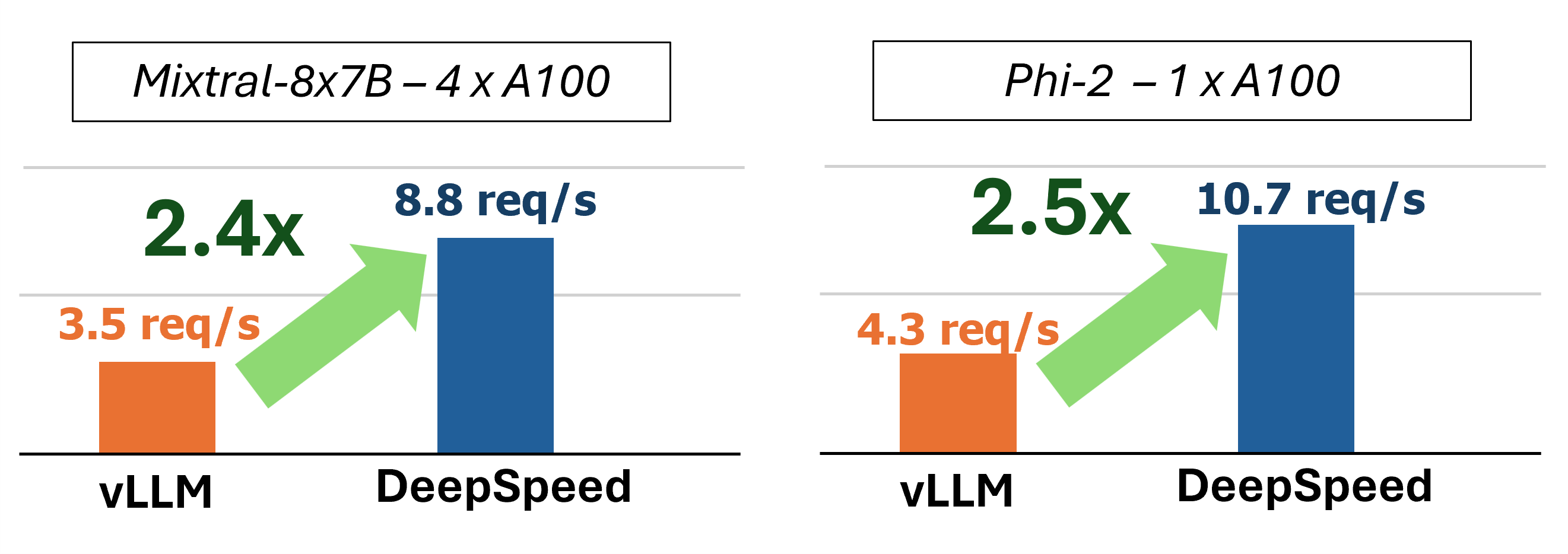
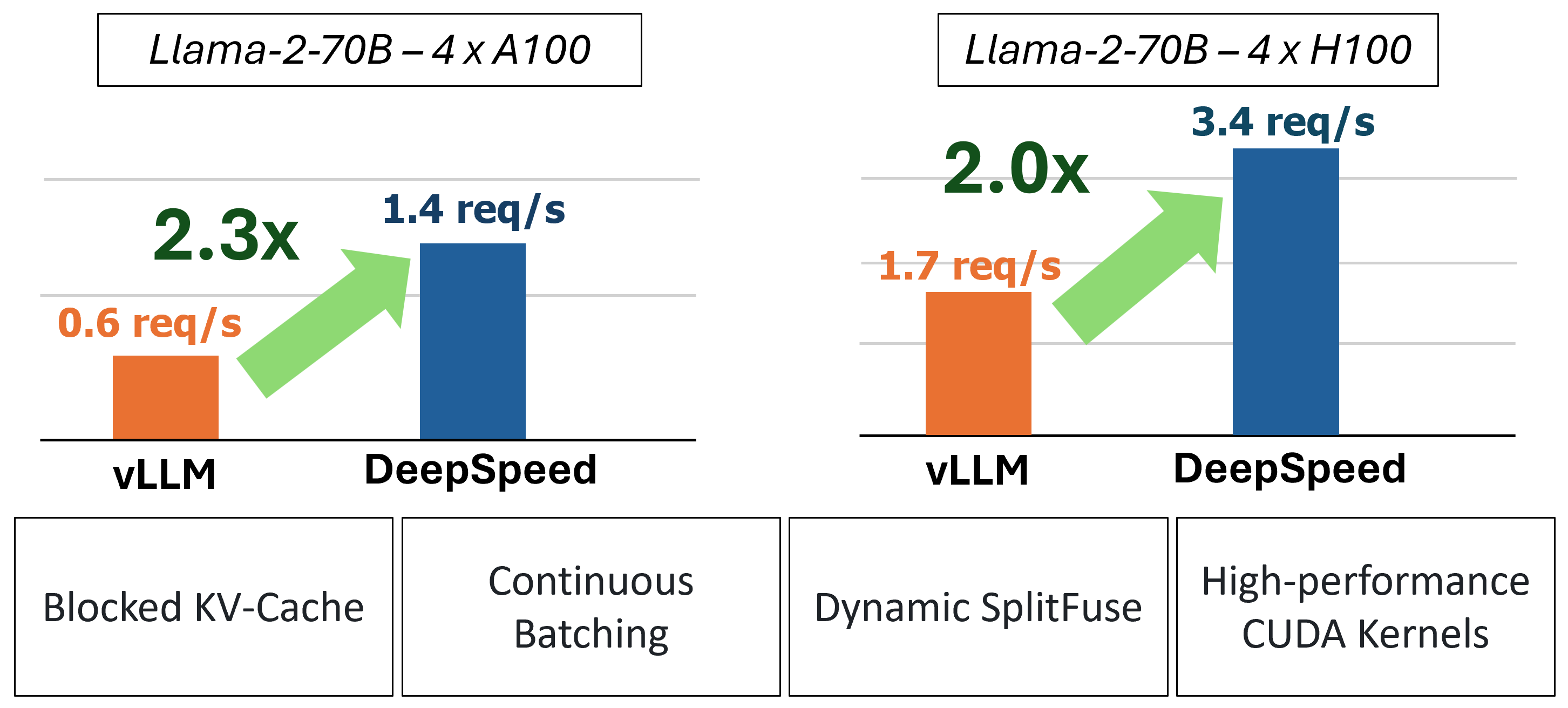
- MII features include blocked KV-caching, continuous batching, Dynamic SplitFuse, tensor parallelism, and high-performance CUDA kernels to support fast high throughput text-generation for LLMs such as Llama-2-70B, Mixtral (MoE) 8x7B, and Phi-2. The latest updates in v0.2 add new model families, performance optimizations, and feature enhancements. MII now delivers up to 2.5 times higher effective throughput compared to leading systems such as vLLM. For detailed performance results please see our latest DeepSpeed-FastGen blog and DeepSpeed-FastGen release blog.
- We first announced MII in 2022, which covers all prior releases up to v0.0.9. In addition to language models, we also support accelerating text2image models like Stable Diffusion. For more details on our previous releases please see our legacy APIs.
Key Technologies
MII for High-Throughput Text Generation
MII provides accelerated text-generation inference through the use of four key technologies:
- Blocked KV Caching
- Continuous Batching
- Dynamic SplitFuse
- High Performance CUDA Kernels
For a deeper dive into understanding these features please refer to our blog which also includes a detailed performance analysis.
MII Legacy
In the past, MII introduced several key performance optimizations for low-latency serving scenarios:
- DeepFusion for Transformers
- Multi-GPU Inference with Tensor-Slicing
- ZeRO-Inference for Resource Constrained Systems
- Compiler Optimizations
How does MII work?
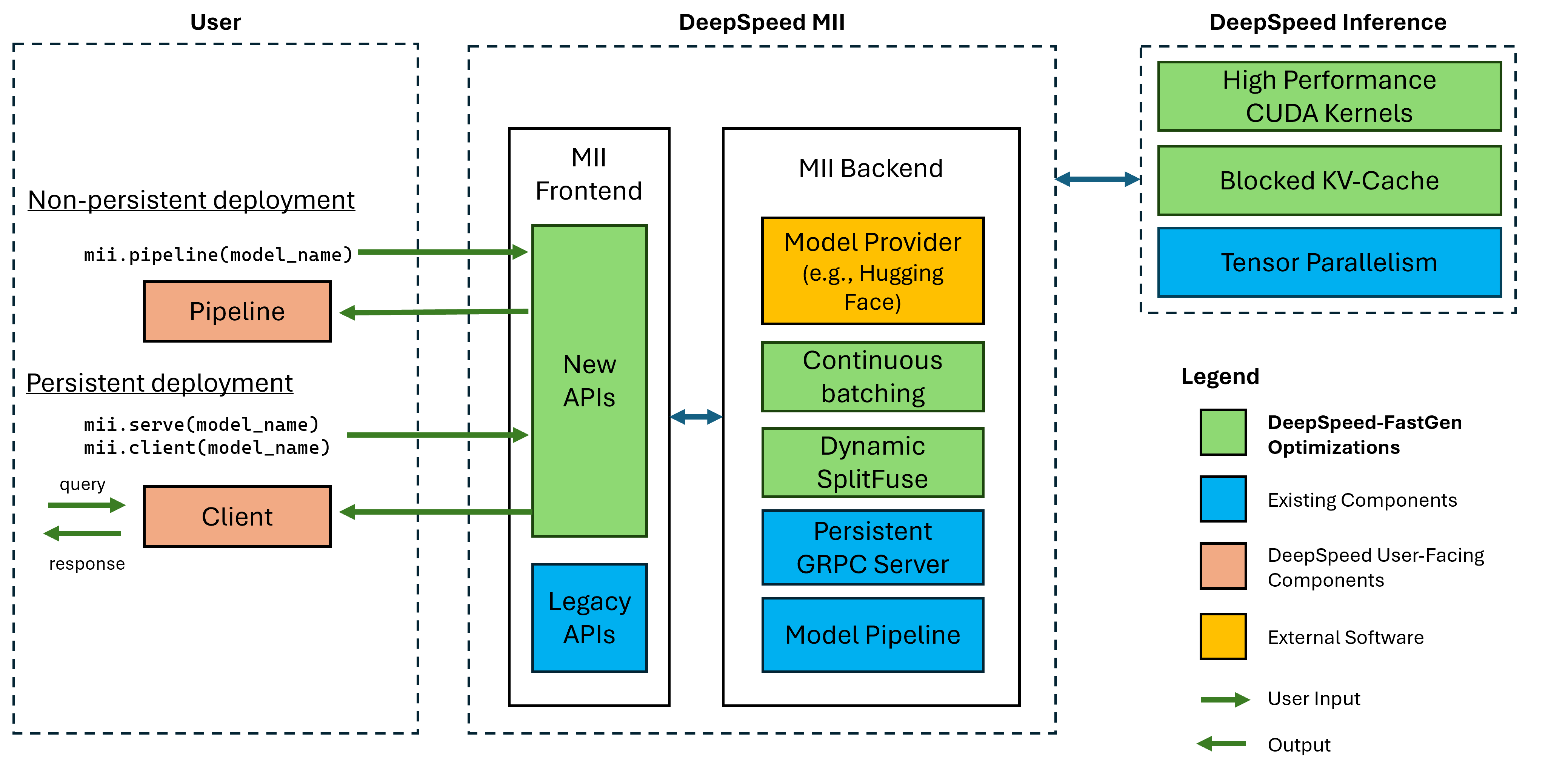
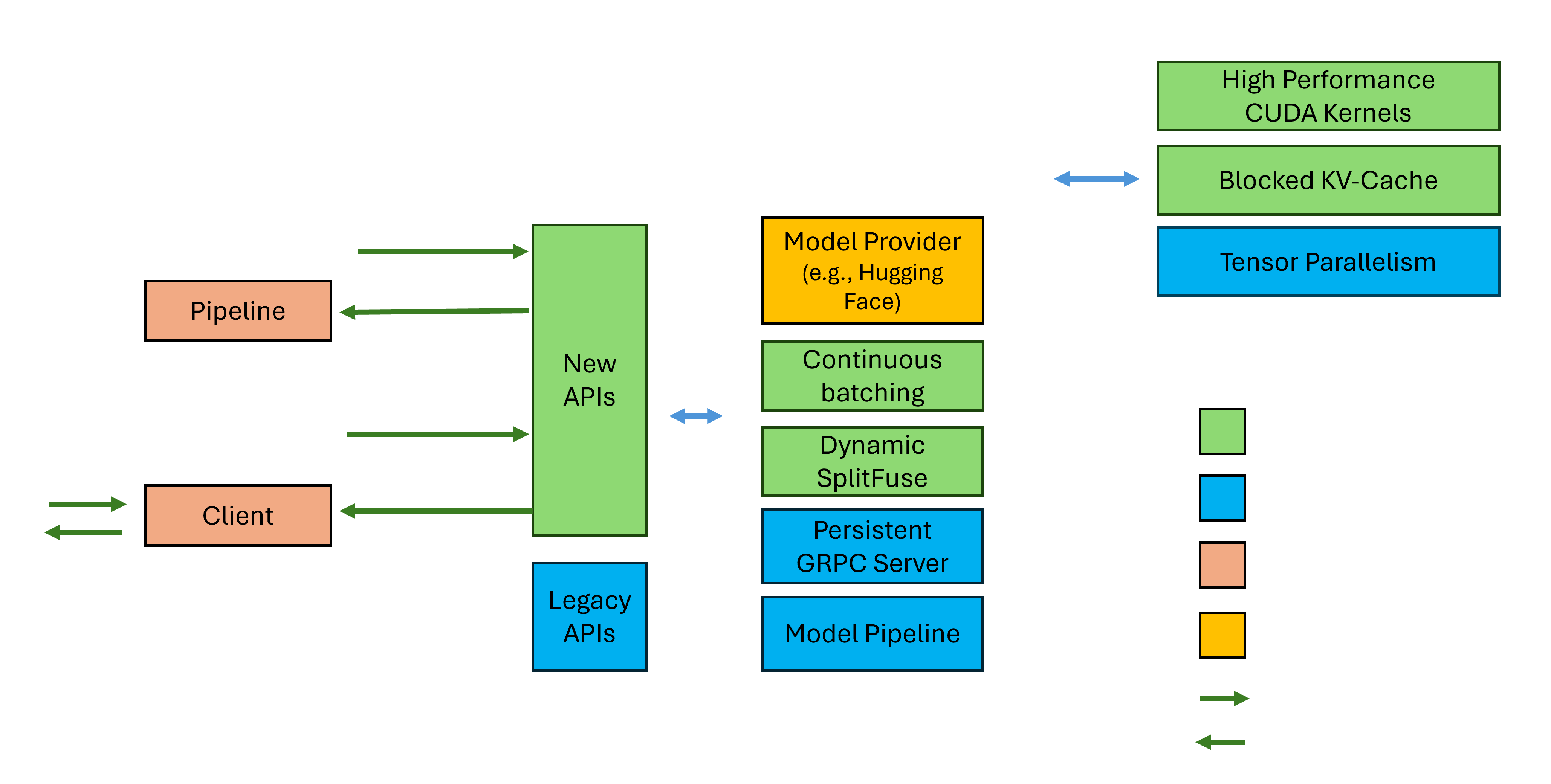
Figure 1: MII architecture, showing how MII automatically optimizes OSS models using DS-Inference before deploying them. DeepSpeed-FastGen optimizations in the figure have been published in our blog post.
Under-the-hood MII is powered by DeepSpeed-Inference. Based on the model architecture, model size, batch size, and available hardware resources, MII automatically applies the appropriate set of system optimizations to minimize latency and maximize throughput.
Supported Models
MII currently supports over 37,000 models across eight popular model architectures. We plan to add additional models in the near term, if there are specific model architectures you would like supported please file an issue and let us know. All current models leverage Hugging Face in our backend to provide both the model weights and the model's corresponding tokenizer. For our current release we support the following model architectures:
| model family | size range | ~model count |
|---|---|---|
| Falcon | 7B - 180B | 600 |
| Llama | 7B - 65B | 57,000 |
| Llama-2 | 7B - 70B | 1,200 |
| Llama-3 | 8B - 405B | 1,600 |
| Mistral | 7B | 23,000 |
| Mixtral (MoE) | 8x7B | 2,900 |
| OPT | 0.1B - 66B | 2,200 |
| Phi-2 | 2.7B | 1,500 |
| Qwen | 7B - 72B | 500 |
| Qwen2 | 0.5B - 72B | 3700 |
MII Legacy Model Support
MII Legacy APIs support over 50,000 different models including BERT, RoBERTa, Stable Diffusion, and other text-generation models like Bloom, GPT-J, etc. For a full list please see our legacy supported models table.
Getting Started with MII
DeepSpeed-MII allows users to create non-persistent and persistent deployments for supported models in just a few lines of code.
Installation
The fasest way to get started is with our PyPI release of DeepSpeed-MII which means you can get started within minutes via:
pip install deepspeed-mii
For ease of use and significant reduction in lengthy compile times that many projects require in this space we distribute a pre-compiled python wheel covering the majority of our custom kernels through a new library called DeepSpeed-Kernels. We have found this library to be very portable across environments with NVIDIA GPUs with compute capabilities 8.0+ (Ampere+), CUDA 11.6+, and Ubuntu 20+. In most cases you shouldn't even need to know this library exists as it is a dependency of DeepSpeed-MII and will be installed with it. However, if for whatever reason you need to compile our kernels manually please see our advanced installation docs.
Non-Persistent Pipeline
A non-persistent pipeline is a great way to try DeepSpeed-MII. Non-persistent pipelines are only around for the duration of the python script you are running. The full example for running a non-persistent pipeline deployment is only 4 lines. Give it a try!
import mii
pipe = mii.pipeline("mistralai/Mistral-7B-v0.1")
response = pipe(["DeepSpeed is", "Seattle is"], max_new_tokens=128)
print(response)
The returned response is a list of Response objects. We can access several details about the generation (e.g., response[0].prompt_length):
generated_text: strText generated by the model.prompt_length: intNumber of tokens in the original prompt.generated_length: intNumber of tokens generated.finish_reason: strReason for stopping generation.stopindicates the EOS token was generated andlengthindicates the generation reachedmax_new_tokensormax_length.
If you want to free device memory and destroy the pipeline, use the destroy method:
pipe.destroy()
Tensor parallelism
Taking advantage of multi-GPU systems for greater performance is easy with MII. When run with the deepspeed launcher, tensor parallelism is automatically controlled by the --num_gpus flag:
# Run on a single GPU
deepspeed --num_gpus 1 mii-example.py

# Run on multiple GPUs
deepspeed --num_gpus 2 mii-example.py
Pipeline Options
While only the model name or path is required to stand up a non-persistent pipeline deployment, we offer customization options to our users:
mii.pipeline() Options:
model_name_or_path: strName or local path to a HuggingFace model.max_length: intSets the default maximum token length for the prompt + response.all_rank_output: boolWhen enabled, all ranks return the generated text. By default, only rank 0 will return text.
Users can also control the generation characteristics for individual prompts (i.e., when calling pipe()) with the following options:
max_length: intSets the per-prompt maximum token length for prompt + response.min_new_tokens: intSets the minimum number of tokens generated in the response.max_lengthwill take precedence over this setting.max_new_tokens: intSets the maximum number of tokens generated in the response.ignore_eos: bool(Defaults toFalse) Setting toTrueprevents generation from ending when the EOS token is encountered.top_p: float(Defaults to0.9) When set below1.0, filter tokens and keep only the most probable, where token probabilities sum to ≥top_p.top_k: int(Defaults toNone) WhenNone, top-k filtering is disabled. When set, the number of highest probability tokens to keep.temperature: float(Defaults toNone) WhenNone, temperature is disabled. When set, modulates token probabilities.do_sample: bool(Defaults toTrue) WhenTrue, sample output logits. WhenFalse, use greedy sampling.return_full_text: bool(Defaults toFalse) WhenTrue, prepends the input prompt to the returned text
Persistent Deployment
A persistent deployment is ideal for use with long-running and production applications. The persistent model uses a lightweight GRPC server that can be queried by multiple clients at once. The full example for running a persistent model is only 5 lines. Give it a try!
import mii
client = mii.serve("mistralai/Mistral-7B-v0.1")
response = client.generate(["Deepspeed is", "Seattle is"], max_new_tokens=128)
print(response)
The returned response is a list of Response objects. We can access several details about the generation (e.g., response[0].prompt_length):
generated_text: strText generated by the model.prompt_length: intNumber of tokens in the original prompt.generated_length: intNumber of tokens generated.finish_reason: str
Questions
What is DeepSpeed-MII?
deepspeedai/DeepSpeed-MII is a public repo on GitHub by deepspeedai. MII makes low-latency and high-throughput inference possible, powered by DeepSpeed.
Is DeepSpeed-MII open source?
It declares the Apache-2.0 license on GitHub.
Does DeepSpeed-MII run on macOS, Windows or Linux?
Its maker has not tagged a system, so it is unknown here. Its README says what it needs.
How do I install DeepSpeed-MII?
Open "Take it" on its page: Take My Repo writes an install plan for your machine and hands it to your AI agent (Claude Code, Codex or Cursor), which asks you before each step. Take My Repo has not tested it on any machine.






