rea
Reverse engineer anything with agents, from app behavior down to native binaries.
- 476k
- TypeScript
- MIT
- 56 min ago
Claude Code session log viewer for JSONL files in ~/.claude/projects. Browse conversations, tool calls, tokens, and live tail sessions on desktop, web, and TUI.
Repo delexw/claude-code-trace, read from GitHub 2 h ago. delexw has not joined Take My Repo.
delexw/claude-code-trace is a public repo on GitHub by delexw. Claude Code session log viewer for JSONL files in ~/.claude/projects. Browse conversations, tool calls, tokens, and live tail sessions on desktop, web, and TUI. It declares the MIT license on GitHub. It is written mainly in Rust, has 391 stars and last changed on 2026-11-21. Nobody has reviewed it on Take My Repo yet, which says nothing about its quality. Read from GitHub on 2026-11-24.
Reverse engineer anything with agents, from app behavior down to native binaries.
AI search engine and MCP server for bots and agents. One Rust binary indexes code, docs, logs, JSONL/CSV and PDFs for BM25 full-text, vector and hybrid search, code search without grep, agent memory and RAG. Elasticsearch-compatible API; Corpus Hub serves hundreds of reference memory corpora.

Claude Code Trace is a viewer for the session logs Claude Code keeps on your machine
(~/.claude/projects/*.jsonl). It turns raw JSONL into a readable conversation, follows live
sessions as they run, and can score how efficiently an agent worked. It runs as a desktop app,
a web app, or a terminal UI, and nothing leaves your machine unless you ask for an analysis.
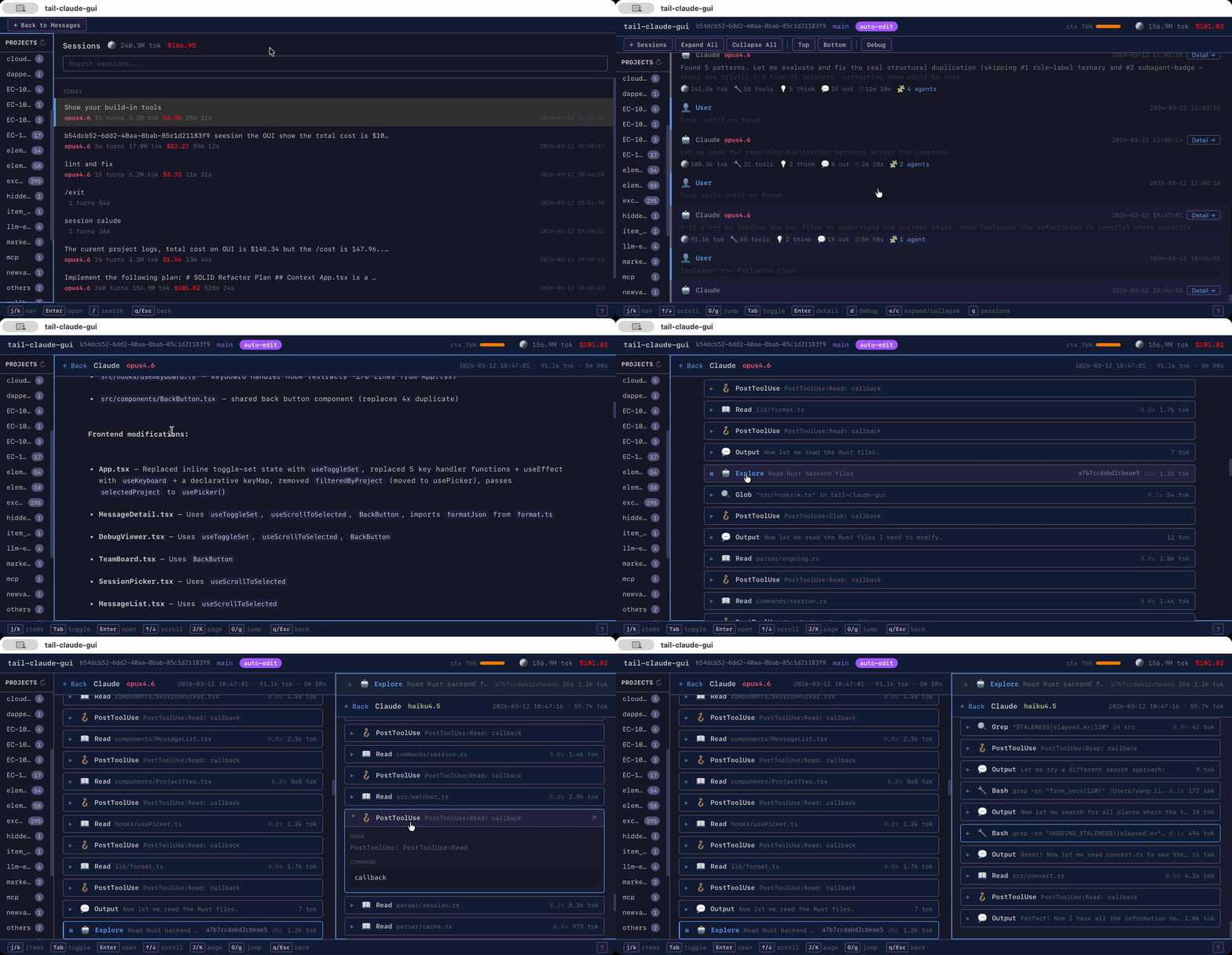
mcp__<server>__<tool> calls get readable names, e.g. MCP figma.Each session source is a plugin with its own folder on every part of the app. The picker, views and settings show whatever the enabled plugins provide.
| Plugin | What it reads | Default |
|---|---|---|
| Claude Code | ~/.claude/projects/ session logs |
Always on |
| Antigravity | Google Antigravity "brain" conversations in ~/.gemini/<flavor>/brain/ |
Off |
| Codex | ~/.codex/sessions/ and ~/.codex/archived_sessions/ rollout logs |
Off |
Turn optional plugins on under Settings → General → Sources. With more than one on, the picker gets an All / per-source filter. Antigravity conversations are read-only, and you can point it at a different brain directory in Settings.
Enable Codex under Sources to browse Codex chats. It reads $CODEX_HOME (or ~/.codex)
and, on Windows, also detects Codex homes in installed WSL distributions. Set a Codex Home
Directory in Settings to read one specific home instead. Messages, readable reasoning, tool
calls and results, recorded token totals, and estimated USD costs are supported; encrypted
reasoning stays hidden. Costs appear on session cards, in picker totals, and in an open chat's
info bar. They are API-equivalent model-token estimates using OpenAI's published rates,
including cached input, rather than subscription bills. Missing usage or unknown pricing shows
as unavailable, and totals with unpriced chats are marked with +.
Verified linked worker usage is counted once, excluding inherited history. If worker usage
cannot be attributed, the known subtotal remains visible with +.
The picker shows user chats with their saved names or first meaningful prompt. Background-agent
rollouts are excluded, and client page metadata is skipped when choosing a title.
The project sidebar groups chats by their original working folder, with nested folders,
collapse controls, search and date groups. Recorded model, Git branch, approval/sandbox policy,
context usage, active status and turn timing appear when available. Resume and Fork buttons
copy commands for the chat's Windows or WSL environment, including custom Codex homes. The
web and terminal viewers build the same command; when a value (such as a folder name with a
line break) makes a safe command impossible, the web buttons are disabled and the terminal
UI hides its copy action.
Only rollout-*.jsonl files under a configured home's sessions or archived_sessions folder
can be opened, after symlinks are resolved, and turning the source off blocks opening chats too.
Efficiency analysis uses the same local redaction, payload preview and consent flow as Claude
sessions; no transcript is sent merely by opening a chat.
The web, desktop and terminal viewers follow updates to an open chat; r also refreshes the
terminal UI manually. Chat files are read-only. All committed Codex test data is fabricated.
To add a plugin, see specs/15-session-source-plugins.md.
flowchart LR
    Logs["Session logs on disk"] --> Backend
    subgraph Backend["Rust backend"]
        Plugins["Source plugins: parse, index, watch"]
        API["HTTP API + SSE, port 11423"]
        Plugins --> API
    end
    Backend -- "Tauri IPC" --> Desktop["Desktop app"]
    API -- "JWT" --> Web["Web app"]
    API -- "JWT" --> TUI["Terminal UI"]
    API -- "JWT" --> Scripts["Your scripts"]
web-ui) and the terminal
UI (tui) are registered automatically.X-CCTrace-Token header, an Authorization: Bearer header,
a ?token= query (used for the event stream), or a same-origin cookie.Design notes for each part are in specs/.
curl -fsSL https://raw.githubusercontent.com/delexw/claude-code-trace/main/script/install-macos.sh | bash
This installs Claude Code Trace.app into /Applications. Apple Silicon only. The app is
ad-hoc signed but not notarized; installed this way it opens straight away.
Get the latest build from Releases:
| Platform | File |
|---|---|
| macOS (Apple Silicon) | .dmg |
| Linux | .deb, .rpm, .AppImage |
| Windows | .msi, .exe |
The first time you open the downloaded macOS app, macOS says it can't verify it. Click Done, then go to System Settings → Privacy & Security and click Open Anyway. On macOS 14 and earlier you can right-click the app and choose Open instead.
Needs Rust (stable), Node.js 18+ and Python 3.11+ for the terminal UI. On Linux also install
libwebkit2gtk-4.1-dev libayatana-appindicator3-dev librsvg2-dev libxdo-dev libssl-dev.
git clone https://github.com/delexw/claude-code-trace.git
cd claude-code-trace
./script/install.sh       # builds everything and puts cctrace on your PATH
docker compose up --build # then open http://localhost:1421
./script/redeploy.sh does the same and can store a Jev API key for the container.
See docs/docker.md.
cctrace              # desktop app
cctrace --web        # web app at http://localhost:1420
cctrace --tui        # terminal UI
Pick a session to open it. Click a message to expand it, or press Enter for the full detail
view. Press ? in any view to see the keys.
JEV_API_KEY in the backend's environment.a in the terminal UI).Results are cached per session and marked stale when the session changes.
Add a client under Settings → Accepted clients and copy its token (shown once), or use the terminal UI's token file:
curl -H "X-CCTrace-Token: $(cat ~/.config/claude-code-trace/clients/tui.jwt)" \
  http://127.0.0.1:11423/api/whoami
The config folder is ~/Library/Application Support/claude-code-trace on macOS and
%APPDATA%\claude-code-trace on Windows. Set CCTRACE_API_AUTH=off to turn the check off.
npm install
npm run tauri dev        # desktop app with hot reload
npm run dev:web          # web app
npm run dev:tui          # backend + terminal UI
npm run check            # types, lint, format and all tests
npm run test:e2e         # Playwright, real backend + browser
Issues and pull requests are welcome. For bigger changes, open an issue first.
delexw/claude-code-trace is a public repo on GitHub by delexw. Claude Code session log viewer for JSONL files in ~/.claude/projects. Browse conversations, tool calls, tokens, and live tail sessions on desktop, web, and TUI.
It declares the MIT license on GitHub.
Its maker tagged it for macOS, Windows and Linux, or as Docker or cross-platform. That is declared by the maker; Take My Repo has not tested it.
The agent harness performance optimization system. Skills, instincts, memory, security, and research-first development for Claude Code, Codex, Opencode, Cursor and beyond.
A terminal application to view, tail, merge, and search log files (plus JSONL).
freeCodeCamp.org's open-source codebase and curriculum. Learn math, programming, and computer science for free.
Open "Take it" on its page: Take My Repo writes an install plan for your machine and hands it to your AI agent (Claude Code, Codex or Cursor), which asks you before each step. Take My Repo has not tested it on any machine.
Its last change on GitHub was on 2026-11-21. Take My Repo does not judge from that whether it is maintained.
Nobody has reviewed it on Take My Repo yet, which says nothing about its quality.
Take My Repo cannot say: it does not audit code and has not run claude-code-trace. What is known comes from GitHub. It declares the MIT license on GitHub. Its last change was on 2026-11-21. It has 391 stars, which measure popularity, not safety. Nobody has reviewed it on Take My Repo yet, which says nothing about its quality. Read the source before you run it. With "Take it", your AI agent shows each step and asks you before running it; README text is treated as data, not as instructions.