
epub_downloader
Browser extension for Chrome, Edge and Brave that downloads complete EPUB books from epub.pub using your browser session. No backend required.
- 2
- MIT
- 7 wk ago
Repo devploit/epub_downloader, read from GitHub 20 h ago. devploit has not joined Take My Repo.
In short
devploit/epub_downloader is a public repo on GitHub by devploit. Browser extension for Chrome, Edge and Brave that downloads complete EPUB books from epub.pub using your browser session. No backend required. It declares the MIT license on GitHub. It is written mainly in JavaScript, has 2 stars and last changed on 2026-10-07. Nobody has reviewed it on Take My Repo yet, which says nothing about its quality. Read from GitHub on 2026-11-23.

EPUB Downloader
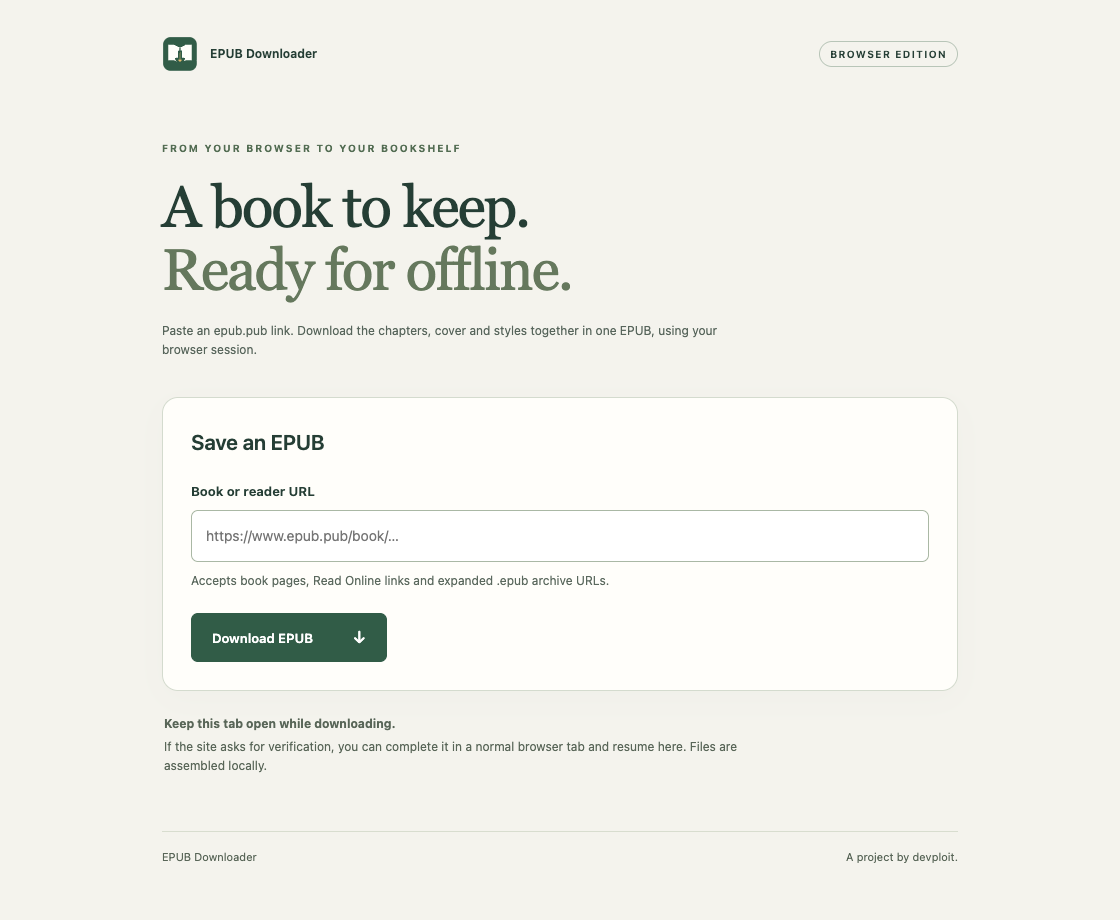
Save a book for offline reading. A browser extension by devploit.
Download complete EPUB books from epub.pub using your existing browser session.
Paste a book or reader URL, download its resources, and save a single .epub file
with the original chapters, images, styles and reading order.
No server, account, build step, or runtime dependencies. Everything is assembled locally in your browser.
Features
- Browser-based downloads: requests run in epub.pub tabs using your existing session.
- Complete archives: preserves package metadata, navigation, chapters, covers, images, styles and fonts listed in the EPUB manifest.
- Current and legacy readers: supports Next.js Read Online buttons and older links.
- Verification and resume: complete site verification in a normal tab, then continue from the paused resource.
- Progress and cancellation: track downloaded files and cancel a running task.
- Checked before saving: missing or failed required resources stop the download. A cancelled save can be retried without downloading the book again.
Install
Use Chrome 120+, or a recent Chromium-based version of Edge or Brave. Chrome/Chromium is verified; Edge and Brave have not been tested separately. Firefox and Safari are not supported by this package.
Download the repository with Code → Download ZIP and extract it, or clone it.
Open your browser's extension manager:
Browser Address Chrome chrome://extensionsEdge edge://extensionsBrave brave://extensionsEnable Developer mode.
Select Load unpacked and choose the repository's
extensiondirectory.Pin EPUB Downloader by devploit from the browser's extensions menu.
If you received epub-downloader-extension.zip, extract it and select the extracted
folder containing manifest.json instead. You do not need Node.js or Python to
install or use the extension.
Use
- Click the extension icon to open the downloader. An active epub.pub tab's URL is filled in automatically.
- Paste a supported URL and select Download EPUB.
- Keep the downloader and its source tabs open while files are collected.
- If verification is requested, select Open source tab, complete it normally, return to the downloader, and select Resume download.
- Choose where to save the EPUB. Saved means the browser has confirmed completion.
Supported URL formats:
| Source | Format |
|---|---|
| Book page | https://www.epub.pub/book/<book-slug> |
| Swipe reader | https://spread.epub.pub/epub/<asset-id> |
| Continuous reader | https://continuous.epub.pub/epub/<asset-id> |
| Expanded archive | https://asset.epub.pub/epub/<filename>.epub |
| Package document | An .opf URL inside an expanded .epub archive |
These are URL patterns; replace the placeholders with an actual book or reader URL.
How it works
The extension resolves the reader's archive URL, reads META-INF/container.xml
and the EPUB package documents, then fetches the resources listed in their
manifests. Each origin is accessed through a normal browser tab using same-origin
requests with browser credentials.
It assembles the archive locally, places the uncompressed mimetype entry first,
and hands the finished file to the browser's download manager. The original package
documents and resource bytes are preserved. Source tabs remain open after download.
Privacy and permissions
The extension has no analytics, remote scripts, external backend, or account system. It does not export cookies or access them through the cookies API. Requests to epub.pub still use the browser session, and the site receives those requests normally.
| Permission | Purpose |
|---|---|
scripting |
Read book and reader pages; fetch resources inside source tabs. |
downloads |
Save the EPUB and monitor completion. |
https://epub.pub/*, https://*.epub.pub/* |
Limit page access to epub.pub and its subdomains. |
Limitations and troubleshooting
Using a browser session does not guarantee access through Cloudflare. The extension does not solve challenges automatically; it pauses for manual verification. Permanent access denials can still prevent a download.
| Situation | What to do |
|---|---|
| No EPUB reader was found | Open Read Online on the book page, then paste that reader URL into the extension. |
| Waiting for verification | Open the source tab, complete verification, return and resume. |
| HTTP error or missing resource | Check access in the source tab and try again. Failed required files are never silently skipped. |
| Save dialog cancelled | Select Save EPUB to retry without fetching the book again. |
| Source tab closed or navigated away | Start the download again and keep the source tabs open. |
| Extension updated on disk | Reload it in the extension manager, then reopen the downloader. |
Additional limits:
- Resources must be correctly listed in the source EPUB manifest. Undeclared dependencies cannot be discovered reliably.
- External manifest resources and explicit remote-resource declarations are rejected.
- Font-obfuscation metadata is preserved; other encryption is unsupported.
- Expanded EPUB archives are supported. Plain chapter pages and arbitrary standalone EPUB/ZIP downloads are not.
- Limits are 32 MiB per resource, 256 MiB per book, and 10,000 entries.
- The book is assembled in memory. Closing or reloading the downloader discards progress; there is no persistent resume after restarting the browser.
- Files use ZIP STORE, so the saved EPUB can be larger than a compressed original.
Development
Requirements: Node.js 22+, npm, and Python 3 available as python3.
Python is used for packaging and independent ZIP inspection in the tests.
npm ci
npx playwright install chromium
npm run check
npm test
npm run check validates the manifest, permissions and JavaScript syntax.
The Playwright suite loads the real extension in Chromium with controlled site
fixtures and exercises saving, verification/resume, cancellation, retry behavior,
reader discovery, archive completeness and keyboard navigation. Saved archives
are independently inspected with Python's zipfile, including CRC checks.
A live download has also been verified in an existing Chrome session. Automated fixtures keep the test suite independent of epub.pub availability and Cloudflare.
Build a shareable ZIP
python3 scripts/package.py
This creates dist/epub-downloader-extension.zip, containing only the extension,
its user guide and the license. No compilation is required. Share this ZIP rather
than the full development repository.
Repository layout
extension/          Browser extension, icons and packaged user guide
scripts/            Source checks and distribution packaging
tests/              Browser integration and regression tests
docs/images/        README screenshots
LICENSE             MIT license and copyright notices
Contributing
Bug reports and focused pull requests are welcome. Include your browser version, the type of URL used, the displayed error and steps to reproduce the issue. Avoid including cookies or other session data. For code changes, run the checks above and add a regression test when fixing a bug.
Acknowledgements
This project uses mcombeau/epub_downloader by Mia Combeau as a reference.
License
Created and maintained by devploit. Distributed under the MIT license.
Questions
What is epub_downloader?
devploit/epub_downloader is a public repo on GitHub by devploit. Browser extension for Chrome, Edge and Brave that downloads complete EPUB books from epub.pub using your browser session. No backend required.
Is epub_downloader open source?
It declares the MIT license on GitHub.
Does epub_downloader run on macOS, Windows or Linux?
Its maker has not tagged a system, so it is unknown here. Its README says what it needs.
How do I install epub_downloader?
Open "Take it" on its page: Take My Repo writes an install plan for your machine and hands it to your AI agent (Claude Code, Codex or Cursor), which asks you before each step. Take My Repo has not tested it on any machine.