

AutoGPT
AutoGPT is the vision of accessible AI for everyone, to use and to build on. Our mission is to provide the tools, so that you can focus on what matters.
- 188k
- Python
- 53 min ago
top #1 and most feature rich GPT wrapper for git — generate commit messages with an LLM in 1 sec — works with Claude, GPT and every other provider, supports local Ollama models too
Repo di-sukharev/opencommit, read from GitHub 1 d ago. di-sukharev has not joined Take My Repo.
di-sukharev/opencommit is a public repo on GitHub by di-sukharev. top #1 and most feature rich GPT wrapper for git — generate commit messages with an LLM in 1 sec — works with Claude, GPT and every other provider, supports local Ollama models too. It declares the MIT license on GitHub. It is written mainly in JavaScript, has 7,554 stars and last changed on 2026-11-21. Nobody has reviewed it on Take My Repo yet, which says nothing about its quality. Read from GitHub on 2026-11-23.
AutoGPT is the vision of accessible AI for everyone, to use and to build on. Our mission is to provide the tools, so that you can focus on what matters.

Killing lame commits with AI 🤯🔫
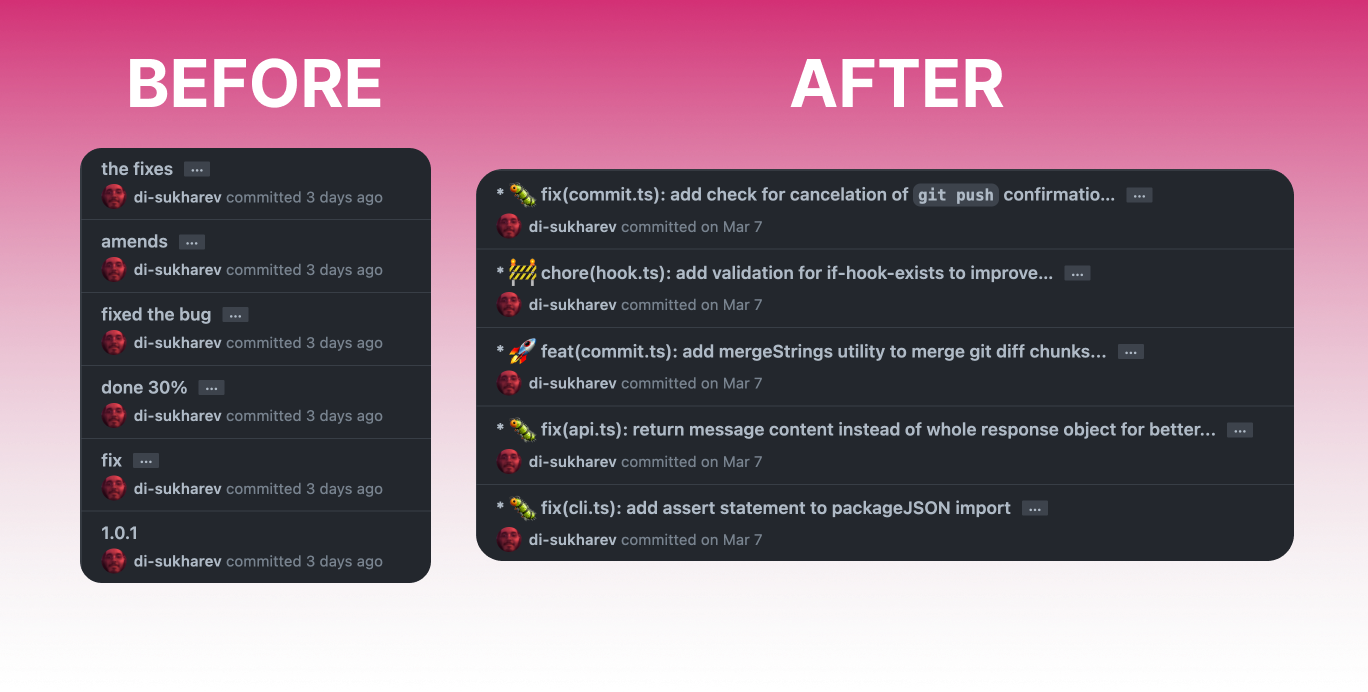
All the commits in this repo are authored by OpenCommit — look at the commits to see how OpenCommit works. Emojis and long commit descriptions are configurable, basically everything is.
You can use OpenCommit by simply running it via the CLI like this oco. 2 seconds and your staged changes are committed with a meaningful message.
Install OpenCommit globally to use in any repository:
npm install -g opencommit
Get your API key from OpenAI or other supported LLM providers (we support them all). Make sure that you add your OpenAI payment details to your account, so the API works.
Set the key to OpenCommit config:
oco config set OCO_API_KEY=<your_api_key>
Your API key is stored locally in the ~/.opencommit config file.
You can call OpenCommit with oco command to generate a commit message for your staged changes:
git add <files...>
oco
Running git add is optional, oco will do it for you.
You can also run it with local model through ollama:
ollama run mistral (do this only once, to pull model)git add <files...>
oco config set OCO_AI_PROVIDER='ollama' OCO_MODEL='llama3:8b'
Default model is mistral.
If you have ollama that is set up in docker/ on another machine with GPUs (not locally), you can change the default endpoint url.
You can do so by setting the OCO_API_URL environment variable as follows:
oco config set OCO_API_URL='http://192.168.1.10:11434/api/chat'
where 192.168.1.10 is example of endpoint URL, where you have ollama set up.
If you encounter issues with Ollama, such as the error
✖ local model issues. details: connect ECONNREFUSED ::1:11434
It's likely because Ollama is not listening on IPv6 by default. To fix this, you can set the OLLAMA_HOST environment variable to 0.0.0.0 before starting Ollama:
export OLLAMA_HOST=0.0.0.0
This will make Ollama listen on all interfaces, including IPv6 and IPv4, resolving the connection issue. You can add this line to your shell configuration file (like .bashrc or .zshrc) to make it persistent across sessions.
You can run OpenCommit with local models served by llama.cpp:
./llama-server -m model.gguf --port 8080git add <files...>
oco config set OCO_AI_PROVIDER='llamacpp' OCO_API_URL='http://localhost:8080'
If the server is running on a different machine, set the URL accordingly:
oco config set OCO_API_URL='http://192.168.1.10:8080'
There are multiple optional flags that can be used with the oco command:
Link to the GitMoji specification: https://gitmoji.dev/
This flag enables GitMoji and allows users to use all emojis in the GitMoji specification. Without the flag, OCO_EMOJI=true uses a shorter set of 10 emojis (🐛✨📝🚀✅♻️⬆️🔧🌐💡) to limit the number of tokens sent in each request.
This is due to limit the number of tokens sent in each request. However, if you would like to use the full GitMoji specification, you can use the --fgm flag.
oco --fgm
If you always want the full specification, turn it on once in the config instead of passing the flag on every run:
oco config set OCO_EMOJI_FULL_SPEC=true
The setting also applies to messages generated by the prepare-commit-msg git hook, which does not take flags.
This flag allows users to automatically commit the changes without having to manually confirm the commit message. This is useful for users who want to streamline the commit process and avoid additional steps. To use this flag, you can run the following command:
oco --yes
Create a .env file and add OpenCommit config variables there like this:
...
OCO_AI_PROVIDER=<openai (default), anthropic, azure, ollama, llamacpp, gemini, flowise, deepseek, aimlapi, openrouter, orcarouter, cheaperinference, requesty, atlascloud, uberllm, trustedrouter, aigrow>
OCO_API_KEY=<your OpenAI API token> // or other LLM provider API token
OCO_API_URL=<may be used to set proxy path to OpenAI api>
OCO_API_CUSTOM_HEADERS=<JSON string of custom HTTP headers to include in API requests>
OCO_TOKENS_MAX_INPUT=<max model token limit (default: 4096)>
OCO_TOKENS_MAX_OUTPUT=<max response tokens (default: 500)>
OCO_REASONING=<override reasoning-model auto-detection with true or false; omitted by default>
OCO_REASONING_MAX_TOKENS=<max completion token budget for reasoning models, including hidden reasoning tokens (default: 1000)>
OCO_DESCRIPTION=<postface a message with ~3 sentences description of the changes>
OCO_EMOJI=<boolean, add GitMoji>
OCO_EMOJI_POSITION_BEFORE_DESCRIPTION=<boolean, place GitMoji immediately before the commit subject; default: false>
OCO_EMOJI_FULL_SPEC=<boolean, use the full GitMoji specification, same as the --fgm flag; default: false>
OCO_MODEL=<either 'gpt-4o-mini' (default), 'gpt-4o', 'gpt-4', 'gpt-4-turbo', 'gpt-3.5-turbo', 'gpt-3.5-turbo-0125', 'gpt-4-1106-preview', 'gpt-4-turbo-preview' or 'gpt-4-0125-preview' or any Anthropic or Ollama model or any string basically, but it should be a valid model name>
OCO_LANGUAGE=<locale, scroll to the bottom to see options>
OCO_MESSAGE_TEMPLATE_PLACEHOLDER=<message template placeholder, default: '$msg'>
OCO_PROMPT_MODULE=<either conventional-commit or @commitlint, default: conventional-commit>
OCO_ONE_LINE_COMMIT=<one line commit message, default: false>
Global configs are same as local configs, but they are stored in the global ~/.opencommit config file and set with oco config set command, e.g. oco config set OCO_MODEL=gpt-4o.
When you switch providers, set the new provider's API key, model, and any required endpoint or custom headers. Put OCO_AI_PROVIDER alongside the API key when you select a different provider in a repository's .env file or in the shell. A key, endpoint, or custom header configured without a provider applies to the globally configured provider. If OpenCommit prompts for a key for a repository provider that differs from the global provider, it uses the key for the current run.
Local config still has more priority than Global config, but you may set OCO_MODEL and OCO_LOCALE globally and set local configs for OCO_EMOJI and OCO_DESCRIPTION per repo which is more convenient.
Simply set any of the variables above like this:
oco config set OCO_MODEL=gpt-4o-mini
To see all available configuration parameters and their accepted values:
oco config describe
To see details for a specific parameter:
oco config describe OCO_MODEL
Configure GitMoji to preface a message.
oco config set OCO_EMOJI=true
To remove preface emojis:
oco config set OCO_EMOJI=false
By default, GitMoji appears at the start of the commit header:
🐛 (server.ts): handle an unavailable port
To place GitMoji immediately before the subject, after the Conventional Commit type and optional scope:
oco config set OCO_EMOJI_POSITION_BEFORE_DESCRIPTION=true
fix(server.ts): 🐛 handle an unavailable port
This setting only affects commits generated with OCO_EMOJI=true, OCO_EMOJI_FULL_SPEC=true or --fgm.
Other config options are behaving the same.
You can set the OCO_WHY config to true to have OpenCommit output a short description of WHY the changes were done after the commit message. Default is false.
To make this perform accurate we must store 'what files do' in some kind of an index or embedding and perform a lookup (kinda RAG) for the accurate git commit message. If you feel like building this comment on this ticket https://github.com/di-sukharev/opencommit/issues/398 and let's go from there together.
oco config set OCO_WHY=true
By default, OpenCommit uses gpt-4o-mini model.
You may switch to gpt-4o which performs better, but costs more 🤠
oco config set OCO_MODEL=gpt-4o
or for as a cheaper option:
oco config set OCO_MODEL=gpt-3.5-turbo
OpenCommit automatically fetches available models from your provider when you run oco setup. Models are cached for 7 days to reduce API calls.
To see available models for your current provider:
oco models
To refresh the model list (e.g., after new models are released):
oco models --refresh
To see models for a specific provider:
oco models --provider anthropic
By default OpenCommit uses OpenAI.
You could switch to Azure OpenAI Service or Flowise or Ollama or llama.cpp.
oco config set OCO_AI_PROVIDER=azure OCO_API_KEY=<your_azure_api_key> OCO_API_URL=<your_azure_endpoint>

oco config set OCO_AI_PROVIDER=flowise OCO_API_KEY=<your_flowise_api_key> OCO_API_URL=<your_flowise_endpoint>

oco config set OCO_AI_PROVIDER=ollama OCO_API_KEY=<your_ollama_api_key> OCO_API_URL=<your_ollama_endpoint>

oco config set OCO_AI_PROVIDER=llamacpp OCO_API_URL=<your_llamacpp_endpoint>
By default OpenCommit uses OpenAI.
You could switch to OrcaRouter, an OpenAI-compatible gateway that supports direct provider models and automatic model routing. It can also provide optional gateway-level guardrails and firewall policies for prompts, responses, and tool calls. Enabling and configuring those controls is a separate step on the OrcaRouter side: the recommended balanced posture is primarily audit-based, while tight applies default-deny enforcement. OpenCommit itself does not configure them — it simply calls the gateway like any OpenAI-compatible API.
oco config set OCO_AI_PROVIDER=orcarouter OCO_API_KEY=<your_orcarouter_api_key>

oco config set OCO_AI_PROVIDER=orcarouter OCO_API_KEY=<your_orcarouter_api_key> OCO_MODEL=orcarouter/auto
The default model is orcarouter/auto, which lets OrcaRouter pick the best model for your request automatically.
You could switch to Cheaper Inference, an OpenAI-compatible gateway to models from several labs.
Get an API key at cheaperinference.com/signup.
oco config set OCO_AI_PROVIDER=cheaperinference OCO_API_KEY=<your_cheaperinference_api_key> OCO_MODEL=gpt-5.4-mini

oco config set OCO_AI_PROVIDER=cheaperinference OCO_API_KEY=<your_cheaperinference_api_key> OCO_MODEL=claude-sonnet-5
The default model is gpt-5.4-mini. See the model list for other model IDs.
You could switch to Requesty, an OpenAI-compatible gateway with a single API key for models from many providers. Get a key at app.requesty.ai/api-keys.
oco config set OCO_AI_PROVIDER=requesty OCO_API_KEY=<your_requesty_api_key> OCO_MODEL=openai/gpt-4o-mini

oco config set OCO_AI_PROVIDER=requesty OCO_API_KEY=<your_requesty_api_key> OCO_MODEL=google/gemini-2.5-flash
The default model is openai/gpt-4o-mini. To route through the EU region, set OCO_API_URL=https://router.eu.requesty.ai/v1. See the Requesty docs for the full model list.
Atlas Cloud exposes an OpenAI-compatible API. It is optional and does not change OpenCommit's default provider.
oco config set OCO_AI_PROVIDER=atlascloud OCO_API_KEY=<your_atlascloud_api_key> OCO_MODEL=qwen/qwen3.5-397b-a17b
di-sukharev/opencommit is a public repo on GitHub by di-sukharev. top #1 and most feature rich GPT wrapper for git — generate commit messages with an LLM in 1 sec — works with Claude, GPT and every other provider, supports local Ollama models too.
It declares the MIT license on GitHub.
Its maker has not tagged a system, so it is unknown here. Its README says what it needs.
Open "Take it" on its page: Take My Repo writes an install plan for your machine and hands it to your AI agent (Claude Code, Codex or Cursor), which asks you before each step. Take My Repo has not tested it on any machine.
The agent that grows with you
The agent harness performance optimization system. Skills, instincts, memory, security, and research-first development for Claude Code, Codex, Opencode, Cursor and beyond.
Reverse engineer anything with agents, from app behavior down to native binaries.
🪀 Lobe CLI Toolbox - AI CLI Toolbox, enhancing git commit and i18n workflow efficiency
Its last change on GitHub was on 2026-11-21. Take My Repo does not judge from that whether it is maintained.
Nobody has reviewed it on Take My Repo yet, which says nothing about its quality.
Take My Repo cannot say: it does not audit code and has not run opencommit. What is known comes from GitHub. It declares the MIT license on GitHub. Its last change was on 2026-11-21. It has 7,554 stars, which measure popularity, not safety. Nobody has reviewed it on Take My Repo yet, which says nothing about its quality. Read the source before you run it. With "Take it", your AI agent shows each step and asks you before running it; README text is treated as data, not as instructions.







