ngterm for Omarchy
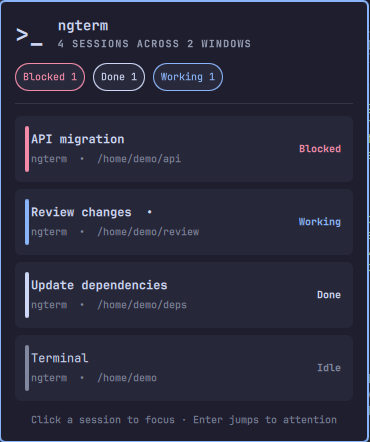
An unofficial Omarchy bar plugin for ngterm. It shows session status across open windows and workspaces and lets you select an existing session. Based on omarchy-agterm, with native ngtermctl support.
Requirements
- Omarchy with native Quickshell plugins. Development uses Omarchy 4.5.0.
- ngterm with
ngtermctl on PATH. Development uses ngterm 0.2.4.
- Python 3.10+ (
python3), Git, and jq.
Install
omarchy plugin add https://github.com/dmitriiweb/ngterm-ormachy-plugin.git --enable
Review the plugin before you accept Omarchy's trust prompt. It runs with your user permissions. The plugin ID is dmitriiweb.ngterm. The repository name keeps the requested spelling, ngterm-ormachy-plugin.
To set its bar position:
omarchy bar move dmitriiweb.ngterm --after omarchy.agents
Use this position only if the omarchy.agents widget is present.
Manual copy
git clone https://github.com/dmitriiweb/ngterm-ormachy-plugin.git
cd ngterm-ormachy-plugin
./install.sh
The installer copies the runtime files to ${XDG_CONFIG_HOME:-$HOME/.config}/omarchy/plugins/dmitriiweb.ngterm, validates them, rescans plugins, and enables the widget. It does not overwrite an existing destination. If discovery has not finished, it prints the commands to complete activation. Copied files remain if activation fails.
A manual copy has no Git update path. Back up or move that copy before you install another version. Non-default XDG discovery depends on the installed Omarchy version.
Controls
| Control |
Action |
| Left-click |
Open or close the session list. |
| Click a session |
Select that session and raise its window. |
| Middle-click, or Enter in the popup |
Select the first session in attention order: Blocked, Done, Working, Idle. |
| Right-click |
Restart the monitor. |
| Up / Down, or mouse wheel |
Scroll the session list. |
| Escape |
Close the popup. |
Horizontal bars show status counts. Vertical bars show the terminal icon and an offline indicator. The popup lists recent sessions first. A failed selection leaves the popup open with an error. The plugin does not create sessions or start agents.
Settings
Use Omarchy's bar plugin settings.
| Setting |
Default |
Effect |
cliPath |
Empty |
Find ngtermctl on PATH or in standard install locations. Set a path if required. |
socketPath |
Empty |
Use NGTERM_SOCKET from the Omarchy shell's environment, then ngtermctl's default socket. Set a path to select a specific ngterm instance. |
showIdle |
true |
Include idle sessions in the popup. Does not filter status counts. |
showIcon |
true |
Show the icon on horizontal bars. Vertical bars always show it. |
ngtermctl does not read NGTERM_SOCKET itself. The bridge passes the resolved socket explicitly to snapshots, events, and focus commands. A shell started before ngterm may not have that variable. In that case, use socketPath if ngterm's default socket is not the required instance.
Status sources and limits
| Display |
Source |
| Working |
Explicit active status, or a recognized OMP spinner title when structured status is absent. |
| Blocked |
Explicit blocked status. |
| Done |
Explicit completed status. |
| Idle |
Explicit idle, an unknown status, or no recognized activity signal. |
Title detection recognizes π <frame> or <frame> π at the start of the terminal title, with frames from ⠋⠙⠹⠸⠼⠴⠦⠧⠇⠏. Explicit status takes precedence. A stopped spinner does not prove completion. A stale terminal title can produce a stale Working state. Idle does not prove that no agent is running.
Counts are per terminal session, not per agent process. Splits and scratch panes do not add rows. Companion terminal sessions can each have a row. Page sessions are excluded. Status reporting is ngterm's responsibility: the plugin does not inspect conversations or install agent hooks or OMP extensions. Enable and check the required agent integration in ngterm separately.
The bridge uses local events and a 20-second safety snapshot. Title changes can wait until the next snapshot. The popup uses recent-use ordering; the attention action uses status-first ordering. Partial window-read errors keep readable sessions and show a warning.
Update and remove
For Git installs:
omarchy plugin update dmitriiweb.ngterm
omarchy plugin remove dmitriiweb.ngterm
Omarchy asks for confirmation when required. Removal of a Git install deletes its checkout, including local changes. Plugin updates do not require a full shell restart. Right-click the widget to restart an old bridge process if necessary.
Troubleshooting and privacy
ngtermctl window list --json
# From a terminal with NGTERM_SOCKET set:
ngtermctl tree --socket "$NGTERM_SOCKET" --json
python3 scripts/ngterm_bridge.py snapshot --socket "$NGTERM_SOCKET"
omarchy plugin validate .
- Check
cliPath and socketPath if the widget is offline.
- The bridge reads local session names, paths, titles, timestamps, and status through
ngtermctl.
- Usage timestamps are stored under
${XDG_CACHE_HOME:-$HOME/.cache}/omarchy-ngterm/.
- Runtime code makes no network requests. Git installation and updates contact GitHub.
- Neither the plugin nor its installer changes ngterm configuration or agent configuration.
- Plugin text uses an English catalog under
i18n/, with Omarchy's language fallback mechanism.
Development
manifest.json: native plugin metadata and settings.BarWidget.qml: native panel, popup, counts, and selection controls.scripts/ngterm_bridge.py: Python standard-library bridge.i18n/en.json: plugin text.install.sh: manual copy installer.tests/: isolated bridge and process regression tests.
PYTHONDONTWRITEBYTECODE=1 python3 -m unittest discover -s tests -v
bash -n install.sh
omarchy plugin validate .
python3 scripts/ngterm_bridge.py --help
Tests use temporary cache directories and fake control clients. They do not change live session status or user configuration. Native smoke checks must use the installed Omarchy QML modules and a running display.
To render synthetic sessions with the real Omarchy UI modules:
./tests/widget-smoke.sh
# In another terminal, run the printed command with "verify" instead of "inspect".
The harness opens a separate panel; it does not install or enable the plugin. Close it with Ctrl+C. It replaces displayed session data with synthetic rows; use the bridge command above to check live data. The verify action checks recent-use ordering and markup-safe error tooltips.
Version 0.1.0
Initial ngterm port: bar counts, scrollable session popup, explicit session focus, event monitoring, socket selection, and separate usage storage.
License and credits
MIT; see LICENSE. The bridge and widget derive from dmitriiweb/omarchy-agterm. This project is not affiliated with or endorsed by the Omarchy or ngterm projects.