
pingpongcode
The maintainer has not written a description at the source.
- 5
- MIT
- 3 mo ago
Repo doonny/pingpongcode, read from GitHub 3 h ago. doonny has not joined Take My Repo.
In short
doonny/pingpongcode is a public repo on GitHub by doonny. It declares the MIT license on GitHub. It is written mainly in Python, has 5 stars and last changed on 2026-08-21. Nobody has reviewed it on Take My Repo yet, which says nothing about its quality. Read from GitHub on 2026-11-24.

PingPongCode · 码来码去
You ping. Code pongs.
An open-source messaging bridge connecting WeChat, Feishu, and other chat platforms to Claude Code, Codex, and more.
Key Features
Lightweight, no build step. Pure Python, single asyncio process — no C extensions, no compiler toolchain, no Node sidecar, no Docker, no web framework, no browser automation.
Easy to use. A single
/cccommand surface covers querying, reviewing, and bidirectional file/image transfer. Everything is driven from the chat window — no extra client UI.Safe development loop. Opt-in remote dev loop: each write task runs in an isolated git worktree (main workspace untouched), sensitive tool calls go through a
IMapproval gate, a risk classifier allow/ask/deny each call, and one command decides keep or rollback.Bidirectional resume.
IMand the desktop Terminal share the same local Vibe Code sessions — resume a Terminal session from your phone, or hand aIMsession back to the computer.
How it works
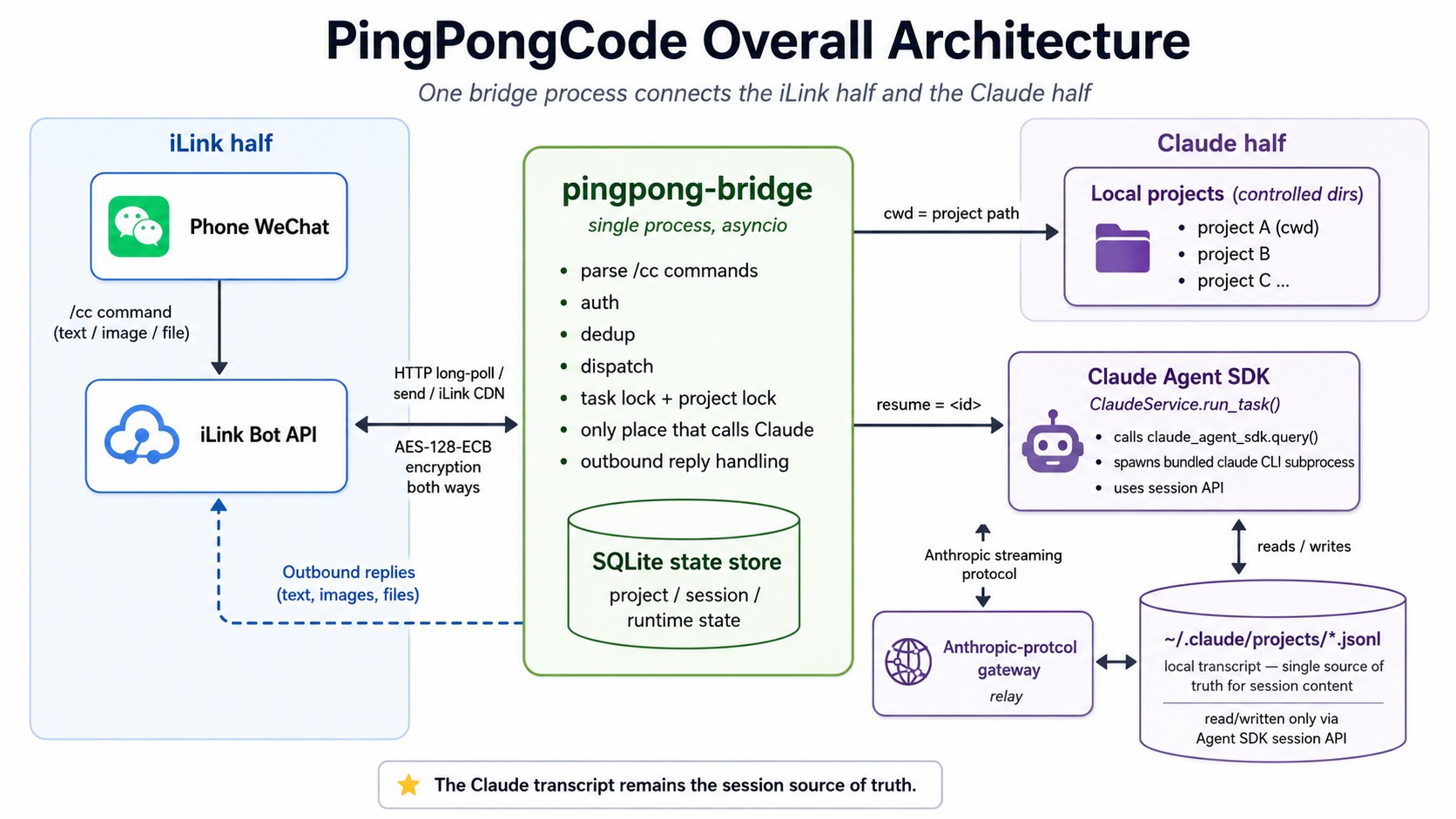
One bridge process joins two halves: the iLink half (WeChat transport — long-polling, AES-encrypted CDN) and the Claude half (claude_agent_sdk.query() → bundled claude CLI → Anthropic-protocol gateway). The pingpong-bridge is the single orchestrator and the only place that calls Claude. Project/session/runtime state lives in SQLite; the Claude Code local transcript remains the single source of truth for session content, accessed only via the Agent SDK session API.
The three modes
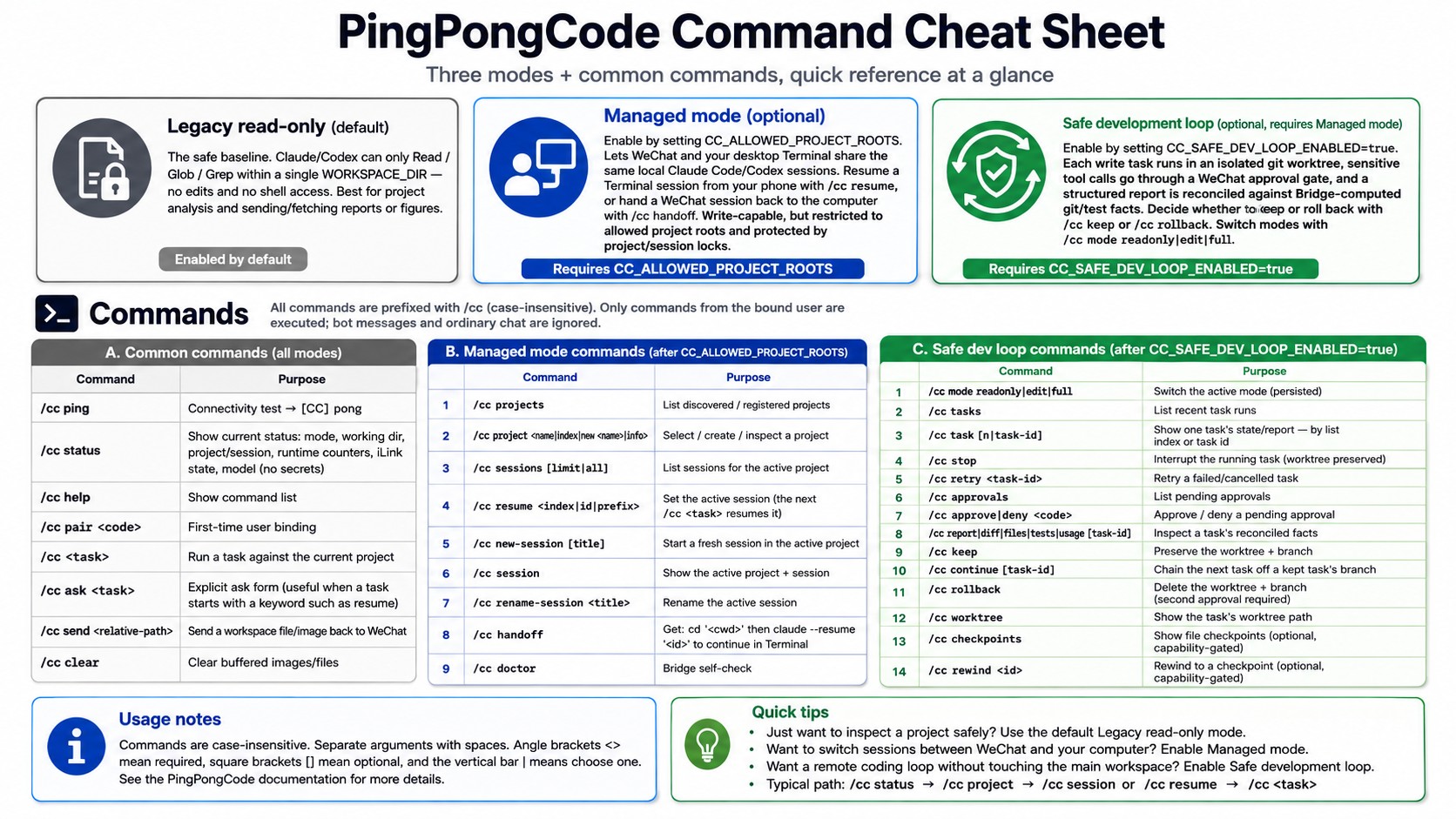
PingPongCode has three operating modes that layer on top of each other. All are off by default, so the read-only path is the unchanged baseline — you only turn on what you need.
Legacy read-only (default). Claude can only
Read/Glob/Grepagainst a singleWORKSPACE_DIR— no edits, no shell. The safe baseline for project analysis, send/fetch reports/figures. Nothing to configure; this is what you get out of the box.Managed mode (opt-in). Set
CC_ALLOWED_PROJECT_ROOTSto let WeChat and your desktop Terminal share the same local Claude Code sessions — resume a Terminal session from your phone (/cc resume), or hand a WeChat session back to the computer (/cc handoff→claude --resume <id>). Write-capable but confined to allowed roots under a project+session lock.Safe development loop (opt-in, requires managed mode). Set
CC_SAFE_DEV_LOOP_ENABLED=truefor a full remote dev loop: each write task runs in an isolated git worktree (main workspace untouched), sensitive tool calls go through a WeChat approval gate (/cc approve//cc deny), and a structured report is reconciled against Bridge-computed git/test facts. One command decides keep or rollback (/cc keep//cc rollback). Switch from WeChat with/cc mode readonly|edit|full.
For the full comparison table, exact
permission_mode/setting_sourcesmappings, and how the two opt-ins layer, seedocs/DETAIL.md#three-modes.
Requirements
Runtime environment
| Requirement | Notes |
|---|---|
| OS | Ubuntu / Linux (designed & tested) · macOS (tested). Windows not supported currently (os.kill liveness + 0600 perms). |
| Python | ≥ 3.11 |
claude CLI |
On PATH — claude-agent-sdk spawns it. The SDK bundles a compatible CLI; the system claude may differ. |
git |
Required by managed mode (git init) and essential for the safe-dev-loop (every write task uses a git worktree). |
| Gateway | An Anthropic-protocol endpoint. The SDK sets ANTHROPIC_BASE_URL and speaks the Anthropic Messages API. Image analysis needs a vision model (e.g. claude-sonnet-5, minimax-m3, etc.). |
| Via an iLink/ClawBot session. |
Python dependencies
Installed via pip install -r requirements.txt:
| Package | Purpose |
|---|---|
claude-agent-sdk |
spawns the bundled claude CLI subprocess |
httpx |
iLink HTTP API (long-poll, send, CDN upload/download) |
pydantic / pydantic-settings / python-dotenv |
config model + .env loading |
aiosqlite |
async SQLite persistence |
qrcode / pillow |
iLink QR login rendering |
rich |
terminal output / QR display |
tenacity |
polling backoff/retry |
Install
From the repo root. Create a Python ≥ 3.11 environment, then install the dependencies — venv or conda both work (uv/poetry too, if you prefer):
# Option A — venv (built into Python, no extra install)
python3 -m venv .venv
source .venv/bin/activate

# Option B — conda
conda create -n pingpongcode python=3.11
conda activate pingpongcode

# then, in whichever env you activated:
pip install -r requirements.txt
pip install -e .
Ubuntu's system Python is externally-managed (PEP 668) — use one of the environments above, or
--break-system-packages.
Configure
Recommended — the interactive wizard (grouped, validated, secrets masked):
python -m pingpong_bridge config init
Or create .env by hand:
cp .env.example .env
$EDITOR .env
For the required variables (gateway, model,
WORKSPACE_DIR), managed-mode & safe-dev-loop variables, and how the wizard validates values, seedocs/DETAIL.md#configure.
Check config (secrets masked):
python -m pingpong_bridge show-config
Note: running straight from source without a registered package, i.e., you prefer not using
pip install -e .? Prefix the module withPYTHONPATH=src— e.g.PYTHONPATH=src python -m pingpong_bridge login(and likewise forrun/check-*).
Run
Four steps, in order:
A. Scan to log in — terminal prints a QR (also saved to artifacts/ilink-login.png); scan with WeChat iLink/ClawBot and confirm. Credentials save to data/ilink_credentials.json (0600).
python -m pingpong_bridge login
B. iLink bidirectional self-check — run it, then send /cc ping from your phone; expect [CC] pong.
python -m pingpong_bridge check-ilink
C. Gateway + Agent SDK self-check — no phone needed.
python -m pingpong_bridge check-gateway
D. Start the bridge — runs in the foreground; Ctrl+C to stop.
python -m pingpong_bridge run
Note: on first run (if ILINK_ALLOWED_USER_ID isn't set) the terminal shows a pairing code — send /cc pair <code> from your phone to bind, then any /cc task.
Pairing details, a first-task example, and how to stop/restart:
docs/DETAIL.md#run.
Commands
All commands are /cc-prefixed (case-insensitive). Only messages from the bound user are executed; bot's own messages and plain chat are ignored. Commands are grouped by the mode that enables them.
📋 Quick-reference cheatsheet (click to expand)
Common (all modes)
| Command | Purpose |
|---|---|
/cc ping |
connectivity test → [CC] pong |
/cc status |
mode-aware status (mode, working dir, project/session, runtime counters, iLink state, model — no secrets) |
/cc help |
command list |
/cc pair <code> |
first-time user binding |
/cc <task> |
run a task against the current project |
/cc ask <task> |
explicit ask form (use for tasks starting with a keyword like resume) |
/cc send <relative-path> |
send a workspace file/image back to WeChat (details) |
/cc clear |
drop buffered images/files |
Command typos are not run as tasks.
/cc aproveor/cc reports(no further text) replies "unknown command" with a "did you mean" hint — retype the correct command. A typo with trailing text (/cc aproove fix the bug) still runs as a task.
Managed mode (after CC_ALLOWED_PROJECT_ROOTS)
| Command | Purpose |
|---|---|
/cc projects |
list discovered/registered projects |
/cc project <name|index|new <name>|info> |
select / create / inspect a project |
/cc sessions [limit|all] |
list sessions for the active project |
/cc resume <index|id|prefix> |
set the active session (next /cc <task> resumes it) |
/cc new-session [title] |
start a fresh session in the active project |
/cc session |
show the active project + session |
/cc rename-session <title> |
rename the active session |
/cc handoff |
get cd '<cwd>'\nclaude --resume '<id>' to continue in a Terminal |
/cc doctor |
bridge self-check |
Bidirectional resume workflow (Terminal↔WeChat, restart persistence) and the path-safety model: docs/DETAIL.md#resume.
Safe dev loop (after CC_SAFE_DEV_LOOP_ENABLED=true)
| Command | Purpose |
|---|---|
/cc mode readonly|edit|full |
switch the active mode (persisted) |
/cc tasks |
list recent task runs (numbered, like /cc sessions) |
/cc task [n|task-id] |
show one task's state/report — by list index or id |
/cc stop |
interrupt the running task (worktree preserved) |
/cc retry <task-id> |
retry a failed/cancelled task |
/cc approvals |
list pending approvals |
/cc approve|deny [code] [reason] |
decide a pending approval (omit code when only one is pending; deny may take a reason that is fed back to the model to guide a fallback) |
/cc answer <code> <text> |
answer a question the model asked mid-task (seen as [CC][提问 XXXX]; code required) |
/cc report|diff|files|tests|usage [task-id] |
inspect a task's reconciled facts |
/cc keep |
preserve the worktree + branch |
/cc continue [task-id] |
next task chains off a kept task's branch (progressive dev) |
/cc rollback |
delete the worktree + branch (second approval) |
/cc worktree |
show the task's worktree path |
/cc checkpoints / /cc rewind <id> |
(optional, capability-gated) file checkpointing |
Flow, the mode × tool permission matrix, hard invariants, and the SDK workarounds: docs/DETAIL.md#safe-dev-loop.
Two-phase planning (on by default; after CC_TWO_PHASE_ENABLED=true)
On by default, but inert unless the safe dev loop is enabled and the backend is Claude. When active, a bare /cc <task> (mode edit/full) splits into a multi-turn planning phase (plan mode, read-only) and a one-shot execution phase (same worktree, default mode). The model calls ExitPlanMode to submit its plan; you confirm or reject from WeChat. Set CC_TWO_PHASE_ENABLED=false to keep the single-phase safe-dev-loop path.
| Command | Purpose |
|---|---|
/cc say <msg> |
append a follow-up message to the in-flight planning conversation (multi-turn) |
/cc confirm [code] |
approve the proposed plan → proceed to execution |
Questions
What is pingpongcode?
doonny/pingpongcode is a public repo on GitHub by doonny. Its maker has not written a description.
Is pingpongcode open source?
It declares the MIT license on GitHub.
Does pingpongcode run on macOS, Windows or Linux?
Its maker has not tagged a system, so it is unknown here. Its README says what it needs.
How do I install pingpongcode?
Open "Take it" on its page: Take My Repo writes an install plan for your machine and hands it to your AI agent (Claude Code, Codex or Cursor), which asks you before each step. Take My Repo has not tested it on any machine.