pandas
Flexible and powerful data analysis / manipulation library for Python, providing labeled data structures similar to R data.frame objects, statistical functions, and much more
- 51k
- Python
- BSD-3-Clause
- 18 h ago
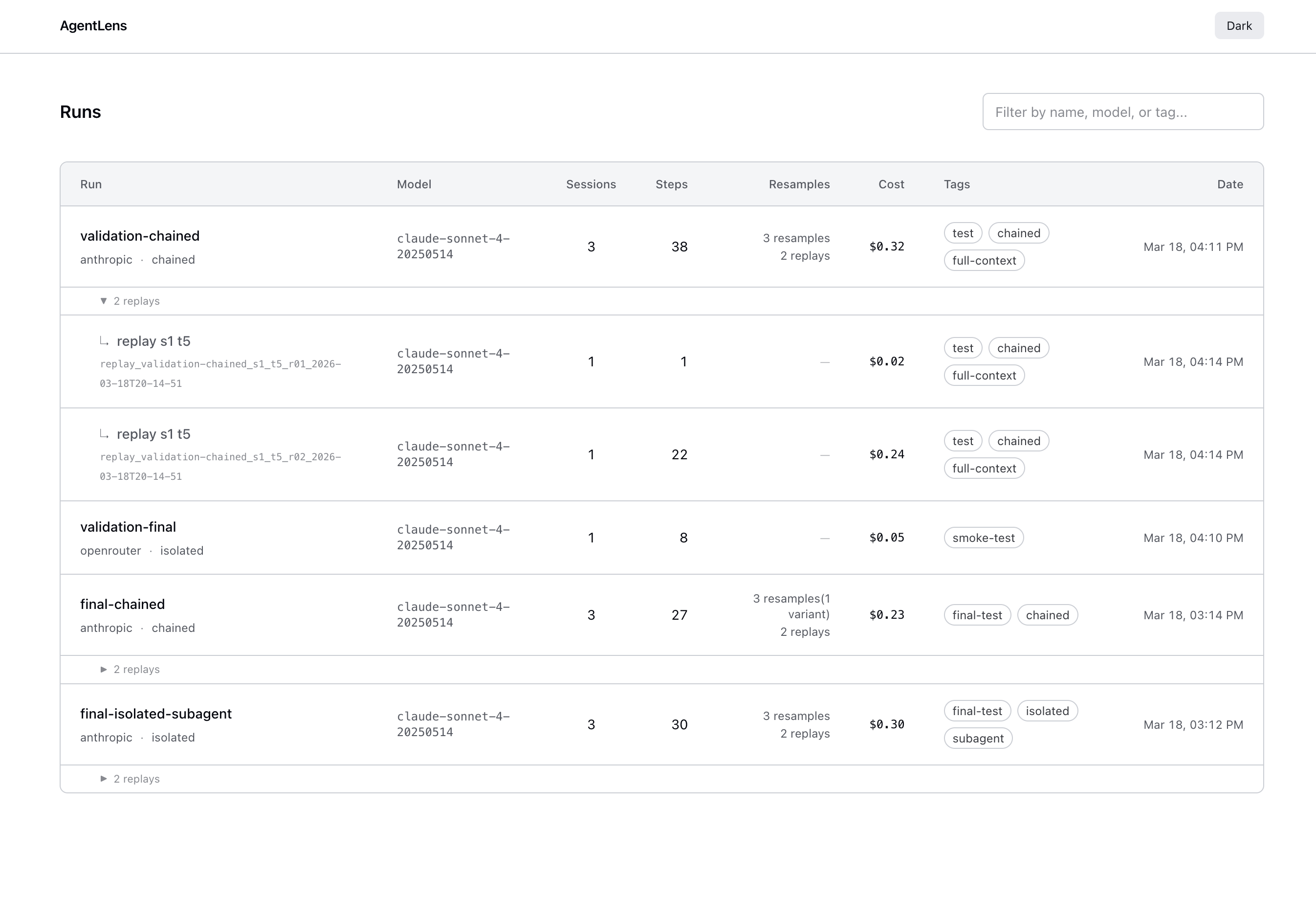
Agent observability and replay tooling for AI safety & interpretability research.
Repo dreadnode/agent-lens, read from GitHub 21 h ago. dreadnode has not joined Take My Repo.
dreadnode/agent-lens is a public repo on GitHub by dreadnode. Agent observability and replay tooling for AI safety & interpretability research. It declares the MIT license on GitHub. It is written mainly in Python, has 118 stars and last changed on 2026-06-19. Nobody has reviewed it on Take My Repo yet, which says nothing about its quality. Read from GitHub on 2026-11-23.
Flexible and powerful data analysis / manipulation library for Python, providing labeled data structures similar to R data.frame objects, statistical functions, and much more
Developed at MATS Exploration Phase under Neel Nanda, for a research project with Greg Kocher.
A harness for running multi-session agent trajectories across multiple engines (Claude Code and OpenAI Codex), capturing them in ATIF (Agent Trajectory Interchange Format), and tracking file state changes across sessions.
Built for AI alignment and interpretability research — studying how LLM agents behave across multi-turn, multi-session, multi-agent interactions.
Note: AgentLens supports two engines — Claude Code (via the Claude Agent SDK) and Codex (via the Codex CLI) — selected with the
engineconfig field. Every run is clearly labeled with its engine in the CLI,run_meta.json, and the web UI. Support for additional agents and frameworks is planned — see Roadmap. Some features (especially turn-level replay) are experimental. We welcome PRs and contributions — open an issue if you run into bugs.
The harness takes a YAML config describing a sequence of sessions (prompts to an agent), runs each session against a working directory via the selected engine (Claude Code or Codex), and produces structured outputs:
SubagentTrajectoryRefRequires Python >= 3.12 and uv.
git clone <this-repo>
cd agentlens
uv sync
If you have a Claude Code subscription (Pro/Max), no API key is needed — the SDK uses your subscription credentials automatically. Otherwise, set an API key:
export ANTHROPIC_API_KEY=sk-ant-...   # Anthropic API key
# or
export OPENROUTER_API_KEY=sk-or-...   # OpenRouter (set provider: openrouter in config)
Run the smoke test:
harness run tests/smoke.yaml
Inspect results:
harness inspect runs/<run-name>
Browse in the web UI:
cd ui && npm install && npm run dev
# Open http://localhost:5173
The engine field selects the coding-agent runtime. Both engines share the same trajectory model, shadow-git change tracking, diffs, session modes, capture, resample, and replay — runs are labeled with their engine everywhere (CLI, run_meta.json, ATIF extra.engine, run-dir slug, web UI badge).
| Engine | Config value | Runtime | Auth | Notes |
|---|---|---|---|---|
| Claude Code | claude_code (default) |
Claude Agent SDK | ANTHROPIC_API_KEY or Claude Pro/Max subscription |
Subagents via the agents: config block. Routes via the Anthropic Messages API. |
| Codex | codex |
Codex CLI codex exec --json (>= 0.135) |
codex login (subscription) or OPENAI_API_KEY; OPENROUTER_API_KEY for provider: openrouter |
Subagents via Codex multi-agent (codex_multi_agent: true). Routes via the OpenAI Responses API, or OpenRouter with provider: openrouter. |
Subagents are captured for both engines as separate, linked ATIF trajectories (a SubagentTrajectoryRef on the spawning step). They use different mechanisms: Claude Code via the agents: config block (Claude-only); Codex via its native multi-agent system — set codex_multi_agent: true to let Codex spawn agents (TOML agent definitions live in ~/.codex/agents/), and AgentLens rebuilds each spawned thread's rollout into a linked subagent trajectory.
# Codex engine
engine: codex
model: "gpt-5.4"
sandbox_mode: workspace-write   # read-only | workspace-write | danger-full-access

# Codex via OpenRouter — point Codex at any OpenRouter model:
# engine: codex
# provider: openrouter
# model: "openai/gpt-5.3-codex"   # exact OpenRouter slug (vendor prefix required)
Codex via OpenRouter. Set provider: openrouter to route the Codex engine through OpenRouter, then export OPENROUTER_API_KEY. AgentLens injects the required Codex model_providers block automatically (base_url=https://openrouter.ai/api/v1, wire_api=responses). The model must be a full OpenRouter slug including the vendor prefix (e.g. openai/gpt-5.3-codex) — a bare slug is rejected at config load. For Codex, provider is either openai (default) or openrouter.
Codex auth & capture. Normal runs and turn-level replay use whatever codex login configured. API capture (capture_api_requests: true) and the resampling it enables additionally require an API key with active billing — OPENAI_API_KEY for provider: openai or OPENROUTER_API_KEY for provider: openrouter — because capture routes Codex through a proxy via a custom model provider that uses API-key auth (the built-in providers' base URLs can't be overridden). For trajectories + replay only, subscription auth is enough on the OpenAI path; keep capture_api_requests: false. See examples/codex.yaml.
For the claude_code engine, the provider field routes API calls. The Claude Agent SDK speaks the Anthropic Messages API protocol and only runs Claude models. (For the codex engine, provider selects the Codex model provider — openai (default) or openrouter; see Engines.)
| Provider | Config value | Env var | Notes |
|---|---|---|---|
| Anthropic | anthropic (default) |
ANTHROPIC_API_KEY |
Direct Anthropic API. If no key is set, falls back to Claude Code subscription credentials. |
| OpenRouter | openrouter |
OPENROUTER_API_KEY |
Routes through OpenRouter. The harness sets ANTHROPIC_BASE_URL automatically. |
| AWS Bedrock | bedrock |
Standard AWS credentials (AWS_ACCESS_KEY_ID, etc.) |
Sets CLAUDE_CODE_USE_BEDROCK=1. |
| GCP Vertex AI | vertex |
Standard GCP credentials (GOOGLE_APPLICATION_CREDENTIALS, etc.) |
Sets CLAUDE_CODE_USE_VERTEX=1. |
You can also set base_url in your config to point at a custom Anthropic-compatible endpoint.
With provider: anthropic (the default), if no ANTHROPIC_API_KEY is set, the SDK falls back to your Claude Code subscription credentials from ~/.claude/credentials.json (requires Claude Pro/Max). Usage is covered by your subscription with rate limits rather than per-token billing. If ANTHROPIC_API_KEY is set in your environment, it takes precedence over subscription credentials.
Cost reporting caveat: Cost figures in
run_meta.jsonand the web UI come from the SDK and are based on Anthropic's list pricing regardless of provider. They may not match your actual bill (especially on OpenRouter, Bedrock, or Vertex) and are purely informational when using a Claude Code subscription.
Example configs:
# Anthropic (default) — uses API key or Claude Code subscription
model: "claude-sonnet-4-20250514"
provider: anthropic

# OpenRouter
model: "claude-sonnet-4-20250514"
provider: openrouter
Experiments are defined as YAML config files. Here's a full example:
model: "claude-sonnet-4-20250514"
provider: anthropic                     # anthropic | openrouter | bedrock | vertex
hypothesis: "The agent preserves hedging across sessions"  # what this experiment tests
work_dir: "./repos/my_project"          # working directory the agent operates in
session_mode: chained                   # isolated | chained | forked
tags: ["experiment-1"]

system_prompt: |
  You are exploring a Python codebase. Use MEMORY.md to keep notes.

allowed_tools:                          # Claude Code tools the agent can use
  - Read
  - Grep
  - Glob
  - Bash
  - Write
  - Edit

max_turns: 30                           # max agent turns per session
permission_mode: bypassPermissions      # acceptEdits | bypassPermissions
max_budget_usd: 1.00                    # optional spend cap per session
load_project_settings: false            # whether to load the repo's CLAUDE.md

memory_file: "MEMORY.md"               # auto-seeded file in working dir (default: MEMORY.md)
memory_seed: "# Project Notes\n"        # initial content if file doesn't exist
revert_work_dir: true                  # reset working dir after run (default: false)

sessions:
  - session_index: 1
    prompt: "Explore the project structure. Take notes in MEMORY.md."
  - session_index: 2
    prompt: "Read the main module in detail. Update your notes."
  - session_index: 3
    prompt: "Summarize what you know about this project."
    max_turns: 10                       # per-session override
All file changes in the working directory are tracked automatically via a shadow git — a bare git repo stored in the run output directory (.shadow_git/). The agent never sees this repo; it uses GIT_DIR/GIT_WORK_TREE env vars to stay invisible.
This enables:
state_changelog.jsonlsession_diff.patchThe working directory does not need to be a git repo. The shadow git works with any directory.
MEMORY.md (or whatever memory_file is set to) with the memory_seed content if it doesn't already exist.work_dir.| Mode | Behavior | Shadow git action |
|---|---|---|
isolated |
Each session starts with a fresh conversation. File changes persist. | No reset |
chained |
Each session resumes from the previous session's conversation. Full context preserved. | Changes accumulate (no reset) |
forked |
Sessions 2+ fork from session 1. Each sees session 1's context but not each other's. | Reset to session 1's end state |
fork_fromFor more control than session_mode: forked provides, use fork_from on individual sessions to fork from any prior session — not just session 1:
session_mode: isolated   # fork_from overrides session_mode per-session

sessions:
  - session_index: 1
    prompt: "Explore the codebase and take notes in MEMORY.md"
  - session_index: 2
    prompt: "Write a security analysis based on your notes"
    fork_from: 1         # forks from session 1's conversation
  - session_index: 3
    prompt: "Write a performance analysis based on your notes"
    fork_from: 1         # also forks from session 1 (independent of session 2)
fork_from must reference a session with a lower index. It works with any session_mode — when set, it overrides the mode for that session.
countTo study behavioral variance, run the same forked session multiple times:
sessions:
  - session_index: 1
    prompt: "Explore the codebase and take notes"
  - session_index: 2
    prompt: "Write a security analysis based on your notes"
    fork_from: 1
    count: 5             # run 5 replicates of this session
Replicates use a _rNN
dreadnode/agent-lens is a public repo on GitHub by dreadnode. Agent observability and replay tooling for AI safety & interpretability research.
It declares the MIT license on GitHub.
Its maker has not tagged a system, so it is unknown here. Its README says what it needs.
Open "Take it" on its page: Take My Repo writes an install plan for your machine and hands it to your AI agent (Claude Code, Codex or Cursor), which asks you before each step. Take My Repo has not tested it on any machine.
A game theoretic approach to explain the output of any machine learning model.
Full-stack observability · Metrics · Logs · Traces · Flows · Topology · Infrastructure · APM · NPM · DBM · RUM · Synthetics · Cloud · AI SRE · OpenTelemetry · SNMP · NetFlow/IPFIX/sFlow · IPMI · Redfish · 2000+ integrations
NeMo Guardrails is an open-source library for applying programmable safety and security controls to LLM and agentic applications.
A curated list of awesome open source libraries to deploy, monitor, version and scale your machine learning
Its last change on GitHub was on 2026-06-19. Take My Repo does not judge from that whether it is maintained.
Nobody has reviewed it on Take My Repo yet, which says nothing about its quality.
Take My Repo cannot say: it does not audit code and has not run agent-lens. What is known comes from GitHub. It declares the MIT license on GitHub. Its last change was on 2026-06-19. It has 118 stars, which measure popularity, not safety. Nobody has reviewed it on Take My Repo yet, which says nothing about its quality. Read the source before you run it. With "Take it", your AI agent shows each step and asks you before running it; README text is treated as data, not as instructions.