Groq
Groq Cloud runs LLM models fast and cheap. Llama 3.1, Mixtrel, Gemma, and more at hundreds of tokens per second, at cents per million tokens.
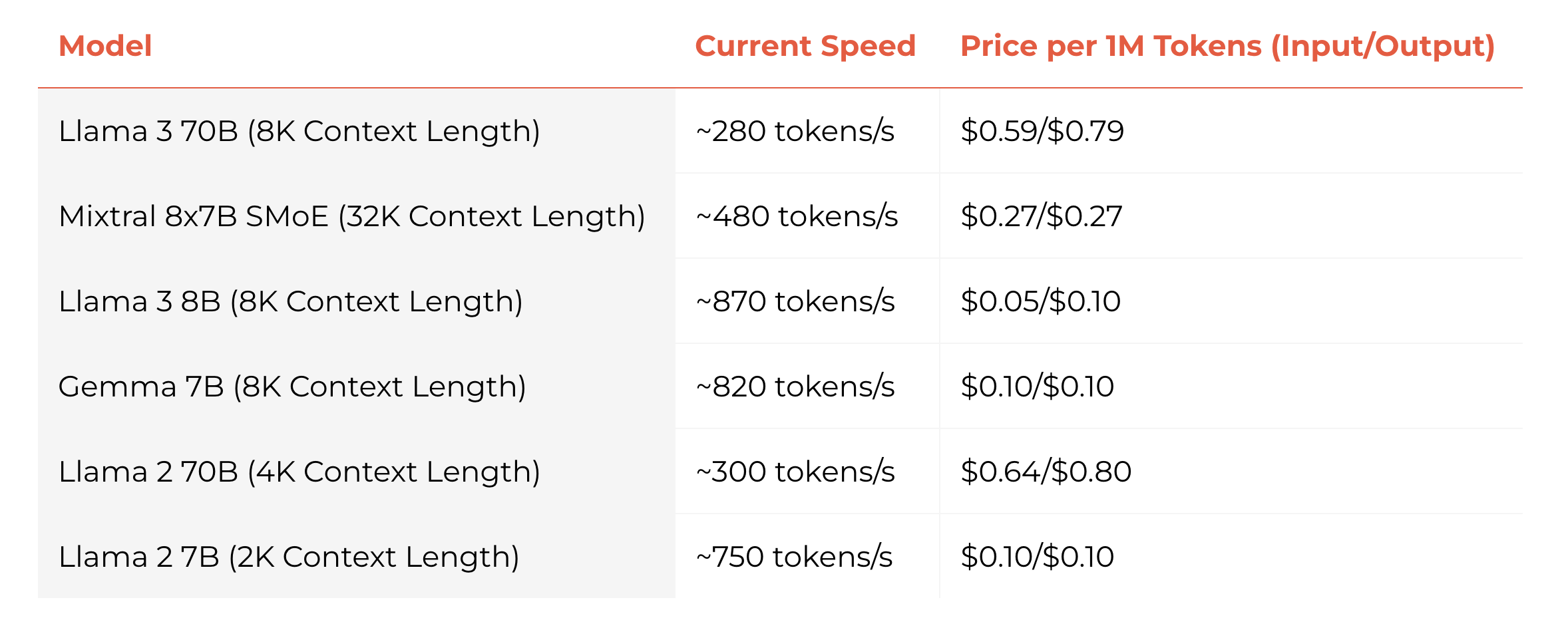
Speed and pricing at 2024-04-21. Also see their changelog for new models and features.
Groq Cloud API
You can interact with their API using any Ruby HTTP library by following their documentation at https://console.groq.com/docs/quickstart. Also use their Playground and watch the API traffic in the browser's developer tools.
The Groq Cloud API looks to be copying a subset of the OpenAI API. For example, you perform chat completions at https://api.groq.com/openai/v1/chat/completions with the same POST body schema as OpenAI. The Tools support looks to have the same schema for defining tools/functions.
So you can write your own Ruby client code to interact with the Groq Cloud API.
Or you can use this convenience RubyGem with some nice helpers to get you started.
@client = Groq::Client.new
@client.chat("Hello, world!")
=> {"role"=>"assistant", "content"=>"Hello there! It's great to meet you!"}

include Groq::Helpers
@client.chat([
  User("Hi"),
  Assistant("Hello back. Ask me anything. I'll reply with 'cat'"),
  User("Favourite food?")
])
# => {"role"=>"assistant", "content"=>"Um... CAT"}
# => {"role"=>"assistant", "content"=>"Not a cat! It's a pizza!"}
# => {"role"=>"assistant", "content"=>"Pizza"}
# => {"role"=>"assistant", "content"=>"Cat"}

@client.chat([
  System("I am an obedient AI"),
  U("Hi"),
  A("Hello back. Ask me anything. I'll reply with 'cat'"),
  U("Favourite food?")
])
# => {"role"=>"assistant", "content"=>"Cat"}
# => {"role"=>"assistant", "content"=>"cat"}
# => {"role"=>"assistant", "content"=>"Cat"}
JSON mode:
response = @client.chat([
  S("Reply with JSON. Use {\"number\": 7} for the answer."),
  U("What's 3+4?")
], json: true)
# => {"role"=>"assistant", "content"=>"{\"number\": 7}"}

JSON.parse(response["content"])
# => {"number"=>7}
Installation
Install the gem and add to the application's Gemfile by executing:
If bundler is not being used to manage dependencies, install the gem by executing:
Usage
- Get your API key from console.groq.com/keys
- Place in env var
GROQ_API_KEY, or explicitly pass into configuration below.
- Use the
Groq::Client to interact with Groq and your favourite model.
client = Groq::Client.new # uses ENV["GROQ_API_KEY"] and "llama-3.1-8b-instant"
client = Groq::Client.new(api_key: "...", model_id: "llama-3.1-8b-instant")

Groq.configure do |config|
  config.api_key = "..."
  config.model_id = "llama-3.1-70b-versatile"
end
client = Groq::Client.new
In a Rails application, you can generate a config/initializer/groq.rb file with:
There is a simple chat function to send messages to a model:
# either pass a single message and get a single response
client.chat("Hello, world!")
=> {"role"=>"assistant", "content"=>"Hello there! It's great to meet you!"}

# or pass in a messages array containing multiple messages between user and assistant
client.chat([
    {role: "user", content: "What's the next day after Wednesday?"},
    {role: "assistant", content: "The next day after Wednesday is Thursday."},
    {role: "user", content: "What's the next day after that?"}
])
# => {"role" => "assistant", "content" => "The next day after Thursday is Friday."}
Interactive console (IRb)
This repository has a bin/console script to start an interactive console to play with the Groq API. The @client variable is setup using $GROQ_API_KEY environment variable; and the U, A, T helpers are already included.
@client.chat("Hello, world!")
{"role"=>"assistant",
 "content"=>"Hello there! It's great to meet you! Is there something you'd like to talk about or ask? I'm here to listen and help if I can!"}
The remaining examples below will use @client variable to allow you to copy+paste into bin/console.
Message helpers
We also have some handy U, A, S, and F methods to produce the {role:, content:} hashes:
include Groq::Helpers
@client.chat([
  S("I am an obedient AI"),
  U("Hi"),
  A("Hello back. Ask me anything. I'll reply with 'cat'"),
  U("Favourite food?")
])
# => {"role"=>"assistant", "content"=>"Cat"}
The T() is to provide function/tool responses:
T("tool", tool_call_id: "call_b790", name: "get_weather_report", content: "25 degrees celcius")
# => {"role"=>"function", "tool_call_id"=>"call_b790", "name"=>"get_weather_report", "content"=>"25 degrees celcius"}
There are also aliases for each helper function:
U(content) is also User(content)A(content) is also Assistant(content)S(content) is also System(content)T(content, ...) is also Tool, ToolReply, Function, F
Specifying an LLM model
At the time of writing, Groq Cloud service supports a limited number of models. They've suggested they'll allow uploading custom models in future.
To get the list of known model IDs:
Groq::Model.load_models(client:)
=> {"object"=>"list", "data"=>
  [{"id"=>"gemma2-9b-it", "object"=>"model", "created"=>1693721698, "owned_by"=>"Google", "active"=>true, "context_window"=>8192, "public_apps"=>nil},
   {"id"=>"gemma-7b-it", "object"=>"model", "created"=>1693721698, "owned_by"=>"Google", "active"=>true, "context_window"=>8192, "public_apps"=>nil},
   {"id"=>"llama-3.1-70b-versatile", "object"=>"model", "created"=>1693721698, "owned_by"=>"Meta", "active"=>true, "context_window"=>131072, "public_apps"=>nil},
   {"id"=>"llama-3.1-8b-instant", "object"=>"model", "created"=>1693721698, "owned_by"=>"Meta", "active"=>true, "context_window"=>131072, "public_apps"=>nil},
   ...
As above, you can specify the default model to use for all chat() calls:
client = Groq::Client.new(model_id: "llama-3.1-70b-versatile")
# or
Groq.configure do |config|
  config.model_id = "llama-3.1-70b-versatile"
end
You can also specify the model within the chat() call:
@client.chat("Hello, world!", model_id: "llama-3.1-70b-versatile")To see all known models reply:
puts "User message: Hello, world!"
Groq::Model.model_ids.each do |model_id|
  puts "Assistant reply with model #{model_id}:"
  p @client.chat("Hello, world!", model_id: model_id)
end
The output might looks similar to:
> User message: Hello, world!
Assistant reply with model llama-3.1-8b-instant:
Assistant reply with model llama-3.1-70b-versatile:
{"role"=>"assistant", "content"=>"The classic \"Hello, world!\" It's great to see you here! Is there something I can help you with, or would you like to just chat?"}
Assistant reply with model llama2-70b-4096:
{"role"=>"assistant", "content"=>"Hello, world!"}
Assistant reply with model mixtral-8x7b-32768:
{"role"=>"assistant", "content"=>"Hello! It's nice to meet you. Is there something specific you would like to know or talk about? I'm here to help answer any questions you have to the best of my ability. I can provide information on a wide variety of topics, so feel free to ask me anything. I'm here to assist you."}
Assistant reply with model gemma-7b-it:
{"role"=>"assistant", "content"=>"Hello to you too! 👋🌎 It's great to hear from you. What would you like to talk about today? 😊"}
JSON mode
JSON mode is a beta feature that guarantees all chat completions are valid JSON.
To use JSON mode:
- Pass
json: true to the chat() call
- Provide a system message that contains
JSON in the content, e.g. S("Reply with JSON")
A good idea is to provide an example JSON schema in the system message that you'd prefer to receive.
Other suggestions at JSON mode (beta) Groq docs page.









