Feature Selection Using Hybrid Quantum Solvers
This demo showcases feature selection using D-Wave's Stride™ hybrid solver
or a constrained quadratic model (CQM) solver via
D-Wave's scikit-learn plug-in.
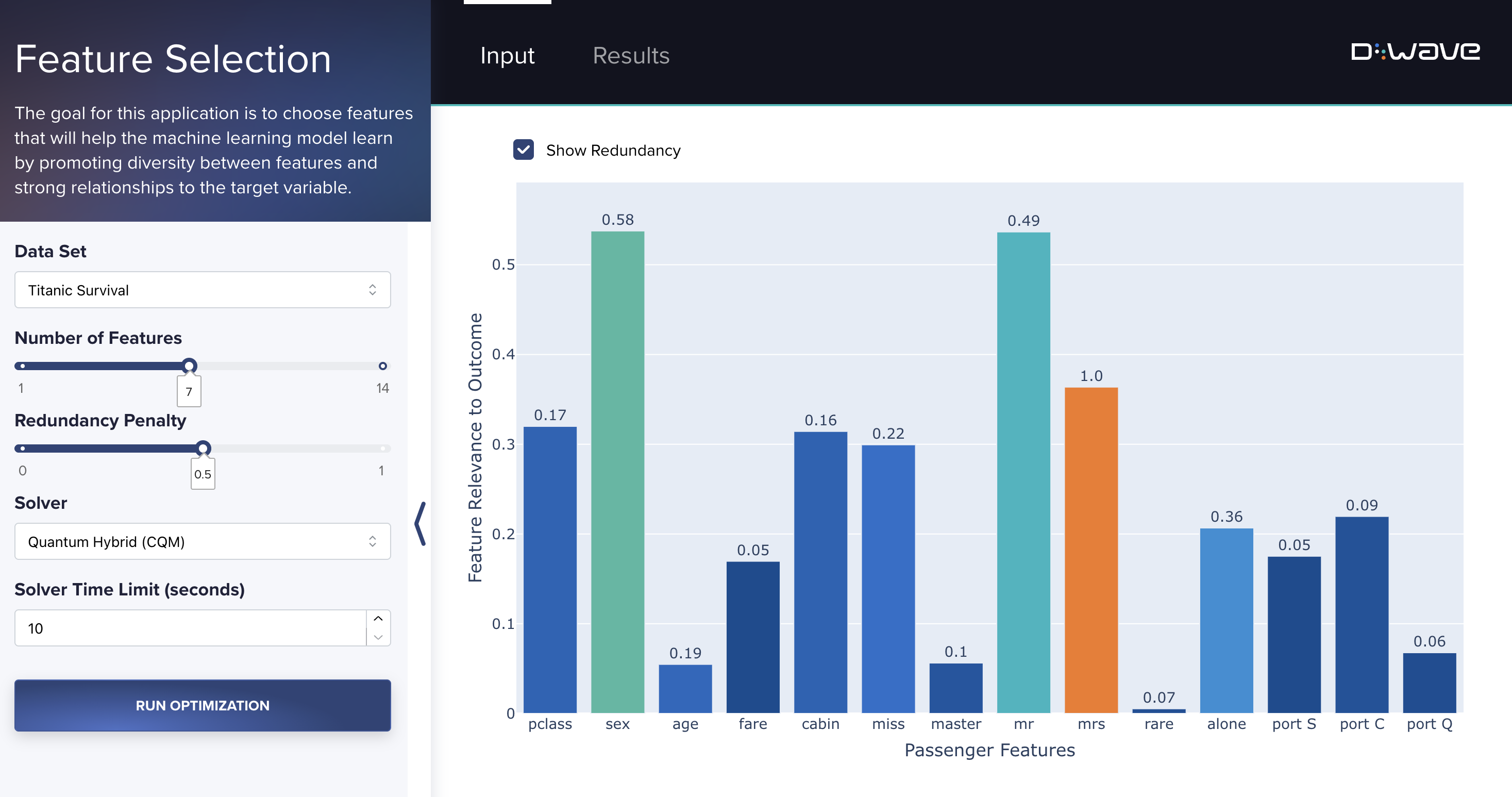
The demo can be used with two different datasets:
titanic: This is a well-known dataset based on passenger survival from the
Titanic. It includes 14 features and illustrates how feature redundancy
impacts the solution.scene: This is a larger dataset with 299 features. It is associated with
recognizing scenes based on feature data contained in images. For additional
information, see:
OpenML.
The features have generic labels such as "attr1" and are associated with image
characteristics such as the mean or variance of different color channels
within regions of the image. As with the Titanic data, this dataset also
illustrates the impact of feature redundancy.
Note: This example solves a CQM or nonlinear model on a Leap™ quantum-classical
hybrid solver.
The MIQUBO Method of Feature Selection
example solves this same problem using a
binary quadratic model (BQM)
directly on a D-Wave quantum computer's quantum processing unit (QPU).
Installation
You can run this example without installation in cloud-based IDEs that support
the
Development Containers specification (aka
"devcontainers") such as GitHub Codespaces.
For development environments that do not support devcontainers, install
requirements:
pip install -r requirements.txt
If you are cloning the repo to your local system, working in a
virtual environment is
recommended.
Usage
Your development environment should be configured to access the
Leap™ quantum cloud service.
You can see information about supported IDEs and authorizing access to your Leap
account
here.
Run the following terminal command to start the Dash application:
python app.py
Access the user interface with your browser at http://127.0.0.1:8050/.
The demo program opens an interface where you can configure problems and submit these problems to
a solver.
Configuration options can be found in the demo_configs.py file.
[!NOTE]
If you plan on editing any files while the application is running, please run the application
with the --debug command-line argument for live reloads and easier debugging:
python app.py --debug
A dropdown menu is provided to choose the dataset.
To visualize feature redundancy, first activate the "Show redundancy" check box.
Then hover the mouse over any of the bars. The colors of all bars will be
dynamically updated to show the similarity (redundancy) against the feature that
is currently under the mouse. A higher value (closer to 1.0) indicates that the
feature is very redundant with the current feature, while a lower value
(closer to 0.0) indicates a feature that is less redundant and may potentially
provide new information for the model.
Click on the Solve button to run the feature selection with the given settings
(each dataset is initialized with reasonable default settings for the number of
features and redundancy penalty). Solutions typically take 1-3 seconds. Once
complete, the bar chart will update to reflect the selected features, and the
bar graph for accuracy scores will also be updated.
Problem Description
The goal for this feature selection application is to choose features that will help
the machine-learning model learn by promoting diversity between features and strong
relationships to the target variable. The model sets the following objectives and constraints
to achieve this goal:
Objectives: minimize the redundancy metric (correlation between features) between each
pair of features to promote diversity and maximize correlation between features and the target
to promote a strong relationship.
Constraints: choose the requested number of features.
Model Overview
In this example we use the Titanic and Scene datasets to generate a CQM or nonlinear model.
The datasets are assumed to be clean, meaning there are no missing entries or repeated features.
The features of the dataset are used to build a correlation matrix which compares the features to
each other as well as a correlation matrix that compares the features to the target variable. Those
correlation matrices are used to build the objective function.
Note: Although a model overview is provided here, all of the code to build
the feature selection model is contained within
D-Wave's scikit-learn plug-in.
Parameters
These are the parameters of the problem:
num_features: the number of features to select redundancy_value: used to determine factor applied to redundancy terms
- 0: features will be selected as to minimize the redundancy without any consideration to quality
- 1: places the maximum weight on the quality of the features
Variables
x_binary: binary variable that shows a list of which features are selected (1) and not selected (0)
Objective
The objective function has two terms. The first term minimizes the correlation between
chosen features in the dataset (this term is weighted by the redundancy parameter, redundancy_val). The
second term maximizes the correlation between the features and the target variable.
Constraints
A single constraint is used to require that the model select a number of features equal to the num_features
parameter.
Code Overview
Given a selected value for the num_features and redundancy_value sliders, the code proceeds as follows:
- The selected dataset and parameters are passed to D-Wave's feature selection scikit-learn plugin
- The resulting selected features are returned from the plugin
- A random forest classifier model is trained on the selected features and accuracy score is calculated
- The display image is updated to reflect the selected features and the classifier accuracy
References
Milne, Andrew, Maxwell Rounds, and Phil Goddard. 2017. "Optimal Feature
Selection in Credit Scoring and Classification Using a Quantum Annealer."
1QBit; White Paper.
https://1qbit.com/whitepaper/optimal-feature-selection-in-credit-scoring-classification-using-quantum-annealer/