handle-cli-error
💣 Error handler for CLI applications 💥
- 28
- MIT
- 6 wk ago
Repo ehmicky/handle-cli-error, read from GitHub 48 min ago. ehmicky has not joined Take My Repo.
In short
ehmicky/handle-cli-error is a public repo on GitHub by ehmicky. 💣 Error handler for CLI applications 💥. It declares the MIT license on GitHub. It is written mainly in JavaScript, has 28 stars and last changed on 2026-10-13. Nobody has reviewed it on Take My Repo yet, which says nothing about its quality. Read from GitHub on 2026-11-23.

Error handler for CLI applications.
Features
- 🖍️ Pretty colors, icons and header
- 💣 Error class-specific and custom handling
- 🚒 Graceful exit
- ⛑️ Normalize invalid errors
- 🔕 Log verbosity: message, stack, nested errors, properties
- 🚨 Custom exit code and log function
- 💥 Exception-safe
Screenshot
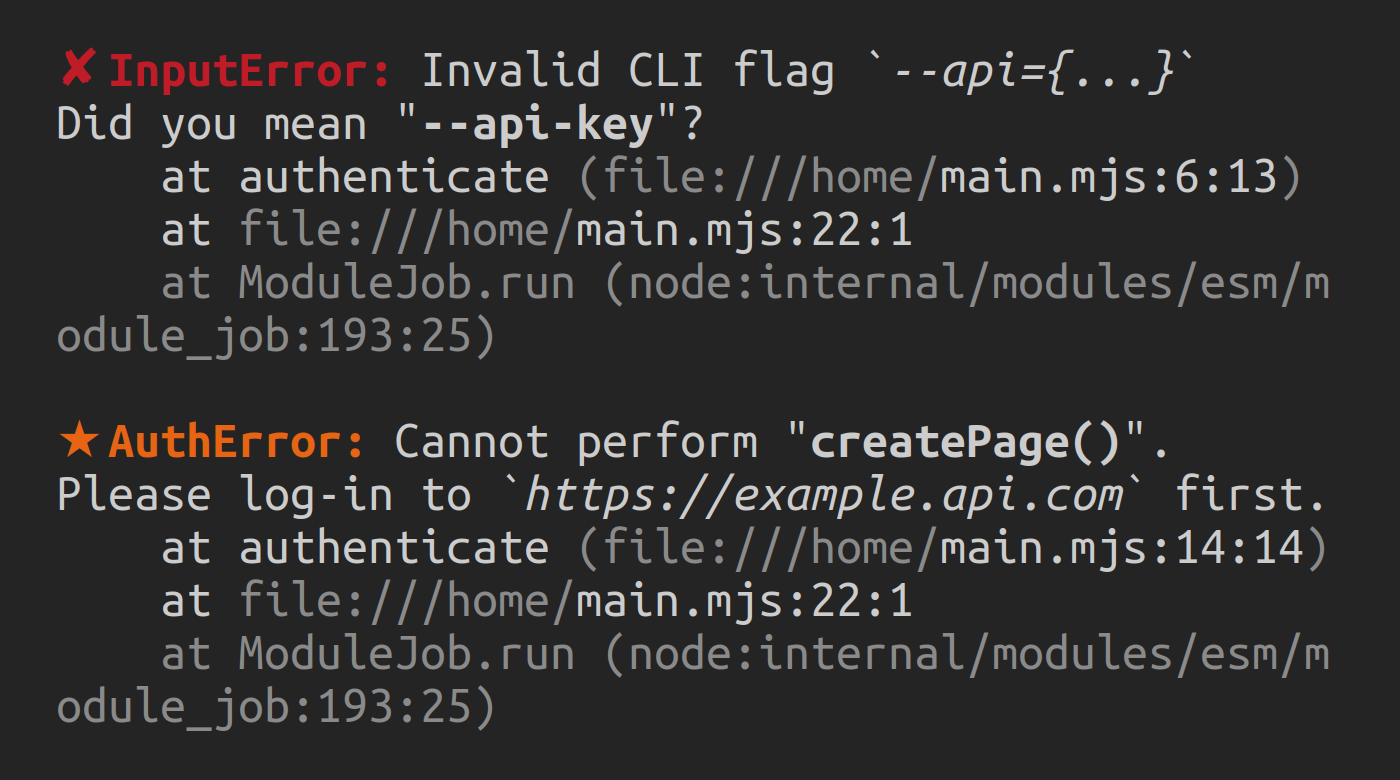
Example
General
#!/usr/bin/env node
import handleCliError from 'handle-cli-error'

const cliMain = () => {
  try {
    // ...
  } catch (error) {
    handleCliError(error) // Logs `error` then exit the process
  }
}

cliMain()
Error class-specific
handleCliError(error, {
  classes: {
    InputError: { exitCode: 1, stack: false },
    DatabaseError: { exitCode: 2, stack: false },
    default: { exitCode: 3 },
  },
})
Install
npm install handle-cli-error
This package works in Node.js >=18.18.0.
This is an ES module. It must be loaded using
an import or import() statement,
not require(). If TypeScript is used, it must be configured to
output ES modules,
not CommonJS.
API
handleCliError(error, options?)
error anyoptions Options?
Return value: undefined
Logs error on the console (stderr) then exits the process.
This never throws. Invalid errors are silently normalized.
Options
🚨 exitCode
Type: integer
Default: 1
Process exit code.
We recommend values between 1 and 124 because the following exit codes have some special meaning:
- 0: success
- 125: invalid
options - 126 to 255: used by shells like Bash
📕 stack
Type: boolean
Default: true
Whether to log the error's stack trace.
cause
Type: boolean
Default: true
Whether to show nested errors, i.e.
error.cause
and
error.errors.
📢 props
Type: boolean
Default: true
Whether to log the error's additional properties.
🔕 silent
Type: boolean
Default: false
Exits the process without logging anything on the console.
🖍️ colors
Type: boolean
Default: true in terminals, false otherwise
Whether to colorize the error's message, stack trace and additional properties.
Quoted strings in the error's message are printed in bold (for "..." and
'...') and in italic (for `...`).
❌ icon
Type: string
Default: 'cross'
Icon prepended to the error's name. The available values are listed here. Can be disabled by passing an empty string.
💄 header
Type: string
Default: 'red bold'
Color/style of the error's icon and name. The available values are listed here. Several styles can be specified by using spaces. Can be disabled by passing an empty string.
🚒 timeout
Type: integer (in milliseconds)
Default: 5000 (5 seconds)
The process exits gracefully: it waits for any ongoing tasks (callbacks,
promises, etc.) to complete, up to a specific timeout.
Special values:
0: Exits right away, without waiting for ongoing tasksNumber.POSITIVE_INFINITY: Waits for ongoing tasks forever, without timing out
📜 log
Type: (string) => void
Default: console.error
Function used to print the error message.
💣 classes
Type: object
Default: {}
Specify different options per error class. The object:
- Keys are either the
error.name, or"default"(used if noerror.namematches) - Values are options objects
🪛 custom
Type: string | symbol
Default: beautiful
Name of a method to map the output. That method must take the output as a string argument, transform it then return it.
class ExampleError extends Error {
  beautiful(output) {
    return output.replaceAll('secret', '***')
  }
}

const error = new ExampleError('Unknown value: secret')
handleCliError(error) // 'Unknown value: ***'
Related projects
modern-errors: Handle errors in a simple, stable, consistent waymodern-errors-cli: Handle errors in CLI modulesmodern-errors-beautiful: Prettify errors messages and stackserror-custom-class: Create one error classerror-class-utils: Utilities to properly create error classeserror-serializer: Convert errors to/from plain objectsnormalize-exception: Normalize exceptions/errorsis-error-instance: Check if a value is anErrorinstancemerge-error-cause: Merge an error with itscauseset-error-class: Properly update an error's classset-error-message: Properly update an error's messagewrap-error-message: Properly wrap an error's messageset-error-props: Properly update an error's propertiesset-error-stack: Properly update an error's stackerror-cause-polyfill: Polyfillerror.causebeautiful-error: Prettify error messages and stackslog-process-errors: Show some ❤ to Node.js process errorserror-http-response: Create HTTP error responseswinston-error-format: Log errors with Winston
Credits
The logo background was created by dgim-studio.
Support
For any question, don't hesitate to submit an issue on GitHub.
Everyone is welcome regardless of personal background. We enforce a Code of conduct in order to promote a positive and inclusive environment.
Contributing
This project was made with ❤️. The simplest way to give back is by starring and sharing it online.
If the documentation is unclear or has a typo, please click on the page's Edit
button (pencil icon) and suggest a correction.
If you would like to help us fix a bug or add a new feature, please check our guidelines. Pull requests are welcome!
Questions
What is handle-cli-error?
ehmicky/handle-cli-error is a public repo on GitHub by ehmicky. 💣 Error handler for CLI applications 💥.
Is handle-cli-error open source?
It declares the MIT license on GitHub.
Does handle-cli-error run on macOS, Windows or Linux?
Its maker has not tagged a system, so it is unknown here. Its README says what it needs.
How do I install handle-cli-error?
Open "Take it" on its page: Take My Repo writes an install plan for your machine and hands it to your AI agent (Claude Code, Codex or Cursor), which asks you before each step. Take My Repo has not tested it on any machine.
Is handle-cli-error still maintained?
Its last change on GitHub was on 2026-10-13. GitHub counts 0 open issues and pull requests. Take My Repo does not judge from that whether it is maintained.
What do people who ran handle-cli-error say?
Nobody has reviewed it on Take My Repo yet, which says nothing about its quality.