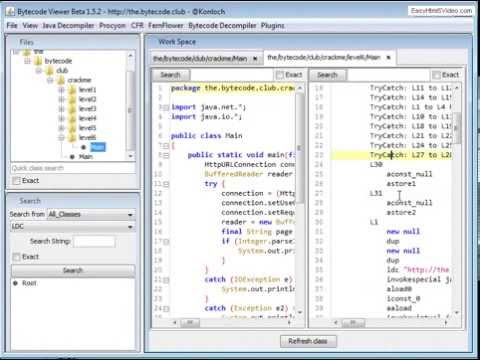
bytecode-viewer
A Java 8+ Jar & Android APK Reverse Engineering Suite (Decompiler, Editor, Debugger & More)
- 16k
- Java
- GPL-3.0
- 4 wk ago
A multifunctional utility tool for operating internal python objects, compatible with nearly all Python 3 versions.
Repo ekcbw/pyobject, read from GitHub 5 h ago. ekcbw has not joined Take My Repo.
ekcbw/pyobject is a public repo on GitHub by ekcbw. A multifunctional utility tool for operating internal python objects, compatible with nearly all Python 3 versions. It declares the MIT license on GitHub. It is written mainly in Python, has 33 stars and last changed on 2026-11-04. Nobody has reviewed it on Take My Repo yet, which says nothing about its quality. Read from GitHub on 2026-11-24.
A Java 8+ Jar & Android APK Reverse Engineering Suite (Decompiler, Editor, Debugger & More)
An open-source user mode debugger for Windows. Optimized for reverse engineering and malware analysis.
pyobject - A multifunctional all-in-one utility tool for managing internal Python objects, compatible with nearly all Python 3 versions and all platforms (Windows, Linux, macOS, etc.).
[English | 中文]
pyobject.__init__ - Displays and outputs attribute values of Python objects.
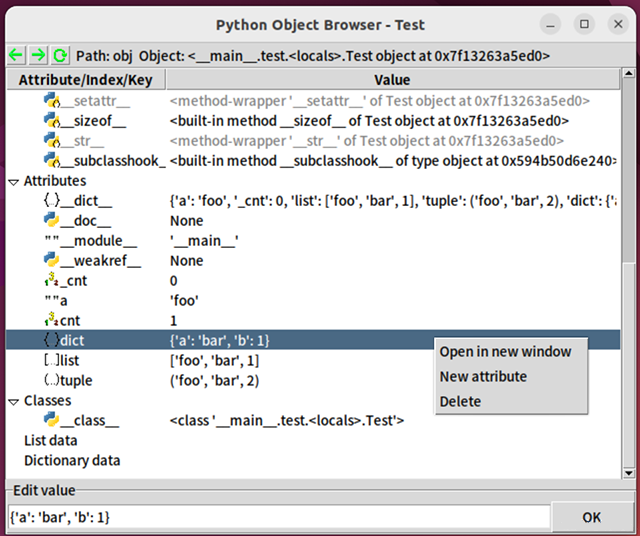
pyobject.browser - Provides a visual interface to browse Python objects using tkinter.
pyobject.code - Provides tools for manipulating Python native bytecode.
pyobject.search - Implements the utility for locating the path to a specific object.
pyobject.objproxy - Implement a generic object proxy that can replace any Python object, including modules, functions, and classes
pyobject.pyobj_extension - A C extension module offering functions to manipulate low-level Python objects.
describe(obj, level=0, maxlevel=1, tab=4, verbose=False, file=sys.stdout):
Printing all attributes of an object in attribute: value format for debugging purpose. The alias is desc().
__init__).browse(object, verbose=False, name='obj'):
Browse any Python objects in a GUI using tkinter.
describe(), whether to print special methods.The GUI of browse() function is:
bases(obj, level=0, tab=4):
Prints base classes and the inheritance order of an object.
make_iter(start_obj, recursions=2, all=False):
Creates an iterator of objects without duplicates.
__init__) in the list.make_list(start_obj, recursions=2, all=False):
Similar to make_iter, but creates an list.
search(obj, start, recursions=3, search_str=False):
Searches for objects starting from a specified starting point. For example, search(os, sys, 3) returns results like ["sys.modules['site'].os", "sys.modules['os']", ...].
pyobject.CodeThe Code class provides a wrapper for Python bytecode objects to manipulate them.
Python's internal bytecode object, CodeType (e.g., func.__code__), is immutable. The Code class offers a mutable bytecode object and a set of methods to simplify operations on the underlying bytecode.
Unlike Java bytecode, Python bytecode is not cross-version compatible. Bytecode generated by different versions of the Python interpreter is incompatible.
The Code class provides a universal interface for bytecode, supporting all Python versions from 3.6 to 3.14 (including PyPy's .pyc format), simplifying complex version compatibility issues.
def __init__(self, code=None))The Code class can be initialized with an existing CodeType object or another Code instance. If no argument is provided, a default CodeType object is created.
_code: The internal bytecode of the current Code object. Use exec(c._code) or exec(c.to_code()) instead of directly using exec(c).The following are attributes of Python's built-in bytecode (also attributes of the Code object). While Python's internal CodeType bytecode is immutable and these attributes are read-only, the Code object is mutable, meaning these attributes can be modified:
co_argcount: The number of positional arguments (including those with default values).co_cellvars: A tuple containing the names of local variables referenced by nested functions.co_code: A bytes object representing the sequence of bytecode instructions, storing the actual binary bytecode.co_consts: A tuple containing the literals used by the bytecode.co_filename: The filename of the source code being compiled.co_firstlineno: The first line number of the source code corresponding to the bytecode. Used internally by the interpreter in combination with co_lnotab to output precise line numbers in tracebacks.co_flags: An integer encoding multiple flags used by the interpreter.co_freevars: A tuple containing the names of free variables.co_kwonlyargcount: The number of keyword-only arguments.co_lnotab: A string encoding the mapping of bytecode offsets to line numbers (replaced by co_linetable in Python 3.10).co_name: The name of the function/class corresponding to the bytecode.co_names: A tuple containing the names used by the bytecode.co_nlocals: The number of local variables used by the function (including arguments).co_stacksize: The stack size required to execute the bytecode.co_varnames: A tuple containing the names of local variables (starting with argument names).Attributes introduced in Python 3.8 and later:
co_posonlyargcount: The number of positional-only arguments, introduced in Python 3.8.co_linetable: Line number mapping data, introduced in Python 3.10 as a replacement for co_lnotab.co_exceptiontable: Exception table data, introduced in Python 3.11.co_qualname: The qualified name of the bytecode, introduced in Python 3.11.Core Methods
exec(globals_=None, locals_=None): Executes the code object within the provided global and local scope dictionaries.eval(globals_=None, locals_=None): Executes the code object within the provided global and local scope dictionaries and returns the result.copy(): Creates a copy of the Code object and returns the duplicate.to_code(): Converts the Code instance back to a built-in CodeType object, equivalent to c._code.to_func(globals_=None, name=None, argdefs=None, closure=None, kwdefaults=None): Converts the code object into a Python function. The parameters are the same as those used when instantiating Python's built-in FunctionType.get_flags(): Returns a list of flag names for the co_flags attribute, e.g., ["NOFREE"].get_sub_code(name): Searches for sub-code objects (e.g., functions or class definitions) in the co_consts attribute. This method does not perform recursive searches. Returns the found Code object or raises a ValueError if not found.Serialization
to_pycfile(filename): Dumps the code object into a .pyc file using the marshal module.from_pycfile(filename): Creates a Code instance from a .pyc file.from_file(filename): Creates a Code instance from a .py or .pyc file.pickle(filename): Serializes the Code object into a pickle file.Debugging and Inspection
show(*args, **kw): Internally calls pyobject.desc to display the attributes of the code object. The parameters are the same as those used in desc().info(): Internally calls dis.show_code to display basic information about the bytecode.dis(*args, **kw): Calls the dis module to output the disassembly of the bytecode, equivalent to dis.dis(c.to_code()).decompile(version=None, *args, **kw): Decompile the code object into source code. (deprecated)Factory Functions
fromfunc(function): Creates a Code instance from a Python function object, equivalent to Code(func.__code__).fromstring(string, mode='exec', filename=''): Creates a Code instance from a source code string. The parameters are the same as those used in the built-in compile function, which is called internally.co_lnotab: In Python 3.10 and later, attempts to set the co_lnotab attribute will automatically be converted into setting the co_linetable attribute.Example usage: (excerpted from the doctest):
>>> def f():print("Hello")
...
>>> c=Code.fromfunc(f) # or c=Code(f.__code__)
>>> 'Hello' in c.co_consts
True
>>> c.co_consts=tuple(('Hello World!' if item=='Hello' else item) for item in c.co_consts)
>>> c.exec()
Hello World!
>>>
>>> # Save to pickle files
>>> import os,pickle
>>> temp=os.getenv('temp') if os.name=='nt' else '/tmp'
>>> with open(os.path.join(temp,"temp.pkl"),'wb') as f:
...     pickle.dump(c,f)
...
>>>
>>> # Execute bytecodes from pickle files
>>> with open(os.path.join(temp,"temp.pkl"),'rb') as f:
...     pickle.load(f).to_func()()
...
Hello World!
>>>
>>> # Convert to pyc files and import them
>>> c.to_pycfile(os.path.join(temp,"temppyc.pyc"))
>>> sys.path.append(temp)
>>> import temppyc
Hello World!
>>> Code.from_pycfile(os.path.join(temp,"temppyc.pyc")).exec()
Hello World!
ObjChain and ProxiedObjpyobject.objproxy is a powerful tool for proxying any other object and generating the code that calls the object. It is capable of recording detailed access and call history of the object.ObjChain is a class encapsulation used to manage multiple ProxiedObj objects, where ProxiedObj is a class that acts as a proxy to other objects.
Example usage:
from pyobject import ObjChain

chain = ObjChain(export_attrs=["__array_struct__"])
np = chain.new_object("import numpy as np", "np")
plt = chain.new_object("import matplotlib.pyplot as plt", "plt",
                        export_funcs=["show"])

# Testing the pseudo numpy and matplotlib modules
arr = np.array(range(1, 11))
arr_squared = arr ** 2
print(np.mean(arr)) # Output the average value

plt.plot(arr, arr_squared) # Plot the graph of y=x**2
plt.show()

# Display the auto-generated code calling numpy and matplotlib libraries
print(f"Code:\n{chain.get_code()}\n")
print(f"Optimized:\n{chain.get_optimized_code()}")
Output:
Code: # Unoptimized code that contains all detailed access records for objects
import numpy as np
import matplotlib.pyplot as plt
var0 = np.array
var1 = var0(range(1, 11))
var2 = var1 ** 2
var3 = np.mean
var4 = var3(var1)
var5 = var1.mean
var6 = var5(axis=None, dtype=None, out=None)
ex_var7 = str(var4)
var8 = plt.plot
var9 = var8(var1, var2)
var10 = var1.to_numpy
var11 = var1.values
var12 = var1.shape
var13 = var1.ndim
...
var81 = var67.__array_struct__
ex_var82 = iter(var70)
ex_var83 = iter(var70)
var84 = var70.mask
var85 = var70.__array_struct__
var86 = plt.show
var87 = var86()

Optimized: # Optimized code
import numpy as np
import matplotlib.pyplot as plt
var1 = np.array(range(1, 11))
plt.plot(var1, var1 ** 2)
plt.show()
ObjChain
ObjChain(export_funcs=None, export_attrs=None): Creates an ObjChain object, where export_funcs is a list of functions to be exported at the global level, and export_attrs is a list of attributes to be exported at the global level. Since these are at global scope, they are effective for all variables.new_object(code_line, name, export_funcs=None, export_attrs=None, use_target_obj=True): Adds a new object and returns a proxy object of type ProxiedObj that can be directly used as a normal object.code_line is the code that needs to be executed to obtain the object (e.g., "import numpy as np"), and name is the variable name in which the object is stored after execution (e.g., "np").export_funcs and export_attrs are the lists of methods and attributes for this object that need to be exported.use_target_obj indicates whether to create a proxy template object in real-time and operate on it (see the "Implementation" section for details).add_existing_obj(obj, name): Adds an existing object and returns a proxy object of type ProxiedObj.obj is the object to be added, and name is an arbitrary variable name that will be used to refer to this object in the code generated by ObjChain. use_exported_obj determines whether not to pass the ProxiedObj object as a calling parameter to __target_obj.get_code(start_lineno=None, end_lineno=None): Retrieves the original code generated by ObjChain. start_lineno and end_lineno are line numbers starting from 0, and if not specified, they default to the beginning and end.get_optimized_code(no_optimize_vars=None, remove_internal=True, remove_export_type=True): Retrieves the optimized code. Internally, a directed acyclic graph (DAG) is used for optimization (see the "Implementation" section).no_optimize_vars: A list of variable names that should not be removed, such as ["temp_var"].remove_internal: Whether to remove internal code generated during the execution of the code. For example, with plt.plot and arr, arr2 being ProxiedObj objects, if remove_internal is Falseekcbw/pyobject is a public repo on GitHub by ekcbw. A multifunctional utility tool for operating internal python objects, compatible with nearly all Python 3 versions.
It declares the MIT license on GitHub.
Its maker has not tagged a system, so it is unknown here. Its README says what it needs.
Open "Take it" on its page: Take My Repo writes an install plan for your machine and hands it to your AI agent (Claude Code, Codex or Cursor), which asks you before each step. Take My Repo has not tested it on any machine.
:books: 本代码库是作者小傅哥多年从事一线互联网 Java 开发的学习历程技术汇总,旨在为大家提供一个清晰详细的学习教程,侧重点更倾向编写Java核心内容。如果本仓库能为您提供帮助,请给予支持(关注、点赞、分享)!
📚 A curated list of awesome articles, videos, and other resources to learn and practice software architecture, patterns, and principles.
Its last change on GitHub was on 2026-11-04. Take My Repo does not judge from that whether it is maintained.
Nobody has reviewed it on Take My Repo yet, which says nothing about its quality.
Take My Repo cannot say: it does not audit code and has not run pyobject. What is known comes from GitHub. It declares the MIT license on GitHub. Its last change was on 2026-11-04. It has 33 stars, which measure popularity, not safety. Nobody has reviewed it on Take My Repo yet, which says nothing about its quality. Read the source before you run it. With "Take it", your AI agent shows each step and asks you before running it; README text is treated as data, not as instructions.