
ragbot
RAG demo
- 18
- Apache-2.0
- 8 mo ago
Repo embabel/ragbot, read from GitHub 1 min ago. embabel has not joined Take My Repo.
In short
embabel/ragbot is a public repo on GitHub by embabel. RAG demo. It declares the Apache-2.0 license on GitHub. It is written mainly in Java, has 18 stars and last changed on 2026-03-20. Nobody has reviewed it on Take My Repo yet, which says nothing about its quality. Read from GitHub on 2026-11-24.

Ragbot - RAG-Powered Chatbot Example
This project demonstrates Retrieval-Augmented Generation (RAG) using Embabel Agent with Apache Lucene for vector storage and Spring Shell or a simple Javelit UI for interaction.
Getting Started
Prerequisites
API Key: Set at least one LLM provider API key as an environment variable:
# For OpenAI (GPT models)
export OPENAI_API_KEY=sk-...

# For Anthropic (Claude models)
export ANTHROPIC_API_KEY=sk-ant-...
The model configured in application.yml determines which key is required. The default configuration uses OpenAI.
Java: Java 21+ is required.
Quick Start
- Set your API key (see above)
- Run the shell:
./scripts/shell.sh
- Ingest the default document (Robert Schumann's music criticism):
ingest - Optionally, ingest Philip Hale's Boston Symphony program notes for cross-source comparison:
ingest https://www.gutenberg.org/files/56208/56208-h/56208-h.htm - Start chatting. Change the port if you wish:
uichat 8888
Why Old Music Criticism?
While you can ingest any content into this RAG app, the default content is historical music criticism: Robert Schumann's writings (1830s-1850s) and Philip Hale's Boston Symphony program notes (early 1900s). This choice is deliberate: obscure historical content ensures the LLM must actually use RAG rather than relying on general knowledge. Also, Rod Johnson has a PhD in musicology and loves this stuff.
If you ingested Wikipedia articles about Java or common tech topics, the LLM could answer most questions from its training data alone, making it hard to verify that RAG is working. With Schumann's opinions on Chopin's nocturnes or Hale's commentary on Meyerbeer, the LLM has no choice but to search the indexed content - giving you clear evidence that retrieval is happening.
Example questions to try:
# Single-source questions
What did Schumann think about Liszt?
What did Philip Hale think about Liszt?
What does Schumann say about Chopin's nocturnes?

# Cross-source comparison (requires ingesting both sources)
Compare Hale and Schumann's opinions of Liszt
These questions demonstrate agentic RAG in action - the LLM will make multiple searches, synthesize information across chunks, and cite specific passages from the criticism.
Usage
Run the shell script to start Embabel under Spring Shell:
./scripts/shell.sh
You can also run the main class, com.embabel.examples.ragbot.RagShellApplication, directly from your IDE.
Shell Commands
| Command | Description |
|---|---|
ingest [url] |
Ingest a URL or file into the RAG store. Uses Apache Tika to parse content hierarchically and chunks it for vector storage. Defaults to Schumann's music criticism. Documents are only ingested if they don't already exist. |
ingest-directory <path> |
Ingest all markdown (.md) and text (.txt) files from a directory recursively. Useful for loading preprocessed content from docling or other sources. |
zap |
Clear all documents from the Lucene index. Returns the count of deleted documents. |
chunks |
Display all stored chunks with their IDs and content. Useful for debugging what content has been indexed. |
chat |
Start an interactive chat session where you can ask questions about ingested content. |
uichat [port] |
Launch a web-based chat UI using Javelit. Opens at http://localhost:8888 by default. Use uichat-stop to stop. |
info |
Show Lucene store info: number of chunks, index size, etc. |
Web Chat UI
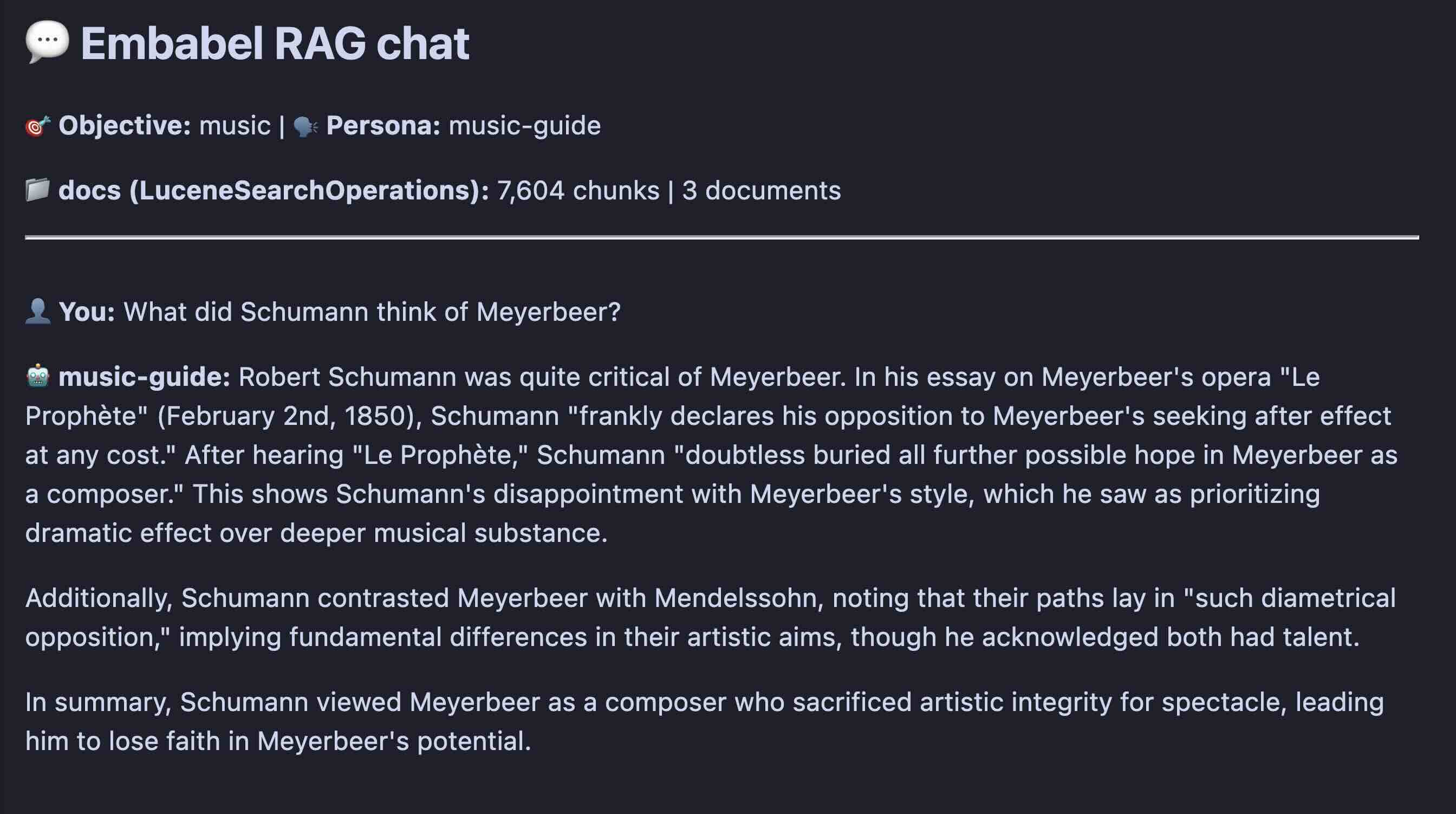
The uichat command launches a browser-based chat interface built with Javelit:

Example Workflow
# Start the shell
./scripts/shell.sh

# Ingest the default document (Schumann's music criticism)
ingest

# Or ingest Philip Hale's Boston Symphony program notes
ingest https://www.gutenberg.org/files/56208/56208-h/56208-h.htm

# View what was indexed
chunks

# Chat with the RAG-powered assistant
chat
> What does this document say about X?

# Clear the index when done
zap
Troubleshooting
No Output in Chat
If you're not seeing LLM responses in the chat session, the output may be redirected to a log file. Set redirect-log-to-file to false in application.yml:
embabel:
  agent:
    shell:
      redirect-log-to-file: false
Alternatively, you can tail the log file in a separate terminal to see output:
tail -f logs/chat-session.log
Poor Quality RAG Results
First, check the state of the Lucene index by running the info command in the shell.
If you do have content, run the chunks command to see what has been indexed.
If ingested content is present but you're seeing poor results, it may be that the source was in a format (like complex HTML) that didn't parse cleanly. Consider using docling to convert complex documents to clean markdown before ingestion.
You may also want to adjust chunking parameters in application.yml to better suit your content:
ragbot:
  chunker-config:
    max-chunk-size: 800      # Increase for longer chunks
    overlap-size: 100        # Increase for more context overlap
Implementation
Chatbot with Utility Actions
The chatbot uses Embabel's utility pattern - a streamlined approach where @Action methods respond to conversation events without complex goal planning. This is ideal for chatbots where the flow is straightforward: user sends message → system responds.
flowchart TB
    subgraph Shell["🖥️ Spring Shell"]
        CMD["chat command"]
        USER["User Message"]
    end

    subgraph Agent["🤖 AgentProcess"]
        TRIGGER["Event Trigger<br/>UserMessage.class"]
        ACTION["@Action<br/>ChatActions.respond()"]
    end

    subgraph AI["✨ Ai Interface"]
        TEMPLATE["Jinja Template<br/>ragbot.jinja"]
        TOOLS["Tool Definitions<br/>ToolishRag"]
        LLM_CALL["LLM Request"]
    end

    subgraph Response["💬 Response"]
        ASSIST["Assistant Message"]
        SEND["sendMessage()"]
    end

    CMD --> TRIGGER
    USER --> TRIGGER
    TRIGGER -->|"triggers"| ACTION
    ACTION -->|"context.ai()"| TEMPLATE
    TEMPLATE --> TOOLS
    TOOLS --> LLM_CALL
    LLM_CALL -->|"LLM response"| ASSIST
    ASSIST --> SEND
    SEND -->|"back to user"| Shell

    style Shell fill:#d4eeff,stroke:#63c0f5,color:#1e1e1e
    style Agent fill:#e8dcf4,stroke:#9f77cd,color:#1e1e1e
    style AI fill:#fff3cd,stroke:#e9b306,color:#1e1e1e
    style Response fill:#d4f5d4,stroke:#3fd73c,color:#1e1e1e
Key Concepts:
- Utility Pattern:
AgentProcessChatbot.utilityFromPlatform()creates a chatbot that auto-discovers@Actionmethods - Trigger-based:
@Action(trigger = UserMessage.class)fires on each user message - Fluent AI Builder:
context.ai().withLlm(...).withReference(toolishRag).withTemplate(...)builds the request
Agentic RAG
The RAG system is agentic - the LLM autonomously decides when and how to search, potentially making multiple tool calls to gather comprehensive information before responding.
flowchart TB
    subgraph Query["❓ User Query"]
        Q["What did Schumann think<br/>about Chopin's nocturnes?"]
    end

    subgraph LLM["🧠 LLM Reasoning"]
        THINK1["I need to find Schumann's<br/>views on Chopin..."]
        THINK2["Let me search for more<br/>specific nocturne references..."]
        THINK3["Now I can synthesize<br/>a complete answer"]
    end

    subgraph Tools["🔧 ToolishRag"]
        SEARCH1["vectorSearch(<br/>'Schumann Chopin')"]
        SEARCH2["vectorSearch(<br/>'Chopin nocturnes review')"]
    end

    subgraph RAG["📚 LuceneSearchOperations"]
        EMBED["Embed Query"]
        VECTOR["Vector Search<br/>.lucene-index"]
        CHUNKS["Return Chunks"]
    end

    subgraph Answer["✅ Final Response"]
        SYNTH["Synthesize from<br/>retrieved context"]
        RESP["Comprehensive<br/>answer with citations"]
    end

    Q --> THINK1
    THINK1 -->|"tool call"| SEARCH1
    SEARCH1 --> EMBED
    EMBED --> VECTOR
    VECTOR --> CHUNKS
    CHUNKS -->|"results"| THINK2
    THINK2 -->|"follow-up search"| SEARCH2
    SEARCH2 --> RAG
    RAG -->|"more results"| THINK3
    THINK3 --> SYNTH
    SYNTH --> RESP

    style Query fill:#d4eeff,stroke:#63c0f5,color:#1e1e1e
    style LLM fill:#e8dcf4,stroke:#9f77cd,color:#1e1e1e
    style Tools fill:#fff3cd,stroke:#e9b306,color:#1e1e1e
    style RAG fill:#fafafa,stroke:#9f77cd,color:#1e1e1e
    style Answer fill:#d4f5d4,stroke:#3fd73c,color:#1e1e1e
Agentic Capabilities:
- Autonomous Search: LLM decides when to call
vectorSearch()based on the question - Iterative Refinement: Can make multiple searches, using results to inform follow-up queries
- Context Synthesis: Combines information from multiple chunks into coherent responses
- Citation Awareness: References specific sources from the retrieved content
Flow Summary:
- User types
chat→ AgentProcess starts and manages the session - User sends a message → triggers
@Action(trigger = UserMessage.class) - ChatActions.respond() builds request via Ai interface, adding ToolishRag with
.withReference() - Ai packages prompt + tool definitions, sends to LLM
- LLM autonomously decides to call ToolishRag tools to search for relevant content
- The ToolishRag tool queries Lucene index, returns matching chunks to LLM
- LLM may make additional searches based on initial results
- LLM generates response using all retrieved context → sent back to user
- Loop continues for each new message until user exits
RAG Configuration
RAG is configured in RagConfiguration.java:
@Bean
LuceneSearchOperations luceneSearchOperations(
        ModelProvider modelProvider,
        RagbotProperties properties) {
    var embeddingService = modelProvider.getEmbeddingService(DefaultModelSelectionCriteria.INSTANCE);
    var luceneSearchOperations = LuceneSearchOperations
            .withName("docs")
            .withEmbeddingService(embeddingService)
            .withChunkerConfig(properties.chunkerConfig())
            .withIndexPath(Paths.get("./.lucene-index"))
            .buildAndLoadChunks();
    return luceneSearchOperations;
}
Key aspects:
- Lucene with disk persistence: The vector index is stored at
./.lucene-index, surviving application restarts - Embedding service: Uses the configured
ModelProviderto get an embedding service for vectorizing content - Configurable chunking: Content is split into chunks with configurable size (default 800 chars), overlap (default 50 chars), and optional section title inclusion
Chunking properties can be configured via application.yml:
ragbot:
  chunker-config:
    max-chunk-size: 800
    overlap-size: 100
Chatbot Creation
The chatbot is created in
ChatConfiguration.java:
Questions
What is ragbot?
embabel/ragbot is a public repo on GitHub by embabel. RAG demo.
Is ragbot open source?
It declares the Apache-2.0 license on GitHub.
Does ragbot run on macOS, Windows or Linux?
Its maker has not tagged a system, so it is unknown here. Its README says what it needs.
How do I install ragbot?
Open "Take it" on its page: Take My Repo writes an install plan for your machine and hands it to your AI agent (Claude Code, Codex or Cursor), which asks you before each step. Take My Repo has not tested it on any machine.
Is ragbot still maintained?
Its last change on GitHub was on 2026-03-20. GitHub counts 4 open issues and pull requests. Take My Repo does not judge from that whether it is maintained.