awesome-mac
This project is dedicated to collecting high-quality macOS software and organizing them systematically by different categories for easy search and use.
- 119k
- Swift
- CC0-1.0
- 3 h ago
Write native widgets for iPhone, iPad, Mac and Android in JavaScript and JSX. Open source, with a browser studio, templates and AI.
Repo everettjf/scriptwidget, read from GitHub 10 min ago. everettjf has not joined Take My Repo.
everettjf/scriptwidget is a public repo on GitHub by everettjf. Write native widgets for iPhone, iPad, Mac and Android in JavaScript and JSX. Open source, with a browser studio, templates and AI. It declares the Apache-2.0 license on GitHub. It is written mainly in Swift, has 303 stars and last changed on 2026-11-23. Nobody has reviewed it on Take My Repo yet, which says nothing about its quality. Read from GitHub on 2026-11-24.
This project is dedicated to collecting high-quality macOS software and organizing them systematically by different categories for easy search and use.
Website: https://atomsprout.com/scriptwidget/
Create widgets for iPhone, iPad, Mac, Android, Windows and Linux with JavaScript, JSX, and AI
English | 简体中文 | Español | 日本語 | 한국어 | Français | Deutsch | Português | Русский | العربية
✨ One widget package for iPhone, iPad, Mac and Android, and in preview for Windows and Linux—without writing Swift or Kotlin.
Get it: iPhone and iPad · Mac · Android (APK) · Windows preview (Microsoft Store) · Linux preview for Omarchy (archive or PKGBUILD) · Web Studio in your browser
Describe a widget in Claude Code. Generate it, validate it, and open it directly in Web Studio. Use your own Agent and model with the scriptwidget-creator Skill.
brew install everettjf/tap/scriptwidget-cli
mkdir -p ~/.claude/skills
# First installation; preserve any existing customized Skill.
test ! -e ~/.claude/skills/scriptwidget-creator && cp -R "$(brew --prefix scriptwidget-cli)/libexec/ScriptWidgetCLI.app/Contents/Resources/scriptwidget-creator" ~/.claude/skills/
In Claude Code: /scriptwidget-creator Create a reading habit widget and show it in Web Studio.
scriptwidget preview ./MyWidget # opens Web Studio and loads your widget automatically
scriptwidget render ./MyWidget --output ./artifacts --format json # native macOS verification
Preview links carry the validated package in a URL fragment and load a separate project; no upload server or model hosting is required. Links support up to 45 KB of compressed package data. Keep links private when code/resources are private. Larger packages can use native previews or explicit .swt import. Import .swt on iPhone through the existing App; adding a Home Screen widget is a separate user action.
Install the Skill and get started · Creator website · CLI details
ScriptWidget is an open-source widget development platform for building native widgets with JavaScript and JSX-like syntax: WidgetKit on iPhone, iPad, and Mac, App Widgets on Android, and desktop widgets on Windows 11 and Linux (Omarchy), both previews. Write once, preview on Mac or in the browser, and install the same package on all of them—without requiring Swift or Kotlin for widget authoring.
It combines a JavaScriptCore runtime with native SwiftUI rendering on Apple platforms, a QuickJS-NG runtime with one shared renderer on Android, Windows and Linux, a desktop development environment, a browser studio, secure package sharing, AI-assisted generation, and a GitHub-backed community catalog.
The Android app (Android 13 or later) is available as an APK on GitHub Releases. On Google Play it is in closed testing: to join, become a member of the Atomsprout Testers group, then become a tester and install from Google Play. See ScriptWidget for Android for what differs from iOS.
The Windows and Linux apps are previews: Windows needs Windows 11 (21H2, build 22000) or later (see ScriptWidget for Windows), and Linux is for Omarchy 4.5 (see ScriptWidget for Linux). Both run the same widget packages, without the personal-data APIs such as health, calendar and location; Linux has music, notifications and files you choose.
| Feature | Description |
|---|---|
| 🖥️ Cross-Platform | One widget package for iPhone, iPad, Mac and Android, and in preview for Windows and Linux |
| 🎨 JSX Support | Declarative UI with JavaScript XML syntax |
| ⚡ Native Rendering | JSX elements are rendered as native SwiftUI views on Apple systems, and by one shared renderer on Android, Windows and Linux |
| 🔧 Versioned Runtime API | Storage, files, networking, device, location, health, system, and data sources; which API runs where is in Platform support |
| 📱 Interactive Widgets | Links, buttons, toggles, App Intents, Live Activities, and Control Widgets |
| 🎨 Custom Styling | Full control over appearance |
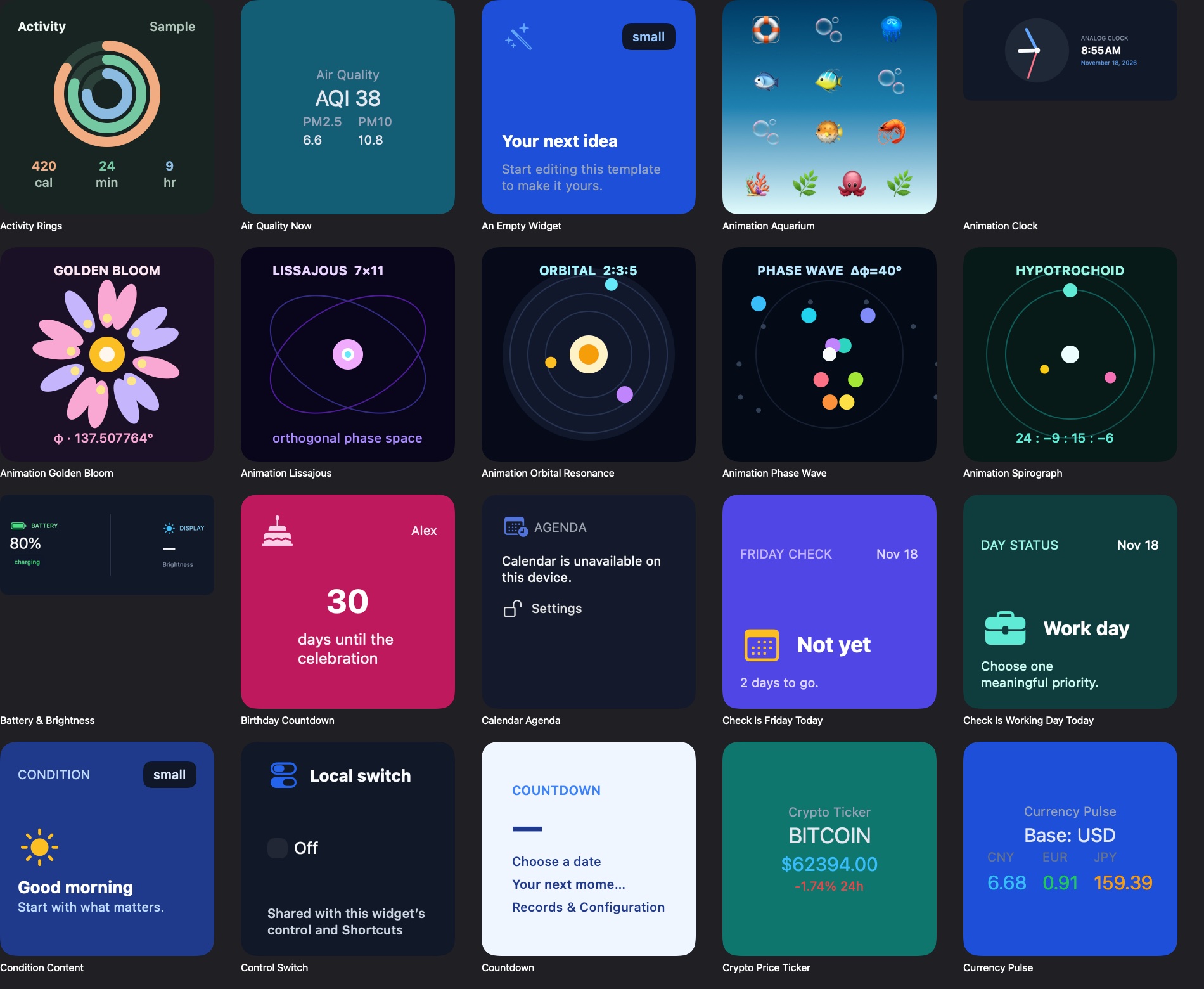
| 📦 Template Gallery | 92 bundled templates, 140 examples in all, to get started |
| 🌐 Community Gallery | Verified, one-click Widget and AI Skill installs |
| 🧰 ScriptWidget Studio | Build on Mac with CodeMirror, diagnostics, console, and multi-size preview |
| ✨ AI Generation | Generate, run, diagnose, and refine widgets with an OpenAI-compatible model |
| 🧠 Skills 1.0 | Import, author, export, and share focused AI instructions |
| 📦 Package 2.0 | Versioned widget.json, permissions, host allowlists, migration, and hardened imports |
| 🔌 Data Source Plugins | Declarative third-party API connectors with a Mac request lab |
Studio is the primary place to build widgets:
widget.json, families, permissions, network domains, plugins, and preview parameters;The first-launch guide can create a complete tutorial widget and walk a new user from editing through adding it to the desktop in about five minutes.
# Clone the repository
git clone https://github.com/everettjf/scriptwidget.git
cd ScriptWidget
# iOS app + widget + share extension
open iOS/ScriptWidget.xcodeproj

# macOS app + widget
open macOS/ScriptWidgetMac.xcodeproj
For Android, build with Gradle instead (JDK 17 or later and the Android SDK; the app needs Android 13 or later):
cd Android && ./gradlew :app:assembleDebug
ScriptWidget / ScriptWidgetWidget for iOS, ScriptWidgetMac for macOS)iCloud.ScriptWidget container and group.everettjf.scriptwidget app group so script storage worksCmd + R to build and runShared/ScriptWidgetRuntime/Resource/Script.bundle/ (api/, component/, template/)ScriptWidget/
├── Shared/
│ └── ScriptWidgetRuntime/ # Core runtime: JavaScriptCore host, JSX→SwiftUI
│ ├── AI/ # Provider settings, agent loop, evals, Skills
│ ├── Common/ # Script storage, Package 2.0, cache & imports
│ ├── Gallery/ # Verified GitHub catalog, cache & installer
│ ├── Plugin/ # Declarative Data Source Plugin runtime
│ ├── Widget/Runtime/ # JS engine setup, Babel transform, execution
│ ├── Widget/API/ # JS APIs ($device, $file, $storage, ...)
│ ├── Widget/Component/ # Element → SwiftUI view mapping
│ └── Resource/ # Babel bundle + bundled example scripts
├── iOS/
│ ├── ScriptWidget/ # iOS app (editor, settings)
│ ├── ScriptWidgetWidget/ # Widget, Live Activity, Control Widget
│ └── ScriptWidgetShare/ # Share extension
├── macOS/
│ ├── ScriptWidgetMac/ # macOS app
│ └── ScriptWidgetMacWidget/ # macOS widget
├── Android/
│ ├── core/ # QuickJS runtime, native APIs, renderer, package store
│ ├── app/ # Compose app, widget providers, Studio editor
│ └── play/ # Google Play listing kit
├── Windows/ # Windows 11 app (preview): C# runtime, desktop host, management window
├── Linux/ # Linux app (preview, Omarchy): Rust runtime, service, command line, management window
├── Web/
│ ├── preview-engine/ # Browser preview engine; its kernel and renderer also run on Android, Windows and Linux
│ └── studio/ # Web Studio (React + TypeScript)
├── Editor/editorfe/ # Vite + CodeMirror 6 editor frontend
├── Gallery/ # Curated Widget & Skills Gallery index
├── Tests/ # Shared runtime, execution, cache & security tests
├── docs/ # User, API, package, Skills & release documentation
├── Resource/ # Marketing assets, screenshots
└── README.md
A script's entry point is the $render(...) call, which takes a JSX tree built from
runtime tags (vstack, hstack, zstack, text, image, gauge, chart, ...).
$render(
  <vstack frame="max">
    <text font="title">Hello, ScriptWidget! 👋</text>
  </vstack>
);
const result = await fetch("https://jsonplaceholder.typicode.com/todos/1");
const model = JSON.parse(result);

$render(
  <vstack>
    <text font="title">{model.title}</text>
  </vstack>
);
Package 2.0 widgets using network access must declare the network permission and matching hosts in widget.json.
const weather = await $dataSource.request(
  "app.scriptwidget.datasource.open-meteo",
  "forecast",
  { latitude: "37.7749", longitude: "-122.4194" }
);

$render(
  <vstack frame="max" padding="16">
    <text font="caption">San Francisco</text>
    <text font="largeTitle">{weather.current.temperature_2m}°</text>
  </vstack>
);
The package must declare the plugin identifier, network permission, and the plugin host. Plugins are declarative HTTPS request mappings—not executable native extensions.
$storage$storage.setString("greeting", "Hello ScriptWidget");
const greeting = $storage.getString("greeting");
$render(
<vstack frame="max" background="#0f172a">
<text font="caption" color="#94a3b8">Storage</text>
<text font="title3" color="#e2e8f0">{greeting}</text>
</vstack>
);
everettjf/scriptwidget is a public repo on GitHub by everettjf. Write native widgets for iPhone, iPad, Mac and Android in JavaScript and JSX. Open source, with a browser studio, templates and AI.
It declares the Apache-2.0 license on GitHub.
Its maker tagged it for macOS. That is declared by the maker; Take My Repo has not tested it.
Open "Take it" on its page: Take My Repo writes an install plan for your machine and hands it to your AI agent (Claude Code, Codex or Cursor), which asks you before each step. Take My Repo has not tested it on any machine.
👑 The all-in-one macOS menu bar companion: customizable controls, system monitor, AI Agent, Shortcuts, widgets, remote control, and more.
Incredibly fast JavaScript runtime, bundler, test runner, and package manager – all in one
Flutter makes it easy and fast to build beautiful apps for mobile and beyond
f.k.a. Awesome ChatGPT Prompts. Share, discover, and collect prompts from the community. Free and open source — self-host for your organization with complete privacy.
Its last change on GitHub was on 2026-11-23. Take My Repo does not judge from that whether it is maintained.
Nobody has reviewed it on Take My Repo yet, which says nothing about its quality.
Take My Repo cannot say: it does not audit code and has not run scriptwidget. What is known comes from GitHub. It declares the Apache-2.0 license on GitHub. Its last change was on 2026-11-23. It has 303 stars, which measure popularity, not safety. Nobody has reviewed it on Take My Repo yet, which says nothing about its quality. Read the source before you run it. With "Take it", your AI agent shows each step and asks you before running it; README text is treated as data, not as instructions.