compreface-python-sdk
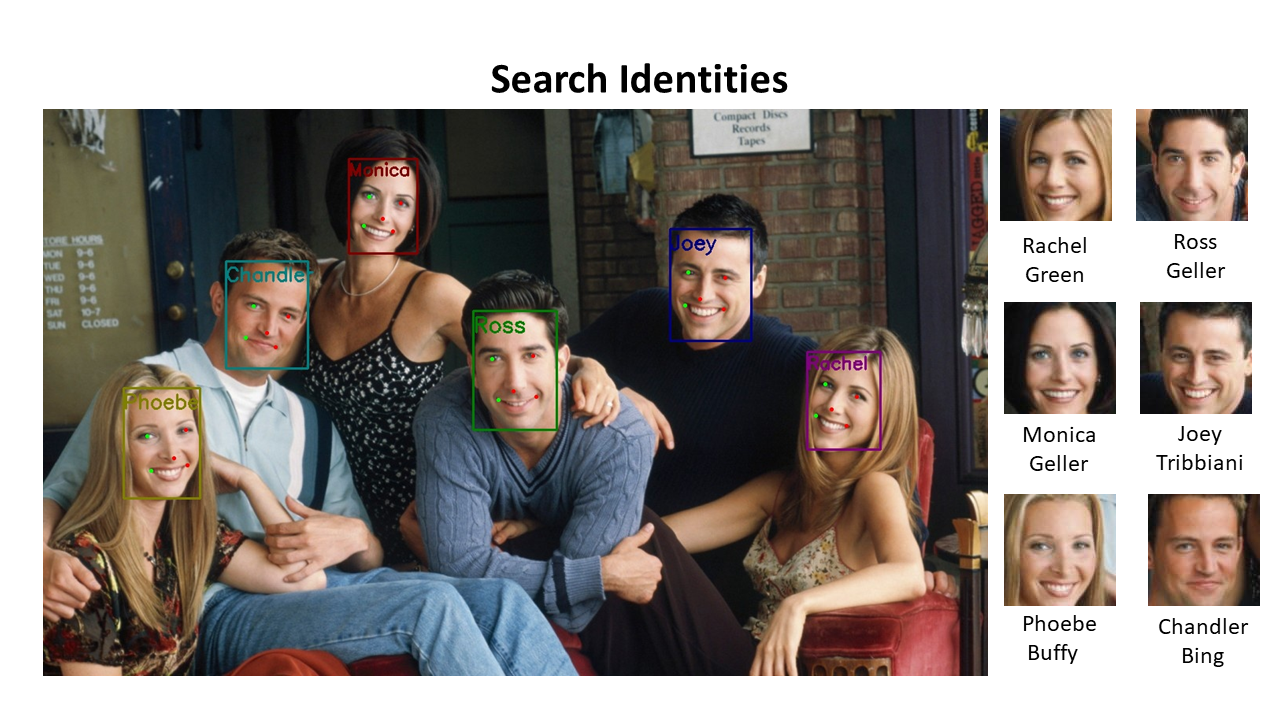
Python SDK for CompreFace - free and open-source face recognition system from Exadel
- 169
- Apache-2.0
- 4 y ago
Repo exadel-inc/compreface-python-sdk, read from GitHub 1 min ago. exadel-inc has not joined Take My Repo.
In short
exadel-inc/compreface-python-sdk is a public repo on GitHub by exadel-inc. Python SDK for CompreFace - free and open-source face recognition system from Exadel. It declares the Apache-2.0 license on GitHub. It is written mainly in Python, has 169 stars and last changed on 2023-04-05. Nobody has reviewed it on Take My Repo yet, which says nothing about its quality. Read from GitHub on 2026-11-19.
In the maintainer's words. Shown from GitHub; Take My Repo does not keep a copy.
CompreFace Python SDK
CompreFace Python SDK makes face recognition into your application even easier.
Table of content
- Requirements
- Installation
- Usage
- Reference
- Contributing
- License info
Requirements
Before using our SDK make sure you have installed CompreFace and Python on your machine.
- CompreFace
- Python (Version 3.7+)
CompreFace compatibility matrix
| CompreFace Python SDK version | CompreFace 0.5.x | CompreFace 0.6.x |
|---|---|---|
| 0.1.0 | ✔ | 🟡 |
| 0.6.x | 🟡 | ✔ |
Explanation:
- ✔ SDK supports all functionality from CompreFace.
- 🟡 SDK works with this CompreFace version. In case if CompreFace version is newer - SDK won't support new features of CompreFace. In case if CompreFace version is older - new SDK features will fail.
- ✘ There are major backward compatibility issues. It is not recommended to use these versions together
Installation
It can be installed through pip:
pip install compreface-sdk
Usage
All these examples you can find in repository inside examples folder.
Initialization
To start using Python SDK you need to import CompreFace object from 'compreface-sdk' dependency.
Then you need to init it with url and port. By default, if you run CompreFace on your local machine, it's http://localhost and 8000 respectively.
You can pass optional options object when call method to set default parameters, see reference for more information.
After you initialized CompreFace object you need to init the service object with the api key of your face service. You can use this service object to recognize faces.
However, before recognizing you need first to add faces into the face collection. To do this, get the face collection object from the service object.
from compreface import CompreFace
from compreface.service import RecognitionService
from compreface.collections import FaceCollection
from compreface.collections.face_collections import Subjects

DOMAIN: str = 'http://localhost'
PORT: str = '8000'
API_KEY: str = 'your_face_recognition_key'

compre_face: CompreFace = CompreFace(DOMAIN, PORT)

recognition: RecognitionService = compre_face.init_face_recognition(API_KEY)

face_collection: FaceCollection = recognition.get_face_collection()

subjects: Subjects = recognition.get_subjects()
Adding faces into a face collection
Here is example that shows how to add an image to your face collection from your file system:
image_path: str = 'examples/common/jonathan-petit-unsplash.jpg'
subject: str = 'Jonathan Petit'

face_collection.add(image_path=image_path, subject=subject)
Recognition
This code snippet shows how to recognize unknown face.
image_path: str = 'examples/common/jonathan-petit-unsplash.jpg'

recognition.recognize(image_path=image_path)
Webcam demo
Webcam demo shows how to use CompreFace Recognition and Detection services using Python SDK. In both cases, age, gender and mask plugins are applied.
Follow this link to see the instructions.
Reference
CompreFace Global Object
Global CompreFace Object is used for initializing connection to CompreFace and setting default values for options. Default values will be used in every service method if applicable. If the option’s value is set in the global object and passed as a function argument then the function argument value will be used.
Constructor:
CompreFace(domain, port, options)
| Argument | Type | Required | Notes |
|---|---|---|---|
| url | string | required | URL with protocol where CompreFace is located. E.g. http://localhost |
| port | string | required | CompreFace port. E.g. 8000 |
| options | object | optional | Default values for face recognition services. See more here. AllOptionsDict object can be used in this method |
Possible options:
| Option | Type | Notes |
|---|---|---|
| det_prob_threshold | float | minimum required confidence that a recognized face is actually a face. Value is between 0.0 and 1.0 |
| limit | integer | maximum number of faces on the image to be recognized. It recognizes the biggest faces first. Value of 0 represents no limit. Default value: 0 |
| prediction_count | integer | maximum number of subject predictions per face. It returns the most similar subjects. Default value: 1 |
| face_plugins | string | comma-separated slugs of face plugins. If empty, no additional information is returned. Learn more |
| status | boolean | if true includes system information like execution_time and plugin_version fields. Default value is false |
Example:
from compreface import CompreFace

DOMAIN: str = 'http://localhost'
PORT: str = '8000'

compre_face: CompreFace = CompreFace(domain=DOMAIN, port=PORT, options={
    "limit": 0,
    "det_prob_threshold": 0.8,
    "prediction_count": 1,
    "face_plugins": "calculator,age,gender,landmarks",
    "status": "true"
})
Methods
CompreFace.init_face_recognition(api_key)
Inits face recognition service object.
| Argument | Type | Required | Notes |
|---|---|---|---|
| api_key | string | required | Face Recognition Api Key in UUID format |
Example:
from compreface.service import RecognitionService

API_KEY: str = 'your_face_recognition_key'

recognition: RecognitionService = compre_face.init_face_recognition(API_KEY)
CompreFace.init_face_detection(api_key)
Inits face detection service object.
| Argument | Type | Required | Notes |
|---|---|---|---|
| api_key | string | required | Face Detection Api Key in UUID format |
Example:
from compreface.service import DetectionService

DETECTION_API_KEY: str = 'your_face_detection_key'

detection: DetectionService = compre_face.init_face_detection(DETECTION_API_KEY)
CompreFace.init_face_verification(api_key)
Inits face verification service object.
| Argument | Type | Required | Notes |
|---|---|---|---|
| api_key | string | required | Face Verification Api Key in UUID format |
Example:
from compreface.service import VerificationService

VERIFICATION_API_KEY: str = 'your_face_verification_key'

verify: VerificationService = compre_face.init_face_verification(VERIFICATION_API_KEY)
Options structure
Options is optional field in every request that contains an image. If the option’s value is set in the global object and passed as a function argument then the function argument value will be used.
class DetProbOptionsDict(TypedDict):
    det_prob_threshold: float


class ExpandedOptionsDict(DetProbOptionsDict):
    limit: int
    status: bool
    face_plugins: str


class AllOptionsDict(ExpandedOptionsDict):
    prediction_count: int
| Option | Type | Notes |
|---|---|---|
| det_prob_threshold | float | minimum required confidence that a recognized face is actually a face. Value is between 0.0 and 1.0 |
| limit | integer | maximum number of faces on the image to be recognized. It recognizes the biggest faces first. Value of 0 represents no limit. Default value: 0 |
| prediction_count | integer | maximum number of subject predictions per face. It returns the most similar subjects. Default value: 1 |
| face_plugins | string | comma-separated slugs of face plugins. If empty, no additional information is returned. Learn more |
| status | boolean | if true includes system information like execution_time and plugin_version fields. Default value is false |
Example of face recognition with object:
recognition.recognize(image_path=image_path, options={
    "limit": 0,
    "det_prob_threshold": 0.8,
    "prediction_count": 1,
    "face_plugins": "calculator,age,gender,landmarks",
    "status": "true"
})
Face Recognition Service
Face recognition service is used for face identification. This means that you first need to upload known faces to face collection and then recognize unknown faces among them. When you upload an unknown face, the service returns the most similar faces to it. Also, face recognition service supports verify endpoint to check if this person from face collection is the correct one. For more information, see CompreFace page.
Recognize Faces from a Given Image
Recognizes all faces from the image. The first argument is the image location, it can be an url, local path or bytes.
recognition.recognize(image_path, options)
| Argument | Type | Required | Notes |
|---|---|---|---|
| image_path | image | required | Image can pass from url, local path or bytes. Max size is 5Mb |
| options | object | optional | AllOptionsDict object can be used in this method. See more here. |
Response:
{
  "result" : [ {
    "age" : {
      "probability": 0.9308982491493225,
      "high": 32,
      "low": 25
    },
    "gender" : {
      "probability": 0.9898611307144165,
      "value": "female"
    },
    "mask" : {
      "probability": 0.9999470710754395,
      "value": "without_mask"
    },
    "embedding" : [ 9.424854069948196E-4, "...", -0.011415496468544006 ],
    "box" : {
      "probability" : 1.0,
      "x_max" : 1420,
      "y_max" : 1368,
      "x_min" : 548,
      "y_min" : 295
    },
    "landmarks" : [ [ 814, 713 ], [ 1104, 829 ], [ 832, 937 ], [ 704, 1030 ], [ 1017, 1133 ] ],
    "subjects" : [ {
      "similarity" : 0.97858,
      "subject" : "subject1"
    } ],
    "execution_time" : {
      "age" : 28.0,
      "gender" : 26.0,
      "detector" : 117.0,
      "calculator" : 45.0,
      "mask": 36.0
    }
  } ],
  "plugins_versions" : {
    "age" : "agegender.AgeDetector",
    "gender" : "agegender.GenderDetector",
    "detector" : "facenet.FaceDetector",
    "calculator" : "facenet.Calculator",
    "mask": "facemask.MaskDetector"
  }
}| Element | Type | Description |
|---|---|---|
| age | object | detected age range. Return only if age plugin is enabled |
| gender | object | detected gender. Return only if gender plugin is enabled |
| mask | object | detected mask. Return only if face mask plugin is enabled. |
| embedding | array | face embeddings. Return only if calculator plugin is enabled |
| box | object | list of parameters of the bounding box for this face |
| probability | float | probability that a found face is actually a face |
| x_max, y_max, x_min, y_min | integer | coordinates of the frame containing the face |
| landmarks | array | list of the coordinates of the frame containing the face-landmarks. |
| subjects | list | list of similar subjects with size of <prediction_count> order by similarity |
| similarity | float | similarity that on that image predicted person |
| subject | string | name of the subject in Face Collection |
| execution_time | object | execution time of all plugins |
| plugins_versions | object | contains information about plugin versions |
Get Face Collection
recognition.get_face_collection()
Returns Face collection object
Face collection could be used to manage known faces, e.g. add, list, or delete them.
Face recognition is performed for the saved known faces in face collection, so before using the recognize method you need to save at least one face into the face collection.
More information about face collection and managing examples here
Methods:
Add an Example of a Subject
This creates an example of the subject by saving images. You can add as many images as you want to train the system. Image should contain only one face.
face_collection.add(image_path, subject, options)
| Argument | Type | Required | Notes |
|---|---|---|---|
| image_path | image | required | Image can pass from url, local path or bytes. Max size is 5Mb |
| subject | string | required | is the name you assign to the image you save |
| options | object | optional | DetProbOptionsDict object can be used in this method. See more here. |
Response:
{
  "image_id": "6b135f5b-a365-4522-b1f1-4c9ac2dd0728",
  "subject": "subject1"
}| Element | Type | Description |
|---|---|---|
| image_id | UUID | UUID of uploaded image |
| subject | string | Subject of the saved image |
List of All Saved Examples of the Subject
To retrieve a list of subjects saved in a Face Collection:
face_collection.list()
Response:
{
  "faces": [
    {
      "image_id": <image_id>,
      "subject": <subject>
    },
    ...
  ]
}
| Element | Type | Description |
|---|---|---|
| image_id | UUID | UUID of the face |
| subject | string | of the person, whose picture was saved for this api key |
Delete All Examples of the Subject by Name
To delete all image examples of the :
face_collection.delete_all(subject)
| Argument | Type | Required | Notes |
|---|---|---|---|
| subject | string | optional | is the name you assign to the image you save. If this parameter is absent, all faces in Face Collection will be removed |
Response:
{
    "deleted": <count>
}
| Element | Type | Description |
|---|---|---|
| deleted | integer | Number of deleted faces |
Delete an Example of the Subject by ID
To delete an image by ID:
face_collection.delete(image_id)
| Argument | Type | Required | Notes |
|---|---|---|---|
| image_id | UUID | required | UUID of the removing face |
Response:
{
  "image_id": <image_id>,
  "subject": <subject>
}
| Element | Type | Description |
|---|---|---|
| image_id | UUID | UUID of the removed face |
| subject | string | of the person, whose picture was saved for this api key |
Verify Faces from a Given Image
face_collection.verify(image_path, image_id, options)
Compares similarities of given image with image from your face collection.
| Argument | Type | Required | Notes |
|---|---|---|---|
| image_path | image | required | Image can pass from url, local path or bytes. Max size is 5Mb |
| image_id | UUID | required | UUID of the verifying face |
| options | string | Object | ExpandedOptionsDict object can be used in this method. See more here. |
Response:
{
  "result" : [ {
    "age" : {
      "probability": 0.9308982491493225,
      "high": 32,
      "low": 25
    },
    "gender" : {
      "probability": 0.9898611307144165,
      "value": "female"
    },
    "mask" : {
      "probability": 0.9999470710754395,
      "value": "without_mask"
    },
    "embedding" : [ 9.424854069948196E-4, "...", -0.011415496468544006 ],
    "box" : {
      "probability" : 1.0,
      "x_max" : 1420,
      "y_max" : 1368,
      "x_min" : 548,
      "y_min" : 295
    },
    "landmarks" : [ [ 814, 713 ], [ 1104, 829 ], [ 832, 937 ], [ 704, 1030 ], [ 1017, 1133 ] ],
    "subjects" : [ {
      "similarity" : 0.97858,
      "subject" : "subject1"
    } ],
    "execution_time" : {
      "age" : 28.0,
      "gender" : 26.0,
      "detector" : 117.0,
      "calculator" : 45.0,
      "mask": 36.0
    }
  } ],
  "plugins_versions" : {
    "age" : "agegender.AgeDetector",
    "gender" : "agegender.GenderDetector",
    "detector" : "facenet.FaceDetector",
    "calculator" : "facenet.Calculator",
    "mask": "facemask.MaskDetector"
  }
}| Element | Type | Description |
|---|---|---|
| age | object | detected age range. Return only if age plugin is enabled |
| gender | object | detected gender. Return only if gender plugin is enabled |
| mask | object | detected mask. Return only if face mask plugin is enabled. |
| embedding | array | face embeddings. Return only if calculator plugin is enabled |
| box | object | list of parameters of the bounding box for this face |
| probability | float | probability that a found face is actually a face |
| x_max, y_max, x_min, y_min | integer | coordinates of the frame containing the face |
| landmarks | array | list of the coordinates of the frame containing the face-landmarks. Return only if landmarks plugin is enabled |
| similarity | float | similarity that on that image predicted person |
| execution_time | object | execution time of all plugins |
| plugins_versions | object | contains information about plugin versions |
Get Subjects
recognition.get_subjects()
Returns subjects object
Subjects object allows working with subjects directly (not via subject examples).
More information about subjects here
Methods:
Add a Subject
Create a new subject in Face Collection.
subjects.add(subject)
| Argument | Type | Required | Notes |
|---|---|---|---|
| subject | string | required | is the name of the subject. It can be any string |
Response:
{
  "subject": "subject1"
}| Element | Type | Description |
|---|---|---|
| subject | string | is the name of the subject |
List Subjects
Returns all subject related to Face Collection.
subjects.list()
Response:
{
  "subjects": [
    "<subject_name1>",
    "<subject_name2>"
  ]
}| Element | Type | Description |
|---|---|---|
| subjects | array | the list of subjects in Face Collection |
Rename a Subject
Rename existing subject. If a new subject name already exists, subjects are merged - all faces from the old subject name are reassigned to the subject with the new name, old subject removed.
subjects.rename(subject, new_name)
| Argument | Type | Required | Notes |
|---|---|---|---|
| subject | string | required | is the name of the subject that will be updated |
| new_name | string | required | is the name of the subject. It can be any string |
Response:
{
  "updated": "true|false"
}| Element | Type | Description |
|---|---|---|
| updated | boolean | failed or success |
Delete a Subject
Delete existing subject and all saved faces.
subjects.delete(subject)
| Argument | Type | Required | Notes |
|---|---|---|---|
| subject | string | required | is the name of the subject. |
Response:
{
  "subject": "subject1"
}| Element | Type | Description |
|---|---|---|
| subject | string | is the name of the subject |
Delete All Subjects
Delete all existing subjects and all saved faces.
subjects.delete_all()
Response:
{
  "deleted": "<count>"
}| Element | Type | Description |
|---|---|---|
| deleted | integer | number of deleted subjects |
Face Detection Service
Face detection service is used for detecting faces in the image.
Methods:
Detect
detection.detect(image_path, options)
Finds all faces on the image.
| Argument | Type | Required | Notes |
|---|---|---|---|
| image_path | image | required | image where to detect faces. Image can pass from url, local path or bytes. Max size is 5Mb |
| options | string | Object | ExpandedOptionsDict object can be used in this method. See more here. |
Response:
{
  "result" : [ {
    "age" : {
      "probability": 0.9308982491493225,
      "high": 32,
      "low": 25
    },
    "gender" : {
      "probability": 0.9898611307144165,
      "value": "female"
    },
    "mask" : {
      "probability": 0.9999470710754395,
      "value": "without_mask"
    },
    "embedding" : [ -0.03027934394776821, "...", -0.05117142200469971 ],
    "box" : {
      "probability" : 0.9987509250640869,
      "x_max" : 376,
      "y_max" : 479,
      "x_min" : 68,
      "y_min" : 77
    },
    "landmarks" : [ [ 156, 245 ], [ 277, 253 ], [ 202, 311 ], [ 148, 358 ], [ 274, 365 ] ],
    "execution_time" : {
      "age" : 30.0,
      "gender" : 26.0,
      "detector" : 130.0,
      "calculator" : 49.0,
      "mask": 36.0
    }
  } ],
  "plugins_versions" : {
    "age" : "agegender.AgeDetector",
    "gender" : "agegender.GenderDetector",
    "detector" : "facenet.FaceDetector",
    "calculator" : "facenet.Calculator",
    "mask": "facemask.MaskDetector"
  }
}| Element | Type | Description |
|---|---|---|
| age | object | detected age range. Return only if age plugin is enabled |
| gender | object | detected gender. Return only if gender plugin is enabled |
| mask | object | detected mask. Return only if face mask plugin is enabled. |
| embedding | array | face embeddings. Return only if calculator plugin is enabled |
| box | object | list of parameters of the bounding box for this face (on processedImage) |
| probability | float | probability that a found face is actually a face (on processedImage) |
| x_max, y_max, x_min, y_min | integer | coordinates of the frame containing the face (on processedImage) |
| landmarks | array | list of the coordinates of the frame containing the face-landmarks. Return only if landmarks plugin is enabled |
| execution_time | object | execution time of all plugins |
| plugins_versions | object | contains information about plugin versions |
Face Verification Service
Face verification service is used for comparing two images. A source image should contain only one face which will be compared to all faces on the target image.
Methods:
Verify
verify.verify(source_image_path, target_image_path, options)
Compares two images provided in arguments. Source image should contain only one face, it will be compared to all faces in the target image.
| Argument | Type | Required | Notes |
|---|---|---|---|
| image_id | UUID | required | UUID of the verifying face |
| source_image_path | image | required | file to be verified. Image can pass from url, local path or bytes. Max size is 5Mb |
| target_image_path | image | required | reference file to check the source file. Image can pass from url, local path or bytes. Max size is 5Mb |
| options | string | Object | ExpandedOptionsDict object can be used in this method. See more here. |
Response:
{
  "result" : [{
    "source_image_face" : {
      "age" : {
        "probability": 0.9308982491493225,
        "high": 32,
        "low": 25
      },
      "gender" : {
        "probability": 0.9898611307144165,
        "value": "female"
      },
      "mask" : {
        "probability": 0.9999470710754395,
        "value": "without_mask"
      },
      "embedding" : [ -0.0010271212086081505, "...", -0.008746841922402382 ],
      "box" : {
        "probability" : 0.9997453093528748,
        "x_max" : 205,
        "y_max" : 167,
        "x_min" : 48,
        "y_min" : 0
      },
      "landmarks" : [ [ 92, 44 ], [ 130, 68 ], [ 71, 76 ], [ 60, 104 ], [ 95, 125 ] ],
      "execution_time" : {
        "age" : 85.0,
        "gender" : 51.0,
        "detector" : 67.0,
        "calculator" : 116.0,
        "mask": 36.0
      }
    },
    "face_matches": [
      {
        "age" : {
          "probability": 0.9308982491493225,
          "high": 32,
          "low": 25
        },
        "gender" : {
          "probability": 0.9898611307144165,
          "value": "female"
        },
        "mask" : {
          "probability": 0.9999470710754395,
          "value": "without_mask"
        },
        "embedding" : [ -0.049007344990968704, "...", -0.01753818802535534 ],
        "box" : {
          "probability" : 0.99975,
          "x_max" : 308,
          "y_max" : 180,
          "x_min" : 235,
          "y_min" : 98
        },
        "landmarks" : [ [ 260, 129 ], [ 273, 127 ], [ 258, 136 ], [ 257, 150 ], [ 269, 148 ] ],
        "similarity" : 0.97858,
        "execution_time" : {
          "age" : 59.0,
          "gender" : 30.0,
          "detector" : 177.0,
          "calculator" : 70.0,
          "mask": 36.0
        }
      }],
    "plugins_versions" : {
      "age" : "agegender.AgeDetector",
      "gender" : "agegender.GenderDetector",
      "detector" : "facenet.FaceDetector",
      "calculator" : "facenet.Calculator",
      "mask": "facemask.MaskDetector"
    }
  }]
}| Element | Type | Description |
|---|---|---|
| source_image_face | object | additional info about source image face |
| face_matches | array | result of face verification |
| age | object | detected age range. Return only if age plugin is enabled |
| gender | object | detected gender. Return only if gender plugin is enabled |
| mask | object | detected mask. Return only if face mask plugin is enabled. |
| embedding | array | face embeddings. Return only if calculator plugin is enabled |
| box | object | list of parameters of the bounding box for this face |
| probability | float | probability that a found face is actually a face |
| x_max, y_max, x_min, y_min | integer | coordinates of the frame containing the face |
| landmarks | array | list of the coordinates of the frame containing the face-landmarks. Return only if landmarks plugin is enabled |
| similarity | float | similarity between this face and the face on the source image |
| execution_time | object | execution time of all plugins |
| plugins_versions | object | contains information about plugin versions |
Contributing
Contributions are what make the open source community such an amazing place to be learn, inspire, and create. Any contributions you make are greatly appreciated.
- Fork the Project
- Create your Feature Branch (
git checkout -b feature/AmazingFeature) - Commit your Changes (
git commit -m 'Add some AmazingFeature') - Push to the Branch (
git push origin feature/AmazingFeature) - Open a Pull Request
After creating your first contributing pull request, you will receive a request to sign our Contributor License Agreement by commenting your pull request with a special message.
Report Bugs
Please report any bugs here.
If you are reporting a bug, please specify:
- Your operating system name and version
- Any details about your local setup that might be helpful in troubleshooting
- Detailed steps to reproduce the bug
Submit Feedback
The best way to send us feedback is to file an issue at https://github.com/exadel-inc/compreface-python-sdk/issues.
If you are proposing a feature, please:
- Explain in detail how it should work.
- Keep the scope as narrow as possible to make it easier to implement.
License info
CompreFace Python SDK is open-source facial recognition SDK released under the Apache 2.0 license.
Questions
What is compreface-python-sdk?
exadel-inc/compreface-python-sdk is a public repo on GitHub by exadel-inc. Python SDK for CompreFace - free and open-source face recognition system from Exadel.
Is compreface-python-sdk open source?
It declares the Apache-2.0 license on GitHub.
Does compreface-python-sdk run on macOS, Windows or Linux?
Its maker has not tagged a system, so it is unknown here. Its README says what it needs.
How do I install compreface-python-sdk?
Open "Take it" on its page: Take My Repo writes an install plan for your machine and hands it to your AI agent (Claude Code, Codex or Cursor), which asks you before each step. Take My Repo has not tested it on any machine.
Is compreface-python-sdk still maintained?
Its last change on GitHub was on 2023-04-05. Take My Repo does not judge from that whether it is maintained.
What do people who ran compreface-python-sdk say?
Nobody has reviewed it on Take My Repo yet, which says nothing about its quality.