
sphinx-external-toc
A sphinx extension that allows the site-map to be defined in a single YAML file
- 36
- MIT
- 6 d ago
Repo executablebooks/sphinx-external-toc, read from GitHub 3 d ago. executablebooks has not joined Take My Repo.
In short
executablebooks/sphinx-external-toc is a public repo on GitHub by executablebooks. A sphinx extension that allows the site-map to be defined in a single YAML file. It declares the MIT license on GitHub. It is written mainly in Python, has 36 stars and last changed on 2026-11-16. Nobody has reviewed it on Take My Repo yet, which says nothing about its quality. Read from GitHub on 2026-11-19.
sphinx-external-toc
A sphinx extension that allows the documentation site-map (a.k.a Table of Contents) to be defined external to the documentation files.
As used by default by Jupyter Book (no need to manually add this extension to the extensions in _config.yml in a JupyterBook)!
In normal Sphinx documentation, the documentation site-map is defined via a bottom-up approach - adding toctree directives within pages of the documentation.
This extension facilitates a top-down approach to defining the site-map structure, within a single YAML file.
It also allows for documents not specified in the ToC to be auto-excluded.
User Guide
Sphinx Configuration
Add to your conf.py:
extensions = ["sphinx_external_toc"]
use_multitoc_numbering = True  # optional, default: True
external_toc_path = "_toc.yml"  # optional, default: _toc.yml
external_toc_exclude_missing = False  # optional, default: False
Note the external_toc_path is always read as a Unix path, and can either be specified relative to the source directory (recommended) or as an absolute path.
Jupyterbook configuration
This extension is included in your jupyterbook configuration by default, so there's need to add it to the list of extensions. The other options can still be added:
use_multitoc_numbering: true  # optional, default: true
external_toc_path: "_toc.yml"  # optional, default: _toc.yml
external_toc_exclude_missing: False  # optional, default: False
Note the external_toc_path is always read as a Unix path, and can either be specified relative to the source directory (recommended) or as an absolute path.
Basic Structure
A minimal ToC defines the top level root key, for a single root document file:
root: intro
The value of the root key will be a path to a file, in Unix format (folders split by /), relative to the source directory, and can be with or without the file extension.
:::{note}
This root file will be set as the master_doc.
:::
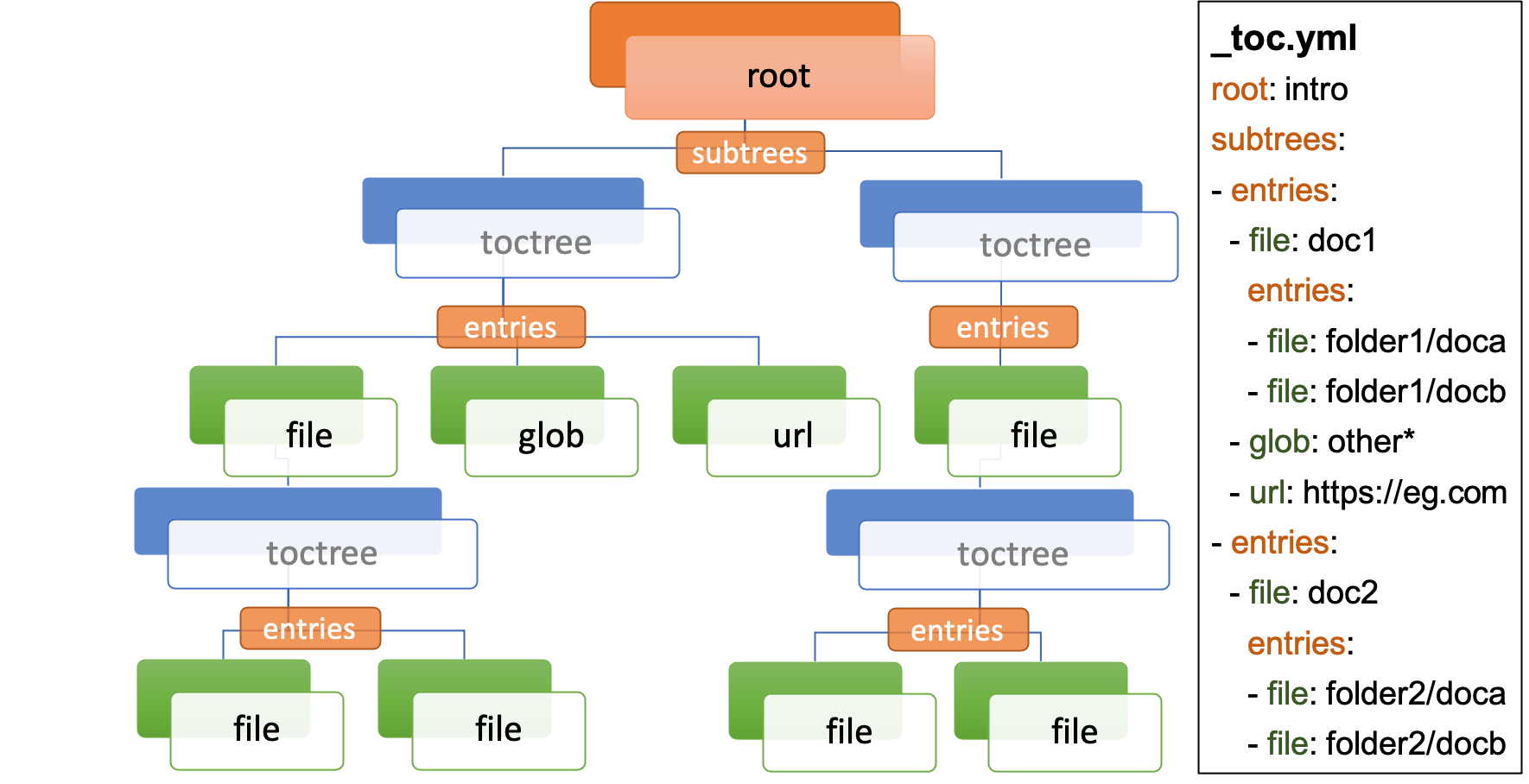
Document files can then have a subtrees key - denoting a list of individual toctrees for that document - and in-turn each subtree should have a entries key - denoting a list of children links, that are one of:
file: path to a single document file in Unix format, with or without the file extension (as forroot)glob: path to one or more document files via Unix shell-style wildcards (similar tofnmatch, but single stars don't match slashes.)url: path for an external URL (starting e.g.httporhttps)
:::{important} Each document file can only occur once in the ToC! :::
This can proceed recursively to any depth.
root: intro
subtrees:
- entries:
  - file: doc1
    subtrees:
    - entries:
      - file: doc2
        subtrees:
        - entries:
          - file: doc3
  - url: https://example.com
  - glob: subfolder/other*
This is equivalent to having a single toctree directive in intro, containing doc1,
and a single toctree directive in doc1, with the :glob: flag and containing doc2, https://example.com and subfolder/other*.
As a shorthand, the entries key can be at the same level as the file, which denotes a document with a single subtree.
For example, this file is exactly equivalent to the one above:
root: intro
entries:
- file: doc1
  entries:
  - file: doc2
    entries:
    - file: doc3
- url: https://example.com
- glob: subfolder/other*
File and URL titles
By default, the initial header within a file document will be used as its title in generated Table of Contents.
With the title key you can set an alternative title for a document. and also for url:
root: intro
subtrees:
- entries:
  - file: doc1
    title: Document 1 Title
  - url: https://example.com
    title: Example URL Title
ToC tree options
Each subtree can be configured with a number of options (see also sphinx toctree options):
caption(string): A title for the whole the subtree, e.g. shown above the subtree in ToCshidden(boolean): Whether to show the ToC within (inline of) the document (defaultFalse). By default it is appended to the end of the document, but see also thetableofcontentsdirective for positioning of the ToC.maxdepth(integer): A maximum nesting depth to use when showing the ToC within the document (default -1, meaning infinite).numbered(boolean or integer): Automatically add numbers to all documents within a subtree (defaultFalse). If set toTrue, all subtrees will also be numbered based on nesting (e.g. with1.1or1.1.1), or if set to an integer then the numbering will only be applied until that depth. Warning: This can lead to unexpected results if not carefully managed, for example references created usingnumrefmay fail. Internally this options is always converted to an integer, withTrue->999(effectively unlimited depth) andFalse->0(no numbering).reversed(boolean): IfTruethen the entries in the subtree will be listed in reverse order (defaultFalse). This can be useful when usingglobentries.titlesonly(boolean): IfTruethen only the first heading in the document will be shown in the ToC, not other headings of the same level (defaultFalse).style(string or list of strings): The section numbering style to use for this subtree (defaultnumerical). If a single string is given, this will be used for the top level of the subtree. If a list of strings is given, then each entry will be used for the corresponding level of section numbering. If styles are not given for all levels, then the remaining levels will benumerical. If too many styles are given, the extra ones will be ignored. The first time a style is used at the top level in a subtree, the numbering will start from 1, 'a', 'A', 'I' or 'i' depending on the style. Subsequent times the same style is used at the top level in a subtree, the numbering will continue from the last number used for that style, unlessrestart_numberingis set toTrue. Available styles:numerical: 1, 2, 3, ...romanlower: i, ii, iii, iv, v, ...romanupper: I, II, III, IV, V, ...alphalower: a, b, c, d, e, ..., aa, ab, ...alphaupper: A, B, C, D, E, ..., AA, AB, ...
restart_numbering(boolean): IfTrue, the numbering for the top level of this subtree will restart from 1 (or 'a', 'A', 'I' or 'i' depending on the style). IfFalsethe numbering for the top level of this subtree will continue from the last letter/number/symbol used in a previous subtree with the same style. The default value of this option isnot use_multitoc_numbering. This means that:- if
use_multitoc_numberingisTrue(the default), the numbering for each part will continue from the last letter/number/symbol used in a previous part with the same style, unlessrestart_numberingis explicitly set toTrue. - if
use_multitoc_numberingisFalse, the numbering of each subtree will restart from 1 (or 'a', 'A', 'I' or 'i' depending on the style), unlessrestart_numberingis explicitly set toFalse.
- if
These options can be set at the level of the subtree:
root: intro
subtrees:
- caption: Subtree Caption
  hidden: False
  maxdepth: 1
  numbered: True
  reversed: False
  titlesonly: True
  style: [alphaupper, romanlower]
  restart_numbering: True
  entries:
  - file: doc1
    subtrees:
    - titlesonly: True
      entries:
      - file: doc2
or, if you are using the shorthand for a single subtree, set options under an options key:
root: intro
options:
  caption: Subtree Caption
  hidden: False
  maxdepth: 1
  numbered: True
  reversed: False
  titlesonly: True
  style: [alphaupper, romanlower]
  restart_numbering: True
entries:
- file: doc1
  options:
    titlesonly: True
  entries:
  - file: doc2
You can also use the top-level defaults key, to set default options for all subtrees:
root: intro
defaults:
  titlesonly: True
options:
  caption: Subtree Caption
  hidden: False
  maxdepth: 1
  numbered: True
  reversed: False
  style: [alphaupper, romanlower]
  restart_numbering: True
entries:
- file: doc1
  entries:
  - file: doc2
Using different key-mappings
For certain use-cases, it is helpful to map the subtrees/entries keys to mirror e.g. an output LaTeX structure.
The format key can be used to provide such mappings (and also initial defaults).
Currently available:
jb-article:- Maps
entries->sections - Sets the default of
titlesonlytotrue
- Maps
jb-book:- Maps the top-level
subtreestoparts - Maps the top-level
entriestochapters - Maps other levels of
entriestosections - Sets the default of
titlesonlytotrue
- Maps the top-level
For example:
defaults:
  titlesonly: true
root: index
subtrees:
- entries:
  - file: doc1
    entries:
    - file: doc2
is equivalent to:
format: jb-book
root: index
parts:
- chapters:
  - file: doc1
    sections:
    - file: doc2
:::{important} These change in key names do not change the output site-map structure. :::
Add a ToC to a page's content
By default, the toctree generated per document (one per subtree) are appended to the end of the document and hidden (then, for example, most HTML themes show them in a side-bar).
But if you would like them to be visible at a certain place within the document body, you may do so by using the tableofcontents directive:
ReStructuredText:
.. tableofcontents::
MyST Markdown:
```{tableofcontents}
```
Currently, only one tableofcontents should be used per page (all toctree will be added here), and only if it is a page with child/descendant documents.
Note, this will override the hidden option set for a subtree.
Excluding files not in ToC
By default, Sphinx will build all document files, regardless of whether they are specified in the Table of Contents, if they:
- Have a file extension relating to a loaded parser (e.g.
.rstor.md) - Do not match a pattern in
exclude_patterns
To automatically add any document files that do not match a file or glob in the ToC to the exclude_patterns list, add to your conf.py:
external_toc_exclude_missing = True
Note that, for performance, files that are in hidden folders (e.g. in .tox or .venv) will not be added to exclude_patterns even if they are not specified in the ToC.
You should exclude these folders explicitly.
:::{important} This feature is not currently compatible with orphan files. :::
Command-line
This package comes with the sphinx-etoc command-line program, with some additional tools.
To see all options:
$ sphinx-etoc --help
Usage: sphinx-etoc [OPTIONS] COMMAND [ARGS]...

  Command-line for sphinx-external-toc.

Options:
  --version   Show the version and exit.
  -h, --help  Show this message and exit.

Commands:
  from-project  Create a ToC file from a project directory.
  migrate    Migrate a ToC from a previous revision.
  parse      Parse a ToC file to a site-map YAML.
  to-project    Create a project directory from a ToC file.
To build a template project from only a ToC file:
$ sphinx-etoc to-project -p path/to/site -e rst path/to/_toc.yml
Note, you can also add additional files in meta/create_files amd append text to the end of files with meta/create_append, e.g.
root: intro
entries:
- glob: doc*
meta:
  create_append:
    intro: |
      This is some
      appended text
  create_files:
  - doc1
  - doc2
  - doc3
To build a ToC file from an existing site:
$ sphinx-etoc from-project path/to/folder
Some rules used:
- Files/folders will be skipped if they match a pattern added by
-s(based on fnmatch Unix shell-style wildcards) - Sub-folders with no content files inside will be skipped
- File and folder names will be sorted by natural order
- If there is a file called
index(or the name set by-i) in any folder, it will be treated as the index file, otherwise the first file by ordering will be used.
The command can also guess a title for each file, based on its path:
- The folder name is used for index files, otherwise the file name
- Words are split by
_ - The first "word" is removed if it is an integer
For example, for a project with files:
index.rst
1_a_title.rst
11_another_title.rst
.hidden_file.rst
.hidden_folder/index.rst
1_a_subfolder/index.rst
2_another_subfolder/index.rst
2_another_subfolder/other.rst
3_subfolder/1_no_index.rst
3_subfolder/2_no_index.rst
14_subfolder/index.rst
14_subfolder/subsubfolder/index.rst
14_subfolder/subsubfolder/other.rst
will create the ToC:
$ sphinx-etoc from-project path/to/folder -i index -s ".*" -e ".rst" -t
root: index
entries:
- file: 1_a_title
  title: A title
- file: 11_another_title
  title: Another title
- file: 1_a_subfolder/index
  title: A subfolder
- file: 2_another_subfolder/index
  title: Another subfolder
  entries:
  - file: 2_another_subfolder/other
    title: Other
- file: 3_subfolder/1_no_index
  title: No index
  entries:
  - file: 3_subfolder/2_no_index
    title: No index
- file: 14_subfolder/index
  title: Subfolder
  entries:
  - file: 14_subfolder/subsubfolder/index
    title: Subsubfolder
    entries:
    - file: 14_subfolder/subsubfolder/other
      title: Other
API
The ToC file is parsed to a SiteMap, which is a MutableMapping subclass, with keys representing docnames mapping to a Document that stores information on the toctrees it should contain:
import yaml
from sphinx_external_toc.parsing import parse_toc_yaml
path = "path/to/_toc.yml"
site_map = parse_toc_yaml(path)
yaml.dump(site_map.as_json())
Would produce e.g.
root: intro
documents:
  doc1:
    docname: doc1
    subtrees: []
    title: null
  intro:
    docname: intro
    subtrees:
    - caption: Subtree Caption
      numbered: true
      reversed: false
      items:
      - doc1
      titlesonly: true
    title: null
meta: {}
Development Notes
Questions / TODOs:
- Using
external_toc_exclude_missingto exclude a certain file suffix: currently if you had filesdoc.mdanddoc.rst, and putdoc.mdin your ToC, it will adddoc.rstto the excluded patterns but then, when looking fordoc.md, will still selectdoc.rst(since it is first insource_suffix). Maybe open an issue on sphinx, thatdoc2pathshould respect exclude patterns. - document suppressing warnings
- test against orphan file
- https://github.com/executablebooks/sphinx-book-theme/pull/304
- CLI command to generate toc from existing documentation
toctrees(and then remove toctree directives) - test rebuild on toc changes (and document how rebuilds are controlled when toc changes)
- some jupyter-book issues point to potential changes in numbering, based on where the
toctreeis in the document. So could look into placing it e.g. under the first heading/title
Questions
What is sphinx-external-toc?
executablebooks/sphinx-external-toc is a public repo on GitHub by executablebooks. A sphinx extension that allows the site-map to be defined in a single YAML file.
Is sphinx-external-toc open source?
It declares the MIT license on GitHub.
Does sphinx-external-toc run on macOS, Windows or Linux?
Its maker has not tagged a system, so it is unknown here. Its README says what it needs.
How do I install sphinx-external-toc?
Open "Take it" on its page: Take My Repo writes an install plan for your machine and hands it to your AI agent (Claude Code, Codex or Cursor), which asks you before each step. Take My Repo has not tested it on any machine.
Is sphinx-external-toc still maintained?
Its last change on GitHub was on 2026-11-16. GitHub counts 25 open issues and pull requests. Take My Repo does not judge from that whether it is maintained.
What do people who ran sphinx-external-toc say?
Nobody has reviewed it on Take My Repo yet, which says nothing about its quality.


