
transformers
🤗 Transformers: the model-definition framework for state-of-the-art machine learning models in text, vision, audio, and multimodal models, for both inference and training.
- 169k
- Python
- Apache-2.0
- 2 h ago

🦆 Contextually-keyed word vectors
Repo explosion/sense2vec, read from GitHub 7 h ago. explosion has not joined Take My Repo.
explosion/sense2vec is a public repo on GitHub by explosion. 🦆 Contextually-keyed word vectors. It declares the MIT license on GitHub. It is written mainly in Python, has 1,678 stars and last changed on 2026-03-27. Nobody has reviewed it on Take My Repo yet, which says nothing about its quality. Read from GitHub on 2026-11-25.
🤗 Transformers: the model-definition framework for state-of-the-art machine learning models in text, vision, audio, and multimodal models, for both inference and training.

sense2vec (Trask et. al, 2015) is a nice twist on word2vec that lets you learn more interesting and detailed word vectors. This library is a simple Python implementation for loading, querying and training sense2vec models. For more details, check out our blog post. To explore the semantic similarities across all Reddit comments of 2015 and 2019, see the interactive demo.
🦆 Version 2.0 (for spaCy v3) out now! Read the release notes here.
from sense2vec import Sense2Vec

s2v = Sense2Vec().from_disk("/path/to/s2v_reddit_2015_md")
query = "natural_language_processing|NOUN"
assert query in s2v
vector = s2v[query]
freq = s2v.get_freq(query)
most_similar = s2v.most_similar(query, n=3)
# [('machine_learning|NOUN', 0.8986967),
#  ('computer_vision|NOUN', 0.8636297),
#  ('deep_learning|NOUN', 0.8573361)]
⚠️ Note that this example describes usage with spaCy v3. For usage with spaCy v2, download
sense2vec==1.0.3and check out thev1.xbranch of this repo.
import spacy

nlp = spacy.load("en_core_web_sm")
s2v = nlp.add_pipe("sense2vec")
s2v.from_disk("/path/to/s2v_reddit_2015_md")

doc = nlp("A sentence about natural language processing.")
assert doc[3:6].text == "natural language processing"
freq = doc[3:6]._.s2v_freq
vector = doc[3:6]._.s2v_vec
most_similar = doc[3:6]._.s2v_most_similar(3)
# [(('machine learning', 'NOUN'), 0.8986967),
#  (('computer vision', 'NOUN'), 0.8636297),
#  (('deep learning', 'NOUN'), 0.8573361)]
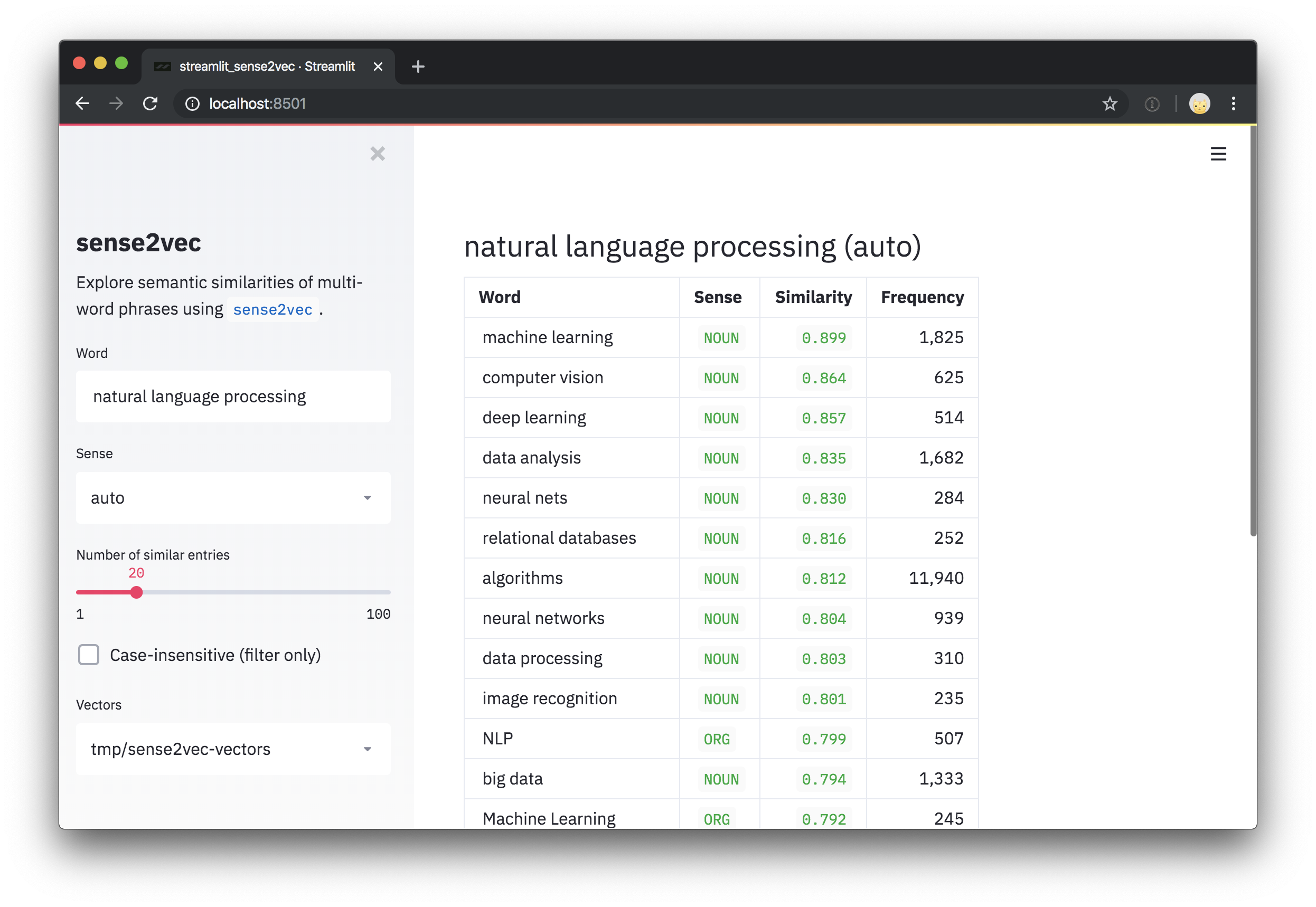
To try out our pretrained vectors trained on Reddit comments, check out the interactive sense2vec demo.
This repo also includes a Streamlit demo script for
exploring vectors and the most similar phrases. After installing streamlit,
you can run the script with streamlit run and one or more paths to
pretrained vectors as positional arguments on the command line. For
example:
pip install streamlit
streamlit run https://raw.githubusercontent.com/explosion/sense2vec/master/scripts/streamlit_sense2vec.py /path/to/vectors
To use the vectors, download the archive(s) and pass the extracted directory to
Sense2Vec.from_disk or Sense2VecComponent.from_disk. The vector files are
attached to the GitHub release. Large files have been split into multi-part
downloads.
| Vectors | Size | Description | 📥 Download (zipped) |
|---|---|---|---|
s2v_reddit_2019_lg |
4 GB | Reddit comments 2019 (01-07) | part 1, part 2, part 3 |
s2v_reddit_2015_md |
573 MB | Reddit comments 2015 | part 1 |
To merge the multi-part archives, you can run the following:
cat s2v_reddit_2019_lg.tar.gz.* > s2v_reddit_2019_lg.tar.gz
sense2vec releases are available on pip:
pip install sense2vec
To use pretrained vectors, download
one of the vector packages, unpack the .tar.gz archive
and point from_disk to the extracted data directory:
from sense2vec import Sense2Vec
s2v = Sense2Vec().from_disk("/path/to/s2v_reddit_2015_md")
The easiest way to use the library and vectors is to plug it into your spaCy
pipeline. The sense2vec package exposes a Sense2VecComponent, which can be
initialised with the shared vocab and added to your spaCy pipeline as a
custom pipeline component.
By default, components are added to the end of the pipeline, which is the
recommended position for this component, since it needs access to the dependency
parse and, if available, named entities.
import spacy
from sense2vec import Sense2VecComponent

nlp = spacy.load("en_core_web_sm")
s2v = nlp.add_pipe("sense2vec")
s2v.from_disk("/path/to/s2v_reddit_2015_md")
The component will add several
extension attributes and methods
to spaCy's Token and Span objects that let you retrieve vectors and
frequencies, as well as most similar terms.
doc = nlp("A sentence about natural language processing.")
assert doc[3:6].text == "natural language processing"
freq = doc[3:6]._.s2v_freq
vector = doc[3:6]._.s2v_vec
most_similar = doc[3:6]._.s2v_most_similar(3)
For entities, the entity labels are used as the "sense" (instead of the token's part-of-speech tag):
doc = nlp("A sentence about Facebook and Google.")
for ent in doc.ents:
    assert ent._.in_s2v
    most_similar = ent._.s2v_most_similar(3)
The following extension attributes are exposed on the Doc object via the ._
property:
| Name | Attribute Type | Type | Description |
|---|---|---|---|
s2v_phrases |
property | list | All sense2vec-compatible phrases in the given Doc (noun phrases, named entities). |
The following attributes are available via the ._ property of Token and
Span objects – for example token._.in_s2v:
| Name | Attribute Type | Return Type | Description |
|---|---|---|---|
in_s2v |
property | bool | Whether a key exists in the vector map. |
s2v_key |
property | unicode | The sense2vec key of the given object, e.g. "duck NOUN". |
s2v_vec |
property | ndarray[float32] |
The vector of the given key. |
s2v_freq |
property | int | The frequency of the given key. |
s2v_other_senses |
property | list | Available other senses, e.g. "duck|VERB" for "duck|NOUN". |
s2v_most_similar |
method | list | Get the n most similar terms. Returns a list of ((word, sense), score) tuples. |
s2v_similarity |
method | float | Get the similarity to another Token or Span. |
⚠️ A note on span attributes: Under the hood, entities in
doc.entsareSpanobjects. This is why the pipeline component also adds attributes and methods to spans and not just tokens. However, it's not recommended to use the sense2vec attributes on arbitrary slices of the document, since the model likely won't have a key for the respective text.Spanobjects also don't have a part-of-speech tag, so if no entity label is present, the "sense" defaults to the root's part-of-speech tag.
If you're training and packaging a spaCy pipeline and want to include a
sense2vec component in it, you can load in the data via the
[initialize] block of the
training config:
[initialize.components]

[initialize.components.sense2vec]
data_path = "/path/to/s2v_reddit_2015_md"
You can also use the underlying Sense2Vec class directly and load in the
vectors using the from_disk method. See below for the available API methods.
from sense2vec import Sense2Vec
s2v = Sense2Vec().from_disk("/path/to/reddit_vectors-1.1.0")
most_similar = s2v.most_similar("natural_language_processing|NOUN", n=10)
⚠️ Important note: To look up entries in the vectors table, the keys need to follow the scheme of
phrase_text|SENSE(note the_instead of spaces and the|before the tag or label) – for example,machine_learning|NOUN. Also note that the underlying vector table is case-sensitive.
Sense2VecThe standalone Sense2Vec object that holds the vectors, strings and
frequencies.
Sense2Vec.__init__Initialize the Sense2Vec object.
| Argument | Type | Description |
|---|---|---|
shape |
tuple | The vector shape. Defaults to (1000, 128). |
strings |
spacy.strings.StringStore |
Optional string store. Will be created if it doesn't exist. |
senses |
list | Optional list of all available senses. Used in methods that generate the best sense or other senses. |
vectors_name |
unicode | Optional name to assign to the Vectors table, to prevent clashes. Defaults to "sense2vec". |
overrides |
dict | Optional custom functions to use, mapped to names registered via the registry, e.g. {"make_key": "custom_make_key"}. |
| RETURNS | Sense2Vec |
The newly constructed object. |
s2v = Sense2Vec(shape=(300, 128), senses=["VERB", "NOUN"])
Sense2Vec.__len__The number of rows in the vectors table.
| Argument | Type | Description |
|---|---|---|
| RETURNS | int | The number of rows in the vectors table. |
s2v = Sense2Vec(shape=(300, 128))
assert len(s2v) == 300
Sense2Vec.__contains__Check if a key is in the vectors table.
| Argument | Type | Description |
|---|---|---|
key |
unicode / int | The key to look up. |
| RETURNS | bool | Whether the key is in the table. |
s2v = Sense2Vec(shape=(10, 4))
s2v.add("avocado|NOUN", numpy.asarray([4, 2, 2, 2], dtype=numpy.float32))
assert "avocado|NOUN" in s2v
assert "avocado|VERB" not in s2v
Sense2Vec.__getitem__Retrieve a vector for a given key. Returns None if the key is not in the table.
| Argument | Type | Description |
|---|---|---|
key |
unicode / int | The key to look up. |
| RETURNS | numpy.ndarray |
The vector or None. |
vec = s2v["avocado|NOUN"]
Sense2Vec.__setitem__Set a vector for a given key. Will raise an error if the key doesn't exist. To
add a new entry, use Sense2Vec.add.
| Argument | Type | Description |
|---|---|---|
key |
unicode / int | The key. |
explosion/sense2vec is a public repo on GitHub by explosion. 🦆 Contextually-keyed word vectors.
It declares the MIT license on GitHub.
Its maker tagged it for Windows. That is declared by the maker; Take My Repo has not tested it.
Open "Take it" on its page: Take My Repo writes an install plan for your machine and hands it to your AI agent (Claude Code, Codex or Cursor), which asks you before each step. Take My Repo has not tested it on any machine.
Topic Modelling for Humans
💬 Open source machine learning framework to automate text- and voice-based conversations: NLU, dialogue management, connect to Slack, Facebook, and more - Create chatbots and voice assistants
Its last change on GitHub was on 2026-03-27. GitHub counts 23 open issues and pull requests. Take My Repo does not judge from that whether it is maintained.
Nobody has reviewed it on Take My Repo yet, which says nothing about its quality.
Take My Repo cannot say: it does not audit code and has not run sense2vec. What is known comes from GitHub. It declares the MIT license on GitHub. Its last change was on 2026-03-27. It has 1,678 stars, which measure popularity, not safety. Nobody has reviewed it on Take My Repo yet, which says nothing about its quality. Read the source before you run it. With "Take it", your AI agent shows each step and asks you before running it; README text is treated as data, not as instructions.


