
FastGS
[CVPR 2026 Highlight, the CVPR Compute Gold Star] Offical code for "FastGS: Training 3D Gaussian Splatting in 100 Seconds"
- 1.3k
- MIT
- 8 mo ago
Repo fastgs/FastGS, read from GitHub 20 h ago. fastgs has not joined Take My Repo.
In short
fastgs/FastGS is a public repo on GitHub by fastgs. [CVPR 2026 Highlight, the CVPR Compute Gold Star] Offical code for "FastGS: Training 3D Gaussian Splatting in 100 Seconds". It declares the MIT license on GitHub. It is written mainly in Python, has 1,307 stars and last changed on 2026-03-23. Nobody has reviewed it on Take My Repo yet, which says nothing about its quality. Read from GitHub on 2026-11-23.
Similar repos


AI models this project points to
FastGS: Training 3D Gaussian Splatting in 100 Seconds
CVPR 2026

🚀 What Makes FastGS Special?
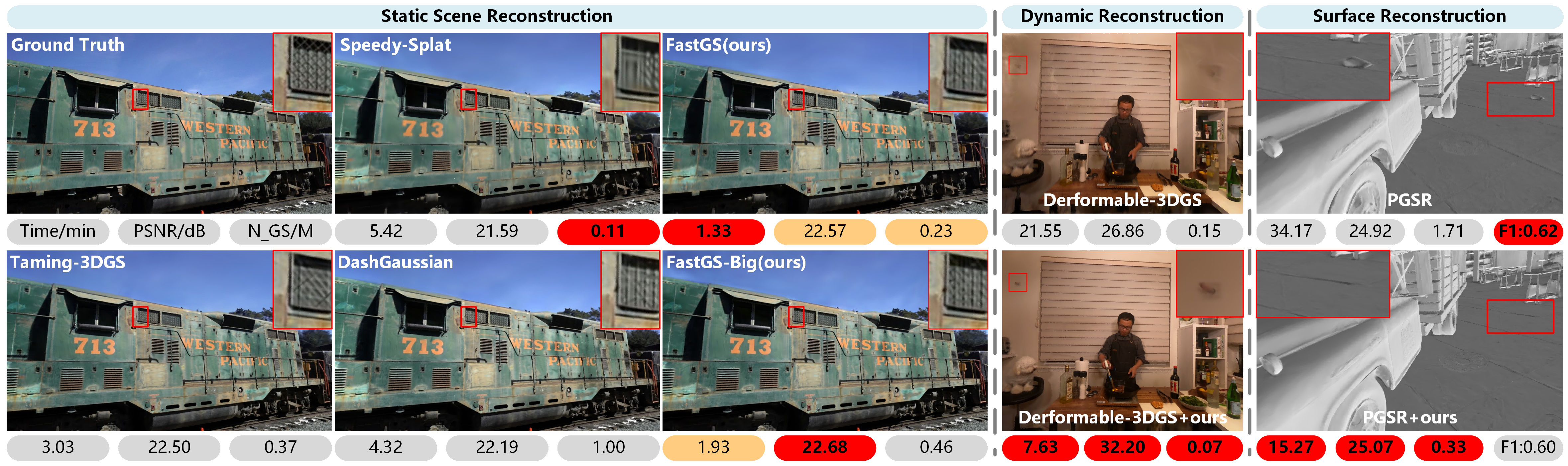
FastGS is a general acceleration framework that supercharges 3D Gaussian Splatting training while maintaining Comparable rendering quality. Our method stands out with:
- ⚡ Blazing Fast Training: Achieve SOTA results within 100 seconds. 3.32× faster than DashGaussian on Mip-NeRF 360 dataset. 15.45× acceleration vs vanilla 3DGS on Deep Blending.
- ⚡ High fidelity: Comparable rendering quality with SOTA methods
- 🎯 Easy Integration: Seamlessly integrates with various backbones (Vanilla 3DGS, Scaffold-GS, Mip-splatting, etc.)
- 🛠️ Multi-Task Ready: Proven effective across dynamic scenes, surface reconstruction, sparse-view, large-scale, and SLAM tasks
- 💡 Memory-Efficient: Low GPU Memory requirements make it accessible for various hardware setups
- 🔧 Easy Deployment: Simple post-training tool for feedforward 3DGS that works out-of-the-box
📢 Latest Updates
🔥 [2026.03] The surface reconstruction code Fast-PGSR has been released!
🎉 [2026.02] Our work has been accepted to CVPR 2026! 🤗🤗🤗
🥇 [2026.01] Our method was used as a component in the winning solution (1st place🥇) of the SIGGRAPH Asia 2025 3DGS Fast Reconstruction Challenge. We sincerely thank the 3DV-CASIA for their interest and adoption of our work.
🔥 [2025.12.03] The sparse-view reconstruction code Fast-DropGaussian has been released!
🔥 [2025.11.29] The dynamic scene reconstruction code Fast-D3DGS has been released!
🔧 [2025.11.27] The tutorial has been released — see the Wiki!
📄 [2025.11.26] The supplementary material has been released here!
🔥 [2025.11.17] Pre-trained model Released 🤗!
🔥 [2025.11.16] Code Released - Get Started Now! 🚀
🎯 Coming Soon
Released Modules
- Dynamic Scenes Reconstruction — Fast-D3DGS (based on Deformable-3D-Gaussians) — Released
- Sparse-view Reconstruction — Fast-DropGaussian (based on DropGaussian) — Released
- Surface Reconstruction — Fast-PGSR (based on PGSR) — Released
To Be Released
- Backbone Enhancing — based on Mip-splatting
- SLAM — based on Photo-SLAM
- Autonomous Driving Scenes — based on street_gaussians
- Large-scale Reconstruction — based on OctreeGS
🏗️ Training Framework
Our training pipeline leverages PyTorch and optimized CUDA extensions to efficiently produce high-quality trained models in record time.
💻 Hardware Requirements
- GPU: CUDA-ready GPU with Compute Capability 7.0+
- Memory: 24 GB VRAM (for paper-quality results; we recommend NVIDIA RTX4090)
📦 Software Requirements
- Conda (recommended for streamlined setup)
- C++ Compiler compatible with PyTorch extensions
- CUDA SDK 11 (or compatible version)
- ⚠️ Important: Ensure C++ Compiler and CUDA SDK versions are compatible
⚠️ CUDA Version Reference
Our testing environment uses the following CUDA configuration:
| Component | Version |
|---|---|
| Conda environment CUDA version | 11.6 |
Ubuntu system nvidia-smi CUDA |
12.2 |
nvcc -V compiler version |
11.8 (v11.8.89) |
Note: The Conda CUDA and system CUDA versions may differ. The compiler version (
nvcc) is what matters for PyTorch extensions compilation (diff-gaussian-rasterization_fastgs).
🚀 Quick Start
📥 Clone the Repository
git clone https://github.com/fastgs/FastGS.git --recursive
cd FastGS
⚙️ Environment Setup
We provide a streamlined setup using Conda:
# Windows only
SET DISTUTILS_USE_SDK=1

# Create and activate environment
conda env create --file environment.yml
conda activate fastgs
📂 Dataset Organization
Organize your datasets in the following structure:
datasets/
├── mipnerf360/
│   ├── bicycle/
│   ├── flowers/
│   └── ...
├── db/
│   ├── playroom/
│   └── ...
└── tanksandtemples/
    ├── truck/
    └── ...
The MipNeRF360 scenes are hosted by the paper authors here. You can find our SfM data sets for Tanks&Temples and Deep Blending here.
🎯 Training & Evaluation
⚡ FastGS (Standard)
Train the base model with optimal speed and quality balance:
bash train_base.sh
🎨 FastGS-Big (High Quality)
For enhanced quality with slightly longer training time:
bash train_big.sh
📋 Advanced: Command Line Arguments for train.py
--loss_thresh
Threshold of the loss map; a lower value generally results in more Gaussians being retained.
--grad_abs_thresh
Absolute gradient (same as Abs-GS) threshold for split.
--grad_thresh
Gradient(same as vanilla 3DGS) threshold for clone.
--highfeature_lr
Learning rate for high-order SH coefficients (features_rest).
--lowfeature_lr
Learning rate for low-order SH coefficients (features_dc).
--dense
Percentage of scene extent (0--1) a point must exceed to be forcibly densified.
--mult
Multiplier for the compact box to control the tile number of each splat
--source_path / -s
Path to the source directory containing a COLMAP or Synthetic NeRF data set.
--model_path / -m
Path where the trained model should be stored (output/<random> by default).
--images / -i
Alternative subdirectory for COLMAP images (images by default).
--eval
Add this flag to use a MipNeRF360-style training/test split for evaluation.
--resolution / -r
Specifies resolution of the loaded images before training. If provided 1, 2, 4 or 8, uses original, 1/2, 1/4 or 1/8 resolution, respectively. For all other values, rescales the width to the given number while maintaining image aspect. If not set and input image width exceeds 1.6K pixels, inputs are automatically rescaled to this target.
--data_device
Specifies where to put the source image data, cuda by default, recommended to use cpu if training on large/high-resolution dataset, will reduce VRAM consumption, but slightly slow down training. Thanks to HrsPythonix.
--white_background / -w
Add this flag to use white background instead of black (default), e.g., for evaluation of NeRF Synthetic dataset.
--sh_degree
Order of spherical harmonics to be used (no larger than 3). 3 by default.
--convert_SHs_python
Flag to make pipeline compute forward and backward of SHs with PyTorch instead of ours.
--convert_cov3D_python
Flag to make pipeline compute forward and backward of the 3D covariance with PyTorch instead of ours.
--debug
Enables debug mode if you experience erros. If the rasterizer fails, a dump file is created that you may forward to us in an issue so we can take a look.
--debug_from
Debugging is slow. You may specify an iteration (starting from 0) after which the above debugging becomes active.
--iterations
Number of total iterations to train for, 30_000 by default.
--ip
IP to start GUI server on, 127.0.0.1 by default.
--port
Port to use for GUI server, 6009 by default.
--test_iterations
Space-separated iterations at which the training script computes L1 and PSNR over test set, 7000 30000 by default.
--save_iterations
Space-separated iterations at which the training script saves the Gaussian model, 7000 30000 <iterations> by default.
--checkpoint_iterations
Space-separated iterations at which to store a checkpoint for continuing later, saved in the model directory.
--start_checkpoint
Path to a saved checkpoint to continue training from.
--quiet
Flag to omit any text written to standard out pipe.
--feature_lr
Spherical harmonics features learning rate, 0.0025 by default.
--opacity_lr
Opacity learning rate, 0.05 by default.
--scaling_lr
Scaling learning rate, 0.005 by default.
--rotation_lr
Rotation learning rate, 0.001 by default.
--position_lr_max_steps
Number of steps (from 0) where position learning rate goes from initial to final. 30_000 by default.
--position_lr_init
Initial 3D position learning rate, 0.00016 by default.
--position_lr_final
Final 3D position learning rate, 0.0000016 by default.
--position_lr_delay_mult
Position learning rate multiplier (cf. Plenoxels), 0.01 by default.
--densify_from_iter
Iteration where densification starts, 500 by default.
--densify_until_iter
Iteration where densification stops, 15_000 by default.
--densify_grad_threshold
Limit that decides if points should be densified based on 2D position gradient, 0.0002 by default.
--densification_interval
How frequently to densify, 100 (every 100 iterations) by default.
--opacity_reset_interval
How frequently to reset opacity, 3_000 by default.
--lambda_dssim
Influence of SSIM on total loss from 0 to 1, 0.2 by default.
--percent_dense
Percentage of scene extent (0--1) a point must exceed to be forcibly densified, 0.01 by default.
Note that similar to MipNeRF360 and vanilla 3DGS, we target images at resolutions in the 1-1.6K pixel range. For convenience, arbitrary-size inputs can be passed and will be automatically resized if their width exceeds 1600 pixels. We recommend to keep this behavior, but you may force training to use your higher-resolution images by setting -r 1.
🎬 Interactive Viewers
Our 3DGS representation is identical to vanilla 3DGS, so you can use the official SIBR viewer for interactive visualization. For a quick start without local setup, try the web-based Supersplat.
🎯 Quick Facts
| Feature | FastGS | Previous Methods |
|---|
Questions
What is FastGS?
fastgs/FastGS is a public repo on GitHub by fastgs. [CVPR 2026 Highlight, the CVPR Compute Gold Star] Offical code for "FastGS: Training 3D Gaussian Splatting in 100 Seconds".
Is FastGS open source?
It declares the MIT license on GitHub.
Does FastGS run on macOS, Windows or Linux?
Its maker tagged it for Linux. That is declared by the maker; Take My Repo has not tested it.
How do I install FastGS?
Open "Take it" on its page: Take My Repo writes an install plan for your machine and hands it to your AI agent (Claude Code, Codex or Cursor), which asks you before each step. Take My Repo has not tested it on any machine.


