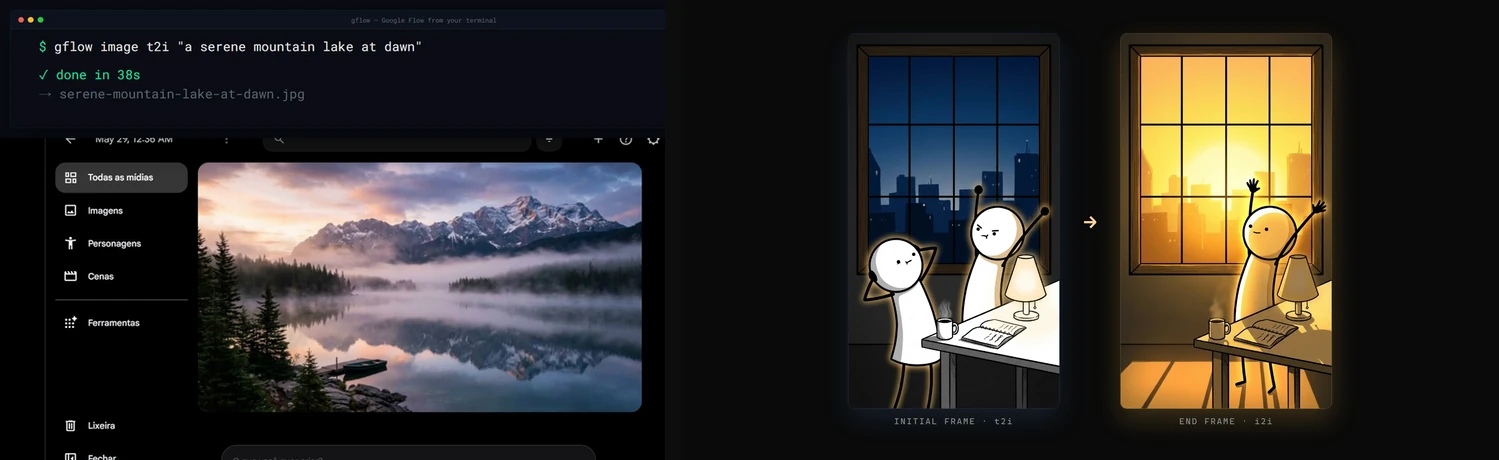
gflow-cli: MCP server and CLI for Google Flow (Veo 3.1, Omni, Nano Banana)
gflow-cli is an open-source MCP server and command-line tool that automates Google Flow. It generates Veo 3.1 and Omni video and Nano Banana and Imagen images from Claude Code, Claude Desktop, Cursor, Codex, VS Code or your terminal, billed to your own Google account's Flow credits. Install it from PyPI with uv tool install gflow-cli (MIT, macOS, Windows and Linux).


An independent project, not affiliated with Google. It drives your own signed-in Flow session in a real Chrome window, so Google's terms apply to your account: read the DISCLAIMER and ACCOUNT_SAFETY.
gflow-cli at a glance
|
|
| What it is |
One Python package that is both a CLI (gflow) and an MCP server (gflow mcp run, gflow serve) for Google Flow |
| Agent surface |
27 MCP tools plus resources and prompts, over stdio and Streamable HTTP; listed in the official MCP Registry as io.github.ffroliva/gflow-cli |
| Terminal surface |
70+ commands with typed exit codes, most with --json output; gflow --help --json prints the whole tree for agents |
| Video models |
Veo 3.1 Lite, Fast and Quality; Omni Flash and Omni 1.2 Flash (up to 15 s, up to 7 reference images) |
| Image models |
Nano Banana 2.1, Nano Banana Pro, Nano Banana 2 Lite, Imagen 4 |
| Works with |
Claude Code (plugin), Claude Desktop, Cursor, VS Code, Codex, any MCP client, shell scripts and CI |
| Cost |
Free and MIT-licensed. Video bills your own Flow credits; images spend no credits (they count against a daily image quota) |
| Maturity |
130+ releases since May 2026; every release since v0.54.0 is live-verified against real Google Flow before it ships |
What can gflow-cli do?
- Generate video: text-to-video, image-to-video with a start and an end frame, and reference-to-video, on Veo 3.1 and Omni (
gflow video t2v | i2v | r2v, or gflow video generate to pick the mode for you).
- Make long videos:
gflow video extend --segments N continues a clip past Flow's 8 s limit with a continuous join, gflow video chain links shots frame to frame, and gflow scene create stitches clips server-side for free.
- Generate images: text-to-image and image-to-image, 1–4 per call, five aspect ratios (
gflow image t2i | i2i).
- Keep characters consistent:
gflow character create makes a reusable Flow Character (face, body, voice), and prompts can mention it as @Name.
- Upscale: video to 1080p (or a GIF), images to 2K, or 4K on an Ultra plan.
- Run batches and pipelines: JSON batch runs where a row can build on an earlier row (
gflow run), multi-scene films from a manifest (gflow movie run), and persistent Agent-Mode briefs (gflow instructions).
- Rewrite prompts:
--tool creative-director and two other built-in prompt tools (reverse-engineer, storyboard), or your own (TOOLS).
- Track spend and media: the Veo credit balance (
gflow credits), a local media catalog (gflow data), a health check (gflow doctor), and output to S3, MinIO or Google Cloud Storage.
Features on the way are tracked in #1367.
How do I connect Claude Code, Cursor or Codex to Google Flow?
Install gflow-cli and sign in once, then register the MCP server with your client.
uv tool install gflow-cli
gflow auth login --browser chrome
| Client |
One step |
| Claude Code |
/plugin marketplace add ffroliva/gflow-cli then /plugin install gflow@gflow-cli (adds the MCP server plus the gflow-cli and video-production skills) |
| Claude Desktop |
gflow mcp setup |
| Cursor |
gflow mcp setup --target cursor |
| VS Code |
gflow mcp setup --target vscode |
| Codex |
Skills: from a clone, codex plugin marketplace add . then codex plugin add gflow@gflow-cli; MCP: register gflow mcp run as a stdio server |
| Any MCP client |
command uvx, arguments gflow-cli mcp run; or gflow serve for Streamable HTTP at /mcp |
The Claude Code plugin ships disabled, because enabling it starts a server that can spend your Veo credits. For a hard guarantee, register gflow mcp run --no-spend, which never registers the credit-spending tools. Full setup: docs/MCP.md.
60-second quick start
Compatible with macOS (Apple Silicon & Intel), Windows, and Linux (x86_64 / Xvfb).
# 1 · Install (uv recommended; also: pip install gflow-cli)
uv tool install gflow-cli
uv tool run --from gflow-cli playwright install chromium     # one-time, ~150 MB
# optional extras: 'gflow-cli[tts]' for `audio narrate` (Edge), 'gflow-cli[chain]' for `video chain`/`assemble`/`captions`
# later: `gflow update` upgrades in place (other commands show a banner when a newer release is out)
# Windows pip install at 0.99.0 or older? Upgrade once by hand first (#1298):
#   close every gflow process, then <venv>\Scripts\python.exe -m pip install --upgrade gflow-cli
#   (keep your extras in the spec, e.g. "gflow-cli[patchright]", or their pins stay behind)
#   (a --user install: py -3.X -m pip install --user --upgrade gflow-cli; see https://github.com/ffroliva/gflow-cli/blob/main/docs/USAGE.md#gflow-update)

# 2 · Authenticate (one-time, opens a real Chrome window)
# Behind a proxy (e.g. Clash)? Set GFLOW_CLI_BROWSER_PROXY=http://127.0.0.1:7897 first (docs/CONFIGURATION.md)
gflow auth login --browser chrome

# Check the session (spends nothing)
gflow auth status
gflow credits user          # Veo credit balance (no browser when the direct read is on and the saved session is accepted; spends nothing)
gflow capabilities          # what gflow can drive here: yes/no/partial per capability (no call to Flow)
gflow models list           # image and video models, aliases, durations (no call to Flow)
# Every error says whether Flow may have charged you and what to do next: docs/ERRORS.md

# 3 · Generate
gflow image t2i "a hot air balloon over Tokyo at sunrise"
# or:
gflow video t2v "Slow cinematic push-in on a sunlit forest clearing" --aspect 16:9
# or mint a reusable Character (face + body reference):
gflow character create --project <id> --name "Aria" --face-prompt "..." --body-prompt "..."
Outputs land under $GFLOW_CLI_OUTPUT_DIR, or you can route them to S3, MinIO, or Google Cloud Storage with GFLOW_CLI_STORAGE_URI. The first call takes 30 to 90 seconds while Chromium warms up; later calls reuse the warm session.
To save one result at an exact path, pass --out-file PATH (for example gflow image t2i "..." --out-file hero.png). Use -o/--output to select the output format (json|table|id). Non-format arguments to -o fail fast with exit 2 reminding you to use --out-file. See USAGE.
Scripts that branch on exit codes can opt in to the stable core now (0 ok, 1 error, 2 usage, 3 auth, 130 interrupted) by setting GFLOW_CLI_EXIT_CODES=2. It becomes the default in a later release. See ERRORS: the stable core.
Why --browser chrome? It is the only strategy that marks the profile as a real-Chrome profile, which is what later generation runs open it with. The default auto picks it whenever Chrome is installed — see docs/AUTHENTICATION.md.
Installing from a local checkout? uv tool install <path> ignores uv.lock and resolves dependencies from the pyproject.toml ranges, so it can hand you a Playwright build this project has never tested. Playwright ships the browser driver, and an untested minor can wedge a generation silently. Carry the locked version explicitly:
uv tool install --force --with playwright==1.59.0 .
Installing from PyPI (uv tool install gflow-cli) is unaffected — the published range is upper-bounded. Check what you actually have with uv tool run --from gflow-cli python -c "import importlib.metadata as m; print(m.version('playwright'))".
For the full 10-minute walkthrough with troubleshooting and multi-account setup, see USER_GUIDE: Journey 1.
Which Google Flow models does gflow-cli support?
gflow models list prints the full list from the installed version (including veo-lite-lp, a lower-priority Veo 3.1 Lite), with no call to Flow. Its retires on column shows the models Flow has said it will retire.
| Kind |
Model |
Alias |
Max length / refs |
| Video |
Omni 1.2 Flash |
omni-1.2 |
15 s, 7 reference images |
| Video |
Omni Flash (1.1) |
omni-flash |
10 s, 7 reference images; Flow retires it on 2026-12-05 |
| Video |
Veo 3.1 Quality |
veo-quality |
8 s; Flow retires it on 2026-12-05 |
| Video |
Veo 3.1 Fast |
veo-fast |
8 s, 3 reference images; Flow retires it on 2026-12-05 |
| Video |
Veo 3.1 Lite |
veo-lite |
8 s, 3 reference images |
| Image |
Nano Banana 2.1 |
nano2 |
10 reference images |
| Image |
Nano Banana Pro |
nano-pro |
10 reference images |
| Image |
Nano Banana 2 Lite |
nano2-lite |
3 reference images |
| Image |
Imagen 4 (not in Flow's own menu) |
imagen4 |
3 reference images |
For the three models Flow retires on 2026-12-05, use veo-lite or omni-1.2 instead (known issue).
Video comes in 16:9 and 9:16; images in 16:9, 4:3, 1:1, 3:4 and 9:16. Which models and durations your account sees depends on your Flow plan; gflow capabilities reports what this install can drive.
How does gflow-cli protect my Flow credits and my account?
- Only video spends credits. Image generation spends no credits (it counts against a daily image quota), and Scene stitching is free.
- A server that cannot spend.
gflow mcp run --no-spend never registers the credit-spending tools, so an agent cannot call them at all.
- Cost before commitment on multi-clip runs.
video chain, video extend and movie run take --dry-run to show the plan without submitting anything, and chain and extend ask before they spend.
- Never billed twice. A billed request is sent once and never retried automatically, and
gflow run --resume regenerates only the rows the local catalog does not already hold.
- Every error says whether you were charged. Errors carry
charged: yes | no | maybe and a next_action (retry, reauth, reconcile) in both the CLI's --json output and MCP replies (ERRORS).
- Paced like a person. gflow uses a real Chrome window with randomised interaction timing and paced submissions. It does no IP rotation, uses no proxy unless you set one, and does no fingerprint spoofing by default (ACCOUNT_SAFETY).
- Fails loudly.