system-design-101
Explain complex systems using visuals and simple terms. Help you prepare for system design interviews.
- 91k
- 20 mo ago
CLI and library to execute commands over one or more AWS or Azure accounts concurrently.
Repo fidelity/awsrun, read from GitHub 11 h ago. fidelity has not joined Take My Repo.
fidelity/awsrun is a public repo on GitHub by fidelity. CLI and library to execute commands over one or more AWS or Azure accounts concurrently. It declares the Apache-2.0 license on GitHub. It is written mainly in Python, has 81 stars and last changed on 2026-09-28. Nobody has reviewed it on Take My Repo yet, which says nothing about its quality. Read from GitHub on 2026-11-25.
Explain complex systems using visuals and simple terms. Help you prepare for system design interviews.
Universal Command Line Interface for Amazon Web Services
CLI tool and library to concurrently execute user-defined commands across AWS accounts or Azure subscriptions.
Note As of release 3.0.0, installation has changed with the introduction of optional dependencies. Previously,
pip install awsrunwould install all dependencies needed forawsrun,azurerun, and all of the bundled commands. You must now specify the optional dependencies when installing:pip install "awsrun[aws,azure]". See Installation for more details.
Awsrun/azurerun is both a CLI tool and Python package that can be used to execute commands concurrently over one or more AWS accounts or Azure subscriptions. Commands are user-defined Python modules that implement a simple interface to abstract away the complications of obtaining credentials for Boto3 and Azure SDK sessions—especially when using SAML authentication and/or cross-account access in AWS. The key features of awsrun/azurerun include the following:
Concurrent Account Processing: Run a command concurrently across subset or all of your accounts/subscriptions. A worker pool manages the execution to ensure accounts/subscriptions are processed quickly, so you don't have to wait for them to be processed one at a time. Process hundreds of accounts in a few minutes.
SAML and Cross-Account Access: Tired of dealing with AWS temporary STS credentials with SAML and cross-account authentication? Use any of the included credential plug-ins based on your needs, or build your own plug-in to provide credentials for your command authors. Don't use SAML? Define profiles in your AWS credentials file instead. With Azure, the default credentials are obtained via the Azure CLI or interactively via the browser.
Built-in Command for AWS CLI & Azure CLI:
Ever wish you could run the standard AWS CLI tool or Azure CLI tool across
multiple accounts/subscriptions? Now you can using the included
aws or
az commands. These
commands are simple wrappers for AWS's and Azure's CLI tools respectively, but
with the added benefits of using metadata to select multiple accounts as well as
simplified credential handling.
User-Defined Commands: Build your own commands using the powerful Boto3 SDK or Azure SDK without the hassle of obtaining sessions and credentials. Thanks to a simple interface, commands are easy to build and can be integrated directly into the CLI with custom arguments and help messages.
Metadata Enriched Accounts: Accounts/subscriptions can be enriched with metadata from external sources, such as a corporate CMBD, via the account loader plug-in mechanism. This enables you to use metadata to select accounts to process rather than explicitly listing each account/subscription on the command line. In addition, command authors have access to this metadata, so it can used while processing an account if needed.
These examples demonstrate the wide-range of possibilities when building your own awsrun & azurerun commands. While these commands are included in awsrun, they use the same command library that you would if building your own. Nothing is special about these commands other than they are included in the base install of awsrun. You could have built these yourself.
aws commandThis screencast illustrates the power of awsrun once it has been configured to
your environment using appropriate credential and account loader plug-ins. In
this demo, we use awsrun to gather VPC information. While we could do the same
using only AWS's native CLI, we would be limited to processing one account at a
time. Instead, we'll use awsrun and the built-in
aws command to
execute an AWS CLI command across multiple accounts concurrently. We'll also
make use of the awsrun's metadata explorer to select accounts for command
execution.

Note: The output has been obfuscated with random account numbers and identifiers.
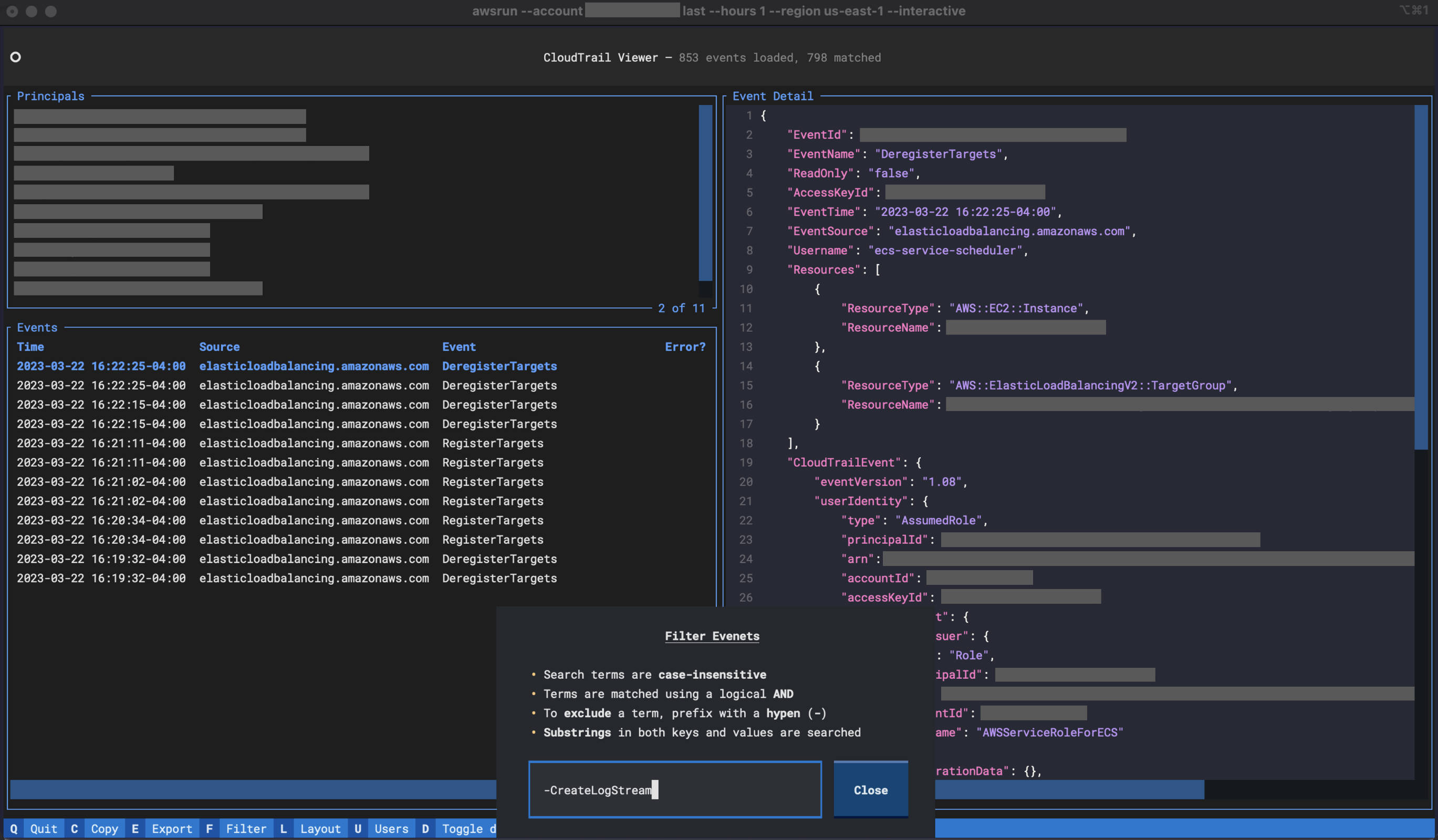
last commandThis screenshot demonstrates the use of the
last command to
interactively explore CloudTrail events. Don't have a simple means to view
CloudTrail logs? Tired of using the AWS Console? The last command provides a
simple way of viewing events in one or more accounts.
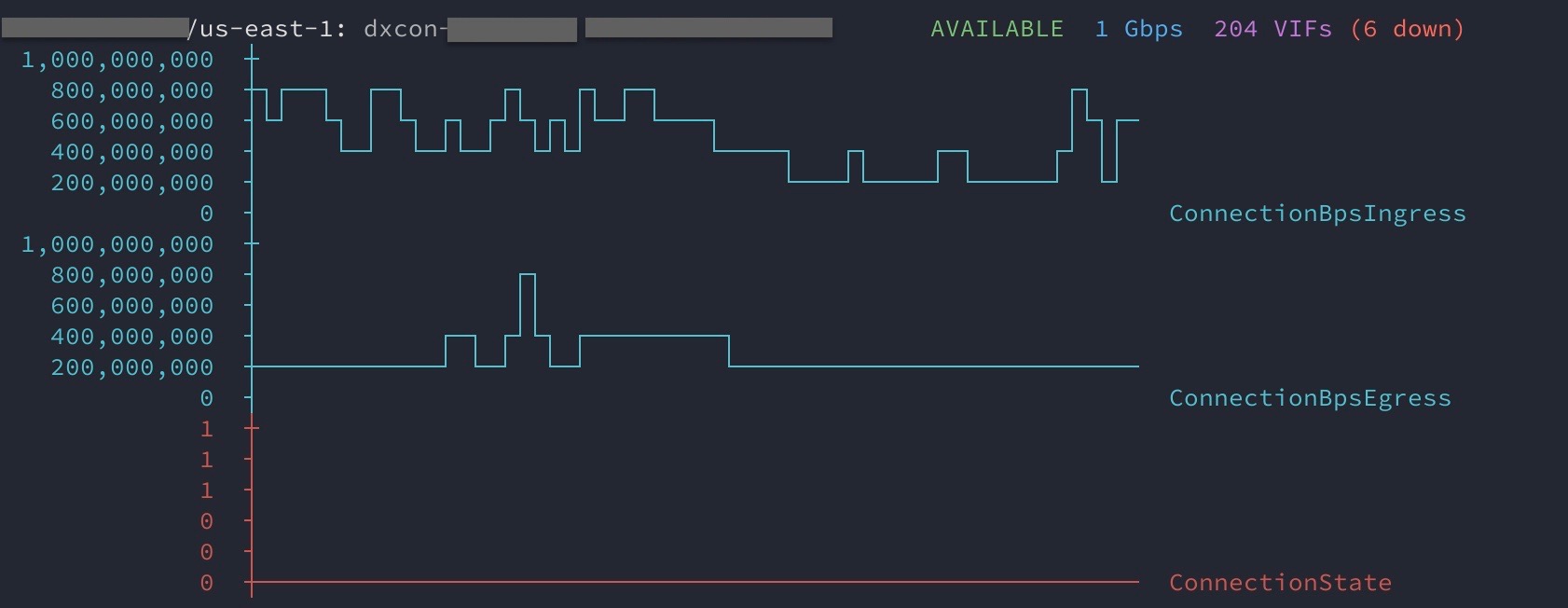
dx_status commandIf you manage AWS Direct Connects to provide connectivity to your on-premise
corporate networks, you might find the
dx_status
command helpful. It provides an overview of Direct Connects contained within an
account. This includes pulling CloudWatch metrics and generating terminal-based
graphs using sparklines and
ASCII-based charts.

Python 3.7 or higher is required.
To install only awsrun:
pip install "awsrun[aws]"
To install only azurerun:
pip install "awsrun[azure]"
To install both awsrun and azurerun:
pip install "awsrun[aws,azure]"
In all cases, the console scripts awsrun and azurerun are installed, but
only the dependencies for the specified CSPs are installed.
Some of the bundled commands have additional dependencies. You will be prompted to install those if you use one of them. Alternatively, you can install all of those ahead of time:
pip install "awsrun[cmds]"
Finally, to install from source with the development dependencies:
git clone https://github.com/fidelity/awsrun.git
cd awsrun
pip install -e ".[aws,azure,cmds,dev]"
Out of the box, the utility of awsrun is limited as most of its power comes from
the configuration of an account loader
plug-in (to
simplify the selection of multiple accounts) and a credential loader
plug-in (to
simplify access to those accounts). With that said, however, you can still use
it, as it will default to loading credentials from your $HOME/.aws/credentials
file. While not convenient when managing hundreds of accounts, it will suffice
to get you started.
Assume you wanted to list the EC2 instances in two accounts: 100200300400
and 200300400100. We can use the built-in
aws command to
execute any AWS CLI
command
across one or more accounts concurrently. Be sure you have followed the
installation instructions in the previous section. Then, create two profiles,
[100200300400] and [200300400100], in your local AWS credentials file
$HOME/.aws/credentials. If awsrun cannot find a profile for named for the
specific account, it will fallback to the [default] profile.
Note: The AWS credentials file is not part of awsrun, but it is used as the default mechanism to obtain credentials if more advanced options have not been configured. For help on the configuration of the AWS credential file, refer to AWS CLI Named Profiles.
With the profiles defined, you can now run the following to list the EC2 instances in both accounts across multiple regions concurrently:
$ awsrun --account 100200300400 --account 200300400100 aws ec2 describe-instances --region us-east-1 --region us-west-2
2 accounts selected:

100200300400, 200300400100

Proceed (y/n)? y
...
If, instead, you want to list lambda functions in those accounts:
$ awsrun --account 100200300400 --account 200300400100 aws lambda list-functions --region us-east-1 --region us-west-2
2 accounts selected:

100200300400, 200300400100

Proceed (y/n)? y
...
There are several other built-in
commands that have
been included in awsrun. The more interesting ones include the
last command to
inspect CloudTrail events as well as the
dx_status
command to check the status of Direct Connect circuits. Remember, you are
encouraged to build your own custom commands. These have been provided to show
you how to do so.
Let's list all the Azure VMs in two subscriptions:
00000000-0000-0000-0000-000000000000 and 11111111-1111-1111-1111-111111111111.
We can use the built-in
az command to
execute an Azure CLI
command
across one or more subscriptions concurrently. Assuming you have already
followed the installation instructions:
$ az login   # Use the Azure CLI to obtain credentials
$ azurerun --account 00000000-0000-0000-0000-000000000000 --account 11111111-1111-1111-1111-111111111111 az vm list --output table
2 accounts selected:

00000000-0000-0000-0000-000000000000, 11111111-1111-1111-1111-111111111111

Proceed (y/n)? y
...
Name   ResourceGroup      Location    Zones
-----  -----------------  ----------  -----
vm1    rg1                centralus   1
vm2    rg1                eastus2     1

Name   ResourceGroup      Location    Zones
-----  -----------------  ----------  -----
vm1    rg2                centralus   1
vm2    rg2                eastus1     1
vm3    rg2                eastus2     1
Out of the box, the utility of azurerun is limited as most of its power comes from the configuration of an account loader plug-in (to simplify selection of multiple accounts). Using the included AzureCLI plug-in, azurerun will use the Azure CLI to obtain a list of subscriptions and metadata associated with those. Furthermore, assuming you use a naming convention for your subscriptions, we can parse the name to pull out additional metadata. For example, if your subscriptions are named "azure-retail-prod" and "azure-retail-nonprod", then we can use this regexp to add the "bu" and "env" metadata attributes:
azure-(?P<bu>[^-]+)-(?P<env>.+)
Create the following azurerun configuration file called .azurerun.yaml in your
home directory:
Accounts:
  plugin: awsrun.plugins.accts.azure.AzureCLI
  options:
    name_regexp: 'azure-(?P<bu>[^-]+)-(?P<env>.+)'
Now, you can use the metadata filters to specify subscriptions instead of enumerating them on the azurerun command line. Here are a few examples:
# Let's see what metadata we can use
$ azurerun --metadata
bu
cloudName
env
homeTenantId
id
isDefault
name
state
tenantId

# Run the command over all subscriptions.
$ azurerun az vm list --output table
...

# Run the command over all prod subscriptions.
$ azurerun --include env=prod az vm list --output table
...

# Run the command over all enabled, nonprod subscriptions
$ azurerun --include state=Enabled --include Env=nonprod az vm list --output table
...
There are several other built-in commands that have been included in azurerun. Remember, you are encouraged to build your own custom commands. These have been provided to show you how to do so.
awsrun includes extensive documentation, which includes the following:
The CLI User Guide includes basic usage, configuration of awsrun, and how to use the account loader and credential loader plug-ins to enhance the user experience on the CLI.
The Library User Guide includes pointers to the key documentation required to use awsrun programmatically instead of via the CLI. All of the awsrun modules are also extensively documented.
The How-to Write Your Own Commands guide provides everything you need to write your own custom awsrun commands. This is where you'll spend a lot of time once you become familiar with the capabilities of awsrun.
fidelity/awsrun is a public repo on GitHub by fidelity. CLI and library to execute commands over one or more AWS or Azure accounts concurrently.
It declares the Apache-2.0 license on GitHub.
Its maker has not tagged a system, so it is unknown here. Its README says what it needs.
Open "Take it" on its page: Take My Repo writes an install plan for your machine and hands it to your AI agent (Claude Code, Codex or Cursor), which asks you before each step. Take My Repo has not tested it on any machine.
21 Lessons, Get Started Building with Generative AI
Linux, Jenkins, AWS, SRE, Prometheus, Docker, Python, Ansible, Git, Kubernetes, Terraform, OpenStack, SQL, NoSQL, Azure, GCP, DNS, Elastic, Network, Virtualization. DevOps Interview Questions
A curated list of awesome Amazon Web Services (AWS) libraries, open source repos, guides, blogs, and other resources. Featuring the Fiery Meter of AWSome.
Enhanced ChatGPT Clone: Features Agents, MCP, Skills, DeepSeek, Anthropic, AWS, OpenAI, Responses API, Azure, Groq, o1, GPT-5, Mistral, OpenRouter, Vertex AI, Gemini, Artifacts, AI model switching, message search, Code Interpreter, langchain, DALL-E-3, OpenAPI Actions, Functions, Secure Multi-User Auth, Presets, open-source for self-hosting. Active
Its last change on GitHub was on 2026-09-28. Take My Repo does not judge from that whether it is maintained.
Nobody has reviewed it on Take My Repo yet, which says nothing about its quality.
Take My Repo cannot say: it does not audit code and has not run awsrun. What is known comes from GitHub. It declares the Apache-2.0 license on GitHub. Its last change was on 2026-09-28. It has 81 stars, which measure popularity, not safety. Nobody has reviewed it on Take My Repo yet, which says nothing about its quality. Read the source before you run it. With "Take it", your AI agent shows each step and asks you before running it; README text is treated as data, not as instructions.