fastapi
FastAPI framework, high performance, easy to learn, fast to code, ready for production
- 105k
- Python
- MIT
- 17 h ago
Archived and unsupported. Local-first loop/task and knowledge assistant with web UI, CLI, FastAPI, SQLite RAG, and an MCP server.
Repo fitchmultz/cloop, read from GitHub 1 h ago. fitchmultz has not joined Take My Repo.
fitchmultz/cloop is a public repo on GitHub by fitchmultz. Archived and unsupported. Local-first loop/task and knowledge assistant with web UI, CLI, FastAPI, SQLite RAG, and an MCP server. It declares the MIT license on GitHub. It is written mainly in Python, has 2 stars and last changed on 2026-10-19. It is archived: its maker no longer maintains it. Nobody has reviewed it on Take My Repo yet, which says nothing about its quality. Read from GitHub on 2026-11-25.
Cloop is a play on “closed loops”: a local assistant for offloading open mental loops into a system you trust, then helping you retrieve, act on, close, or release them without carrying the whole burden in your head.
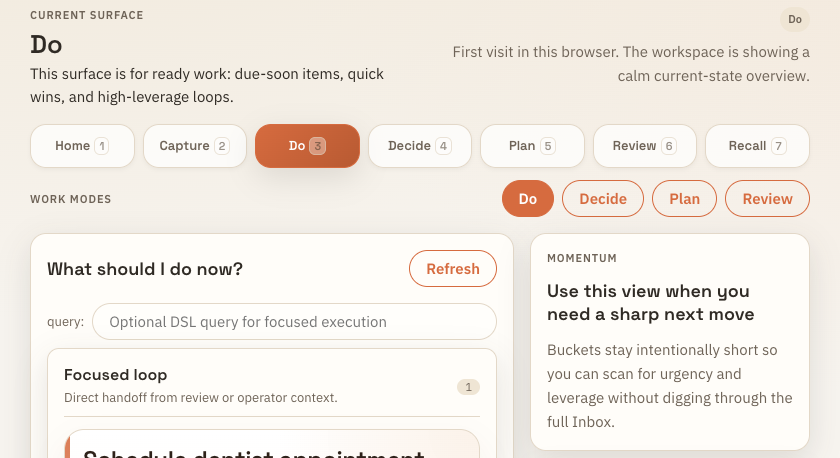
The web workspace opens on a focused “Do” surface instead of a full backlog dump:
That is the core promise: capture what your brain keeps rehearsing, preserve the context locally, and make the next step easy enough that loops can actually close.
A loop is any unresolved thing your mind keeps reopening: a task, worry, decision, follow-up, reminder, idea, obligation, or piece of context you are afraid to lose. Cloop exists to take those loops out of mental RAM, keep them in a private local system, and help move them toward closure or conscious release.
Cloop is for people who carry too many unresolved loops and want a private local assistant/tool/agent for:
The real burden is not just having tasks. It is repeatedly carrying unresolved cognitive state:
Most tools store items but leave your brain as the persistence layer. Cloop combines capture, memory, retrieval, review, and agent assistance into a local-first loop system. The assistant can help organize and retrieve, but deterministic Python services still own validation, state transitions, idempotency, storage, and undoable writes.
| Problem | Cloop capability | Proof surface |
|---|---|---|
| “I need to dump messy thoughts without sorting them first.” | Life/capture flow that turns raw text, voice-style dumps, links, or evidence into structured loops and memory candidates. | Web workspace, POST /life/message, uv run cloop capture ... |
| “I forget what the next action actually is.” | Loop state model with inbox/actionable/blocked/scheduled/completed states, next actions, due dates, review cohorts, and “Next 5” prioritization. | Web Do/Review tabs, uv run cloop next, /loops/next |
| “My context is trapped in chat.” | Durable memory CRUD/search shared across web, CLI, HTTP, and MCP. | uv run cloop memory ..., memory routes, memory.* MCP tools |
| “I want local RAG without standing up infrastructure.” | Recursive ingest, chunking, embeddings, SQLite storage, and grounded ask/chat responses. | uv run cloop ingest, uv run cloop ask, /ingest, /ask |
| “Agents need tools but not unchecked authority.” | MCP and HTTP mutation surfaces reuse shared idempotency, validation, provenance, and review/undo contracts. | cloop-mcp, shared loop/review/memory services |
Supported ingestion file types: .txt, .md, .markdown, .pdf.
uv sync --all-groups
pnpm --dir src/cloop/pi_bridge install --frozen-lockfile
pnpm --dir frontend install --frozen-lockfile
cp .env.example .env
Prerequisites: Python 3.14+, Node 25.8.2+, pnpm 11.0.9+, uv, and an authenticated pi installation for generative flows.
Edit .env. For a first local run, keep automation off and use pi for generation plus Ollama-compatible local embeddings:
CLOOP_PI_MODEL=zai/glm-5.2,kimi-coding/kimi-for-coding,openai-codex/gpt-5.5
CLOOP_PI_ORGANIZER_MODEL=zai/glm-5.2,kimi-coding/kimi-for-coding,openai-codex/gpt-5.5
CLOOP_PI_SELECTOR_MODE=fallback
CLOOP_PI_CHAT_MAX_TOOL_ROUNDS=4
CLOOP_PI_PLANNING_MAX_TOOL_ROUNDS=2
CLOOP_PI_ENRICHMENT_MAX_TOOL_ROUNDS=2
CLOOP_PI_RAG_MAX_TOOL_ROUNDS=2
CLOOP_PI_MUTATION_MAX_TOOL_ROUNDS=2
CLOOP_EMBED_MODEL=ollama/nomic-embed-text
CLOOP_OLLAMA_API_BASE=http://localhost:11434
CLOOP_AUTOPILOT_ENABLED=false
CLOOP_SCHEDULER_ENABLED=false
fallback asks pi --list-models which selectors are available and picks the first selector that pi --list-models reports as available for each role. See docs/ai_runtime.md for model selector, tool-budget, retry, streaming, and embedding details.
make run
Open http://127.0.0.1:8000/ for the web workspace, or http://127.0.0.1:8000/docs for Swagger.
uv run cloop capture "Return Amazon package by Friday" --tz-offset-min -420
uv run cloop loop list --status inbox
uv run cloop next
Then try document retrieval:
uv run cloop ingest ./my-docs
uv run cloop ask "What does the onboarding process say about PTO?" --k 5
cloop ask returns JSON with answer, retrieved chunks, sources, metadata, and a rerun_action.
core.db); retrieval data lives in SQLite (rag.db) by default.make help, use make check-fast while iterating, and run make ci for the full local release gate.make ci includes quality checks, bridge tests, frontend build/test, Python tests, package build, and metadata validation; use make test-all or make test-performance when you need performance-marker coverage.For a guided smoke-test path, use docs/verification_checklist.md.
flowchart LR
  UI[Web UI] --> API[FastAPI app]
  CLI[CLI] --> API
  MCP[MCP server] --> SERVICES[Shared services]
  API --> SERVICES
  SERVICES --> LOOPS[Loop + memory services]
  SERVICES --> RAG[RAG services]
  SERVICES --> REVIEW[Review + planning workflows]
  LOOPS --> CORE[(core.db)]
  RAG --> RAGDB[(rag.db)]
  SERVICES --> EVENTS[SSE + webhooks]
  SCHED[cloop-scheduler] --> SERVICES
Key design choices:
Go deeper:
pi to be installed, authenticated, and able to resolve the configured model selectors.CLOOP_AUTOPILOT_ENABLED=false, CLOOP_SCHEDULER_ENABLED=false.make ci) excludes tests marked performance; use make test-all or make test-performance when you need those signals.See SECURITY.md for security reporting and handling guidance.
If you need to wipe the default repo-local SQLite state and reinitialize from scratch:
make reset-local-data
When scheduling is enabled, run it as a separate process:
cloop-scheduler
make run, then open http://127.0.0.1:8000/http://127.0.0.1:8000/docsuv run cloop --helpuv run cloop-mcpmake helpUse these references after the quick path when you need exact commands, endpoints, or configuration details:
Validation is local-first and uses maintained make targets.
make help shows the short command guide.make check-fast is the normal development gate.make ci is the full local release gate: quality checks, bridge tests, frontend build/test, Python tests excluding performance, package build, and metadata validation.make test-all, make test-cov, and make test-performance are available when you need exhaustive, coverage, or performance-specific signals.For a guided validation path, use docs/verification_checklist.md.
Start with the short command guide:
make help
Most day-to-day work uses:
make run to start the local FastAPI appmake check-fast for rapid iterationmake ci for full local release-grade validationUse make help-all for the full target list, including release, coverage, performance, and maintenance commands.
Run make help, then use make run
fitchmultz/cloop is a public repo on GitHub by fitchmultz. Archived and unsupported. Local-first loop/task and knowledge assistant with web UI, CLI, FastAPI, SQLite RAG, and an MCP server.
It declares the MIT license on GitHub.
Its maker has not tagged a system, so it is unknown here. Its README says what it needs.
Open "Take it" on its page: Take My Repo writes an install plan for your machine and hands it to your AI agent (Claude Code, Codex or Cursor), which asks you before each step. Take My Repo has not tested it on any machine.
VoiceStudio is the open-source, fully-local ElevenLabs alternative — voice cloning, voice design, video dubbing, dictation, transcription & audiobook creation in 646 languages.
Reverse engineer anything with agents, from app behavior down to native binaries.
Compress tool outputs, logs, files, and RAG chunks before they reach the LLM. 20% fewer tokens for coding agents, 60-95% fewer tokens for JSON, same answers. Library, proxy, MCP server.
No. It is archived on GitHub: its maker no longer maintains it.
Nobody has reviewed it on Take My Repo yet, which says nothing about its quality.
Take My Repo cannot say: it does not audit code and has not run cloop. What is known comes from GitHub. It declares the MIT license on GitHub. It is archived: its maker no longer maintains it. It has 2 stars, which measure popularity, not safety. Nobody has reviewed it on Take My Repo yet, which says nothing about its quality. Read the source before you run it. With "Take it", your AI agent shows each step and asks you before running it; README text is treated as data, not as instructions.