
vizzi
Codebase visualization and exploration
- 2
- Apache-2.0
- 2 d ago
Repo fixed-width/vizzi, read from GitHub 2 d ago. fixed-width has not joined Take My Repo.
In short
fixed-width/vizzi is a public repo on GitHub by fixed-width. Codebase visualization and exploration. It declares the Apache-2.0 license on GitHub. It is written mainly in Rust, has 2 stars and last changed on 2026-11-20. Nobody has reviewed it on Take My Repo yet, which says nothing about its quality. Read from GitHub on 2026-11-20.
Vizzi
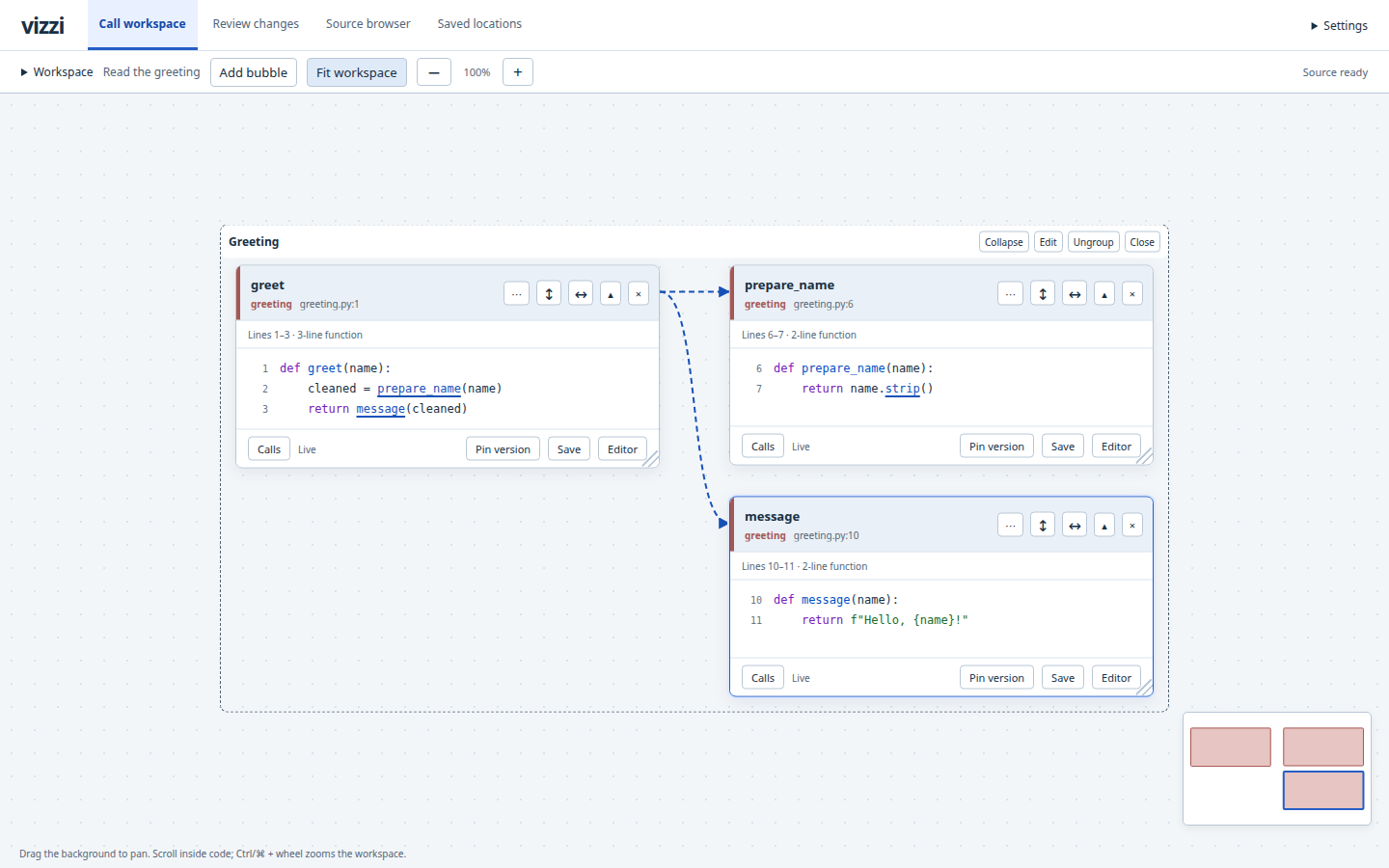
Vizzi helps you visualize your code, follow a call chain without losing the code you came from, and assist reviews.
It runs locally beside your editor. Source exploration is read-only; editing, refactoring and debugging stay in the editor.
Try it
Vizzi is an early preview. Download a release for Linux or macOS on x86-64 or ARM64, or build from source below. Prebuilt executables do not need Rust or a C compiler. Browser checks use Chromium on Linux; native checks also run on macOS. Basic browsing does not need Node.js. Optional language servers have their own runtime requirements. See the installation guide.
To build from a Vizzi checkout, install a current stable Rust toolchain and native C build tools, then run:
cargo build --locked --release -p vizzi
./target/release/vizzi \
  --root /path/to/project \
  --workers 1
Open the printed address, normally http://127.0.0.1:7474/. Select Add bubble, find a
function, and follow a highlighted call. With vizzi on your PATH, you can run it
without arguments from the project directory. --root selects another directory;
--cache overrides the automatically chosen workspace cache.
Stop the server with Ctrl-C.
Using VS Code? Install the bundled extension, then right-click a saved call name and choose Vizzi: Explore Call to open its caller and definition together in an editor tab.
For semantic navigation on a real project, configure its language server:
--pyright pyright-langserver for Python, --rust-analyzer rust-analyzer for Rust,
--ruby-lsp ruby-lsp for Ruby, or --clangd clangd with C/C++ compilation context.
For a guided first run, follow a Python, Rust, Ruby or C/C++ call trail using the included examples. No project build, language server or editor integration is required for these lessons.
What you can do
- Follow calls into neighbouring bubbles, inspect callers and references, and keep branches visible. Configured language servers resolve typed receivers, imports and references for Python, Rust, Ruby and C/C++.
- Arrange related views into groups and save browser-local tasks. Follow saved file changes live or pin an earlier source view.
- Browse source, compare Git revisions or working changes, and keep source locations and notes. Hand off a current location to VS Code when you want to work on it.
Rust, Python, Ruby, JavaScript, and TypeScript are selected by default, including JSX and TSX. Raw C/C++ browsing uses explicit source scopes. Language support and call resolution have important differences; a candidate match is not proof of a runtime call.
Documentation
- Documentation home
- Run Vizzi on your project
- Configure semantic navigation and local dependency source
- Review changes
- Troubleshooting
- Changelog
Contributing covers development and verification. Design contracts, plans and experiment records are indexed in the contributor documentation.
Questions
What is vizzi?
fixed-width/vizzi is a public repo on GitHub by fixed-width. Codebase visualization and exploration.
Is vizzi open source?
It declares the Apache-2.0 license on GitHub.
Does vizzi run on macOS, Windows or Linux?
Its maker has not tagged a system, so it is unknown here. Its README says what it needs.
How do I install vizzi?
Open "Take it" on its page: Take My Repo writes an install plan for your machine and hands it to your AI agent (Claude Code, Codex or Cursor), which asks you before each step. Take My Repo has not tested it on any machine.
Is vizzi still maintained?
Its last change on GitHub was on 2026-11-20. Take My Repo does not judge from that whether it is maintained.
What do people who ran vizzi say?
Nobody has reviewed it on Take My Repo yet, which says nothing about its quality.