
flutter
Flutter makes it easy and fast to build beautiful apps for mobile and beyond
- 182k
- Dart
- BSD-3-Clause
- 14 min ago
Play simultaneously music/audio from assets/network/file directly from Flutter, compatible with android / ios / web / macos, displays notifications
Repo florent37/Flutter-AssetsAudioPlayer, read from GitHub 4 h ago. florent37 has not joined Take My Repo.
florent37/Flutter-AssetsAudioPlayer is a public repo on GitHub by florent37. Play simultaneously music/audio from assets/network/file directly from Flutter, compatible with android / ios / web / macos, displays notifications. It declares the Apache-2.0 license on GitHub. It is written mainly in Dart, has 770 stars and last changed on 2024-12-23. It is archived: its maker no longer maintains it. Nobody has reviewed it on Take My Repo yet, which says nothing about its quality. Read from GitHub on 2026-11-25.
Flutter makes it easy and fast to build beautiful apps for mobile and beyond
Play music/audio stored in assets files (simultaneously) directly from Flutter (android / ios / web / macos).
You can also use play audio files from network using their url, radios/livestream and local files
Notification can be displayed on Android & iOS, and bluetooth actions are handled
flutter:
  assets:
    - assets/audios/
AssetsAudioPlayer.newPlayer().open(
    Audio("assets/audios/song1.mp3"),
    autoStart: true,
    showNotification: true,
);
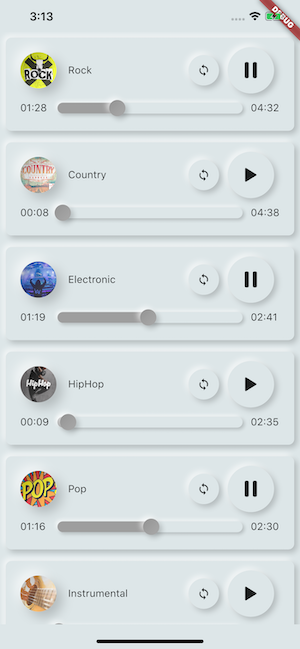
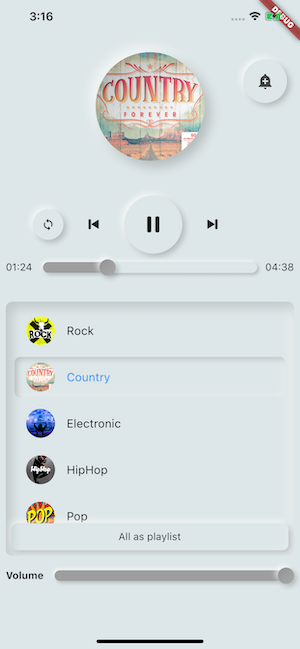
dependencies:
  assets_audio_player: ^3.0.8
Works with flutter: ">=3.3.0", be sure to upgrade your sdk
You like the package ? buy me a kofi :)

| Audio Source | Android | iOS | Web | MacOS |
|---|---|---|---|---|
| 🗄️ Asset file (asset path) | ✅ | ✅ | ✅ | ✅ |
| 🌐 Network file (url) | ✅ | ✅ | ✅ | ✅ |
| 📁 Local file (path) | ✅ | ✅ | ✅ | ✅ |
| 📻 Network LiveStream / radio (url) (Default, HLS, Dash, SmoothStream) |
✅ | ✅ | ✅ | ✅ |
| Feature | Android | iOS | Web | MacOS |
|---|---|---|---|---|
| 🎶 Multiple players | ✅ | ✅ | ✅ | ✅ |
| 💽 Open Playlist | ✅ | ✅ | ✅ | ✅ |
| 💬System notification | ✅ | ✅ | 🚫 | 🚫 |
| 🎧 Bluetooth actions | ✅ | ✅ | 🚫 | 🚫 |
| 🔕 Respect System silent mode | ✅ | ✅ | 🚫 | 🚫 |
| 📞 Pause on phone call | ✅ | ✅ | 🚫 | 🚫 |
| Commands | Android | iOS | Web | MacOS |
|---|---|---|---|---|
| ▶ Play | ✅ | ✅ | ✅ | ✅ |
| ⏸ Pause | ✅ | ✅ | ✅ | ✅ |
| ⏹ Stop | ✅ | ✅ | ✅ | ✅ |
| ⏩ Seek(position) | ✅ | ✅ | ✅ | ✅ |
| ⏪⏩ SeekBy(position) | ✅ | ✅ | ✅ | ✅ |
| ⏩ Forward(speed) | ✅ | ✅ | ✅ | ✅ |
| ⏪ Rewind(speed) | ✅ | ✅ | ✅ | ✅ |
| ⏭ Next | ✅ | ✅ | ✅ | ✅ |
| ⏮ Prev | ✅ | ✅ | ✅ | ✅ |
| Widgets | Android | iOS | Web | MacOS |
|---|---|---|---|---|
| 🐦 Audio Widget | ✅ | ✅ | ✅ | ✅ |
| 🐦 Widget Builders | ✅ | ✅ | ✅ | ✅ |
| 🐦 AudioPlayer Builders Extension | ✅ | ✅ | ✅ | ✅ |
| Properties | Android | iOS | Web | MacOS |
|---|---|---|---|---|
| 🔁 Loop | ✅ | ✅ | ✅ | ✅ |
| 🔀 Shuffle | ✅ | ✅ | ✅ | ✅ |
| 🔊 get/set Volume | ✅ | ✅ | ✅ | ✅ |
| ⏩ get/set Play Speed | ✅ | ✅ | ✅ | ✅ |
| ⏩ get/set Pitch | ✅ | 🚫 | 🚫 | 🚫 |
| Listeners | Android | iOS | Web | MacOS |
|---|---|---|---|---|
| 🦻 Listener onReady(completeDuration) | ✅ | ✅ | ✅ | ✅ |
| 🦻 Listener currentPosition | ✅ | ✅ | ✅ | ✅ |
| 🦻 Listener finished | ✅ | ✅ | ✅ | ✅ |
| 🦻 Listener buffering | ✅ | ✅ | ✅ | ✅ |
| 🦻 Listener volume | ✅ | ✅ | ✅ | ✅ |
| 🦻Listener Play Speed | ✅ | ✅ | ✅ | ✅ |
| 🦻Listener Pitch | ✅ | 🚫 | 🚫 | 🚫 |
No needed to copy songs to a media cache, with assets_audio_player you can open them directly from the assets.
flutter:
  assets:
    - assets/audios/
final assetsAudioPlayer = AssetsAudioPlayer();

assetsAudioPlayer.open(
    Audio("assets/audios/song1.mp3"),
);
You can also play network songs from url
final assetsAudioPlayer = AssetsAudioPlayer();

try {
    await assetsAudioPlayer.open(
        Audio.network("http://www.mysite.com/myMp3file.mp3"),
    );
} catch (t) {
    //mp3 unreachable
}
LiveStream / Radio from url
The main difference with network, if you pause/play, on livestream it will resume to present duration
final assetsAudioPlayer = AssetsAudioPlayer();

try {
    await assetsAudioPlayer.open(
        Audio.liveStream(MY_LIVESTREAM_URL),
    );
} catch (t) {
    //stream unreachable
}
And play songs from file
//create a new player
final assetsAudioPlayer = AssetsAudioPlayer();

assetsAudioPlayer.open(
    Audio.file(FILE_URI),
);
for file uri, please look at https://pub.dev/packages/path_provider
assetsAudioPlayer.playOrPause();
assetsAudioPlayer.play();
assetsAudioPlayer.pause();
assetsAudioPlayer.seek(Duration to);
assetsAudioPlayer.seekBy(Duration by);
assetsAudioPlayer.forwardRewind(double speed);
//if positive, forward, if negative, rewind
assetsAudioPlayer.stop();
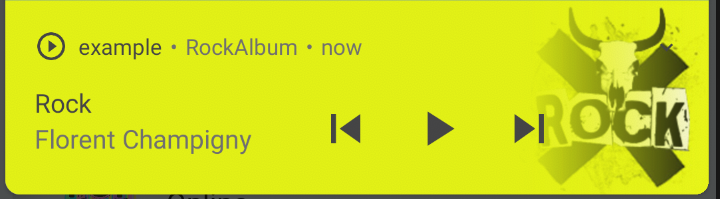
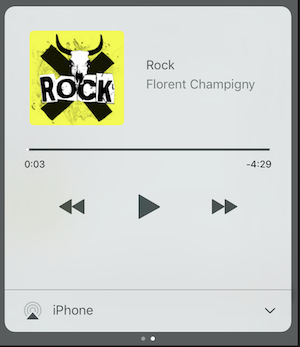
on iOS, it will use MPNowPlayingInfoCenter
final audio = Audio.network("/assets/audio/country.mp3",
    metas: Metas(
            title:  "Country",
            artist: "Florent Champigny",
            album: "CountryAlbum",
            image: MetasImage.asset("assets/images/country.jpg"), //can be MetasImage.network
          ),
   );
showNotification: true_player.open(audio, showNotification: true)
Custom icon (android only)
Make sure you added those icons inside your android/res/drawable !!! not on flutter assets !!!!
await _assetsAudioPlayer.open(
        myAudio,
        showNotification: true,
        notificationSettings: NotificationSettings(
            customStopIcon: AndroidResDrawable(name: "ic_stop_custom"),
            customPauseIcon: AndroidResDrawable(name:"ic_pause_custom"),
            customPlayIcon: AndroidResDrawable(name:"ic_play_custom"),
            customPrevIcon: AndroidResDrawable(name:"ic_prev_custom"),
            customNextIcon: AndroidResDrawable(name:"ic_next_custom"),
        )
And don't forget tell proguard to keep those resources for release mode
(part Keeping Resources)
https://sites.google.com/a/android.com/tools/tech-docs/new-build-system/resource-shrinking
<?xml version="1.0" encoding="utf-8"?>
<resources xmlns:tools="http://schemas.android.com/tools"
tools:keep="@drawable/ic_next_custom, @drawable/ic_prev_custom, @drawable/ic_pause_custom, @drawable/ic_play_custom, @drawable/ic_stop_custom"/>
Add your icon into your android's res folder (android/app/src/main/res)
Reference this icon into your AndroidManifest (android/app/src/main/AndroidManifest.xml)
<meta-data
     android:name="assets.audio.player.notification.icon"
     android:resource="@drawable/ic_music_custom"/>
You can also change actions icons
<meta-data
    android:name="assets.audio.player.notification.icon.play"
    android:resource="@drawable/ic_play_custom"/>
<meta-data
    android:name="assets.audio.player.notification.icon.pause"
    android:resource="@drawable/ic_pause_custom"/>
<meta-data
    android:name="assets.audio.player.notification.icon.stop"
    android:resource="@drawable/ic_stop_custom"/>
<meta-data
    android:name="assets.audio.player.notification.icon.next"
    android:resource="@drawable/ic_next_custom"/>
<meta-data
    android:name="assets.audio.player.notification.icon.prev"
    android:resource="@drawable/ic_prev_custom"/>
Add in main
AssetsAudioPlayer.setupNotificationsOpenAction((notification) {
    //custom action
    return true; //true : handled, does not notify others listeners
                 //false : enable others listeners to handle it
});
Then if you want a custom action on widget
AssetsAudioPlayer.addNotificationOpenAction((notification) {
   //custom action
   return false; //true : handled, does not notify others listeners
                 //false : enable others listeners to handle it
});
You can enable/disable a notification action
open(AUDIO,
   showNotification: true,
   notificationSettings: NotificationSettings(
       prevEnabled: false, //disable the previous button

       //and have a custom next action (will disable the default action)
       customNextAction: (player) {
         print("next");
       }
   )

)
After your audio creation, just call
audio.updateMetas(
       player: _assetsAudioPlayer, //add the player if the audio is actually played
       title: "My new title",
       artist: "My new artist",
       //if I not provide a new album, it keep the old one
       image: MetasImage.network(
         //my new image url
       ),
);
You have to enable notification to make them work
Available remote commands :
florent37/Flutter-AssetsAudioPlayer is a public repo on GitHub by florent37. Play simultaneously music/audio from assets/network/file directly from Flutter, compatible with android / ios / web / macos, displays notifications.
It declares the Apache-2.0 license on GitHub.
Its maker tagged it for macOS, Windows and Linux, or as Docker or cross-platform. That is declared by the maker; Take My Repo has not tested it.
:books: 免费的计算机编程类中文书籍,欢迎投稿
f.k.a. Awesome ChatGPT Prompts. Share, discover, and collect prompts from the community. Free and open source — self-host for your organization with complete privacy.
An open-source remote desktop application designed for self-hosting, as an alternative to TeamViewer.
This project is dedicated to collecting high-quality macOS software and organizing them systematically by different categories for easy search and use.
Open "Take it" on its page: Take My Repo writes an install plan for your machine and hands it to your AI agent (Claude Code, Codex or Cursor), which asks you before each step. Take My Repo has not tested it on any machine.
No. It is archived on GitHub: its maker no longer maintains it.
Nobody has reviewed it on Take My Repo yet, which says nothing about its quality.
Take My Repo cannot say: it does not audit code and has not run Flutter-AssetsAudioPlayer. What is known comes from GitHub. It declares the Apache-2.0 license on GitHub. It is archived: its maker no longer maintains it. It has 770 stars, which measure popularity, not safety. Nobody has reviewed it on Take My Repo yet, which says nothing about its quality. Read the source before you run it. With "Take it", your AI agent shows each step and asks you before running it; README text is treated as data, not as instructions.




