
sdf
Simple SDF mesh generation in Python
- 2k
- MIT
- 8 wk ago
Repo fogleman/sdf, read from GitHub 1 min ago. fogleman has not joined Take My Repo.
In short
fogleman/sdf is a public repo on GitHub by fogleman. Simple SDF mesh generation in Python. It declares the MIT license on GitHub. It is written mainly in Python, has 2,022 stars and last changed on 2026-09-30. Nobody has reviewed it on Take My Repo yet, which says nothing about its quality. Read from GitHub on 2026-11-25.

sdf
Generate 3D meshes based on SDFs (signed distance functions) with a dirt simple Python API.
Special thanks to Inigo Quilez for his excellent documentation on signed distance functions:
Example

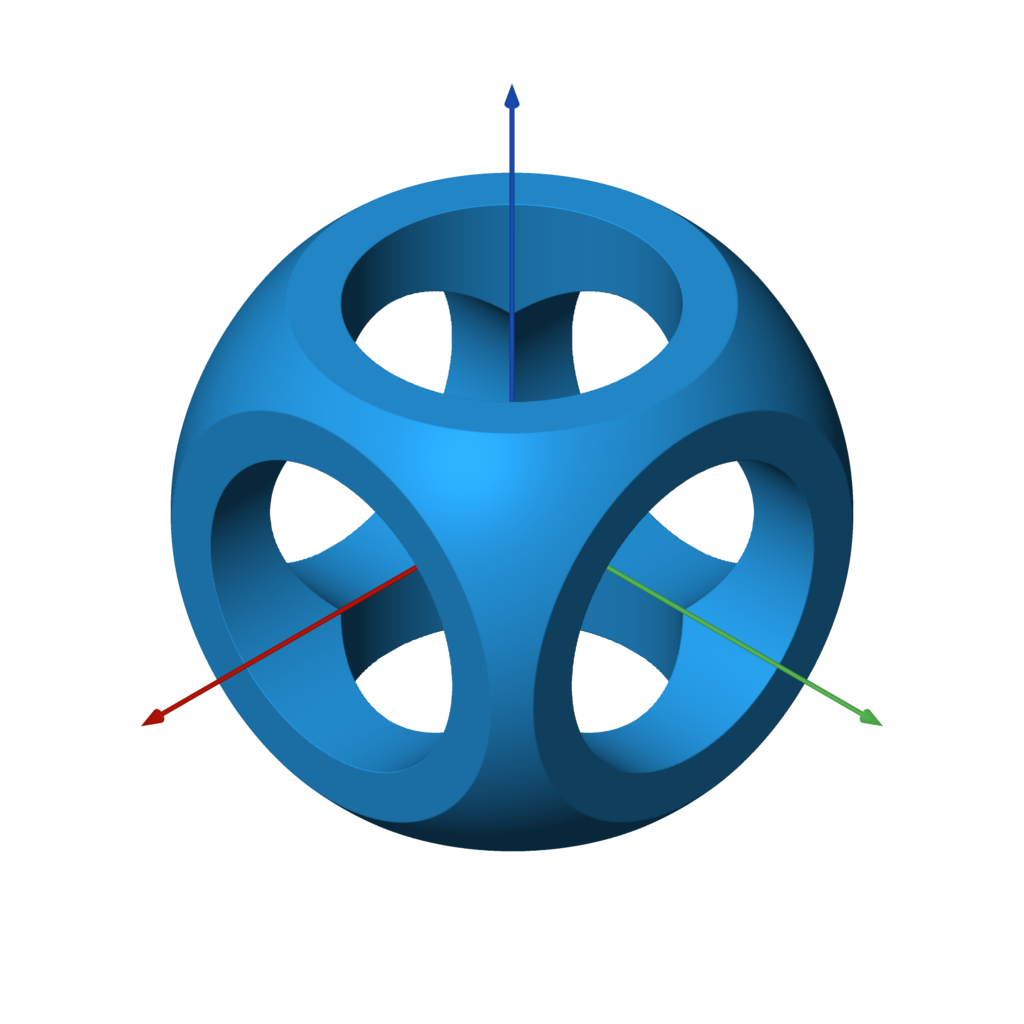
Here is a complete example that generates the model shown. This is the canonical Constructive Solid Geometry example. Note the use of operators for union, intersection, and difference.
from sdf import *

f = sphere(1) & box(1.5)

c = cylinder(0.5)
f -= c.orient(X) | c.orient(Y) | c.orient(Z)

f.save('out.stl')
Yes, that's really the entire code! You can 3D print that model or use it in a 3D application.
More Examples
Have a cool example? Submit a PR!
| gearlike.py | knurling.py | blobby.py | weave.py |
|---|---|---|---|
 |
 |
 |
 |
 |
 |
 |
 |
Requirements
Note that the dependencies will be automatically installed by setup.py when following the directions below.
- Python 3
- matplotlib
- meshio
- numpy
- Pillow
- scikit-image
- scipy
Installation
Use the commands below to clone the repository and install the sdf library
in a Python virtualenv.
git clone https://github.com/fogleman/sdf.git
cd sdf
virtualenv env
. env/bin/activate
pip install -e .
Confirm that it works:
python examples/example.py # should generate a file named out.stlYou can skip the installation if you always run scripts that import sdf
from the root folder.
OpenVDB
OpenVDB and its Python module are also required if you want to use meshes as SDFs. It doesn't seem like this can easily be installed via pip. The basic approach for building it is as follows:
git clone https://github.com/AcademySoftwareFoundation/openvdb.git
cd openvdb
mkdir build
cd build
cmake -D OPENVDB_BUILD_PYTHON_MODULE=ON -D USE_NUMPY=ON ..
make -j8
cp openvdb/openvdb/python/pyopenvdb.* `python -c 'import site; print(site.getsitepackages()[0])'`
File Formats
sdf natively writes binary STL files. For other formats, meshio
is used (based on your output file extension). This adds support for over 20 different 3D file formats,
including OBJ, PLY, VTK, and many more.
Viewing the Mesh

Find and install a 3D mesh viewer for your platform, such as MeshLab.
I have developed and use my own cross-platform mesh viewer called meshview (see screenshot). Installation is easy if you have Go and glfw installed:
$ brew install go glfw # on macOS with homebrew
$ go get -u github.com/fogleman/meshview/cmd/meshview
Then you can view any mesh from the command line with:
$ meshview your-mesh.stl
See the meshview README for more complete installation instructions.
On macOS you can just use the built-in Quick Look (press spacebar after selecting the STL file in Finder) in a pinch.
API
In all of the below examples, f is any 3D SDF, such as:
f = sphere()
Bounds
The bounding box of the SDF is automatically estimated. Inexact SDFs such as non-uniform scaling may cause issues with this process. In that case you can specify the bounds to sample manually:
f.save('out.stl', bounds=((-1, -1, -1), (1, 1, 1)))
Resolution
The resolution of the mesh is also computed automatically. There are two ways
to specify the resolution. You can set the resolution directly with step:
f.save('out.stl', step=0.01)
f.save('out.stl', step=(0.01, 0.02, 0.03)) # non-uniform resolution
Or you can specify approximately how many points to sample:
f.save('out.stl', samples=2**24) # sample about 16M points
By default, samples=2**22 is used.
Tip: Use the default resolution while developing your SDF. Then when you're done, crank up the resolution for your final output.
Batches
The SDF is sampled in batches. By default the batches have 32**3 = 32768
points each. This batch size can be overridden:
f.save('out.stl', batch_size=64) # instead of 32
The code attempts to skip any batches that are far away from the surface of the mesh. Inexact SDFs such as non-uniform scaling may cause issues with this process, resulting in holes in the output mesh (where batches were skipped when they shouldn't have been). To avoid this, you can disable sparse sampling:
f.save('out.stl', sparse=False) # force all batches to be completely sampled
Worker Threads
The SDF is sampled in batches using worker threads. By default,
multiprocessing.cpu_count() worker threads are used. This can be overridden:
f.save('out.stl', workers=1) # only use one worker thread
Without Saving
You can of course generate a mesh without writing it to an STL file:
points = f.generate() # takes the same optional arguments as `save`
print(len(points)) # print number of points (3x the number of triangles)
print(points[:3]) # print the vertices of the first triangle
If you want to save an STL after generate, just use:
write_binary_stl(path, points)
Visualizing the SDF

You can plot a visualization of a 2D slice of the SDF using matplotlib. This can be useful for debugging purposes.
f.show_slice(z=0)
f.show_slice(z=0, abs=True) # show abs(f)
You can specify a slice plane at any X, Y, or Z coordinate. You can also specify the bounds to plot.
Note that matplotlib is only imported if this function is called, so it
isn't strictly required as a dependency.
How it Works
The code simply uses the Marching Cubes algorithm to generate a mesh from the Signed Distance Function.
This would normally be abysmally slow in Python. However, numpy is used to evaluate the SDF on entire batches of points simultaneously. Furthermore, multiple threads are used to process batches in parallel. The result is surprisingly fast (for marching cubes). Meshes of adequate detail can still be quite large in terms of number of triangles.
The core "engine" of the sdf library is very small and can be found in
core.py.
In short, there is nothing algorithmically revolutionary here. The goal is to provide a simple, fun, and easy-to-use API for generating 3D models in our favorite language Python.
Files
- sdf/core.py: The core mesh-generation engine. Also includes code for estimating the bounding box of an SDF and for plotting a 2D slice of an SDF with matplotlib.
- sdf/d2.py: 2D signed distance functions
- sdf/d3.py: 3D signed distance functions
- sdf/dn.py: Dimension-agnostic signed distance functions
- sdf/ease.py: Easing functions that operate on numpy arrays. Some SDFs take an easing function as a parameter.
- sdf/mesh.py: Code for loading meshes and using them as SDFs.
- sdf/progress.py: A console progress bar.
Questions
What is sdf?
fogleman/sdf is a public repo on GitHub by fogleman. Simple SDF mesh generation in Python.
Is sdf open source?
It declares the MIT license on GitHub.
Does sdf run on macOS, Windows or Linux?
Its maker tagged it for macOS and Linux. That is declared by the maker; Take My Repo has not tested it.
How do I install sdf?
Open "Take it" on its page: Take My Repo writes an install plan for your machine and hands it to your AI agent (Claude Code, Codex or Cursor), which asks you before each step. Take My Repo has not tested it on any machine.
Is sdf still maintained?
Its last change on GitHub was on 2026-09-30. GitHub counts 36 open issues and pull requests. Take My Repo does not judge from that whether it is maintained.