
vue-element-admin
:tada: A magical vue admin https://panjiachen.github.io/vue-element-admin
- 90k
- Vue
- MIT
- 2 y ago
A MERN boilerplate repository using Antd-Pro with RBAC feature, following all production best practices.
Repo fullstack-superdev/MERN-AntD-Project, read from GitHub 1 min ago. fullstack-superdev has not joined Take My Repo.
fullstack-superdev/MERN-AntD-Project is a public repo on GitHub by fullstack-superdev. A MERN boilerplate repository using Antd-Pro with RBAC feature, following all production best practices. It declares the MIT license on GitHub. It is written mainly in JavaScript, has 0 stars and last changed on 2023-05-16. Nobody has reviewed it on Take My Repo yet, which says nothing about its quality. Read from GitHub on 2026-11-20.
In this repository I will keep adding the production best practices we should follow in a MERN (MongoDB, Express.js, React.js, and Node.js) project. Also for better UX I am using Antd Pro for the UI. May be later I will use MUI as well.
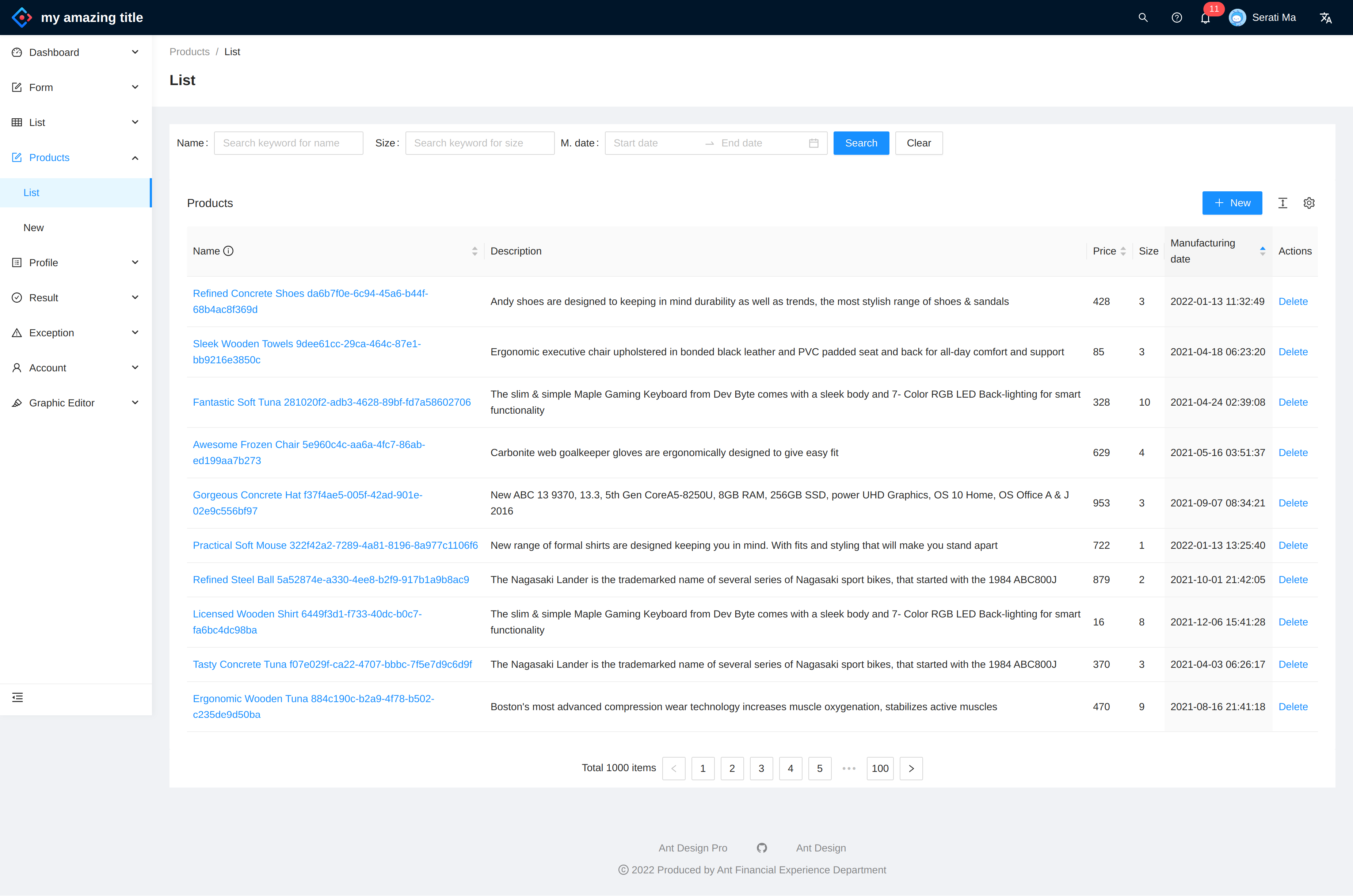
Below are the sample of a sample list page:


As the name suggests, this repository is built on top of Express.js and React.js, however in the implementation detail, we will find other supporting technologies as well.
Details frameworks and packages can be found in the package.json files in server and client directory.
This project can be run basically in two ways. One is using docker, other way is to run manually via vscode.
Depending on the MongoDB hosting option, we choose the appropriate docker-compose file.
Currently we have two docker-compose files:
docker-compose.mongocloud.yml - MongoDB.com hosted clusterdocker-compose.yml - Local MongoDB containerMONGODB_CLOUD_URL in docker-compose.mongocloud.yml to the appropriate MongoDB URL.REACT_APP_API_URL in docker-compose.yml to the appropriate API URL. If we want to expose our client to the internet, we need to change the REACT_APP_API_URL to the appropriate API URL. Otherwise keep REACT_APP_API_URL as http://localhost:8002.Run docker-compose commands
It is expected that the machine must have docker and docker-compose installed. Go to the root of the repository and execute appropriate commands. This will spin up the server and client containers along with the MongoDB container (if we are using local MongoDB server) inside of Docker environment.
Using docker containers with cloud hosted MongoDB
> cd project-root
> docker-compose -f docker-compose.mongocloud.yml build
> docker-compose -f docker-compose.mongocloud.yml up
Using docker containers with local MongoDB
> cd project-root
> docker-compose build
> docker-compose up
The client and server both are up and running and we should see the following screen if we navigate to the client url.

seed data
Go inside of the docker container and execute below commands. These will seed the database with roles, users and products data.
docker exec -it appserver bash
npm run db:seed
npm run db:migrate
You should see the following output:


You should be now login to the application and see the products list.
To run via vscode, we should run the server and client side projects separately, and also make sure mongodb is up and running.
Create a .env file inside of the server directory. Add the below entries or change accordingly. You can follow the .env.sample file to see the format.
DB_HOST=localhost
DB_PORT=27017
DB_NAME=appdb
JWT_SECRET=secret
JWT_EXPIRES_IN=3600
PORT=5000
IS_MONGODB_CLOUD_URL=false
MONGODB_CLOUD_URL=mongodb+srv:// <USER >: <PASSWORD >@cluster0.abcd.mongodb.net/myFirstDatabase?retryWrites=true
We assume we run the MongoDB in the docker container.
cd server
npm i
npm run db:up
npm startcd client-pro
nvm use --lts
yarn
yarn startTo seed the database, we need to run the following commands in the docker container. You can run these commands in the terminal as well if you are running the server and client outside of the docker environment. I assume we are running appserver in the docker container.
docker exec -it appserver bash
npm run db:seed
npm run db:migrate
You should be able to see the username and password in the /server/setup/users.json file.
I have introduced a permission management ui for the application. Sample image is given below.

Sentry.ioWe can also send the logs to sentry.io. To use this feature, we need to add the dsn entry into client/src/env.config.js.
Setup snippet is like below in index.js file
Sentry.init({
  dsn: Config.dsn,
  integrations: [new Integrations.BrowserTracing()],
  tracesSampleRate: 1.0,
});
server APITo view the api, open your browser and visit http://localhost:5000/api-docs
Ideally we should add all of the API endpoints into the swagger, but for the demo purpose, we only added Products API endpoint.
To test the APIs, we can reuse the postman collection. Open docs/rbac-mern-boilerplate.postman_collection.json into Postman and you should see the endpoints with appropriate payloads.
| Project | Command | Task |
|---|---|---|
| root | npm run build |
Builds the containers |
| root | npm run start |
Start the projects and database in docker containers |
| root | docker exec -it appserver /bin/sh then npm run db:seed |
Executes seed products inside container |
| server | npm i |
Install server side dependencies |
| server | npm run db:up |
Start the database in a docker container |
| server | npm run test |
Execute tests using jest |
| client | npm i |
Install client side dependencies |
| client | npm run start |
Start the react app |
| client | npm run build |
Build the react app in production mode |
| client | npm run test |
Execute tests using Testing Library |
In this repository, we have included both unit testing and integration testing. For now, the code coverage is very low, but we are working on it to make it more than 90% somewhere in the future
localStorage and axios.To run the tests, we can run npm run test command.
Jest as the testing library, and we have added supertest and mongodb-memory-server packages to make the integration testing easier.Jest to test the service layers and mock the external dependencies like MongoDB.To run the tests, we can run npm run test command.
This project is MIT licensed.
For now, I am not taking any community contritutions in terms of code. But if you have any suggestions or you found any bugs, please feel free to open an issue or a pull request.
On the other hand, if you want to know something, or want to start a discussion about this project, please start a discussion in our GitHub's discussion board.
Thanks. Cheers.
fullstack-superdev/MERN-AntD-Project is a public repo on GitHub by fullstack-superdev. A MERN boilerplate repository using Antd-Pro with RBAC feature, following all production best practices.
It declares the MIT license on GitHub.
Its maker has not tagged a system, so it is unknown here. Its README says what it needs.
Open "Take it" on its page: Take My Repo writes an install plan for your machine and hands it to your AI agent (Claude Code, Codex or Cursor), which asks you before each step. Take My Repo has not tested it on any machine.
Its last change on GitHub was on 2023-05-16. Take My Repo does not judge from that whether it is maintained.
Nobody has reviewed it on Take My Repo yet, which says nothing about its quality.
:tada: A magical vue admin https://panjiachen.github.io/vue-element-admin
Clone any website with one command using AI coding agents
Flutter makes it easy and fast to build beautiful apps for mobile and beyond
f.k.a. Awesome ChatGPT Prompts. Share, discover, and collect prompts from the community. Free and open source — self-host for your organization with complete privacy.
An online news site that includes the latest news, news categories and breaking news with an advanced admin panel
🌀 MVC - E-commerce project made with PHP, Mysql, Javascript, Ajax and materialize CSS
A Web Application generates Invoices as PDFs to your device using html-to-image and jsPDF.
Responsive, Multi-Vendor, MultiLanguage Online Store Platform (shopping cart solution)