

scientific-visualization-book
An open access book on scientific visualization using python and matplotlib
- 12k
- Python
- 11 mo ago
Overlap-free 60° simplex triangulation visualization for tagged content collections — headless TypeScript core, SVG engine & React bindings.
Repo ghackenberg/simplex-viz, read from GitHub 14 h ago. ghackenberg has not joined Take My Repo.
ghackenberg/simplex-viz is a public repo on GitHub by ghackenberg. Overlap-free 60° simplex triangulation visualization for tagged content collections — headless TypeScript core, SVG engine & React bindings. It declares the MIT license on GitHub. It is written mainly in TypeScript, has 1 stars and last changed on 2026-11-22. Nobody has reviewed it on Take My Repo yet, which says nothing about its quality. Read from GitHub on 2026-11-24.
An open access book on scientific visualization using python and matplotlib
Triangulation-based, strictly overlap-free visualization of arbitrary domain collections (vector embeddings, pairwise similarities, or tagged items) on a dynamic 60° equilateral triangle mesh with hierarchical 1:4 zoom/drill-down and chronological timeline playback.
SimplexViz partitions arbitrary collections—whether single- or multi-modal vector embeddings (text, images, videos, voice audio signatures, body-shape latents), custom pairwise similarity functions, or tagged knowledge items—into balanced clusters, embeds them onto an adaptive 60° simplex lattice with perceptual OKLab color mixing, resolves every convex node hull to a guaranteed 0.0 px overlap layout, and supports continuous camera navigation, conformal 1:4 hierarchical zoom / drill-down, and path-independent chronological timeline playback. It is structured as a modular three-layer TypeScript stack across five packages—a zero-dependency headless core (@simplex-viz/core, @simplex-viz/core/worker, plus structural-DOM helpers in @simplex-viz/core/dom), framework-agnostic SVG (@simplex-viz/svg) and independent high-capacity Canvas 2D (@simplex-viz/canvas) renderers, type-safe React bindings (@simplex-viz/react), and a framework-agnostic Web Component (@simplex-viz/wc).
Explore the interactive demo at https://hackenberg.tech/simplex-viz/. It brings together the headless layout solver (@simplex-viz/core), SVG scene graph (@simplex-viz/svg), and React bindings (@simplex-viz/react) in a browser workbench built from src/demo:
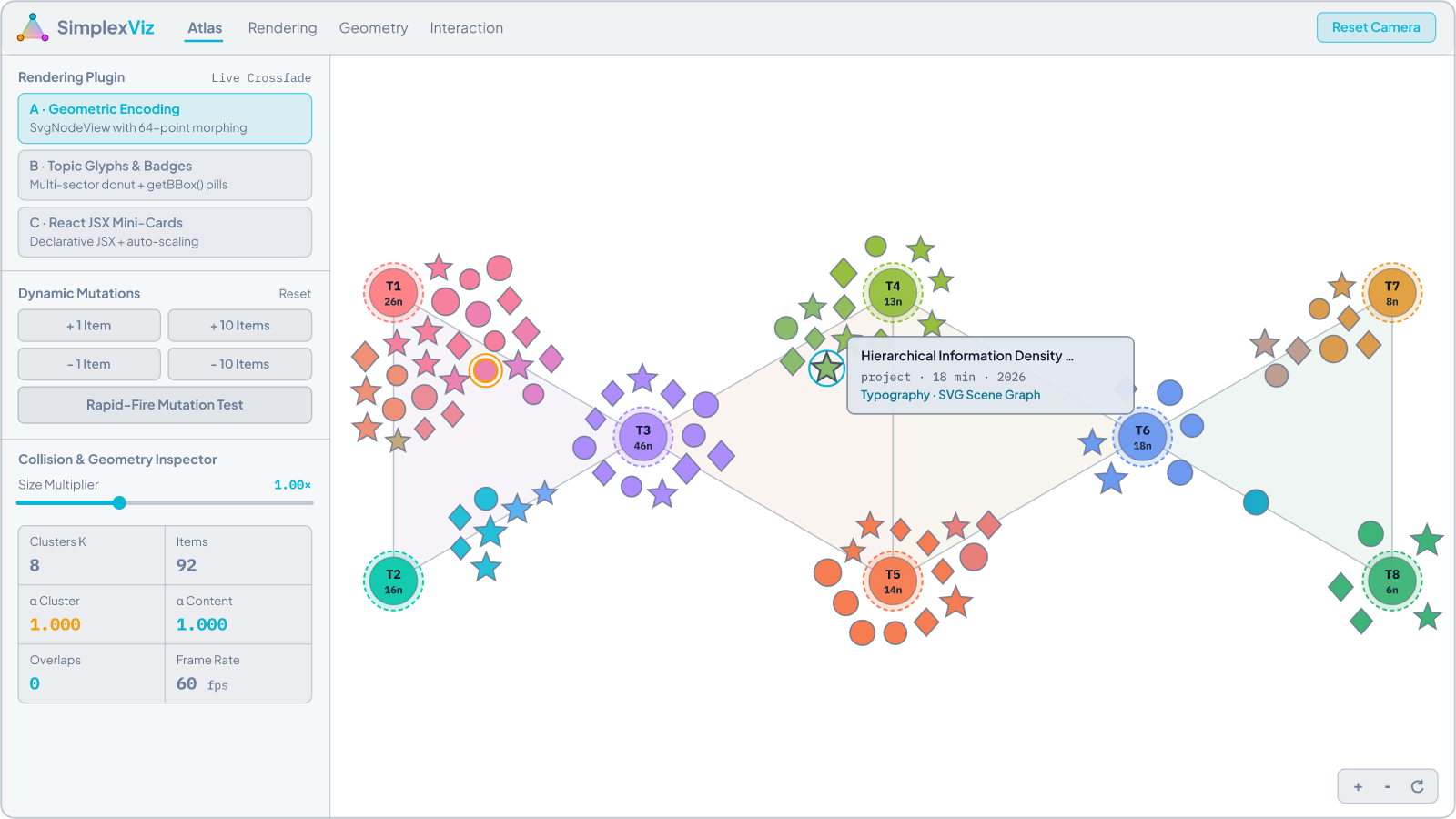
Figure: The interactive SimplexViz showcase. Topic clusters (T1–T8) sit as topic badges or double-ring vertex anchors on the adaptive 60° equilateral triangle lattice, while content items render inside their covering vertices, edges, or triangles as colored shapes, multi-sector glyphs, or React cards blended in perceptual OKLab space. Drillable triangles preview their internal 1:4 subdivision directly in the active mesh edge style, and clicking drills smoothly into sub-triangles or 1-ring cluster stars with dimmed clickable neighborhood context and breadcrumbs. The collapsible left inspector offers independent controls across all five core strategy stages (Mesh, Clustering, Color, Layout, Zoom) plus node, triangle face, and edge renderers (0 overlaps at 60 fps).
Classical force-directed layouts and raw UMAP/t-SNE scatters often turn multi-dimensional collections into unreadable hairballs or overlapping blobs. SimplexViz embeds cluster centroids or medoids onto an adaptive toothed equilateral 60° triangle lattice through five pluggable, independently hot-swappable strategy stages:
SimplexMeshStrategy): Defaults to createAdaptiveHexMeshStrategy() (buildSimplexMesh), which chooses the most area-efficient 60° lattice orientation (horizontal or vertical) and row parity (wideFirst) from (W, H) (with optional explicit sideLength), or swaps to createFixedLatticeMeshStrategy({ cols, rows, sideLength? }).SimplexClusteringStrategy): Representation-agnostic via requiresTags?: boolean:createJaccardAnnealingClusteringStrategy() (Quickstart default), createSoftSimplexTagClusteringStrategy({ triangleSpread }) (smooth interior spreading across covering triangles while preserving 360° halos for single-cluster items), and createIncrementalAnchorClusteringStrategy() (initialize vs. incremental update).requiresTags: false): createEmbeddingClusteringStrategy() and createSoftSimplexEmbeddingClusteringStrategy() cluster untagged items from one or multiple weighted feature vectors (getEmbedding), embed centroids via QAP (embedSimilarityMatrixOnMesh / load-balanced QAP), preserve cluster UIDs via Hungarian matching, and project items into planar simplex coordinates.requiresTags: false): createSimilarityClusteringStrategy({ getSimilarity }) partitions any untagged domain model using PAM k-Medoids, QAP mesh embedding, and simplex projection.createFinalSeededClusteringStrategy(baseStrategy?, options?) wraps any clustering strategy to pin canonical full-corpus clusters, vertices, UIDs, and colors across chronological timeline steps (0..N) or filtered subsets.SimplexColorStrategy): Defaults to createOklabContrastColorStrategy() (perceptual OKLab edge-contrast coloring + chroma-preserving barycentric mixing), or swaps to createThemeAdaptiveOklabColorStrategy() or createPaletteColorStrategy(hexColors).SimplexLayoutStrategy): Defaults to createPbdUniformLayoutStrategy(), or swaps to createWarmStartPbdLayoutStrategy(), createLocalAdaptiveLayoutStrategy(), createCollisionDrivenLayoutStrategy(), createFinalSeededLayoutStrategy() (full-corpus position pinning with scaleMode: 'pinned' | 'adaptive' for zero-drift chronological replay), or any custom LayoutSeeder × PositionRelaxer × ScaleController trio via createComposedLayoutStrategy()—strictly guaranteeing 0.0 px overlap and triangle containment.SimplexZoomStrategy): Defaults to createFreeCameraZoomStrategy() (wheel zoom-to-cursor, 2-finger touch pinch, and drag-to-pan), or swaps to hierarchical 1:4 drill-down via createBarycentricZoomStrategy(), createSemanticZoomStrategy() (6-vertex tag re-partitioning), or createSubspaceZoomStrategy() (6-vertex representation-agnostic subspace refinement)—featuring conformal 1:4 equilateral subdivision, single-triangle leaf focus ('triangle-focus', leafTriangleFocus: true) with directly clickable content items, uniform 1-ring 'incident-star' cluster/subcluster stars with barycentric simplex-distance dimming, internal 1:4 subdivision mesh previews, dimmed clickable neighborhood context, and discrete 2-finger pinch.The diagram and package table below summarize how domain logic, SVG / Canvas 2D rendering, and framework adapters are strictly decoupled across layers so the core math engine runs anywhere while renderers and UI adapters remain hot-swappable:
flowchart LR
  Core["@simplex-viz/core\n(Headless, 0 Deps, NO DOM\n+ /worker · + /dom helpers)"] --> Svg["@simplex-viz/svg\n(Framework-Agnostic SVG Scene Graph)"]
  Core --> Canvas["@simplex-viz/canvas\n(High-Capacity HTML5 Canvas 2D)"]
  Svg --> React["@simplex-viz/react\n(React Bindings & JSX Node Renderers)"]
  Core --> React
  Svg --> Wc["@simplex-viz/wc\n(Web Component <simplex-topic-graph>)"]
  Core --> Wc
  React --> Demo["src/demo\n(Interactive Showcase & GitHub Pages)"]
| Package | Role | Documentation |
|---|---|---|
@simplex-viz/core |
Pure TypeScript triangulation, clustering, OKLab color science, composable 2-phase convex SAT solver, 1:4 zoom/drill-down strategies, headless SimplexTimelineController, shared preset/color/option-equality helpers, serializable view state, multi-selection, reduced-motion springs, convex + triangle hit-testing, Web Worker offloading (@simplex-viz/core/worker), and optional structural-type DOM/interaction helpers (@simplex-viz/core/dom). Zero DOM/SVG/React dependencies in root entrypoint (ES2022). |
Core README |
@simplex-viz/svg |
Framework-agnostic SVG engine (Vanilla TS, Vue, Angular, Svelte) with root-SVG hit-testing, offscreen getBBox() hull measurement, pluggable node/triangle/edge Svg*View plugins, 1:4 subdivision previews, breadcrumbs, timeline HUD, Shift+Click/Shift+Drag multi-selection, prefers-reduced-motion, shared host/tooltip/a11y primitives (@simplex-viz/core/dom), client-side exportSvg()/exportPng(), and zero-DOM SSR string rendering via @simplex-viz/svg/ssr. |
SVG README |
@simplex-viz/canvas |
High-capacity HTML5 Canvas 2D renderer (independent of @simplex-viz/svg) for 2,000–10,000+ items at 60 FPS with zero per-node DOM overhead, HiDPI DPR scaling, world-space frustum culling, automatic lodThresholdPx LOD simplification, 'geometric'/'glyphs'/'badges' presets + custom Canvas 2D hooks, 1:4 drill-down, timeline playback, multi-selection, WCAG 2.1 AA keyboard navigation, tooltips, shared @simplex-viz/core/dom interaction mechanics, and native exportPng(). |
Canvas README |
@simplex-viz/react |
Thin, end-to-end type-safe React bindings (<SimplexTopicGraph />, useSimplexGraphController, useSimplexTimeline) supporting portable SvgNodeView / SvgTriangleView / SvgEdgeView plugins, declarative JSX node renderers, viewport edge-flipped built-in tooltips (@simplex-viz/core/dom), linked-view controls, multi-selection, deep-link view state, SVG/PNG export, chronological timeline playback, and hierarchical drill-down. |
React README |
@simplex-viz/wc |
Dedicated framework-agnostic Web Component (<simplex-topic-graph>, zero React dependency) with SSR-safe registration (@simplex-viz/wc/define), reactive HTML attributes, inline <script type="application/json"> support, typed JS properties, standard bubbling CustomEvents, shared @simplex-viz/core / @simplex-viz/core/dom navigation/timeline plumbing, and full imperative delegation. |
WC README |
Each higher-level package re-exports core/SVG runtime primitives from lower layers—install just the single package matching your stack and pass { id, tags } items directly (specialized runtimes like @simplex-viz/core/worker, @simplex-viz/core/dom, @simplex-viz/svg/ssr, and @simplex-viz/wc/define are imported directly from their exclusive subpath).
@simplex-viz/react)npm install @simplex-viz/react
import { SimplexTopicGraph } from '@simplex-viz/react';

const items = [
  { id: '1', label: 'Simplex Mesh', tags: ['geometry', 'triangulation', 'math'] },
  { id: '2', label: 'OKLab Mixing', tags: ['color', 'geometry', 'perception'] },
  { id: '3', label: 'SAT Solver', tags: ['collision', 'geometry'] },
];

export function TopicMap() {
  return (
    <div style={{ width: '100%', height: 560 }}>
      <SimplexTopicGraph items={items} preset="glyphs" tooltip />
    </div>
  );
}
@simplex-viz/svg)npm install @simplex-viz/svg
import { createSimplexSvg } from '@simplex-viz/svg';

// One-liner mount (enables built-in 'geometric' preset, pan/zoom, focus, and hover tooltips):
const controller = createSimplexSvg('#graph', items);
@simplex-viz/wc)npm install @simplex-viz/wc
ghackenberg/simplex-viz is a public repo on GitHub by ghackenberg. Overlap-free 60° simplex triangulation visualization for tagged content collections — headless TypeScript core, SVG engine & React bindings.
It declares the MIT license on GitHub.
Its maker has not tagged a system, so it is unknown here. Its README says what it needs.
Open "Take it" on its page: Take My Repo writes an install plan for your machine and hands it to your AI agent (Claude Code, Codex or Cursor), which asks you before each step. Take My Repo has not tested it on any machine.
Bring data to life with SVG, Canvas and HTML. :bar_chart::chart_with_upwards_trend::tada:
Collection of cross-platform one-file C/C++ libraries with no dependencies, primarily used for games
Flutter makes it easy and fast to build beautiful apps for mobile and beyond
f.k.a. Awesome ChatGPT Prompts. Share, discover, and collect prompts from the community. Free and open source — self-host for your organization with complete privacy.
Its last change on GitHub was on 2026-11-22. Take My Repo does not judge from that whether it is maintained.
Nobody has reviewed it on Take My Repo yet, which says nothing about its quality.
Take My Repo cannot say: it does not audit code and has not run simplex-viz. What is known comes from GitHub. It declares the MIT license on GitHub. Its last change was on 2026-11-22. It has 1 stars, which measure popularity, not safety. Nobody has reviewed it on Take My Repo yet, which says nothing about its quality. Read the source before you run it. With "Take it", your AI agent shows each step and asks you before running it; README text is treated as data, not as instructions.


