
turismo
A lightweight Sinatra/Express-style Java web framework -- zero-dependency embedded HTTP server or Jakarta Servlet deployment
- 36
- Java
- 6 d ago
Local dashboard that logs in to your own banks, cards, brokers and lenders and shows balances, holdings, cash flow and insights in one place
Repo ghosthack/coincell, read from GitHub 11 min ago. ghosthack has not joined Take My Repo.
ghosthack/coincell is a public repo on GitHub by ghosthack. Local dashboard that logs in to your own banks, cards, brokers and lenders and shows balances, holdings, cash flow and insights in one place. It declares the MIT license on GitHub. It is written mainly in JavaScript, has 0 stars and last changed on 2026-11-21. Nobody has reviewed it on Take My Repo yet, which says nothing about its quality. Read from GitHub on 2026-11-22.

A local dashboard for your own money. It logs in to each of your banks, cards, brokers and lenders with a real browser, reads balances, holdings and transactions, and shows them together: net worth over time, cash flow, upcoming payments, and an Insights tab with suggestions and charts. Everything stays on your machine.
It has two modes that never share data:
npm run demo): five made-up institutions in fakebanks/, so the whole thing can be run and
tested end to end without real accounts. Data lives in .data-demo/, dashboard on port 4690.npm start): your own institutions, added one at a time from the template. Data lives in
.data/, dashboard on port 4680. It starts empty.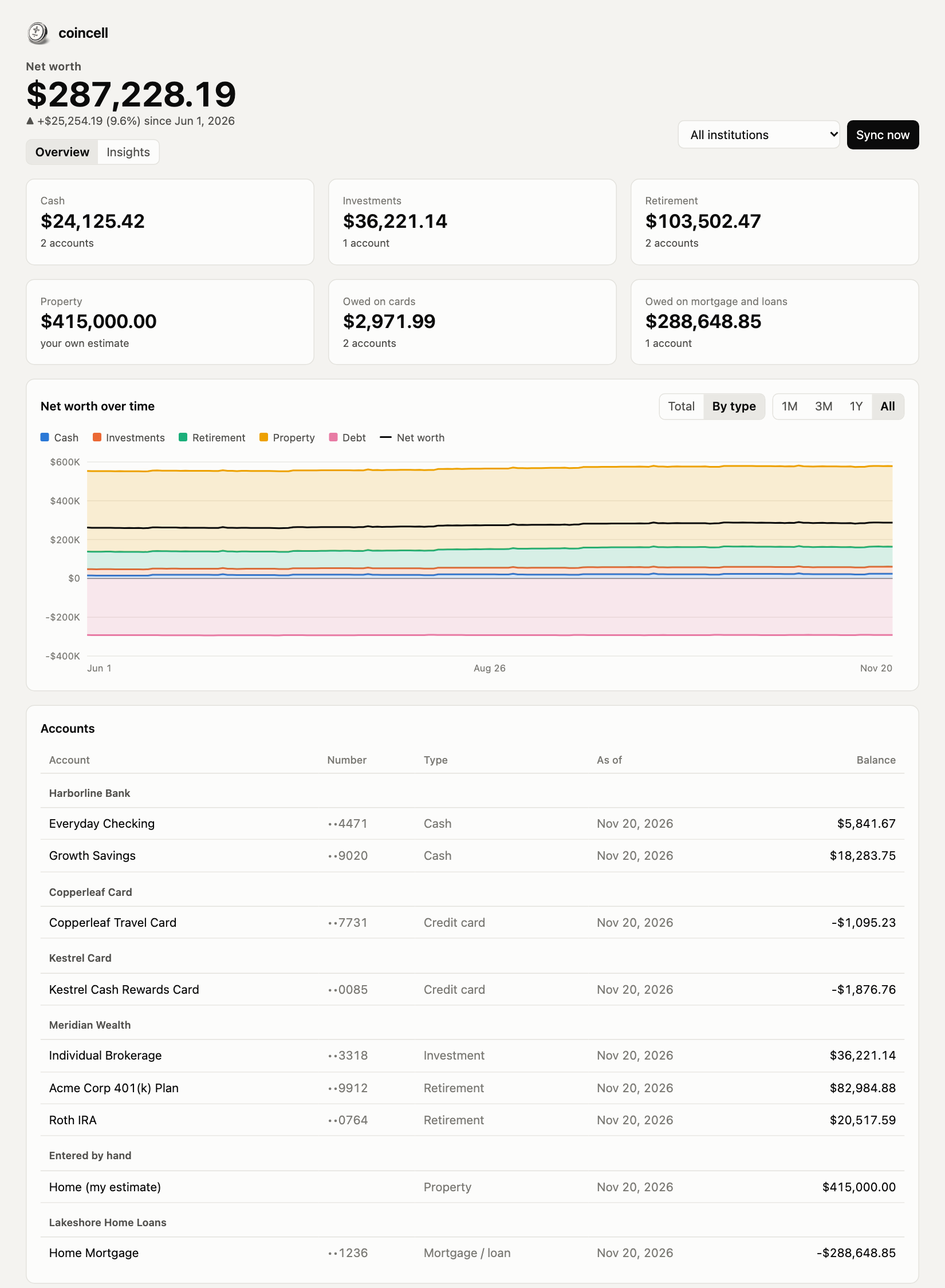

npm install
npx playwright install chromium   # only if Google Chrome is not installed
npm run demo                      # http://localhost:4690, then press "Sync now"
npm run demo: start the made-up institutions (ports 4701-4705) and the demo dashboard together.
Harborline Bank (checking + savings), Kestrel Card, Copperleaf Card, Meridian Wealth (brokerage, Roth IRA, 401(k))
and Lakeshore Home Loans (mortgage). Their logins are filled in automatically.npm run demo:sync: sync every demo institution from the command line (same as the "Sync now" button).npm run demo:verify: after a sync, compare what was scraped with what the fake institutions really hold.npm run demo:test-extension: test the browser extension end to end against the fake institutions.npm start: the dashboard for your real institutions.npm run sync -- all: sync every real institution from the command line, or name one.npm run record -- <login url>: log in by hand and click around; writes the shape of every JSON call the bank's site makes (values redacted) to .data/recordings/. Use it to write an adapter.Some institutions refuse automated browsers. The extension in extension/ works from your everyday Chrome
instead: you log in to a site yourself, press the coincell button, and it collects your balances, holdings and
activity from that site and hands them to coincell on the same computer. Nothing leaves your machine.
chrome://extensions, switch on Developer mode, press Load unpacked and choose the extension folder.npm run demo for the made-up sites, npm start for real ones).For a site coincell does not know yet, press Start recording this site, browse your accounts, positions and
activity pages, and stop. The recording goes to .data/recordings/ and holds the layout of the site's pages and
data with every value masked; it is what a new site script is written from. Site scripts live in
extension/sites/ and are listed in extension/sites.js.
Sites change, and a script can start bringing less without failing outright. Each import is compared with what
was on record: missing accounts, a sharp drop in holdings or transactions, or holdings that no longer add up to
the balance show as warnings in the popup. Every send also leaves a record in .data/recordings/ of which of the
site's services answered, with no financial data, which is the first thing to read when something breaks.
npm run demo:test-extension runs the whole thing against the made-up institutions and checks the result.
A suggestions panel and charts (saved vs market, a money flow diagram, a spending calendar, the cash runway,
mortgage payoff curves, and a projection of when investments could cover spending), plus tables for:
savings rate, net worth change split into saved vs market, spending by category and payee, recurring bills,
cash runway, asset allocation, transactions worth a second look, and debt payoff. The rules behind them are in
insights-config.json (the demo has its own copy in fakebanks/): spending categories (first matching pattern wins), asset class per symbol, allocation
targets, the low-balance warning level, and the extra mortgage payment scenarios. Edit and reload; nothing is stored.
manual-assets.json holds values no website reports, such as your home. Copy manual-assets.example.json to
create it; it is git-ignored because it is about you.
Copy src/banks/mybank.js, fill in the TODOs, and add it to the REAL list in src/banks/index.js. An adapter returns
{ accounts: [{ id, name, type, balance, holdings?, transactions?, history?, dueAmount?, dueDate? }] };
debts are negative balances and money going out is a negative amount. The demo adapters in src/banks/demo/
show four techniques: page scraping, listening to the site's JSON, CSV export, and calling the site's API.
Browser automation may be against an institution's terms of use, and some block automated browsers. Check before relying on it.
.data/coincell.sqlite: all synced data. .data/profiles/: the browser profile per bank (session cookies).
Both stay on this machine and are git-ignored. Treat .data/ like a password file..data-demo/: the same for demo mode. Safe to delete at any time.The icon is a 3D coin cell modelled in three.js and lit like a product photo. Edit icon/scene.js, then cd icon && npm ci && node build.js.
MIT.
ghosthack/coincell is a public repo on GitHub by ghosthack. Local dashboard that logs in to your own banks, cards, brokers and lenders and shows balances, holdings, cash flow and insights in one place.
It declares the MIT license on GitHub.
Its maker has not tagged a system, so it is unknown here. Its README says what it needs.
Open "Take it" on its page: Take My Repo writes an install plan for your machine and hands it to your AI agent (Claude Code, Codex or Cursor), which asks you before each step. Take My Repo has not tested it on any machine.
Its last change on GitHub was on 2026-11-21. Take My Repo does not judge from that whether it is maintained.
Nobody has reviewed it on Take My Repo yet, which says nothing about its quality.
A lightweight Sinatra/Express-style Java web framework -- zero-dependency embedded HTTP server or Jakarta Servlet deployment
Java ImageIO readers that delegate to platform-native image decoding APIs via Project Panama (FFM API, Java 22+). HEIC, AVIF, WEBP, JPEG 2000, camera RAW, and more through standard ImageIO.read().
