
issue-metrics
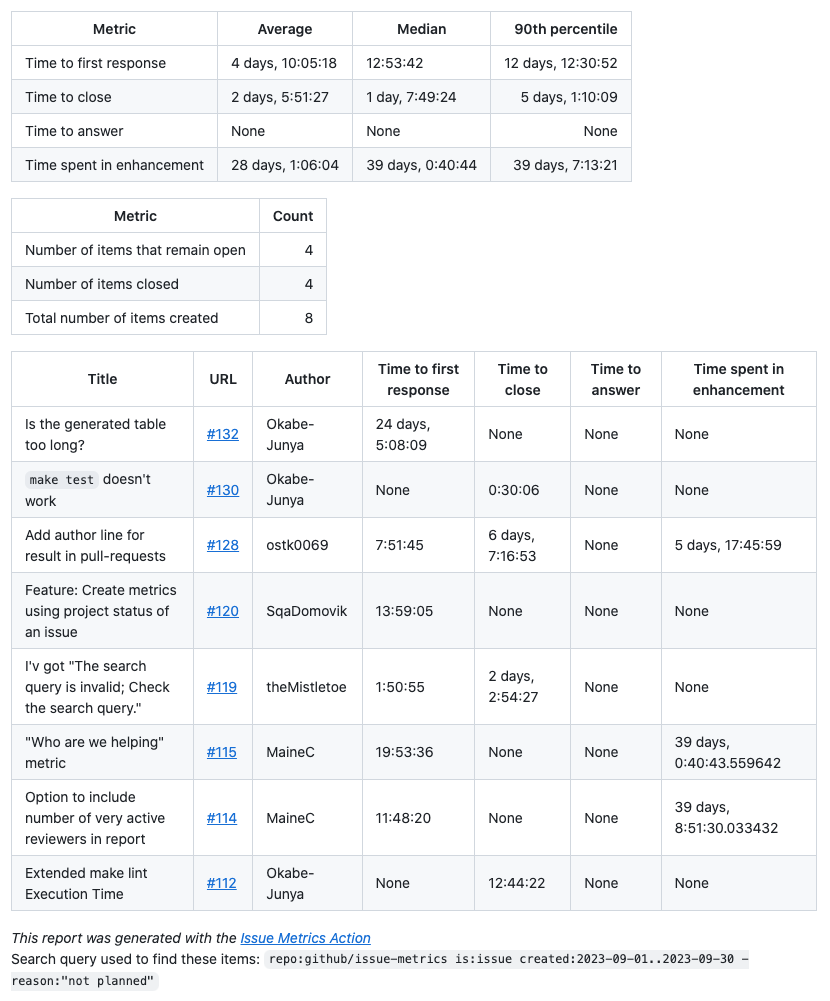
Gather metrics on issues/prs/discussions such as time to first response, count of issues opened, closed, etc.
- 541
- Python
- MIT
- 2 d ago
The maintainer has not written a description at the source.
Repo github-community-projects/safe-settings, read from GitHub 1 min ago. github-community-projects has not joined Take My Repo.
github-community-projects/safe-settings is a public repo on GitHub by github-community-projects. It declares the ISC license on GitHub. It is written mainly in JavaScript, has 942 stars and last changed on 2026-11-16. Nobody has reviewed it on Take My Repo yet, which says nothing about its quality. Read from GitHub on 2026-11-21.
Policy-as-Code for GitHub Organizations
Centrally manage and enforce repository settings, branch protections, teams, and more across your entire GitHub organization.
Safe-settings – an app to manage policy-as-code and apply repository settings across an organization.
In safe-settings, all the settings are stored centrally in an admin repo within the organization. Unlike the GitHub Repository Settings App, the settings files cannot be in individual repositories.
It is possible specify a custom repo instead of the
adminrepo withADMIN_REPO. See Environment variables for more details.
The settings in the default branch are applied. If the settings are changed on a non-default branch and a PR is created to merge the changes, the app runs in a dry-run mode to evaluate and validate the changes. Checks pass or fail based on the dry-run results. The dry-run compares the PR's config against the base branch config, so the check run and PR comment report only the changes the PR itself introduces (see Dry-run PR comment).
In safe-settings the settings can have 2 types of targets:
org - These settings are applied to the organization. Org-targeted settings are defined in .github/settings.yml. Currently, only rulesets are supported as org-targeted settings.repo - These settings are applied to repositories.For the repo-targeted settings, there can be 3 levels at which the settings are managed:
Org-level settings are defined in .github/settings.yml
It is possible to override this behavior and specify a different filename for the
settings.ymlfile withSETTINGS_FILE_PATH. Similarly, the.githubdirectory can be overridden withCONFIG_PATH. See Environment variables for more details.
Suborg level settings. A suborg is an arbitrary collection of repos belonging to projects, business units, or teams. The suborg settings reside in a yaml file for each suborg in the .github/suborgs folder.
In
safe-settings,suborgscould be groups of repos based onrepo names, orteamswhich the repos have collaborators from, orcustom property valuesset for the repos
Repo level settings. They reside in a repo specific yaml in .github/repos folder
It is recommended to break the settings into org-level, suborg-level, and repo-level units. This will allow different teams to define and manage policies for their specific projects or business units. With CODEOWNERS, this will allow different people to be responsible for approving changes in different projects.
Note
The suborg and repo level settings directory structure cannot be customized.
Choose your preferred deployment method:
👉 View all deployment options →
Create an admin repository in your organization to store all configuration files:
# Create admin repo in your organization
gh repo create your-org/admin --privateSet up your configuration files in the admin repository:
admin/
├── .github/
│   ├── settings.yml          # Organization-wide settings
│   ├── suborgs/              # Sub-organization settings
│   │   ├── frontend-team.yml
│   │   └── backend-team.yml
│   └── repos/                # Repository-specific settings
│       ├── api-service.yml
│       └── web-app.yml
Install the Safe-Settings GitHub App in your organization with the required permissions.
graph TD
    A[Organization Settings<br/>.github/settings.yml] --> B[Sub-Organization Settings<br/>.github/suborgs/*.yml]
    B --> C[Repository Settings<br/>.github/repos/*.yml]

    style A fill:#e1f5fe,stroke:#01579b,stroke-width:2px,color:#000
    style B fill:#f3e5f5,stroke:#4a148c,stroke-width:2px,color:#000
    style C fill:#e8f5e8,stroke:#1b5e20,stroke-width:2px,color:#000
Precedence Order: Repository > Sub-Organization > Organization
sequenceDiagram
    participant GH as GitHub
    participant SS as Safe-Settings
    participant AR as Admin Repo
    participant TR as Target Repos

    Note over GH,TR: Webhook Event Processing

    GH->>+SS: Webhook Event<br/>(push, repo created, etc.)
    SS->>SS: Validate Event Source
    SS->>+AR: Fetch Configuration Files<br/>(.github/settings.yml, suborgs/, repos/)
    AR-->>-SS: Return Config Files

    SS->>SS: Merge Configurations<br/>(Org → Suborg → Repo)
    SS->>SS: Compare with Current<br/>GitHub Settings

    alt Configuration Changes Detected
        SS->>+TR: Apply Settings<br/>(Branch Protection, Teams, etc.)
        TR-->>-SS: Confirm Changes
        SS->>GH: Create Check Run<br/>(Success/Failure)
    else No Changes Needed
        SS->>GH: Create Check Run<br/>(No Changes)
    end

    SS-->>-GH: HTTP 200 Response

    Note over GH,TR: Pull Request Validation (Dry-Run Mode)

    GH->>+SS: PR Event<br/>(opened, synchronize)
    SS->>+AR: Fetch PR Changes<br/>(Modified Config Files)
    AR-->>-SS: Return Changed Configs

    SS->>SS: Validate Changes<br/>(Dry-Run Mode)
    SS->>SS: Run Custom Validators<br/>(if configured)

    alt Validation Passes
        SS->>GH: ✅ Check Success<br/>+ PR Comment (optional)
    else Validation Fails
        SS->>GH: ❌ Check Failure<br/>+ Error Details
    end

    SS-->>-GH: HTTP 200 Response

    Note over GH,TR: Scheduled Sync (Drift Prevention)

    SS->>SS: Cron Trigger<br/>(if configured)
    SS->>+AR: Fetch All Configurations
    AR-->>-SS: Return All Configs
    SS->>+TR: Sync All Repositories<br/>(Prevent Drift)
    TR-->>-SS: Confirm Sync
    SS->>GH: Create Check Run<br/>(Sync Results)
Safe-settings is designed to run as a service listening for webhook events or as a scheduled job running on some regular cadence. It can also be triggered through GitHub Actions. (See the How to use section for details on deploying and configuring.)
The App listens to the following webhook events:
push: If the settings are created or modified, that is, if push happens in the default branch of the admin repo and the file added or changed is .github/settings.yml or .github/repos/*.ymlor .github/suborgs/*.yml, then the settings would be applied either globally to all the repos, or specific repos. For each repo, the settings that are actually applied depend on the default settings for the org, overlaid with settings for the suborg that the repo belongs to, overlaid with the settings for that specific repo.
repository.created: If a repository is created in the org, the settings for the repo - the default settings for the org, overlaid with settings for the suborg that the repo belongs to, overlaid with the settings for that specific repo - is applied.
repository.transferred: If a repository is transferred into the org from another org or user account, the settings for the repo are applied the same way as for repository.created.
branch_protection_rule: If a branch protection rule is modified or deleted, safe-settings will sync the settings to prevent any unauthorized changes.
repository.edited: For e.g. If the default branch is renamed, or if topics change, safe-settings will sync the settings, to prevent any unauthorized changes.
repository.renamed: If a repository is renamed, the default behavior is safe-settings will ignore this (for backward-compatibility). If BLOCK_REPO_RENAME_BY_HUMAN env variable is set to true, safe-settings will revert the repo to the previous name unless it is renamed using a bot. If it is renamed using a bot, it will try to copy the existing <old-repo>.yml to <new-repo>.yml so that the repo config yml stays consistent. If a <new-repo.yml> file already exists, it doesn't create a new one.
pull_request.opened, pull_request.reopened, check_suite.requested: If the settings are changed, but it is not in the default branch, and there is an existing PR, the code will validate the settings changes by running safe-settings in nop mode and update the PR with the dry-run status. The run loads the base-branch config and filters the results so only the changes the PR introduces are reported (see Dry-run PR comment).
repository_ruleset: If the ruleset settings are modified in the UI manually, safe-settings will sync the settings to prevent any unauthorized changes.
member_change_events: If a member is added or removed from a repository, safe-settings will sync the settings to prevent any unauthorized changes.
member', team.added_to_repository, team.removed_from_repository, team.edited: safe-settings will sync the settings to prevent any unauthorized changes.
custom_property_values: If new repository properties are set for a repository, safe-settings will run to so that if a sub-org config is defined by that property, it will be applied for the repo
repository_dispatch (event_type: safe-settings-generate): Triggers the settings generator, which reads the current configuration of a repo/org/suborg and opens a PR against the admin repo with the generated YAML. See Generating settings from existing configuration.
When a config change is proposed in a PR (a non-default branch), safe-settings runs in nop (no-operation) dry-run mode and posts a comment summarizing what would change if the PR were merged. The results are filtered against the base branch config, so the comment reports only the changes the PR introduces — not the full diff against live GitHub settings.
The comment contains:
No changes to apply.None when there are none. The check run is marked as failed when errors are present.disable_plugins or deletions suppressed by additive_plugins, so reviewers can see which settings were intentionally not applied.For very large diffs the comment is split across multiple comments, and the check-run summary is truncated with a notice when it exceeds the size limit.
A repo's suborg membership can depend on state that is itself written by safe-settings:
suborgteams — repos belong to a suborg because a given team is granted accesssuborgproperties — repos belong to a suborg because a custom property has a given valuesuborgrepos — repos belong to a suborg because their name matches a globWhen a repo-level change (a push to .github/repos/<repo>.yml, or a repository.created event for a brand-new repo) adds, removes, or changes a team or custom property, the repo may start or stop matching a suborg config. A new repo may also start matching a suborg because its name matches a suborgrepos glob.
To handle this, after applying a repo-yml change safe-settings re-evaluates the repo's suborg membership. If the matched suborg source set changed, it runs the repo through the apply pipeline a second time so newly matched suborg settings are applied and settings from a no-longer-matching suborg can be removed in the same sync.
For a repository that does not exist yet, team and custom-property membership
lookups are deferred until after creation. A 404 from a membership endpoint is
treated as an unmatched selector only when the repository itself also returns
404; other lookup failures remain errors. Name-based suborgrepos matching still
applies before creation. This allows force_create validation and apply runs to
work when earlier changes have already configured team- or property-based suborgs.
Scope: Re-evaluation runs only on the repo-yml change paths (Settings.sync and the per-repo loop of Settings.syncSelectedRepos). Global settings changes (syncAll) and suborg-yml changes (syncSubOrgs) already iterate all relevant repos and do not need it.
Loop prevention. Two guards prevent infinite re-evaluation:
safe-settings snapshots the set of suborg source paths that match the repo. After applying, it refreshes the suborg cache and recomputes the set. If the set did not change, re-evaluation stops. If a source appeared or disappeared, the repo is processed once more.MAX_REEVALUATION_DEPTH = 1 time per sync. This resolves the dominant single-hop case (repo change → suborg membership changed → apply the corrected suborg overlay once) while preventing pathological chains (suborg A applies a team that activates suborg B that activates suborg C…). Chains beyond one hop are resolved on the next sync event, and a warning is logged when the cap is hit.Trigger optimization. Re-evaluation is skipped entirely when the applied repo change did not affect teams, custom_properties, repository creation, or repository rename state — these are the repo-level changes that can affect suborg matching.
safe-settings to rename reposIf you rename a <repo.yml> that corresponds to a repo, safe-settings will rename the repo to the new name. This behavior will take effect whether the env variable BLOCK_REPO_RENAME_BY_HUMAN is set or not.
safe-settings to specific reposTo restrict which repositories safe-settings can manage, create a deployment-settings.yml file. This file controls the app's scope through the restrictedRepos configuration:
# Using include/exclude
restrictedRepos:
  include:
    - api
    - core-*    # Matches `core-api`, `core-service`, etc.
  exclude:
    - admin
    - .github
    - safe-settings
    - test-*    # Matches `test-repo`, etc.

# Or using simple array syntax for includes
restrictedRepos:
  - admin
  - .github
  # ...
Note
Pattern matching uses glob expressions, e.g use * for wildcards.
When using include and exclude:
include is specified, will only run on repositories that match pattern(s)exclude is specified, will run on all repositories except those matching pattern(s)By default, if no configuration file is provided, safe-settings will excludes these repos: admin, .github and safe-settings.
See our deployment-settings.yml sample.
Admins setting up safe-settings can include custom rules that would be validated before applying a setting or overriding a broader scoped setting.
The code has to return true if validation is successful, or false if it isn't.
If the validation fails, the error attribute specified would be used to create the error message in the logs or in the PR checks.
The first use case is where a custom rule has to be applied for a setting on its own. For e.g. No collaborator should be given admin permissions.
For this type of validation, admins can provide custom code as configvalidators which validates the setting by itself.
For e.g. for the case above, it would look like:
configvalidators:
  - plugin: collaborators
    error: |
      `Admin role cannot be assigned to collaborators`
    script: |
      console.log(`baseConfig ${JSON.stringify(baseconfig)}`)
      return baseconfig.permission != 'admin'
For convenience this script has access to a variable, baseconfig, that contains the setting that is be applied.
The second use case is where custom rule has to be applied when a setting in the org or suborg level is being overridden. Such as, when default branch protection is being overridden.
For this type of validation, admins can provide custom code as overridevalidators. The script can access two variables, baseconfig and overrideconfig which represent the base setting and the setting that is overriding it.
A sample would look like:
overridevalidators:
  - plugin: branches
    error: |
      `Branch protection required_approving_review_count cannot be overidden to a lower value`
    script: |
      console.log(`baseConfig ${JSON.stringify(baseconfig)}`)
      console.log(`overrideConfig ${JSON.stringify(overrideconfig)}`)
      if (baseconfig.protection.required_pull_request_reviews.required_approving_review_count && overrideconfig.protection.required_pull_request_reviews.required_approving_review_count ) {
        return overrideconfig.protection.required_pull_request_reviews.required_approving_review_count >= baseconfig.protection.required_pull_request_reviews.required_approving_review_count
      }
      return true
A sample of deployment-settings file is found here.
The JSON schemas in schema/dereferenced/ support editor validation of org,
suborg, and repository configuration. They use GitHub's OpenAPI 3.1 description
for API version 2026-03-10, including native JSON Schema nullable types.
Branch protection also accepts null, {}, [], or false to delete protection.
Regenerate all three schemas after changing their sources in schema/ with
npm run build:schema; do not edit the generated files directly.
Org-level rulesets use the organization API shape; repo-level rulesets use the
repository API shape. Suborg ruleset_scope overrides the org default in
settings.yml, falling back to repo when neither sets a scope. An org scope
requires nonempty suborgproperties; otherwise it also falls back to repo.
For org-scoped suborgs, safe-settings replaces repository targeting conditions
with repository_property targeting derived from suborgproperties, so a
ruleset may specify only its ref conditions. When a suborg omits its scope and
has property filters, its standalone schema accepts both API shapes because it
cannot determine the inherited org default.
For branch protection rules and rulesets, you can allow for status checks to be defined outside of safe-settings together with your usual safe settings.
This can be defined at the org, sub-org, and repo level.
To configure this for branch protection rules, specify {{EXTERNALLY_DEFINED}} under the contexts keyword:
branches:
  - name: main
    protection:
      ...
      required_status_checks:
        contexts:
          - "{{EXTERNALLY_DEFINED}}"
For rulesets, specify {{EXTERNALLY_DEFINED}} under the required_status_checks keyword:
rulesets:
  - name: Status Checks
    ...
    rules:
      - type: required_status_checks
        parameters:
          required_status_checks:
            - context: "{{EXTERNALLY_DEFINED}}"
Notes:
{{EXTERNALLY_DEFINED}} is defined for a new branch protection rule or ruleset configuration, they will be deployed with no status checks.{{EXTERNALLY_DEFINED}}, the status checks in the existing rules in GitHub will remain as is.⚠️ Warning: When
{{EXTERNALLY_DEFINED}}is removed from an existing branch protection rule or ruleset configuration, the status checks in the existing rules in GitHub will revert to the checks that are defined in safe-settings. From this point onwards, all status checks configured through the GitHub UI will be reverted back to the safe-settings configuration.
Entries in the organization-level centralized_ruleset_bypass_actors replace
matching actors in individual rulesets. For OrganizationAdmin and DeployKey,
identity is the actor type alone: GitHub ignores actor_id, so omitted, null,
and concrete IDs all refer to the same actor. The centralized entry's
bypass_mode takes precedence without adding a duplicate actor.
Rulesets normally require numeric ids for bypass_actors[].actor_id and for the
team in required_reviewers[].reviewer.id. To avoid looking these ids up, you
can reference them by name and safe-settings resolves them to the correct id
before applying the ruleset:
bypass_actors[].name — an alternative to actor_id. The value is resolved
based on actor_type:
Team → team slugUser → usernameIntegration → GitHub App slugRepositoryRole → role name. Built-in roles (read, triage, write,
maintain, admin) are mapped automatically; any other name is looked up
among the organization's custom repository roles.required_reviewers[].reviewer.slug — an alternative to reviewer.id, the
slug of the reviewing team.rulesets: - name: Main protection target: branch enforcement: active bypass_actors: - name: my-team # resolved to actor_id actor_type: Team bypass_mode: always - name: admin # built-in repository role actor_type: RepositoryRole bypass_mode: always rules: - type: pull_request parameters: required_approving_review_count: 1 dismiss_stale_reviews_on_push: false require_code_owner_review: false require_last_push_approval: false required_review_thread_resolution: false required_reviewers: - minimum_approvals: 1 file_patterns: ["*.js"] reviewer: slug: my-reviewers-team # resolved to reviewer.id type: Team
Notes:
actor_id /
reviewer.id continue to work unchanged, and numeric ids are never looked up.name / slug) or the id (actor_id /
reviewer.id) for a given entry, not both. Specifying both is an error.Refer to Status checks.
When there are 1000s of repos to be managed -- and there is a global settings change -- safe-settings will have to work efficiently and only make the necessary API calls.
The app also has to complete the work within an hour: the lifetime of the GitHub app token.
To address these constraints the following design decisions have been implemented:
Probot automatically handles rate and abuse limits..github/repos/*, it will selectively load the specific repo file based on which repo settings has changed, or a subset of the repo files associated with suborg settings that has changed. The only time all the repo files will be loaded is if there is a global settings file change.real changes.To determine if there are real changes, the code will generate a detailed list of additions, modifications, and deletions compared to the settings in GitHub:
For e.g:
If the settings is:
{
  "branches": [
    {
      "name": "master",
      "protection": {
        "required_pull_request_reviews": {
          "required_approving_review_count": 2,
          "dismiss_stale_reviews": false,
          "require_code_owner_reviews": true,
          "dismissal_restrictions": {}
        },
        "required_status_checks": {
          "strict": true,
          "contexts": []
        },
        "enforce_admins": false
      }
    }
  ]
}
and the settings in GitHub is:
{
  "branches": [
    {
      "name": "master",
      "protection": {
        "url": "https://api.github.com/repos/decyjphr-org/test/branches/develop/protection",
        "required_status_checks": {
          "url": "https://api.github.com/repos/decyjphr-org/test/branches/develop/protection/required_status_checks",
          "strict": true,
          "contexts": [],
          "contexts_url": "https://api.github.com/repos/decyjphr-org/test/branches/develop/protection/required_status_checks/contexts",
          "checks": []
        },
        "restrictions": {
          "url": "https://api.github.com/repos/decyjphr-org/test/branches/develop/protection/restrictions",
          "users_url": "https://api.github.com/repos/decyjphr-org/test/branches/develop/protection/restrictions/users",
          "teams_url": "https://api.github.com/repos/decyjphr-org/test/branches/develop/protection/restrictions/teams",
          "apps_url": "https://api.github.com/repos/decyjphr-org/test/branches/develop/protection/restrictions/apps",
          "users": [],
          "teams": [],
          "apps": []
        },
        "required_pull_request_reviews": {
          "url": "https://api.github.com/repos/decyjphr-org/test/branches/develop/protection/required_pull_request_reviews",
          "dismiss_stale_reviews": true,
          "require_code_owner_reviews": true,
          "required_approving_review_count": 2,
          "dismissal_restrictions": {
            "url": "https://api.github.com/repos/decyjphr-org/test/branches/develop/protection/dismissal_restrictions",
            "users_url": "https://api.github.com/repos/decyjphr-org/test/branches/develop/protection/dismissal_restrictions/users",
            "teams_url": "https://api.github.com/repos/decyjphr-org/test/branches/develop/protection/dismissal_restrictions/teams",
            "users": [],
            "teams": []
          }
        },
        "required_signatures": false,
        "enforce_admins": false,
        "required_linear_history": false,
        "allow_force_pushes": {
          "enabled": false
        },
        "allow_deletions": false,
        "required_conversation_resolution": false
      }
    }
  ]
}
the results of comparison would be:
{
      "additions": {},
      "modifications": {
        "branches": [
          {
            "protection": {
              "required_pull_request_reviews": {
                "dismiss_stale_reviews": false
              }
            },
            "name": "master"
          }
        ]
      },
      "deletions": {},
      "hasChanges": true
}The App can be configured to apply the settings on a schedule. This could be a way to address configuration drift since webhooks are not always guaranteed to be delivered.
To periodically converge the settings to the configuration, set the CRON environment variable. See Environment variables for more details.
Safe-settings explicitly looks in the admin repo in the organization for the settings files. The admin repo could be a restricted repository with branch protections and CODEOWNERS
In that set up, when changes happen to the settings files and there is a PR for merging the changes back to the default branch in the admin repo, safe-settings will run checks – which will run in nop mode and produce a report of the changes that would happen, including the API calls and the payload.
For e.g. If we have override validators that will fail if org-level branch protections are overridden at the repo or suborg level with a lesser number of required approvers, here is an screenshot of what users will see in the PR.

Note
If you don't want the PR message to have these details, they can be turned off with CREATE_PR_COMMENT. See Environment variables for more details.
Here is a screenshot of what the users will see in the checkrun page:

The app creates a Check at the end of its processing to indicate if there were any errors. The Check is called safe-settings and corresponds to the latest commit on the default branch of the admin repo.
Here is an example of a checkrun result:

And the checkrun page will look like this:

disable_plugins)Any settings file (deployment-settings, org settings.yml, suborg, or repo) can
contain a top-level disable_plugins list to turn off one or more safe-settings
plugins for a given scope. Each entry is either:
{ plugin: <name>, target: all }), or{ plugin: <name>, target: self | children | all } (default target: all).Valid plugin names: repository, labels, collaborators, teams,
milestones, branches, autolinks, validator, rulesets, environments,
custom_properties, custom_repository_roles, variables, archive,
app_installations.
| Declared at | target: self |
target: children |
target: all |
|---|---|---|---|
| deployment-settings | deployment | org + suborg + repo | deployment + org + suborg + repo |
org settings.yml |
org | suborg + repo | org + suborg + repo |
suborgs/*.yml (matched) |
suborg | repo | suborg + repo |
repos/*.yml |
repo | (no-op) | repo |
When safe-settings builds the merged configuration for a repo, it strips the
disabled plugin's keys from the indicated source layers before merging. For
repo-level execution points (the repository and archive plugins) and
org-level execution points (rulesets, custom_repository_roles), a disable
that targets the corresponding layer also short-circuits the plugin run, and
the skip is recorded as an INFO NopCommand in NOP mode (PR check run).
disable_plugins: [labels] is set at the org layer, a
repo cannot re-enable labels for itself.Because strips operate on source layers, a lower-level disable cannot
remove configuration contributed by a higher layer. For example, if branches
is defined at the org layer and a suborg adds
disable_plugins: [{plugin: branches, target: all}], the suborg's strip
removes the branches key only from the suborg and repo layers — the org's
branches config still merges in, and the branches plugin still runs.
To fully suppress a plugin for matched repos, declare the disable at (or above)
the layer that contributes the configuration — typically the org layer with
target: all, or at the deployment layer.
Org settings.yml — disable custom_repository_roles only at the org execution
point (rulesets still run):
disable_plugins:
  - plugin: custom_repository_roles
    target: self
Org settings.yml — disable branches everywhere (shorthand):
disable_plugins:
  - branches
Suborg suborgs/team-x.yml — strip labels for matched repos (effective only
if labels is not also defined at the org layer):
disable_plugins:
  - plugin: labels
    target: all
The legacy custom_properties list enforces declared values and clears
undeclared values by setting them to null; GitHub does not delete the property
definition. To preserve values owned by other automation while still clearing
other undeclared values, use the object form:
custom_properties:
  include:
    - name: environment
      value: production
    - property_name: services
      value: [api, worker]
  exclude:
    - name: '^external-'
    - name: '^OWNER$'
include, exclude, or both may be specified. Exclusions are case-insensitive
JavaScript regular expressions, not globs; use .*, not *, to match all
names. Regex escapes and character classes retain their normal meaning. Included
properties take precedence over exclusions, including an explicit value: null
to clear a value. An exclude-only object preserves matching properties and
clears unmatched properties. Protected properties are omitted from dry-run
deletions and commands, not merely skipped at apply time.
Org, suborg and repo layers can mix the list and object forms. When any active
layer uses the object form, includes merge by case-insensitive property name
(name and property_name are aliases), and the more specific layer replaces
the complete value, including a multi-value array. Exclusions accumulate across
layers; an included property can override an inherited exclusion. Empty lists
do not remove inherited entries or patterns. A custom_properties: null layer
resets inherited custom-property configuration. All-list configurations retain
their existing merge behavior.
Malformed objects, invalid include values, and invalid exclusion entries or regexes are recorded as per-repository configuration errors without aborting other repositories. No values are cleared for that repository; valid non-null included values can still be applied. Schema validation is an authoring aid, not a replacement for these runtime safeguards.
additive_plugins: [custom_properties] remains the simpler option to suppress
all undeclared-value clears. It still allows declared values to be applied.
disable_plugins strips the configured layers before includes and exclusions
are merged, using its existing target semantics.
Smoke phase 20 verifies selective preservation, exact create/update/clear
values, include precedence, exclude-only reconciliation, case-insensitive regex
escapes, invalid-regex NOP failure, and real-Octokit dry-run PATCH commands.
It creates a dedicated smoke-property-exclusions repo and
smoke-exclusion-* property definitions, refuses pre-existing fixtures, and
removes its owned resources afterward. Run with npm run smoke-test:phase -- 20
only in a dedicated test organization; the harness also runs its normal setup
and teardown.
additive_plugins)additive_plugins is the complementary "soft mode" to disable_plugins. When a
Diffable plugin is listed here, safe-settings will only add and update
entries — it will never call remove(). Items that exist on GitHub but are
absent from the YAML are preserved, effectively merging external changes with
your policy rather than overwriting them.
Declare additive_plugins only in settings.yml (org level) to keep behaviour
consistent across all repositories.
Supported plugins (all extend Diffable):
| Plugin | Effect in additive mode |
|---|---|
labels |
Extra labels not in YAML are kept |
collaborators |
Extra collaborators not in YAML are kept |
teams |
Extra team permissions not in YAML are kept |
milestones |
Extra milestones not in YAML are kept |
autolinks |
Extra autolinks not in YAML are kept |
environments |
Extra environments not in YAML are kept |
custom_properties |
Extra property values not in YAML are kept |
variables |
Extra variables not in YAML are kept |
rulesets |
Extra rulesets not in YAML are kept |
custom_repository_roles |
Extra custom roles not in YAML are kept |
Important
repository, archive, branches, and validator are not supported.
Listing them in additive_plugins will produce a validation error.
NOP mode: when additive_plugins is active and the diff would produce
deletions, an informational message — "Additive mode active: N deletion(s)
suppressed by additive_plugins" — is included in the PR check-run comment so
reviewers can see what is being preserved.
Example — never delete labels or collaborators that were added outside of safe-settings:
additive_plugins:
  - labels
  - collaborators
app_installations)Most safe-settings plugins target a repository. The app_installations
plugin is different: its target is a GitHub App installation. It lets you
declaratively manage which repositories a GitHub App can access (the app's
repository_selection), using the same org → suborg → repo config
hierarchy you already use for repository settings.
This is useful for controlling, as code, which repos apps such as Copilot, Dependabot, or your own internal apps are installed on across the org.
payload.enterprise.slug); no extra environment variable is required.The config layer where app_installations is declared determines which repos
are selected for the app:
| Layer | File | Repos selected for the app |
|---|---|---|
| Org | settings.yml |
All repos in the org |
| Suborg | suborgs/*.yml |
Repos matching the suborg's targeting (suborgrepos, suborgteams, suborgproperties) |
| Repo | repos/<repo>.yml |
That specific repo |
Important
An app listed at the org level (which implies all repos) takes precedence. Suborg/repo-level selections for that same app are ignored, and repos are never removed from it by incremental (suborg/repo) changes — it is reconciled only by the full (scheduled) sync.
Org-level settings.yml — give an app access to all repos in the org:
app_installations:
  - app_slug: my-internal-app
Suborg-level suborgs/backend.yml — give an app access to the repos targeted
by this suborg (here, all repos with the Team=backend custom property):
suborgproperties:
  - Team: backend
app_installations:
  - app_slug: my-internal-app
Repo-level repos/my-repo.yml — add this specific repo to the app:
app_installations:
  - app_slug: my-internal-app
Removing an app from a suborg/repo config (or changing the suborg's targeting) removes the affected repos from that app on the next sync, unless another layer still selects them.
suborgs/*.yml or repos/*.yml
file changes. Only the apps affected by the changed file are reconciled: the
previous version of the file is compared with the new one to compute repos to
add (repository_selection) and repos to remove (repository_unselection).
Additions are applied before removals (422-safe swap), so a repo removed by one config and
added by another ends up present.settings.yml changes. It recomputes the full desired state for every managed
app across all layers and reconciles it against the live installation state.
This is the mechanism that corrects any configuration drift.Note
Drift on managed apps is reconciled by the full (cron) sync, not by
webhooks. A GitHub App only receives installation repository events for its
own installation, so safe-settings cannot detect — via webhooks — when a
human changes another app's repository access. Keep the scheduled sync enabled
for timely drift correction.
app_installations honors both disable_plugins
and additive_plugins. In additive mode
the plugin only adds repos to installations and never removes them.
The settings files can be used to set the policies at the org, suborg or repo level.
The following can be configured:
Repository settings - home page, url, visibility, has_issues, has_projects, wikis, etc.Default branch - naming and renamingTopicsCustom propertiesTeams and permissionsCollaborators and permissionsIssue labelsMilestonesBranch protections - if the name of the branch is default in the settings, it is applied to the default branch of the repo.AutolinksRepository name validation using regex patternRulesetsEnvironments - wait timer, required reviewers, prevent self review, protected branches deployment branch policy, custom deployment branch policy, variables, deployment protection rulesApp installations - which repositories a GitHub App installation can access (see App installation management)See docs/sample-settings/settings.yml for a sample settings file.
Note
When using collaborators, teams or labels, you can control which repositories they apply to using include and exclude:
include is specified, settings will only apply to repositories that match those patternsexclude is specified, settings will apply to all repositories except those matching the patternsexclude takes precedence over include but include patterns will still be respectedPattern matching uses glob expressions, e.g use * for wildcards. For example:
teams:
  - name: Myteam-admins
    permission: admin
  - name: Myteam-developers
    permission: push
  - name: Other-team
    permission: push
    include:
      - '*-config'
In addition to the values in the file above, the settings file can have some additional values:
force_create: This is set in the repo-level settings to force create the repo if the repo does not exist.template: This is set in the repo-level settings, and is used with the force_create flag to use a specific repo template when creating the reposuborgrepos: This is set in the suborg-level settings to define an array of repos. This field can also take a glob pattern to allow wild-card expression to specify repos in a suborg. For e.g. test* would include test, test1, testing, etc.suborgteams section contains a list of teams, and all the repos belonging to the teams would be part of the suborgYou can pass environment variables; the easiest way to do it is via a .env file.
CRON you can pass a cron input to run safe-settings at a regular schedule. This is based on node-cron. For eg.# ┌────────────── second (optional)
# │ ┌──────────── minute
# │ │ ┌────────── hour
# │ │ │ ┌──────── day of month
# │ │ │ │ ┌────── month
# │ │ │ │ │ ┌──── day of week
# │ │ │ │ │ │
# │ │ │ │ │ │
# * * * * * *
CRON=* * * * * # Run every minute
LOG_LEVEL. For e.g.LOG_LEVEL=trace
ADMIN_REPO (default is admin). For e.g.ADMIN_REPO=safe-settings-config
CONFIG_PATH (default is .github). For e.g.CONFIG_PATH=.github
SETTINGS_FILE_PATH (default is settings.yml). For e.g.SETTINGS_FILE_PATH=settings.yml
DEPLOYMENT_CONFIG_FILE (default is deployment-settings.yml). For e.g.DEPLOYMENT_CONFIG_FILE=deployment-settings.yml
CREATE_PR_COMMENT (default is true). For e.g.CREATE_PR_COMMENT=true
PR_COMMENT_SUMMARY_ENABLED (default is false). Counts and plugins describe the entire operation, not just the current page. Errors count reported error entries after deduplication; affected plugins have rendered changes. GitHub App subjects do not count as affected repositories. Existing repos-considered/affected counts and detailed output remain unchanged when this flag is unset or false. Truncated opt-in comments close their collapsible sections before the checkbox, keeping it outside those sections within the 55,536-character limit. The checkbox is descriptive only; it is not automatically checked or enforced. CREATE_PR_COMMENT=false still suppresses all PR comments. For e.g.PR_COMMENT_SUMMARY_ENABLED=true
BLOCK_REPO_RENAME_BY_HUMAN (default is false). For e.g.BLOCK_REPO_RENAME_BY_HUMAN=true
default_branch instead of renaming the current one using CREATE_DEFAULT_BRANCH (default is false). By default, when repository.default_branch is configured and differs from the repo's current default branch, safe-settings renames the current default branch to the configured name. When CREATE_DEFAULT_BRANCH=true, if the configured default_branch does not exist, safe-settings instead creates a new branch off the current default branch and sets it as the default, leaving the existing default branch untouched (no rename). If the configured branch already exists, it is simply set as the default. For e.g.CREATE_DEFAULT_BRANCH=true
GH_ORG. For e.g.GH_ORG=my-org
A full sync (CRON or npm run full-sync) selects the installation whose
account login matches GH_ORG case-insensitively and reads configuration from
that account's <ADMIN_REPO>. If no installation matches, including when the
app has no installations, the sync fails instead of syncing another account.
This also applies to dry runs (FULL_SYNC_NOP=true); the CLI exits nonzero on
a targeting error, and cron reports the execution as failed.
When GH_ORG is unset, all repository-owning installations are synced
sequentially. Set it to restrict full sync to one account; enterprise
installations supply app-management context but are not repository sync targets.
Webhook events still use their own installation context. GH_ORG is also used
by the manifest flow
to choose where the app is registered.
runtime settings.runtime settings are configured in deployment-settings.yml that is in the directory from where the GitHub app is running.restrictedRepos: [... ] which allows you to configure a list of repos within your org that are excluded from the settings. If the deployment-settings.yml is not present, the following repos are added by default to the restrictedrepos list: 'admin', '.github', 'safe-settings'#, e.g. color: '#F341B2'. Make sure to wrap it with quotes!required_pull_request_reviews, required_status_checks, enforce_admins and restrictions). If you don't want to use one of them you must set it to null (see comments in the example above). Otherwise, none of the settings will be applied.Create an admin repo (or an alternative of your choosing) within your organization. Remember to set ADMIN_REPO if you choose something other than admin. See Environment variables for more details.
Add the settings for the org, suborgs, and repos. Sample files can be found here.
Deploy and install the app. Alternatively, the GitHub Actions Guide describes how to run safe-settings with GitHub Actions.
The repository includes an end-to-end smoke test script (smoke-test.js) that validates safe-settings against a live GitHub organization. It starts the app, creates repos/configs via the API, and verifies that safe-settings correctly applies and enforces settings.
gh CLI — authenticated and available on PATH (used for drift-remediation tests only).env file in the project root (see below)The smoke test uses two authentication methods:
APP_ID + PRIVATE_KEY) — used for the majority of tests: creating configs, merging PRs, validating repos, teams, rulesets, custom properties, etc.GH_TOKEN) — used only in Phase 2 (team removal) and Phase 3 (rogue ruleset creation). These drift-remediation tests must appear as a human action because safe-settings ignores webhook events where sender.type is Bot.Add the following to your .env file:
| Variable | Description | Required |
|---|---|---|
GH_ORG |
Target GitHub organization (e.g. my-org) |
Yes |
APP_ID |
GitHub App ID | Yes |
PRIVATE_KEY |
GitHub App private key (use \n for newlines) |
Yes |
WEBHOOK_PROXY_URL |
Smee.io proxy URL for webhooks | Yes |
ADMIN_REPO |
Admin repo name (default: admin) |
No |
CONFIG_PATH |
Config path within admin repo (default: .github) |
No |
GH_TOKEN |
Fine-grained PAT with org admin + repo permissions | Yes |
SMOKE_VERBOSE |
Set to 1 to show live safe-settings logs |
No |
# Run all phases
npm run smoke-test
# or
node smoke-test.js

# Interactive mode — pause after each phase for manual validation
npm run smoke-test:interactive
# or
node smoke-test.js --interactive

# Run a single phase (with setup + teardown)
npm run smoke-test:phase -- 3
# or
node smoke-test.js --phase 3

# Run a range of phases
npm run smoke-test:phase -- 1-3
node smoke-test.js --phase 1-3

# Run specific comma-separated phases
npm run smoke-test:phase -- 1,3,5
node smoke-test.js --phase 1,3,5

# Bypass actor apply/NOP convergence (Phase 1 creates the required test repo)
node smoke-test.js --phase 1,19

# Explicit GH_ORG full-sync CLI dry run (setup + Phase 24 + teardown)
node smoke-test.js --phase 24

# Exact team slug NOP diffs and real permission updates (setup + Phase 26 + teardown)
node smoke-test.js --phase 26

# Opt-in PR comments with owned PR/check-run readback (setup + Phase 27 + teardown)
node smoke-test.js --phase 27

# Repository and environment variables, including pagination and no-op convergence
node smoke-test.js --phase 1,13,21

# Full-sync NOP with real Settings, restricted to the verified test-org installation
# Clear harness CRON; see the spawned-server configuration warning below.
CRON= node smoke-test.js --phase 22

# Mix range + interactive
npm run smoke-test:phase -- 1-3 interactive
node smoke-test.js --phase 1-3 --interactive
The smoke test runs the following phases:
| Phase | Description |
|---|---|
| Setup | Initializes the admin repo with an empty settings.yml, removes stale test repos, and starts safe-settings |
| Phase 1 | Creates a repo config (test), validates NOP mode via check runs, merges, and verifies repo creation, teams, custom properties, and rulesets |
| Phase 2 | Removes a team from the repo and verifies safe-settings re-adds it (drift remediation) |
| Phase 3 | Creates a rogue ruleset and verifies safe-settings removes it (drift remediation) |
| Phase 4 | Creates demo-repo-service1 with teams, topics, and branch protection |
| Phase 5 | Creates a property-targeted suborg config, verifies suborg rulesets apply to two matching repos, then changes one repo's custom property and verifies the ruleset is removed only from the repo that no longer matches |
| Phase 6 | Archives demo-repo-service1 and verifies the repo is archived |
| Phase 7 | Creates demo-repo-service2 and verifies suborg rulesets are inherited |
| Phase 7b | Tests external group team sync |
| Phase 8 | Creates org-level settings (custom repository roles + org rulesets) and verifies they are applied |
| Phase 10 | Validates disable_plugins — ensures disabled plugins are skipped |
| Phase 11 | Validates additive_plugins — verifies additive-mode plugin behaviour |
| Phase 12 | Tests custom_properties plugin |
| Phase 13 | Tests the variables plugin (create, update, remove variables) |
| Phase 19 | Tests ignored OrganizationAdmin/DeployKey IDs, order-independent NOP convergence, real bypass-mode/role-ID changes, and no redundant updates (requires Phase 1) |
| Phase 21 | Reads all pages of 101 repository variables and 100 environment variables, verifies unchanged NOP/apply writes nothing, and updates only the two boundary variables (requires Phases 1 and 13) |
| Phase 22 | Runs real full-sync NOP against the verified GH_ORG installation with controlled enumeration/auth and read-only, org-scoped requests. Requires only Setup; multi-installation fanout and failure isolation are covered by unit/CLI tests, not this single-org smoke |
| Phase 23 | Tests real config loading, empty YAML, directories, and missing-file/ref HTTP 404s on an owned temporary branch (requires only Setup) |
| Phase 24 | Runs the real full-sync CLI with explicit GH_ORG and FULL_SYNC_NOP=true, verifying the selected installation and successful completion; multi-account, no-match, and cron failure scenarios use local mocked tests |
| Phase 25 | Creates an owned smoke-archived-repo, archives it with real Settings, verifies listing-based skips make zero fixture requests, checks unknown-state and labels-only fallbacks, then verifies unarchive NOP/apply and convergence (requires only Setup; no webhooks) |
| Phase 26 | Creates an owned smoke-team-slug repo and Smoke Team Slug 26 team, checks unchanged NOP/apply and exact permission-change diffs against the real API, then verifies one PUT and convergence while preserving inherited security-manager teams. Requires only Setup, refuses existing fixture names, and removes both fixtures even on failure. It does not require webhook forwarding. |
| Phase 27 | Creates an owned private smoke-pr-comment-summary repo, PR and check runs; calls real reporting with controlled NOP rows and reads back posted comments. Covers unset/false/true summary flags, no-op and disabled comments, subject-aware counts, errors/warnings/info, pagination and the exact truncation limit with review footers. Removes the owned repo and all its fixtures even on failure. Requires only Setup, refuses existing fixture names, and needs no webhook forwarding. This checks generated markup, not visual rendering or reconciliation. |
| Teardown | Shuts down safe-settings, deletes test repos, teams, custom roles, and rulesets |
Run config-loading and existing config-validation coverage with
node smoke-test.js --phase 10,23 (Setup and Teardown run automatically).
Phase 23 removes its temporary smoke-test-phase23 branch even on failure.
HTTP 403/500 and network failures are injected only in local unit tests, which
also verify original-error identity and full-sync/NOP reporting; the live smoke
does not change permissions or provoke rate limits.
Run archived-repository coverage with node smoke-test.js --phase 25.
Phase 25 refuses to reuse an existing fixture and removes only the repository it
created, including on failure. It exercises real installation repository listing
and repository/label plugins with fixture-only in-memory configuration; it does
not test webhook delivery or multi-organization sync. Setup and Teardown still
touch the shared fixtures described above, so inventory those resources first.
The offline npm run test:archived suite verifies exact request counts, configuration
precedence, NOP behavior, and safe PATCH payloads using the installed Octokit.
The harness rejects a nonempty CRON before authentication or setup. However,
the spawned Probot CLI reloads .env and can override explicit environment values.
This check does not guarantee that the server's CRON, webhook forwarding, or
enterprise verification remains disabled. Phase 22's controlled installation
boundary applies to its direct NOP call, not the spawned server; verify the
server's effective configuration separately before running against a shared App.
GitHub limits each environment to 100 variables,
so Phase 21 stays within that live limit. The phase records actual API next links
and page sizes: GitHub can return fewer than the requested 100 items per page.
Run npm run test:pagination on Node 22+ for real installed-Octokit loopback
coverage of 101 repository and environment variables, server-capped and cursor
pagination, empty pages, and API failures without live credentials.
The archived-repository, pagination, and team transport suites live under
test/integration/transport/ and run automatically
with npm run test:integration and npm run test:integration:ci, including in
Node.js CI. They use Node's native test runner and real Octokit clients against
local HTTP or controlled fetch fixtures, with no live GitHub credentials required.
The test:pagination and test:archived commands remain available for focused runs.
The script uses colored terminal output with pass (✅) / fail (❌) indicators and prints a summary at the end:
══════════════════════════════════════
  Results: 45 passed, 0 failed
══════════════════════════════════════
Safe-settings normally works "forward": you declare settings in YAML and it applies them to GitHub. The settings generator does the reverse — it reads the current state of a repo, an org, or a collection of repos (a suborg) and produces the corresponding safe-settings YAML (repos/<name>.yml, settings.yml, or suborgs/<name>.yml). This is useful for onboarding existing repositories/orgs onto safe-settings without hand-authoring config.
It can be invoked two ways:
generate-settings.js) — writes the generated file to your local filesystem.repository_dispatch event — the running app generates the file and opens a pull request against the admin repo.source_type |
source_value |
What is extracted | Output file |
|---|---|---|---|
repo |
repository name | All repo-level plugins (repository, labels, collaborators, teams, milestones, branches, autolinks, custom_properties, variables, environments, repo rulesets) | repos/<repo>.yml |
org |
org login | Org-level rulesets and custom repository roles only | settings.yml |
custom-property |
name=value (e.g. Team=backend) |
Repo-level settings common to all repos carrying that custom property value (intersection) | suborgs/<name>_<value>.yml |
Note on suborgs: for
custom-property, the generator discovers every repo with the given custom property value, extracts each repo's config, and keeps only the settings that are identical across all of them. Asuborgpropertiesselector is prepended automatically.
By default (overwrite=false) the generator will not replace an existing file. If the target already exists it writes a <name>.sample.yml file next to it instead. Set overwrite=true to replace the file.
The CLI loads variables from a .env file in the project root (APP_ID, PRIVATE_KEY, and optionally GH_ORG/OWNER). Options can be passed as flags or environment variables.
# Generate repos/my-repo.yml from a single repository
node generate-settings.js \
  --source-type repo \
  --source-value my-repo \
  --owner my-org \
  --output-dir ./out

# Generate settings.yml from org-level rulesets + custom repository roles
node generate-settings.js --source-type org --source-value my-org --output-dir ./out

# Generate suborgs/Team_backend.yml from all repos with the custom property Team=backend
node generate-settings.js \
  --source-type custom-property \
  --source-value "Team=backend" \
  --owner my-org \
  --output-dir ./out

# Overwrite an existing file instead of writing a .sample.yml
node generate-settings.js --source-type repo --source-value my-repo --owner my-org --overwrite

# Using environment variables instead of flags
SOURCE_TYPE=repo SOURCE_VALUE=my-repo OWNER=my-org OUTPUT_DIR=./out node generate-settings.js
| Flag | Env var | Description | Default |
|---|---|---|---|
--source-type |
SOURCE_TYPE |
repo, org, or custom-property |
(required) |
--source-value |
SOURCE_VALUE |
repo name / org login / name=value |
(required) |
--property-name |
SOURCE_PROPERTY_NAME |
Custom property name (alternative to encoding it in --source-value) |
— |
--owner |
OWNER / GITHUB_ORG / GH_ORG |
Org login (selects the matching App installation) | first installation |
--output-dir |
OUTPUT_DIR |
Directory to write generated files into | . |
--overwrite |
OVERWRITE=true |
Replace existing files instead of writing .sample.yml |
false |
repository_dispatch)When the app is running, trigger generation by sending a repository_dispatch event (with event_type: safe-settings-generate) to the admin repo. The app generates the file and opens a PR against the admin repo's default branch.
# Generate a repo config and open a PR
gh api --method POST \
  /repos/my-org/admin/dispatches \
  -f event_type=safe-settings-generate \
  -F 'client_payload[source_type]=repo' \
  -F 'client_payload[source_value]=my-repo' \
  -F 'client_payload[overwrite]=false'

# Generate org-level settings.yml and open a PR
gh api --method POST \
  /repos/my-org/admin/dispatches \
  -f event_type=safe-settings-generate \
  -F 'client_payload[source_type]=org' \
  -F 'client_payload[source_value]=my-org'

# Generate a suborg config from a custom property
gh api --method POST \
  /repos/my-org/admin/dispatches \
  -f event_type=safe-settings-generate \
  -F 'client_payload[source_type]=custom-property' \
  -F 'client_payload[source_value]=Team=backend' \
  -F 'client_payload[overwrite]=false'
The client_payload fields are:
| Field | Description | Required |
|---|---|---|
source_type |
repo, org, or custom-property |
Yes |
source_value |
repo name / org login / name=value |
Yes |
property_name |
Custom property name (alternative to encoding it in source_value) |
No |
overwrite |
true to replace an existing file; otherwise a .sample.yml is created |
No (default false) |
Tip: Always review the generated PR before merging. Running safe-settings in NOP mode against the generated config should report no unexpected diffs.
The app never commits generated configuration directly to the admin repo's default branch. Every repository_dispatch invocation produces a pull request that must be reviewed and merged before it takes effect. Concretely, for each request the app:
safe-settings-generate/<source_type>-<source_value>-<timestamp>).This means it is safe to give developers write access to the admin repo so they can trigger generation: a repository_dispatch event can only create a branch and open a PR — it cannot change the live configuration on its own. The generated config does not reach the path safe-settings acts on until the PR is merged, so all changes are subject to your normal review process and any branch protection / required-reviews rules configured on the admin repo's default branch.
To enforce review, protect the admin repo's default branch (for example, require pull request reviews and disallow direct pushes). Because the generator only ever writes to a feature branch and opens a PR, those rules apply to every generated change.
safe-settings is licensed under the ISC license
safe-settings uses 3rd party libraries, each with their own license. These are found here.
github-community-projects/safe-settings is a public repo on GitHub by github-community-projects. Its maker has not written a description.
It declares the ISC license on GitHub.
Its maker has not tagged a system, so it is unknown here. Its README says what it needs.
Open "Take it" on its page: Take My Repo writes an install plan for your machine and hands it to your AI agent (Claude Code, Codex or Cursor), which asks you before each step. Take My Repo has not tested it on any machine.
Its last change on GitHub was on 2026-11-16. Take My Repo does not judge from that whether it is maintained.
Nobody has reviewed it on Take My Repo yet, which says nothing about its quality.
Gather metrics on issues/prs/discussions such as time to first response, count of issues opened, closed, etc.
GitHub Action to enable automated security updates and open a issue/PR in repos in an org that have dependency files but no dependabot.yaml file
A GitHub App that allows you to contribute upstream using private mirrors of public projects
GitHub Action that given an organization or repository, produces information about the contributors over the specified time period.
A GitHub Action to suggest removal of non-organization members from CODEOWNERS files
