

Avalonia
Develop Desktop, Embedded, Mobile and WebAssembly apps with C# and XAML. The future of .NET UI
- 32k
- C#
- MIT
- 19 h ago
MVVM RxJava Retrofit Sample
Repo githubhaohao/MVVMRxJavaRetrofitSample, read from GitHub 1 min ago. githubhaohao has not joined Take My Repo.
githubhaohao/MVVMRxJavaRetrofitSample is a public repo on GitHub by githubhaohao. MVVM RxJava Retrofit Sample. It declares no license on GitHub. Public does not mean open source: without a license, nobody is granted the right to reuse it. It is written mainly in Java, has 147 stars and last changed on 2017-07-13. Nobody has reviewed it on Take My Repo yet, which says nothing about its quality. Read from GitHub on 2026-11-20.
一个简单的结合 Retrofit 和 RxJava 框架实现 MVVM 架构的例子。
最近在研究 Kotlin for Android,做了一个基于 Clean 架构以及 Retrofit , RxKotlin , Dagger 框架实现的 Kotlin for Android App ,更多详情请戳这里。


缺陷:View 和 Model 是相互可知,耦合性大,像 Activity 或者 Fragment 既是 Controller 层,又是 View 层,造成工程的可扩展性可维护性非常差。

在 MVP 设计架构中,Controller 变成了 Presenter。
采用 MVP 设计架构,Activity 与 Fragment 只位于 View 层。
MVP 的缺陷在于:由于我们使用了接口的方式去连接 View 层和 Presenter 层,这样就导致了一个问题,当你的页面逻辑很复杂的时候,你的接口会有很多,如果你的 app 中有很多个这样复杂的页面,维护接口的成本就会变的非常的大。
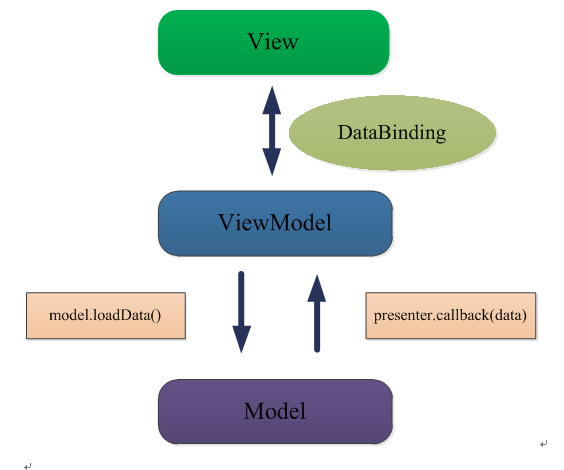
MVVM 模式将 Presenter 改名为 ViewModel,基本上与 MVP 模式完全一致。
区别在于: View 层与 ViewModel 层通过DataBinding相互绑定,View的变动,自动反映在 ViewModel,反之亦然。
RxJava 在 GitHub 主页上的自我介绍是 "a library for composing asynchronous and event-based programs using observable sequences for the Java VM"(一个在 Java VM 上使用可观测的序列来组成异步的、基于事件的程序的库)。
RxJava 本质上是一个异步操作库,是一个能让你用极其简洁的逻辑去处理繁琐复杂任务的异步事件库。
简而言之,RxJava 可以用几个关键字概括:简洁,队列化,异步。

一个 Android 和 Java 上 HTTP 库(利用注解和 okhttp 来实现和服务器的数据交互)。
Retrofit 官方文档:http://square.github.io/retrofit/

在今年的 Google IO 2015 中,Google 在 support-v7 中新增了 Data Binding,使用 Data Binding 可以直接在布局的 xml 中绑定布局与数据,从而简化代码,Android Data Binding 是Android 的 MVVM 框架。因为 Data Binding 是包含在 support-v7 包里面的,所以可以向下兼容到最低 Android 2.1 (API level 7+).
嫌代码不够高亮?请移步博客http://haohaochang.cn
直接上代码。
    compile 'io.reactivex:rxjava:1.1.0'
    compile 'io.reactivex:rxandroid:1.1.0'
    compile 'com.squareup.retrofit2:retrofit:2.0.0-beta4'
    compile 'com.squareup.retrofit2:converter-gson:2.0.0-beta4'
    compile 'com.squareup.retrofit2:adapter-rxjava:2.0.0-beta4'
    compile 'com.github.bumptech.glide:glide:3.7.0'
https://api.douban.com/v2/movie/top250?start=0&count=20
android {
    ......

    dataBinding {
        enabled = true
    }
}

MainActivity.java
getFragmentManager().beginTransaction().add(R.id.movie_fragment, MovieFragment.getInstance()).commit();
MovieFragment.java
public class MovieFragment extends Fragment implements CompletedListener,SwipeRefreshLayout.OnRefreshListener{

    private static String TAG = MovieFragment.class.getSimpleName();
    private MainViewModel viewModel;
    private MovieFragmentBinding movieFragmentBinding;
    private MovieAdapter movieAdapter;

    public static MovieFragment getInstance() {
        return new MovieFragment();
    }

    @Nullable
    @Override
    public View onCreateView(LayoutInflater inflater, ViewGroup container, Bundle savedInstanceState) {
        View contentView = inflater.inflate(R.layout.movie_fragment, container, false);
        movieFragmentBinding = MovieFragmentBinding.bind(contentView);
        initData();
        return contentView;
    }

    private void initData() {
        movieAdapter = new MovieAdapter();
        movieFragmentBinding.recyclerView.setLayoutManager(new LinearLayoutManager(getActivity(), LinearLayoutManager.VERTICAL, false));
        movieFragmentBinding.recyclerView.setItemAnimator(new DefaultItemAnimator());
        movieFragmentBinding.recyclerView.setAdapter(movieAdapter);
        movieFragmentBinding.swipeRefreshLayout.setColorSchemeResources(R.color.colorAccent, R.color.colorPrimary, R.color.colorPrimaryDark);
        movieFragmentBinding.swipeRefreshLayout.setOnRefreshListener(this);
        viewModel = new MainViewModel(movieAdapter,this);
        movieFragmentBinding.setViewModel(viewModel);

    }

    @Override
    public void onRefresh() {
        movieAdapter.clearItems();
        viewModel.refreshData();
    }

    @Override
    public void onCompleted() {
        if (movieFragmentBinding.swipeRefreshLayout.isRefreshing()) {
            movieFragmentBinding.swipeRefreshLayout.setRefreshing(false);
        }
    }
}
activity_main.xml
<?xml version="1.0" encoding="utf-8"?>
<android.support.design.widget.CoordinatorLayout xmlns:android="http://schemas.android.com/apk/res/android"
    xmlns:app="http://schemas.android.com/apk/res-auto"
    xmlns:tools="http://schemas.android.com/tools"
    android:layout_width="match_parent"
    android:layout_height="match_parent"
    android:fitsSystemWindows="true"
    tools:context=".view.MainActivity">

    <!-- ... -->

    <FrameLayout
        android:layout_marginTop="?attr/actionBarSize"
        android:layout_width="match_parent"
        android:layout_height="match_parent"
        android:id="@+id/movie_fragment"/>

    <!-- ... -->

</android.support.design.widget.CoordinatorLayout>
movie_fragment.xml
<?xml version="1.0" encoding="utf-8"?>
<layout xmlns:android="http://schemas.android.com/apk/res/android">
    <data>
        <variable
            name="viewModel"
            type="com.jc.mvvmrxjavaretrofitsample.viewModel.MainViewModel"/>
    </data>
    <RelativeLayout
        android:layout_width="match_parent"
        android:layout_height="match_parent">
        <android.support.v4.widget.SwipeRefreshLayout
            android:visibility="@{viewModel.contentViewVisibility}"
            android:id="@+id/swipe_refresh_layout"
            android:layout_width="match_parent"
            android:layout_height="match_parent">

            <android.support.v7.widget.RecyclerView
                android:id="@+id/recycler_view"
                android:background="#ddd"
                android:layout_width="match_parent"
                android:layout_height="match_parent"
                android:padding="8dp">
            </android.support.v7.widget.RecyclerView>

        </android.support.v4.widget.SwipeRefreshLayout>

        <ProgressBar
            style="?android:attr/progressBarStyleLarge"
            android:id="@+id/progress_bar"
            android:visibility="@{viewModel.progressBarVisibility}"
            android:layout_width="wrap_content"
            android:layout_height="wrap_content"
            android:layout_centerInParent="true"/>

        <LinearLayout
            android:layout_width="match_parent"
            android:id="@+id/error_info_layout"
            android:visibility="@{viewModel.errorInfoLayoutVisibility}"
            android:orientation="vertical"
            android:layout_height="match_parent">
            <TextView
                android:layout_gravity="center"
                android:layout_width="wrap_content"
                android:layout_height="wrap_content"
                android:text="@{viewModel.exception}"/>
        </LinearLayout>
    </RelativeLayout>
</layout>
movie_item.xml
<?xml version="1.0" encoding="utf-8"?>
<layout xmlns:android="http://schemas.android.com/apk/res/android"
    xmlns:app="http://schemas.android.com/tools">
    <data>
        <variable
            name="viewModel"
            type="com.jc.mvvmrxjavaretrofitsample.viewModel.MovieViewModel"/>
    </data>
    <android.support.v7.widget.CardView
        xmlns:card_view="http://schemas.android.com/apk/res-auto"
        android:id="@+id/card_view"
        android:layout_width="match_parent"
        android:layout_height="wrap_content"
        card_view:cardCornerRadius="4dp"
        card_view:cardBackgroundColor="@color/background"
        card_view:cardUseCompatPadding="true">
        <LinearLayout
            android:layout_width="match_parent"
            android:layout_height="wrap_content"
            android:orientation="horizontal">
            <ImageView
                android:layout_margin="8dp"
                android:layout_width="60dp"
                android:layout_height="100dp"
                android:src="@drawable/cover"
                app:imageUrl="@{viewModel.imageUrl}"
                android:id="@+id/cover"/>
            <LinearLayout
                android:layout_width="wrap_content"
                android:layout_height="match_parent"
                android:layout_margin="8dp"
                android:orientation="vertical">
                <TextView
                    android:textColor="@android:color/black"
                    android:layout_width="wrap_content"
                    android:layout_height="wrap_content"
                    android:text="@{viewModel.title}"
                    android:textSize="12sp"/>
                <LinearLayout
                    android:layout_width="wrap_content"
                    android:layout_height="wrap_content"
                    android:layout_marginTop="4dp"
                    android:orientation="horizontal">
                    <android.support.v7.widget.AppCompatRatingBar
                        android:id="@+id/ratingBar"
                        style="?android:attr/ratingBarStyleSmall"
                        android:layout_width="wrap_content"
                        android:layout_height="wrap_content"
                        android:layout_gravity="center_vertical"
                        android:isIndicator="true"
                        android:max="10"
                        android:numStars="5"
                        android:rating="@{viewModel.rating}" />

                    <TextView
                        android:id="@+id/rating_text"
                        android:layout_width="wrap_content"
                        android:layout_height="wrap_content"
                        android:layout_gravity="center_vertical"
                        android:layout_marginLeft="6dp"
                        android:text="@{viewModel.ratingText}"
                        android:textColor="?android:attr/textColorSecondary"
                        android:textSize="10sp" />

                </LinearLayout>
                <TextView
                    android:layout_width="wrap_content"
                    android:layout_height="wrap_content"
                    android:textColor="?android:attr/textColorSecondary"
                    android:textSize="10sp"
                    android:text="@{viewModel.movieType}"
                    android:id="@+id/movie_type_text"
                    android:layout_marginTop="6dp"
                    />
                <TextView
                    android:layout_width="wrap_content"
                    android:layout_height="wrap_content"
                    android:textColor="?android:attr/textColorSecondary"
                    android:textSize="10sp"
                    android:text="@{viewModel.year}"
                    android:id="@+id/year_text"
                    android:layout_marginTop="6dp"
                    />
            </LinearLayout>

        </LinearLayout>

    </android.support.v7.widget.CardView>
</layout>
MovieAdapter.java
public class MovieAdapter extends RecyclerView.Adapter<MovieAdapter.BindingHolder> {
    private List<Movie> movies;

    public MovieAdapter() {
        movies = new ArrayList<>();
    }

    @Override
    public BindingHolder onCreateViewHolder(ViewGroup parent, int viewType) {
        MovieItemBinding itemBinding = DataBindingUtil.inflate(LayoutInflater.from(parent.getContext()), R.layout.movie_item, parent, false);
        return new BindingHolder(itemBinding);
    }

    @Override
    public void onBindViewHolder(BindingHolder holder, int position) {
        MovieViewModel movieViewModel = new MovieViewModel(movies.get(position));
        holder.itemBinding.setViewModel(movieViewModel);
    }

    @Override
    public int getItemCount() {
        return movies.size();
    }

    public void addItem(Movie movie) {
        movies.add(movie);
        notifyItemInserted(movies.size() - 1);
    }

    public void clearItems() {
        movies.clear();
        notifyDataSetChanged();
    }

    public static class BindingHolder extends RecyclerView.ViewHolder {
        private MovieItemBinding itemBinding;

        public BindingHolder(MovieItemBinding itemBinding) {
            super(itemBinding.cardView);
            this.itemBinding = itemBinding;
        }
    }
}
回调接口** CompletedListener.java**
public interface CompletedListener {
    void onCompleted();
}
MainViewModel.java
public class MainViewModel {
    public ObservableField<Integer> contentViewVisibility;
    public ObservableField<Integer> progressBarVisibility;
    public ObservableField<Integer> errorInfoLayoutVisibility;
    public ObservableField<String> exception;
    private Subscriber<Movie> subscriber;
    private MovieAdapter movieAdapter;
    private CompletedListener completedListener;

    public MainViewModel(MovieAdapter movieAdapter,CompletedListener completedListener) {
        this.movieAdapter = movieAdapter;
        this.completedListener = completedListener;
        initData();
        getMovies();
    }

    private void getMovies() {
        subscriber = new Subscriber<Movie>() {
            @Override
            public void onCompleted() {
                Log.d("[MainViewModel]", "onCompleted");
                hideAll();
                contentViewVisibility.set(View.VISIBLE);
                completedListener.onCompleted();
            }

            @Override
            public void onError(Throwable e) {
                hideAll();
                errorInfoLayoutVisibility.set(View.VISIBLE);
                exception.set(e.getMessage());
            }

            @Override
            public void onNext(Movie movie) {
                movieAdapter.addItem(movie);
            }
        };
        RetrofitHelper.getInstance().getMovies(subscriber, 0, 20);
    }

    public void refreshData() {
        getMovies();
    }

    private void initData() {
        contentViewVisibility = new ObservableField<>();
        progressBarVisibility = new ObservableField<>();
        errorInfoLayoutVisibility = new ObservableField<>();
        exception = new ObservableField<>();
        contentViewVisibility.set(View.GONE);
        errorInfoLayoutVisibility.set(View.GONE);
        progressBarVisibility.set(View.VISIBLE);
    }

    private void hideAll(){
        contentViewVisibility.set(View.GONE);
        errorInfoLayoutVisibility.set(View.GONE);
        progressBarVisibility.set(View.GONE);
    }
}
MovieViewModel.java
public class MovieViewModel extends BaseObservable {
    private Movie movie;

    public MovieViewModel(Movie movie) {
        this.movie = movie;
    }

    public String getCoverUrl() {
        return movie.getImages().getSmall();
    }

    public String getTitle() {
        return movie.getTitle();
    }

    public float getRating() {
        return movie.getRating().getAverage();
    }

    public String getRatingText(){
        return String.valueOf(movie.getRating().getAverage());
    }

    public String getYear() {
        return movie.getYear();
    }

    public String getMovieType() {
        StringBuilder builder = new StringBuilder();
        for (String s : movie.getGenres()) {
            builder.append(s + " ");
        }
        return builder.toString();
    }

    public String getImageUrl() {
        return movie.getImages().getSmall();
    }

    @BindingAdapter({"app:imageUrl"})
    public static void loadImage(ImageView imageView,String url) {
        Glide.with(imageView.getContext())
                .load(url)
                .placeholder(R.drawable.cover)
                .error(R.drawable.cover)
                .into(imageView);

    }
}
DouBanMovieService.java
public interface DouBanMovieService {
    String BASE_URL = "https://api.douban.com/v2/movie/";

    @GET("top250")
    Observable<Response<List<Movie>>> getMovies(@Query("start") int start, @Query("count") int count);
}
RetrofitHelper.java
public class RetrofitHelper {
    private static final int DEFAULT_TIMEOUT = 10;
    private Retrofit retrofit;
    private DouBanMovieService movieService;
    OkHttpClient.Builder builder;

    /**
     * 获取RetrofitHelper对象的单例
     * */
    private static class Singleton {
        private static final RetrofitHelper INSTANCE = new RetrofitHelper();
    }

    public static RetrofitHelper getInstance() {
        return Singleton.INSTANCE;
    }

    public RetrofitHelper() {
        builder = new OkHttpClient.Builder();
        builder.connectTimeout(DEFAULT_TIMEOUT, TimeUnit.SECONDS);

        retrofit = new Retrofit.Builder()
                .client(builder.build())
                .addConverterFactory(GsonConverterFactory.create())
                .addCallAdapterFactory(RxJavaCallAdapterFactory.create())
                .baseUrl(DouBanMovieService.BASE_URL)
                .build();
        movieService = retrofit.create(DouBanMovieService.class);
    }

    public void getMovies(Subscriber<Movie> subscriber, int start, int count) {
        movieService.getMovies(start, count)
                .map(new Func1<Response<List<Movie>>, List<Movie>>() {
                    @Override
                    public List<Movie> call(Response<List<Movie>> listResponse) {
                        return listResponse.getSubjects();
                    }
                })
                .flatMap(new Func1<List<Movie>, Observable<Movie>>() {
                    @Override
                    public Observable<Movie> call(List<Movie> movies) {
                        return Observable.from(movies);
                    }
                })
                .subscribeOn(Schedulers.io())
                .observeOn(AndroidSchedulers.mainThread())
                .subscribe(subscriber);
    }
}
还有 entity 类,这里就不贴出来了。
githubhaohao/MVVMRxJavaRetrofitSample is a public repo on GitHub by githubhaohao. MVVM RxJava Retrofit Sample.
It declares no license on GitHub. Public does not mean open source: without a license, nobody is granted the right to reuse it.
Its maker has not tagged a system, so it is unknown here. Its README says what it needs.
Open "Take it" on its page: Take My Repo writes an install plan for your machine and hands it to your AI agent (Claude Code, Codex or Cursor), which asks you before each step. Take My Repo has not tested it on any machine.
Its last change on GitHub was on 2017-07-13. Take My Repo does not judge from that whether it is maintained.
Develop Desktop, Embedded, Mobile and WebAssembly apps with C# and XAML. The future of .NET UI
Nobody has reviewed it on Take My Repo yet, which says nothing about its quality.
👕基于谷歌最新AAC架构,MVVM设计模式的一套快速开发库,整合Okhttp+RxJava+Retrofit+Glide等主流模块,满足日常开发需求。使用该框架可以快速开发一个高质量、易维护的Android应用。
RxJava – Reactive Extensions for the JVM – a library for composing asynchronous and event-based programs using observable sequences for the Java VM.
A collection of samples to discuss and showcase different architectural tools and patterns for Android apps.
:books:A pure reading App based on Material Design + MVP + RxJava2 + Retrofit + Dagger2 + Realm + Glide
Android OpenGL ES 3.0 从入门到精通系统性学习教程 ( OpenGL ES 3.X Systematic Learning Tutorials)
一个基于 Clean 架构以及 Retrofit , RxKotlin , Dagger 框架实现的 Kotlin for Android App 。


