
scribe
A lightweight, native GNOME Markdown editor with live preview, built with Rust, GTK4 and libadwaita
- 60
- AGPL-3.0
- 3 d ago
Repo gnacho/scribe, read from GitHub 17 h ago. gnacho has not joined Take My Repo.
In short
gnacho/scribe is a public repo on GitHub by gnacho. A lightweight, native GNOME Markdown editor with live preview, built with Rust, GTK4 and libadwaita. It declares the AGPL-3.0 license on GitHub. It is written mainly in Rust, has 60 stars and last changed on 2026-11-21. Nobody has reviewed it on Take My Repo yet, which says nothing about its quality. Read from GitHub on 2026-11-24.
Similar repos
firecrawl
Knowledge infrastructure to make your agents smarter. Search, scrape and access 550+ data providers through one API.

Scribe
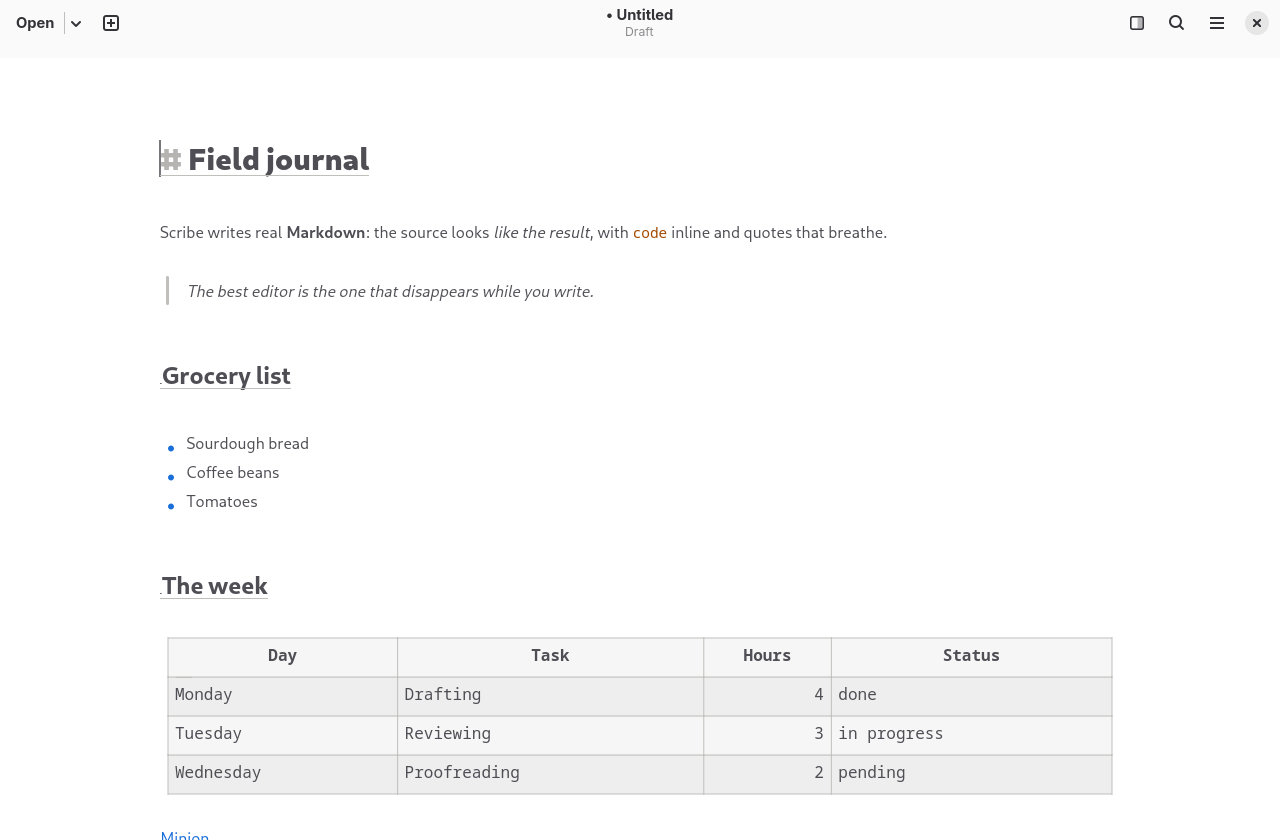
Scribe is a native GNOME Markdown editor that renders your document as you type — no preview switch, one surface. Built with Rust, GTK 4 and libadwaita. It renders Markdown live on the editing buffer so headings look like headings and bold text looks bold, without switching to a separate preview or a browser engine.
See it in action at scribe.cloudless.club: every feature working, screenshots in light and dark, a live typing demo and install instructions for Flathub, .deb, .rpm, AppImage and AUR.
Available on Flathub:
flatpak install flathub io.github.gnacho.Scribe
Why does this exist?
I wanted a Markdown editor that felt like part of GNOME, not a port of a web app. The ones I tried either wrapped a browser engine (ProseMirror, Milkdown inside WebKit) and consumed hundreds of megabytes, or showed a plain source buffer next to a rendered preview. I kept both panes open, going back and forth between them instead of just writing.
The idea is an editor where the source text IS the preview: the buffer stays
plain Markdown, but the rendering happens on top with GtkTextTag. There is
nothing to sync, no HTML under the hood, no browser engine to bundle. It
started as mockups for a GTK4 design exploration and evolved into something I
actually use to draft notes and docs.
Why this stack?
- Rust + GTK4 + libadwaita — native toolkit, no Electron. The binary is around 8 MB and idles at a few dozen megabytes of RAM. A WebKit-based editor would be ten times that before opening a file.
- GtkSourceView 5 for the text buffer and pulldown-cmark for Markdown
parsing, then custom
GtkTextTagspans for rendering. No HTML or CSS in the preview. The editor is a singleGtkTextViewwith decorations applied to the buffer. - No database, no server, no JavaScript. It is a desktop application that opens, edits and saves files. Preferences go through GSettings.
Features
- Live WYSIWYG rendering on the editing buffer: headings at real scale,
bold/italic/strikethrough, inline and fenced code, quotes, links, images,
footnotes, tables and HTML blocks via
GtkTextTagspans. - Rich rendered view on top of the buffer (
snapshot_layer): rounded code blocks, tables as a visual grid (bold header, painted column separators and a rule where the delimiter row was), a rule under H1/H2, vertical quote bars, drawn bullets per nesting level, checkable task boxes and horizontal rules. The mark a decoration replaces is shrunk instead of hidden. - Spell checking: misspelt words are underlined as you type, with suggestions and "ignore/add to dictionary" in the context menu; the language follows the system locale and it can be switched off in Preferences.
- Tables of prose as real tables: when a table's prose cells cannot fit its delimiter geometry (the common long-form table), the source rows collapse and the table is painted as a canvas: every cell wraps within its column, the header is bold with a rule, and alignments are honoured. The row under the cursor shows its raw source for editing.
- Local images in block: when an
is alone on its line and the file exists (relative to the document), it is painted scaled below the mark (max 144 px, 20 MB limit, cache of 64). Missing files show a discreet placeholder. The buffer is never modified: no widgets, no characters inserted. - Image size and alignment from the alt: write
to show it 480 px wide,|480x320to cap both sides, and|centeror|rightto place it in the column. It is the form Obsidian uses, and other renderers either honour it or show the image at its natural size, so the file stays valid Markdown. The right-click menu on the image writes it for you (Small, Medium, Large, Original size, and the three alignments). Without a size, an image is never enlarged and the block gap fits the image. - Remote images: when the destination is a URL, Scribe asks for its size
first (20 MB limit), downloads it and caches it on disk under
~/.cache/scribe/images, so later runs paint it without going out again. A URL that fails keeps the placeholder and is not retried on every redraw. - YouTube cards: a video that is alone on its line, written as a Markdown
link, a bare URL or an
<iframe>, is drawn below the line as a 16:9 card with its thumbnail and a play badge. The line stays visible and editable, and there is no embedded player: clicking the card opens your browser. - Ctrl+click a link opens the destination with the default application;
holding Ctrl over one shows where it goes. Only
http,httpsandmailtoare offered, so the click stays a text click (cursor, selection) when there is nothing to open. - Configurable markup visibility: dim the syntax markers (
**,#, backticks) everywhere, hide them, or reveal them on the cursor line. Because of a GTK bug (gtk#8346), "hide" currently shrinks the marks (scale ~0) instead of removing them; when GTK ships the fix, real hiding returns on its own. - Focus mode (Ctrl+Shift+F) dims everything except the current paragraph.
- Typewriter mode (Ctrl+Shift+T) keeps the cursor vertically centered.
- Split preview on the right (Ctrl+Shift+P, or the header icon) renders the
full document in a side panel using the same
GtkTextTagengine, so you can keep an eye on the outline while you write. - Find in the document (Ctrl+F): a search bar inside the editor pane, with a match counter, next/previous buttons and Enter/Shift+Enter.
- Ctrl+B/I/K wraps the selection in
**,*or backticks. - Align tables (Ctrl+Alt+T) reformats all tables in the document so their columns line up in the source.
- List continuation: pressing Enter starts the next item and re-numbers ordered lists. Leaving an item empty closes the list. Tab indents an item one level and Shift+Tab takes it back out.
- Zoom (Ctrl +/−/0).
- Header bar follows GNOME Text Editor: open button with recent files dropdown, new tab button, centered title, split preview toggle and main menu.
- Preferences window with three pages: Appearance, Editor and Export.
- Export to PDF (Ctrl+P): print or export the document through the GTK
print pipeline, reusing the same span/ornament analysis as the editor.
Headings, code blocks, quotes and tables are themed, with separate export
settings (color scheme, fonts, page size and orientation) and careful
pagination (no orphan headings,
\newpagesupport). - Page templates (Custom, Article, Manuscript, Letter, Compact) group margins, body and code typography, line spacing, heading scale, header and footer and an optional title block. The same template feeds both the exported file and the preview, so what you see is what prints.
- Print preview (menu, next to Export to PDF) renders the real pages through the export pipeline before committing to paper or a file.
- Table of contents: with the Preferences > Export switch, the PDF starts with an index page listing the h1 to h3 headings with the page where each one falls. The numbers are the real ones, and a long index flows onto more pages.
- Your own stylesheet: an optional CSS file applies on top of the chosen template (see Stylesheets).
- Files: open, save and save-as with
GtkFileDialog, atomic writes, unsaved-changes warning, configurable autosave. - Sidebar (F9) with filterable recent files and a navigable outline.
- Light and dark theme follows the GtkSourceView style scheme; the Preferences pick the colour scheme explicitly (follow system, light, dark).
- Integration:
scribe file.mdand "Open with" from the file manager. - Translated UI (gettext): English and Spanish. New translations go in
po/(seepo/update-pot.sh).
How the rendering works
Two modules, neither depending on application types:
src/markdown_render.rsparses Markdown with pulldown-cmark and returns two lists: spans (byte ranges with aGtkTextTagname) and ornaments (elements keyed by line number to be painted). GTK-independent, unit-tested without a display.src/markdown_view.rsis aGtkSourceViewsubclass that implementssnapshot_layer, the vfunc GTK exposes for drawing below or above text. It works in buffer coordinates (GTK handles scrolling) and draws withgsk::PathBuilder.
Markers replaced by an ornament (bullets, [x], ---, >, fences, pipes) are
shrunk rather than hidden: the tiny glyph stays in GTK's layout, so the
invisible-text abort path of GNOME/gtk#8346 is unreachable by construction.
Themes and stylesheets
Export styles come in two layers that stack: a page template decides the
geometry (margins, leading, heading sizes, running header and footer, title
block), and a theme decides typography and colour. Preferences > Export > Theme
offers four bundled themes, written with our own values and compiled into the
binary so there is nothing extra to install:
| Theme | What it does |
|---|---|
| None | Leave the template as it is |
| Sepia | Cream paper, warm serif, wide leading and large headings for long reading |
| High contrast | Bigger sans text, black on white, blue links, for printing |
| Technical | Everything monospaced with tight spacing and navy headings, for notes and code |
| Academic | Eleven point serif with double leading and small headings, like a journal page |
Any theme combines with any template. The Stylesheet row of the same group
takes a CSS file from disk, applied on top of the theme, so it can correct a
single detail of it. The parser is a mapped subset, not a CSS engine: the
export paints and paginates with cairo, so each declaration is translated into a
value the layout already understands, and anything outside this table is ignored
(the export warns once and keeps going).
| Selector | Properties |
|---|---|
@page |
margin, margin-top, margin-right, margin-bottom, margin-left (pt, mm, cm, in, px) |
body, html, :root |
font-family, font-size, line-height, color, background-color, margin-bottom, --block-spacing, --muted-color |
p |
line-height, color, margin-bottom, --block-spacing |
h1 to h4 |
font-size, color |
pre, code |
font-family, color, background-color |
blockquote |
color, border-color (the quote bar) |
a |
color |
table |
color, background-color |
th |
color, background-color |
hr |
color |
When the sheet says nothing about a value, the template keeps its own, and removing the file restores the previous output exactly. Example:
@page { margin: 2cm 2.5cm }
body {
  font-family: "Source Serif 4", serif;
  font-size: 11pt;
  line-height: 1.6;
  color: #1a1a1a;
  --block-spacing: 8pt;
}
h1 { font-size: 20pt; color: #003366 }
pre { background-color: #f5f5f5 }
Limitations
- UTF-8 only. Files are read as UTF-8 and written back byte for byte. A file in another encoding (Latin-1, UTF-16, and so on) does not open. A leading UTF-8 BOM is kept as it is, and Scribe never adds one.
- The source is the preview. Rendering is a set of
GtkTextTagspans and painted ornaments over the buffer, not a layout engine. HTML in the source is not interpreted: it stays as dimmed text in the editor and is dropped in the split preview. The result is an approximation of the Markdown, not a copy of a browser rendering. - No export to HTML, and no spell checking. The find bar (Ctrl+F) searches the active document, with case sensitivity and regular expressions as options. Ctrl+H reveals a second row with Replace and Replace All, so the replacement is done in place, not in a dialog.
- PDF export has no outline/bookmarks.
GtkPrintOperationdoes not expose PDF bookmarks, so the table of contents is a printed page: the viewer outline and clickable internal links are not there. - Images: local files up to 20 MB are painted, at most 144 px tall, and remote URLs are downloaded with the same limits. Inline images (not alone on their line), missing files and downloads that fail show the placeholder.
- The image cache has no expiry. A picture edited on disk is not refreshed
until the document is reopened, and a downloaded one is reused from
~/.cache/scribe/imagesuntil you delete that directory. - Videos are not played inside the editor. The card is drawn from the video
id and a thumbnail fetched from
i.ytimg.com, and clicking it opens the browser. A link whose id is not a valid 11-character id is left as text.
Questions
What is scribe?
gnacho/scribe is a public repo on GitHub by gnacho. A lightweight, native GNOME Markdown editor with live preview, built with Rust, GTK4 and libadwaita.
Is scribe open source?
It declares the AGPL-3.0 license on GitHub.
Does scribe run on macOS, Windows or Linux?
Its maker tagged it for Linux. That is declared by the maker; Take My Repo has not tested it.
How do I install scribe?
Open "Take it" on its page: Take My Repo writes an install plan for your machine and hands it to your AI agent (Claude Code, Codex or Cursor), which asks you before each step. Take My Repo has not tested it on any machine.





