rea
Reverse engineer anything with agents, from app behavior down to native binaries.
- 473k
- TypeScript
- MIT
- 4 h ago
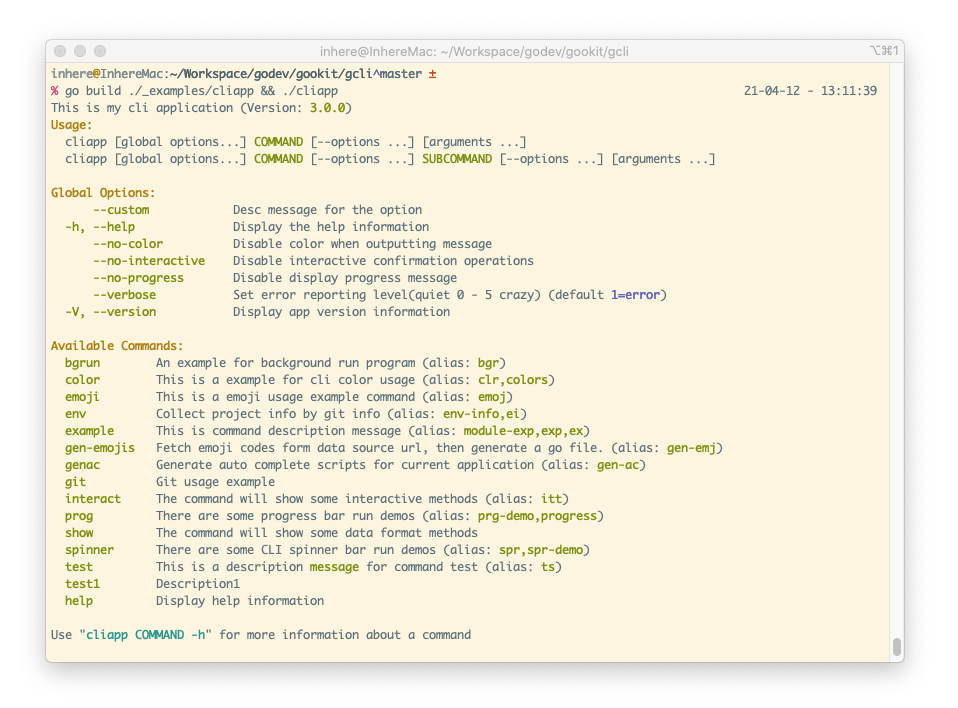
🖥 Go CLI application, tool library, running CLI commands, support console color, user interaction, progress display, data formatting display, generate bash/zsh completion add more features. Go的命令行应用,工具库,运行CLI命令,支持命令行色彩,用户交互,进度显示,数据格式化显示,生成bash/zsh命令补全脚本
Repo gookit/gcli, read from GitHub 3 h ago. gookit has not joined Take My Repo.
gookit/gcli is a public repo on GitHub by gookit. 🖥 Go CLI application, tool library, running CLI commands, support console color, user interaction, progress display, data formatting display, generate bash/zsh completion add more features. Go的命令行应用,工具库,运行CLI命令,支持命令行色彩,用户交互,进度显示,数据格式化显示,生成bash/zsh命令补全脚本. It declares the MIT license on GitHub. It is written mainly in Go, has 381 stars and last changed on 2026-11-21. Nobody has reviewed it on Take My Repo yet, which says nothing about its quality. Read from GitHub on 2026-11-22.
A simple and easy-to-use command-line application and tool library written in Golang. Including running commands, color styles, data display, progress display, interactive methods, etc.
Rich in functions and easy to use. Highlights grouped by area:
Commands
Use(handlers ...RunnerFunc)Option binding
BoolOpt / IntOpt / StrOpt / Float64Opt / VarOpt ...gflag.Opt[T] / gflag.BindVar[T] — one call covers
bool/int/uint/float/string, time.Duration, []string/[]int/[]bool, map[string]stringFromStruct:named(default) / simple / field(field name as option name); anonymous embedded structs auto-expand under any rulebool/int/uint/float/string, native []string/[]int/[]bool (repeatable), time.Duration, map[string]string (repeatable --meta k=v)enum:"a,b,c" tag for value candidates(completion) + membership validationRequired / Validator / Choices per option; option Category for grouped help displayThree-level option model
Command.SharedOpts() (≈ cobra PersistentFlags): inherited by the
command and all its sub-commands (sharing the same variable), grouped under Inherited Options in helpParse enhancements
cmd arg --name tom == cmd --name tom arg
(on by default; disable via gflag.WithReorderArgs(false))-ab = -a -b) via opt-in EnhanceShort; EnhanceShort=2 also supports
attached-value form -Ostdout = -O stdout. Only all-bool groups are split, off by default for compatibilityQuestion when the option value is emptyArguments
required / optional / array settingsTooling
zsh / bash / pwsh command completion scripts (incl. dynamic completion)markdown / man page command documentation (docgen package + builtin GenDoc command)gevent, with gcli.Evt* aliases)Extras
go get github.com/gookit/gcli/v3
Upgrade note: the event package
gcli/v3/eventswas renamed togcli/v3/gevent. Update your imports, or reference event names directly via thegcli.Evt*aliases (e.g.gcli.EvtCmdRunBefore) to avoid the import entirely. See CHANGELOG for details.
an example for quick start:
package main

import (
    "github.com/gookit/gcli/v3"
    "github.com/gookit/gcli/v3/_examples/cmd"
)

// for test run: go build ./_examples/cliapp.go && ./cliapp
func main() {
    app := gcli.NewApp()
    app.Version = "1.0.3"
    app.Desc = "this is my cli application"
    // app.SetVerbose(gcli.VerbDebug)

    // TIP: Add binding app-level option settings (same level as the built-in -h/--help)
    app.Flags().BoolOpt(...)
    app.Flags().StrOpt(...)

    app.Add(cmd.Example)
    app.Add(&gcli.Command{
        Name: "demo",
        // allow color tag and {$cmd} will be replace to 'demo'
        Desc: "this is a description <info>message</> for {$cmd}",
        Subs: []*gcli.Command {
            // ... allow add subcommands
        },
        Aliases: []string{"dm"},
        Func: func (cmd *gcli.Command, args []string) error {
            gcli.Print("hello, in the demo command\n")
            return nil
        },
    })

    // .... add more ...

    app.Run(nil)
}
flags binding and manage by builtin gflag.go, allow binding flag options and arguments.
gcli support multi method to binding flag options.
Available methods:
BoolOpt(p *bool, name, shorts string, defValue bool, desc string)
BoolVar(p *bool, meta FlagMeta)
Float64Opt(p *float64, name, shorts string, defValue float64, desc string)
Float64Var(p *float64, meta FlagMeta)
Int64Opt(p *int64, name, shorts string, defValue int64, desc string)
Int64Var(p *int64, meta FlagMeta)
IntOpt(p *int, name, shorts string, defValue int, desc string)
IntVar(p *int, meta FlagMeta)
StrOpt(p *string, name, shorts, defValue, desc string)
StrVar(p *string, meta FlagMeta)
Uint64Opt(p *uint64, name, shorts string, defValue uint64, desc string)
Uint64Var(p *uint64, meta FlagMeta)
UintOpt(p *uint, name, shorts string, defValue uint, desc string)
UintVar(p *uint, meta FlagMeta)
Var(p flag.Value, meta FlagMeta)
VarOpt(p flag.Value, name, shorts, desc string)
Usage examples:
var id int
var b bool
var opt, dir string
var f1 float64
var names gcli.Strings

// bind options
cmd.IntOpt(&id, "id", "", 2, "the id option")
cmd.BoolOpt(&b, "bl", "b", false, "the bool option")
// notice `DIRECTORY` will replace to option value type
cmd.StrOpt(&dir, "dir", "d", "", "the `DIRECTORY` option")
// setting option name and short-option name
cmd.StrOpt(&opt, "opt", "o", "", "the option message")
// setting a special option var, it must implement the flag.Value interface
cmd.VarOpt(&names, "names", "n", "the option message")
gflag.Opt[T] / gflag.BindVar[T] bind a typed pointer in one type-safe call,
covering scalars, time.Duration, slices and map[string]string:
var name string
var tags []string

gflag.Opt(&cmd.Flags, &name, "name", "n", "tom", "the user name")
// slice option, repeatable: --tag php --tag go
gflag.Opt(&cmd.Flags, &tags, "tag", "t", nil, "the tags, repeatable")
package main

import (
	"github.com/gookit/gcli/v3"
)

type userOpts struct {
	Int  int    `flag:"name=int0;shorts=i;required=true;desc=int option message"`
	Bol  bool   `flag:"name=bol;shorts=b;desc=bool option message"`
	Str1 string `flag:"name=str1;shorts=o;required=true;desc=str1 message"`
	// use ptr
	Str2 *string `flag:"name=str2;required=true;desc=str2 message"`
	// custom type and implement flag.Value
	Verb0 gcli.VerbLevel `flag:"name=verb0;shorts=v0;desc=verb0 message"`
	// use ptr
	Verb1 *gcli.VerbLevel `flag:"name=verb1;desc=verb1 message"`
}

// run: go run ./_examples/issues/iss157.go
func main() {
	astr := "xyz"
	verb := gcli.VerbWarn

	cmd := gcli.NewCommand("test", "desc")
	cmd.Config = func(c *gcli.Command) {
		c.MustFromStruct(&userOpts{
			Str2:  &astr,
			Verb1: &verb,
		})
	}

	// disable auto bind global options: verbose,version, progress...
	gcli.GOpts().SetDisable()

	// direct run
	if err := cmd.Run(nil); err != nil {
		colorp.Errorln( err)
	}
}
FromStruct supports three tag rules, selected by c.FromStruct(ptr, ruleType):
gcli.TagRuleNamed (default): flag:"name=int0;shorts=i;required=true;desc=message"gcli.TagRuleSimple: flag:"desc;required;default;shorts"gcli.TagRuleField: use the field name (SnakeCase) as the option name, read meta
from independent tag keys.Anonymous embedded structs are expanded automatically under all three rules — each inner field is read using whichever rule is active. This also works for embedded unexported types (e.g.
commonOptsbelow).
type commonOpts struct {
	Verbose bool `flag:"v" desc:"enable verbose output"`
}
type demoOpts struct {
	commonOpts        // anonymous: expands to a --verbose/-v option
	UserName string `flag:"u" desc:"the user name" required:"true"`
	Age      int    `desc:"the user age" default:"18"`
}

c.MustFromStruct(&demoOpts{}, gcli.TagRuleField)
// => options: --user-name/-u (required), --age (default 18), --verbose/-v
When an option value is empty, you can auto-collect it via an interactive question
(a built-in default collector). Collector has higher priority than Question.
c.StrOpt2(&token, "token", "the access token",
	gflag.WithQuestion("Please input your access token: "))
// run without --token will prompt: "Please input your access token: "
Combined short options are disabled by default. Enable via Config.EnhanceShort:
c.ParserCfg().EnhanceShort = gcli.EnhanceShortMerge  // 1: -aux => -a -u -x (all bool)
c.ParserCfg().EnhanceShort = gcli.EnhanceShortAttach // 2: also -Ostdout => -O stdout
Or enable it globally for all commands with one call — a command's own setting (if any) still takes priority:
gcli.SetEnhanceShort(gcli.EnhanceShortMerge) // applies to every command
Only groups where all members are bool short options are split; mixed forms are kept as-is to avoid mis-parsing value-taking short options.
Runnable demos in
_examples/cmd:struct-flag(B6),short-merge(B4+B5),ask-demo(B7).
Both commands and options support a Category for grouped display in the help
message. When no category is set, the output is the same as before (commands go
to Available Commands, options are listed directly under Options:).
// command category
app.Add(&gcli.Command{Name: "migrate", Desc: "run db migrate", Category: "database"})
app.Add(&gcli.Command{Name: "serve", Desc: "start http server"}) // default group

// option category
cmd.StrVar(&dsn, &gcli.CliOpt{Name: "db-dsn", Desc: "database dsn", Category: "database"})
cmd.StrOpt2(&port, "port", "bind port", gflag.WithCategory("network"))
Groups keep the order of first appearance; commands inside a group are sorted by name.
NOTE: the log level is no longer controlled by a global
--verboseoption. Use the envGCLI_VERBOSE(egGCLI_VERBOSE=debug) orgcli.SetVerbose()instead, so it won't pollute the option list of the host application.
About arguments:
Available methods:
AddArg(name, desc string, requiredAndArrayed ...bool) *Argument
AddArgByRule(name, rule string) *Argument
AddArgument(arg *Argument) *Argument
BindArg(arg *Argument) *Argument
Usage examples:
cmd.AddArg("arg0", "the first argument, is required", true)
cmd.AddArg("arg1", "the second argument, is required", true)
cmd.AddArg("arg2", "the optional argument, is optional")
cmd.AddArg("arrArg", "the array argument, is array", false, true)
can also use BindArg() to add a *gcli.Argument object:
cmd.BindArg(&gcli.Argument{
	Name: "arg0",
	Desc: "the first argument, is required",
	Required: true,
})
cmd.BindArg(&gcli.Argument{
	Name: "arg2",
	Desc: "the third argument, is is optional",
})
cmd.BindArg(&gcli.Argument{
	Name: "arrArg",
	Desc: "the third argument, is is array",
	Arrayed: true,
})
use AddArgByRule:
cmd.AddArgByRule("arg2", "add an arg by string rule;required;23")
app := gcli.NewApp()
app.Version = "1.0.3"
app.Desc = "this is my cli application"
// app.SetVerbose(gcli.VerbDebug)
app.Add(cmd.Example)
app.Add(&gcli.Command{
    Name: "demo",
    // allow color tag and {$cmd} will be replace to 'demo'
    Desc: "this is a description <info>message</> for {$cmd}",
    Subs: []*gcli.Command {
        // level1: sub commands...
    	{
            Name:    "remote",
            Desc:    "remote command for git",
            Aliases: []string{"rmt"},
            Func: func(c *gcli.Command, args []string) error {
                dump.Println(c.Path())
                return nil
            },
            Subs: []*gcli.Command{
                // level2: sub commands...
                // {}
            }
        },
        // ... allow add subcommands
    },
    Aliases: []string{"dm"},
    Func: func (cmd *gcli.Command, args []string) error {
        gcli.Print("hello, in the demo command\n")
        return nil
    },
})
Build the example application as demo
$ go build ./_examples/cliapp
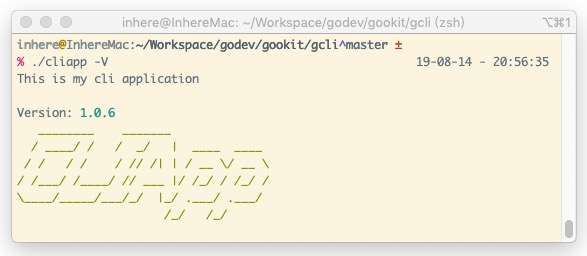
Display version
$ ./cliapp --version
# or use -V
$ ./cliapp -V
Display app help
by
./cliappor./cliapp -hor./cliapp --help
Examples:
./cliapp
./cliapp -h # can also
./cliapp --help # can also
Run command
Format:
./cliapp COMMAND [--OPTION VALUE -S VALUE ...] [ARGUMENT0 ARGUMENT1 ...]
./cliapp COMMAND [--OPTION VALUE -S VALUE ...] SUBCOMMAND [--OPTION ...] [ARGUMENT0 ARGUMENT1 ...]
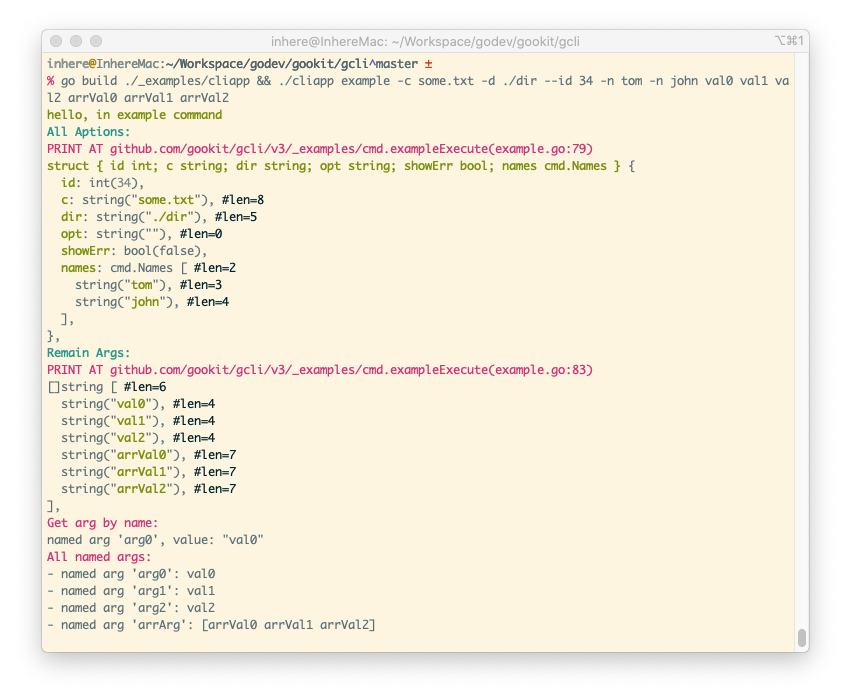
Run example:
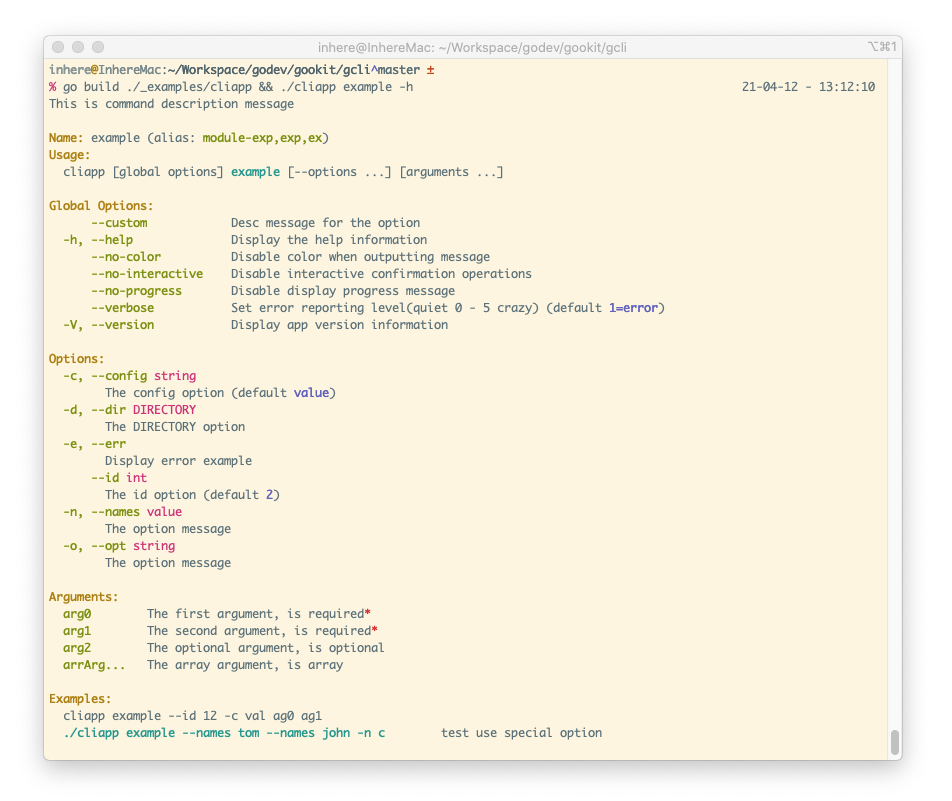
$ ./cliapp example -c some.txt -d ./dir --id 34 -n tom -n john val0 val1 val2 arrVal0 arrVal1 arrVal2
You can see:
Display command help
by
./cliapp example -hor./cliapp example --help
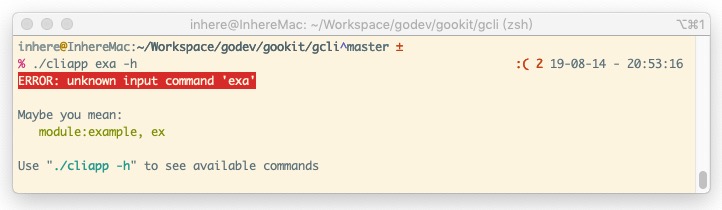
Error command tips
There are two ways to generate command completion scripts:
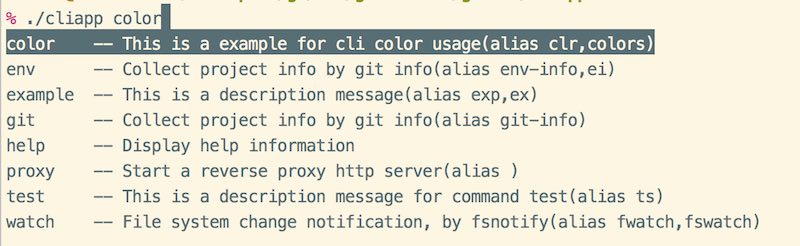
./cliapp --gen-completion bash|zsh > ~/.cliapp-completion.sh to generateGenAutoComplete command and then generate it using ./cliapp genac -o ~/.cliapp-completion.shimport "github.com/gookit/gcli/v3/builtin"
// ...
// add gen command(gen successful you can remove it)
app.Add(builtin.GenAutoComplete())
Build and run command(This command can be deleted after success.):
$ go build ./_examples/cliapp.go && ./cliapp genac -h // display help
$ go build ./_examples/cliapp.go && ./cliapp genac // run gen command
will see:
INFO:
  {shell:zsh binName:cliapp output:auto-completion.zsh}

Now, will write content to file auto-completion.zsh
Continue? [yes|no](default yes): y

OK, auto-complete file generate successful
After running, it will generate an
auto-completion.{zsh|bash}file in the current directory, and the shell environment name is automatically obtained. Of course, you can specify it manually at runtime
Preview:
Command.SharedOpts() (≈ cobra PersistentFlags) binds options that are inherited by the
command and all of its sub-commands, sharing the same variable. They can be written at any
position in the sub-command segment and are grouped under Inherited Options in the help output.
var gitDir string

top := &gcli.Command{Name: "git", Desc: "git tools"}
// bind on SharedOpts: inherited by every sub-command
top.SharedOpts().StrOpt(&gitDir, "git-dir", "", ".git", "the git dir path")

top.Add(&gcli.Command{
    Name: "status",
    Func: func(c *gcli.Command, _ []string) error {
        // --git-dir is usable here even though it is declared on the parent
        gcli.Printf("git dir: %s\n", gitDir)
        return nil
    },
})

// usage: ./app git status --git-dir /path/to/.git
Add the builtin GenDoc command, then export markdown / man documentation for all commands:
import "github.com/gookit/gcli/v3/builtin"

app.Add(builtin.GenDoc())
// ./cliapp gendoc -f md  -o ./docs   # export markdown (default)
// ./cliapp gendoc -f man -o ./docs   # export man pages
You can also call it programmatically:
import "github.com/gookit/gcli/v3/docgen"

docgen.MarkdownTree(app, "./docs") // one .md per command + index.md
docgen.ManTree(app, "./docs")      // man pages
command allow setting fields:
Name the command name.Desc the command description.Aliases the command alias names.Config the command config func, will call it on init.Subs add subcommands, allow multi level subcommandsFunc the command handle callback funcvar MyCmd = &gcli.Command{
Name: "demo",
// allow color tag and {$cmd} will be replace to 'demo'
Desc: "this is a description <info>message</> for command {$cmd}",
Aliases: []string{"dm"},
Func: func (cmd *gcli.Command, args []string) error {
gcli.Print("hello, in the demo command\n")
return nil
},
// allow add multi level subcommands
Subs: []*gcli.Command{},
}
the source file at: example.go
package main

import (
	"fmt"

	"github.com/gookit/color"
	"github.com/gookit/gcli/v3"
	"github.com/gookit/goutil/dump"
)

// options for the command
var exampleOpts = struct {
	id  int
	c   string
	dir string
	opt string
	names gcli.Strings
}{}

// ExampleCommand command definition
var ExampleCommand = &gcli.Command{
	Name: "example",
	Desc: "this is a description message",
	Aliases: []string{"exp", "ex"}, // 命令别名
	// {$binName} {$cmd} is help vars. '{$cmd}' will replace to 'example'
	Examples: `{$binName} {$cmd} --id 12 -c val ag0 ag1
<cyan>{$fullCmd} --names tom --names john -n c</> test use special option`,
	Config: func(c *gcli.Command) {
	    // binding options
        // ...
        c.IntOpt(&exampleOpts.id, "id", "", 2, "the id option")
		c.StrOpt(&exampleOpts.c, "config", "c", "value", "the config option")
		// notice `DIRECTORY` will replace to option value type
		c.StrOpt(&exampleOpts.dir, "dir", "d", "", "the `DIRECTORY` option")
		// 支持设置选项短名称
		c.StrOpt(&exampleOpts.opt, "opt", "o", "", "the option message")
		// 支持绑定自定义变量, 但必须实现 flag.Value 接口
		c.VarOpt(&exampleOpts.names, "names", "n", "the option message")

      // binding arguments
		c.AddArg("arg0", "the first argument, is required", true)
		// ...
	},
	Func:  exampleExecute,
}

// 命令执行主逻辑代码
// example run:
// 	go run ./_examples/cliapp.go ex -c some.txt -d ./dir --id 34 -n tom -n john val0 val1 val2 arrVal0 arrVal1 arrVal2
func exampleExecute(c *gcli.Command, args []string) error {
	color.Infoln("hello, in example command")

	if exampleOpts.showErr {
		return c.NewErrf("OO, An error has occurred!!")
	}

	magentaln := color.Magenta.Println

	color.Cyanln("All Aptions:")
	// fmt.Printf("%+v\n", exampleOpts)
	dump.V(exampleOpts)

	color.Cyanln("Remain Args:")
	// fmt.Printf("%v\n", args)
	dump.P(args)

	magentaln("Get arg by name:")
	arr := c.Arg("arg0")
	fmt.Printf("named arg '%s', value: %#v\n", arr.Name, arr.Value)

	magentaln("All named args:")
	for _, arg := range c.Args() {
		fmt.Printf("- named arg '%s': %+v\n", arg.Name, arg.Value)
	}

	return nil
}
go build ./_examples/cliapp.go && ./cliapp example -h
gcli ships with color output, interactive input (Confirm / Select / ReadLine ...),
progress display (Bar / Spinner / Loading ...) and data display (table / list / tree),
provided by gookit/color and gookit/cliui.
import (
    "github.com/gookit/color"
    "github.com/gookit/cliui/interact"
    "github.com/gookit/cliui/progress"
)

color.Info.Tips("processing...")              // colored output

ok := interact.Confirm("ensure continue?")    // interactive confirm
if !ok {
    return nil
}

p := progress.Bar(100)                        // progress bar
p.Start();
/* p.Advance() in loop */
p.Finish()
For more usage see gookit/color and gookit/cliui.
go directive).go test ./... (-short skips the terminal cases)e2e_pty_test.go drives the built example app (./_examples/cliapp)
through a pseudo terminal via gookit/gopty — the real
prompts, typed answers and -h; unix uses creack/pty, Windows uses ConPTY. go test ./...
builds the example into tmp/e2e/ once per run.inhere/console https://github/inhere/php-consoleissue9/term https://github.com/issue9/termMIT
gookit/gcli is a public repo on GitHub by gookit. 🖥 Go CLI application, tool library, running CLI commands, support console color, user interaction, progress display, data formatting display, generate bash/zsh completion add more features. Go的命令行应用,工具库,运行CLI命令,支持命令行色彩,用户交互,进度显示,数据格式化显示,生成bash/zsh命令补全脚本.
It declares the MIT license on GitHub.
Its maker has not tagged a system, so it is unknown here. Its README says what it needs.
Open "Take it" on its page: Take My Repo writes an install plan for your machine and hands it to your AI agent (Claude Code, Codex or Cursor), which asks you before each step. Take My Repo has not tested it on any machine.
Its last change on GitHub was on 2026-11-21. Take My Repo does not judge from that whether it is maintained.
Nobody has reviewed it on Take My Repo yet, which says nothing about its quality.
Reverse engineer anything with agents, from app behavior down to native binaries.
An AI skill that provides design intelligence for building professional UI/UX across multiple platforms.
🙃 A delightful community-driven (with 2,500+ contributors) framework for managing your zsh configuration. Includes 300+ optional plugins (rails, git, macOS, hub, docker, homebrew, node, php, python, etc), 140+ themes to spice up your morning, and an auto-update tool that makes it easy to keep up with the latest updates from the community.
The new Windows Terminal and the original Windows console host, all in the same place!
The agent harness performance optimization system. Skills, instincts, memory, security, and research-first development for Claude Code, Codex, Opencode, Cursor and beyond.
Fair-code workflow automation platform with native AI capabilities. Combine visual building with custom code, self-host or cloud, 400+ integrations.
💪 Helper Utils(900+): int, byte, string, array/slice, map, struct, dump, convert/format, error, web/http, cli/flag, OS/ENV, filesystem, system, test/assert, time and more. Go 常用的工具函数:数字,字符串,数组,Map,结构体,反射,文本,文件,错误,时间日期,特殊处理,格式化,常用信息获取等等
🎨 Terminal color rendering library, support 8/16 colors, 256 colors, RGB color rendering output, support Print/Sprintf methods, compatible with Windows. GO CLI 控制台颜色渲染工具库,支持16色,256色,RGB色彩渲染输出,使用类似于 Print/Sprintf,兼容并支持 Windows 环境的色彩渲染
⚔ Go package for data validation and filtering. support Map, Struct, Form data. Go通用的数据验证与过滤库,使用简单,内置大部分常用验证、过滤器,支持自定义验证器、自定义消息、字段翻译。
📝 Go configuration manage(load,get,set,export). support JSON, YAML, TOML, Properties, INI, HCL, ENV and Flags. Multi file load, data override merge, parse ENV var. Go应用配置加载管理,支持多种格式,多文件加载,远程文件加载,支持数据合并,解析环境变量名
📢 Lightweight event manager and dispatcher implements by Go. Go实现的轻量级的事件管理、调度程序库, 支持设置监听器的优先级, 支持使用通配符来进行一组事件的监听
📑 Lightweight, configurable, extensible logging library written in Go. Support multi level, multi outputs and built-in multi file logger, buffers, clean, rotate-file handling.一个易于使用的,轻量级、可配置、可扩展的日志库。支持多个级别,输出到多文件;内置文件日志处理、自动切割、清理、压缩等增强功能