grobid
A machine learning software for extracting information from scholarly documents
- 5.2k
- Java
- Apache-2.0
- 1 d ago
Python client for GROBID Web services
Repo grobidOrg/grobid-client-python, read from GitHub 1 h ago. grobidOrg has not joined Take My Repo.
grobidOrg/grobid-client-python is a public repo on GitHub by grobidOrg. Python client for GROBID Web services. It declares the Apache-2.0 license on GitHub. It is written mainly in Python, has 416 stars and last changed on 2026-11-10. Nobody has reviewed it on Take My Repo yet, which says nothing about its quality. Read from GitHub on 2026-11-22.
A simple, efficient Python client for GROBID REST services that provides concurrent processing capabilities for PDF documents, reference strings, and patents.
py.typed marker (PEP 561) for static type checking.zip/.tar/.tar.gz archives without fully decompressing thems3:// (range-streamed, no full download) with the optional [s3] extradocker run -t --rm -p 8070:8070 lfoppiano/grobid:0.8.2http://localhost:8070[!IMPORTANT] GROBID supports Windows only through Docker containers. See the Docker documentation for details.
Choose one of the following installation methods:
pip install grobid-client-python

# to stream inputs directly from S3 (s3:// URIs), install the optional 's3' extra:
pip install "grobid-client-python[s3]"
pip install git+https://github.com/kermitt2/grobid_client_python.git
git clone https://github.com/kermitt2/grobid_client_python
cd grobid_client_python
pip install -e .
# Process PDFs in a directory
grobid_client --input ./pdfs --output ./output processFulltextDocument

# Process with custom server
grobid_client --server https://your-grobid-server.com --input ./pdfs processFulltextDocument
from grobid_client.grobid_client import GrobidClient

# Create client instance
client = GrobidClient(config_path="./config.json")

# Process documents
client.process("processFulltextDocument", "/path/to/pdfs", n=10)
The client provides a comprehensive CLI with the following syntax:
grobid_client [OPTIONS] SERVICE
| Service | Description | Input Format |
|---|---|---|
processFulltextDocument |
Extract full document structure | PDF files |
processHeaderDocument |
Extract document metadata | PDF files |
processReferences |
Extract bibliographic references | PDF files |
processCitationList |
Parse citation strings | Text files (one citation per line) |
processCitationPatentST36 |
Process patent citations | XML ST36 format |
processCitationPatentPDF |
Process patent PDFs | PDF files |
| Option | Description | Default |
|---|---|---|
--input |
Input: a directory, a file, an archive, a glob pattern or an s3:// URI |
One of --input/--input-list |
--input-list |
Text file with one input per line (# comments allowed); combinable with --input |
One of --input/--input-list |
--output |
Output directory path (the input tree is mirrored under it) | Same as input |
--server |
GROBID server URL | http://localhost:8070 |
--n |
Concurrency level | 10 |
--config |
Config file path | Optional |
--force |
Overwrite existing files | False |
--skip_errors |
Also skip documents that failed in a previous run | False |
--verbose |
Enable verbose logging | False |
| Option | Description |
|---|---|
--generate_ids |
Generate random XML IDs |
--consolidate_header |
Consolidate header metadata |
--consolidate_citations |
Consolidate bibliographic references |
--include_raw_citations |
Include raw citation text |
--include_raw_affiliations |
Include raw affiliation text |
--tei_coordinates |
Add PDF coordinates to XML |
--segment_sentences |
Segment sentences with coordinates |
--flavor |
Processing flavor for fulltext extraction |
--json |
Convert TEI output to JSON format |
--markdown |
Convert TEI output to Markdown format |
# Basic fulltext processing
grobid_client --input ~/documents --output ~/results processFulltextDocument

# High concurrency with coordinates
grobid_client --input ~/pdfs --output ~/tei --n 20 --tei_coordinates processFulltextDocument

# Process with JSON output
grobid_client --input ~/pdfs --output ~/results --json processFulltextDocument

# Process with Markdown output
grobid_client --input ~/pdfs --output ~/results --markdown processFulltextDocument

# Process citations with custom server
grobid_client --server https://grobid.example.com --input ~/citations.txt processCitationList

# Force reprocessing with sentence segmentation and JSON output
grobid_client --input ~/docs --force --segment_sentences --json processFulltextDocument

# Resume an interrupted run without retrying the documents that already failed
grobid_client --input ~/docs --output ~/results --skip_errors processFulltextDocument

# Process PDFs directly from a zip or tar.gz archive (streamed, not fully decompressed)
grobid_client --input ~/papers.zip --output ~/results processFulltextDocument
grobid_client --input ~/papers.tar.gz --output ~/results processFulltextDocument

# --input also accepts glob patterns (quote them so the shell does not expand them)
grobid_client --input "~/papers/*.zip"    --output ~/results processFulltextDocument   # many archives
grobid_client --input "~/data/**/*.pdf"   --output ~/results processFulltextDocument   # PDFs in subdirectories
[!NOTE]
--inputaccepts a directory, a single file, an archive, or a glob pattern:
- Directories are processed recursively and the output mirrors the input tree:
~/pdfs/2023/a.pdf→~/results/2023/a.grobid.tei.xml(subdirectories of--outputare created as needed, and the JSON/Markdown outputs and error files sit next to each TEI file). Archives keep their internal paths the same way. When two inputs of one run would get the same output (paper.pdfandpaper.PDF, or two archives that both holddoc.pdf), the first one met keeps the name and the other gets its extension or its archive's name added (paper.pdf.grobid.tei.xml,doc.<archive name>.grobid.tei.xml); a warning names both.- Archives (
.zip,.tar,.tar.gz/.tgz,.tar.bz2/.tbz2) are streamed: eligible entries are read into memory in chunks ofqueue_sizeand sent to GROBID straight from there — the archive is never fully decompressed and nothing but the results in--outputever touches the disk. If--outputis omitted, results go to a directory named after the archive (e.g.papers.zip→papers/).- Glob patterns (
paper.zip,paper*.zip,**/paper*.zip,**recursion; each match is handled by type (archive → streamed, directory → recursed, file → processed). Quote the pattern so your shell passes it through to the client unexpanded.- S3 (requires
pip install "grobid-client-python[s3]"): pass ans3://object, prefix or glob. A remote zip is range-streamed (only its central directory and the entries are fetched — never the whole object); loose remote PDFs are fetched a batch at a time, directly into memory without being written to a local file first. Credentials use the standard AWS chain (env vars /~/.aws/ IAM role).grobid_client --input "s3://my-bucket/papers/2021.zip" --output ~/out processFulltextDocument # one remote zip grobid_client --input "s3://my-bucket/pdfs/*.pdf" --output ~/out processFulltextDocument # loose PDFs grobid_client --input "s3://my-bucket/zips/" --output ~/out processFulltextDocument # every object under a prefixA manifest of paths (local, glob or
s3://, one per line,#comments allowed) can be processed together via--input-list paths.txt(combinable with--input).
[!NOTE] Skipping already handled documents. By default a re-run skips a document only when its TEI output already exists, so documents that failed are sent to GROBID again. Since a failed document generally fails again unless something changed,
--skip_errorsalso skips the documents for which a previous run left an error file (<name>_<status>.txt, e.g.paper_500.txt) next to the expected TEI output. Drop the flag (or use--force) to retry them. Error files are kept in sync automatically: the marker is deleted once the document is processed successfully, and replaced when the same document fails again with a different status code.
from grobid_client.grobid_client import GrobidClient

# Initialize with default localhost server
client = GrobidClient()

# Initialize with custom server
client = GrobidClient(grobid_server="https://your-server.com")

# Initialize with config file
client = GrobidClient(config_path="./config.json")

# Process documents
client.process(
    service="processFulltextDocument",
    input_path="/path/to/pdfs",
    output="/path/to/output",
    n=20
)
# Process with specific options
client.process(
    service="processFulltextDocument",
    input_path="/path/to/pdfs",
    output="/path/to/output",
    n=10,
    generate_ids=True,
    consolidate_header=True,
    tei_coordinates=True,
    segment_sentences=True
)

# Process with JSON output
client.process(
    service="processFulltextDocument",
    input_path="/path/to/pdfs",
    output="/path/to/output",
    json_output=True
)

# Process with Markdown output
client.process(
    service="processFulltextDocument",
    input_path="/path/to/pdfs",
    output="/path/to/output",
    markdown_output=True
)

# Re-run without retrying the documents that failed before
client.process(
    service="processFulltextDocument",
    input_path="/path/to/pdfs",
    output="/path/to/output",
    force=False,
    skip_errors=True
)

```python
# Process citation lists
client.process(
    service="processCitationList",
    input_path="/path/to/citations.txt",
    output="/path/to/output"
)
A PDF that is already in memory - downloaded from an API, read from a database or an object store - can be sent
directly, without writing it to a temporary file first. process_pdf takes either a path or the document itself, as
bytes or as any binary stream, and returns the TEI as a string:
import io
import requests

pdf = io.BytesIO(requests.get("https://example.org/paper.pdf").content)
pdf.name = "paper.pdf"          # optional, see below

name, status, tei = client.process_pdf(
    service="processFulltextDocument",
    pdf_file=pdf,
    consolidate_header=True,
    tei_coordinates=True
)

if status == 200:
    print(tei)
There is no flag to say where the document comes from: the object itself says it. A document also carries its own name,
taken from the name attribute that open() sets on files and that can be set on anything else, io.BytesIO included.
The name identifies the document in the request sent to GROBID, in the logs, and as the first element of the result, so
documents processed this way stay distinguishable. Bytes passed on their own have nothing to be named after and fall
back to document.pdf.
Several documents can be sent concurrently with process_documents, which runs them through the same thread pool the
file-based processing uses:
results = client.process_documents(
    service="processFulltextDocument",
    documents=[pdf1, pdf2, "/path/to/paper3.pdf"],
    n=10                            # documents sent concurrently
)

for name, status, tei in results:
    ...
Documents that do not name themselves are named document-1.pdf, document-2.pdf, ... after their position. Results
come back in the order the documents were given, not in completion order, so they can be zipped back onto whatever
the caller has them keyed by. A document that fails does not stop the others: its own entry carries the error status.
Before an in-memory run starts (this includes archive and s3:// streaming), the client asks the server's /api/health
how many engines it actually has and logs a warning when the requested concurrency n exceeds them - the surplus
requests would only queue on the server or bounce as 503 - and an info message when engines would sit idle. The check is
advisory: a server without the endpoint (older GROBID) never blocks the run.
[!NOTE] Both return the TEI instead of writing it to disk, so the caller decides what to do with it. Use
process()for the directory-oriented processing with resume and JSON/Markdown conversion.
The library includes standalone scripts to convert TEI XML files to other formats without using the main client or server.
Converts TEI XML files to the structured JSON format (similar to --json option).
# Convert a single file
python -m grobid_client.format.TEI2LossyJSON_cli --input path/to/file.tei.xml --output path/to/output.json

# Convert with verbose logging
python -m grobid_client.format.TEI2LossyJSON_cli --input path/to/file.tei.xml --verbose
Converts TEI XML files to Markdown format (similar to --markdown option).
# Convert a single file
python -m grobid_client.format.TEI2Markdown_cli --input path/to/file.tei.xml --output path/to/output.md
Configuration can be provided via a JSON file. When using the CLI, the --server argument overrides the config file
settings.
{
  "grobid_server": "http://localhost:8070",
  "sleep_time": 5,
  "timeout": 180,
  "coordinates": [
    "title",
    "persName",
    "affiliation",
    "orgName",
    "formula",
    "figure",
    "ref",
    "biblStruct",
    "head",
    "p",
    "s",
    "note"
  ]
}
| Parameter | Description | Default |
|---|---|---|
grobid_server |
GROBID server URL | http://localhost:8070 |
queue_size |
Number of files queued per processing chunk. See Choosing a queue size. | 1000 for local directories, 1.2 × n for archives and S3 |
sleep_time |
Wait time when server is busy (seconds) | 5 |
timeout |
Client-side timeout (seconds) | 180 |
coordinates |
XML elements for coordinate extraction | See above |
logging |
Logging configuration (level, format, file output) | See Logging section |
[!TIP] Since version 0.0.12, the config file is optional. The client will use default localhost settings if no configuration is provided.
queue_size controls how many files are grouped into one processing chunk. It is a memory knob, not a
concurrency one: parallelism toward the GROBID server is set by -n, and each chunk is processed n files at a time.
When queue_size is not set, the client picks a sensible default per input type (see the table above); set it
explicitly only if you need to override that. A few guidelines:
n. Effective parallelism is min(n, queue_size): a queue smaller than the thread pool
leaves workers idle. A bit of headroom above n (the default streaming value is 1.2 × n) keeps the pool busy.--force is used).queue_size × average file size. Keep it moderate — the 1.2 × n default is a safe floor; going up to
a few multiples of n (e.g. 2–5 ×) trades memory for slightly better throughput around chunk boundaries.[!WARNING] Citation consolidation and the
timeoutsetting. When--consolidate_citations(orconsolidate_citations=True) is enabled, GROBID queries external services (e.g. CrossRef) to enrich the extracted references. This is considerably slower than a plain extraction, and a lowtimeoutfrequently causesHTTP 408 (Request Timeout)errors. Set thetimeoutto at least 120 seconds (2-3 minutes recommended) when consolidating citations. The client emits a warning when consolidation is requested with a timeout below 120 seconds. See issue #54.
The client provides configurable logging with different verbosity levels. By default, only essential statistics and warnings are shown.
--verbose: Shows only essential information and warnings/errors--verbose: Shows detailed processing information at INFO levelThe following information is always displayed regardless of the --verbose flag:
Found 1000 file(s) to process
Processing completed: 950 out of 1000 files processed
Errors: 50 out of 1000 files processed
Processing completed in 120.5 seconds
--verbose)When the --verbose flag is used, additional detailed information is displayed:
# Clean output - only essential statistics
grobid_client --input pdfs/ processFulltextDocument
# Output:
# Found 1000 file(s) to process
# Processing completed: 950 out of 1000 files processed
# Errors: 50 out of 1000 files processed
# Processing completed in 120.5 seconds

# Verbose output - detailed processing information
grobid_client --input pdfs/ --verbose processFulltextDocument
# Output includes all essential stats PLUS:
# GROBID server http://localhost:8070 is up and running
# JSON file example.json does not exist, generating JSON from existing TEI...
# Successfully created JSON file: example.json
# ... and other detailed processing information
The config file can include logging settings:
{
    "grobid_server": "http://localhost:8070",
    "logging": {
        "level": "WARNING",
        "format": "%(asctime)s - %(levelname)s - %(message)s",
        "console": true,
        "file": null
    }
}
Note: The --verbose command line flag always takes precedence over configuration file logging settings.
Without --verbose the client never logs above WARNING: a "level": "INFO" in the config file is treated as
WARNING, so that a run stays quiet unless detail is asked for on the command line. DEBUG is honoured as written.
Extracts complete document structure including headers, body text, figures, tables, and references.
grobid_client --input pdfs/ --output results/ processFulltextDocument
When using the --json flag, the client converts TEI XML output to a structured JSON format similar to CORD-19. This provides:
{
  "level": "paragraph",
  "biblio": {
    "title": "Document Title",
    "authors": [
      "Author 1",
      "Author 2"
    ],
    "doi": "10.1000/example",
    "publication_date": "2023-01-01",
    "journal": "Journal Name",
    "abstract": [
      ...
    ]
  },
  "body_text": [
    {
      "id": "p_12345",
      "text": "Paragraph text with citations [1].",
      "head_section": "Introduction",
      "refs": [
        {
          "type": "bibr",
          "target": "b1",
          "text": "[1]",
          "offset_start": 25,
          "offset_end": 28
        }
      ]
    }
  ],
  "figures_and_tables": [
    {
      "id": "table_1",
      "type": "table",
      "label": "Table 1",
      "head": "Sample Data",
      "content": {
        "headers": [
          "Header 1",
          "Header 2"
        ],
        "rows": [
          [
            "Value 1",
            "Value 2"
          ]
        ],
        "metadata": {
          "row_count": 1,
          "column_count": 2,
          "has_headers": true
        }
      }
    }
  ]
}
# Generate both TEI and JSON outputs
grobid_client --input pdfs/ --output results/ --json processFulltextDocument

# JSON output with coordinates and sentence segmentation
grobid_client --input pdfs/ --output results/ --json --tei_coordinates --segment_sentences processFulltextDocument
# Python library usage
client.process(
    service="processFulltextDocument",
    input_path="/path/to/pdfs",
    output="/path/to/output",
    json_output=True
)
[!NOTE] When using
--json, the--forceflag only checks for existing TEI files. If a TEI file is rewritten (due to--force), the corresponding JSON file is automatically rewritten as well.
When using the --markdown flag, the client converts TEI XML output to a clean, readable Markdown format. This
provides:
The generated Markdown follows this structure:
# Document Title

## Authors

- Author Name 1
- Author Name 2

## Affiliations

- Affiliation 1
- Affiliation 2

## Publication Date

January 1, 2023

## Fulltext

### Introduction

Content of the introduction section...

### Methods

Content of the methods section...

## Annex

### Acknowledgements

Acknowledgement text...

### Competing Interests

Competing interests statement...

## References

**[1]** Paper Title. *Author Name*. *Journal Name* (2023).
**[2]** Another Paper. *Author et al.*. *Conference* (2022).
# Generate both TEI and Markdown outputs
grobid_client --input pdfs/ --output results/ --markdown processFulltextDocument

# Markdown output with coordinates and sentence segmentation
grobid_client --input pdfs/ --output results/ --markdown --tei_coordinates --segment_sentences processFulltextDocument
# Python library usage
client.process(
    service="processFulltextDocument",
    input_path="/path/to/pdfs",
    output="/path/to/output",
    markdown_output=True
)
[!NOTE] When using
--markdown, the--forceflag only checks for existing TEI files. If a TEI file is rewritten (due to--force), the corresponding Markdown file is automatically rewritten as well.
Extracts only document metadata (title, authors, abstract, etc.).
grobid_client --input pdfs/ --output headers/ processHeaderDocument
Extracts and structures bibliographic references from documents.
grobid_client --input pdfs/ --output refs/ processReferences
Parses raw citation strings from text files.
grobid_client --input citations.txt --output parsed/ processCitationList
[!TIP] For citation lists, input should be text files with one citation string per line.
The project includes comprehensive unit and integration tests using pytest.
# Install development dependencies
pip install -e .[dev]

# Run all tests
pytest

# Run with coverage
pytest --cov=grobid_client

# Run specific test file
pytest tests/test_client.py

# Run with verbose output
pytest -v
tests/test_client.py - Unit tests for the base API clienttests/test_grobid_client.py - Unit tests for the GROBID clienttests/test_integration.py - Integration-style tests of the processing flow (the server is mocked; no GROBID instance is needed)tests/conftest.py - Test configuration and fixturesTests are automatically run via GitHub Actions on:
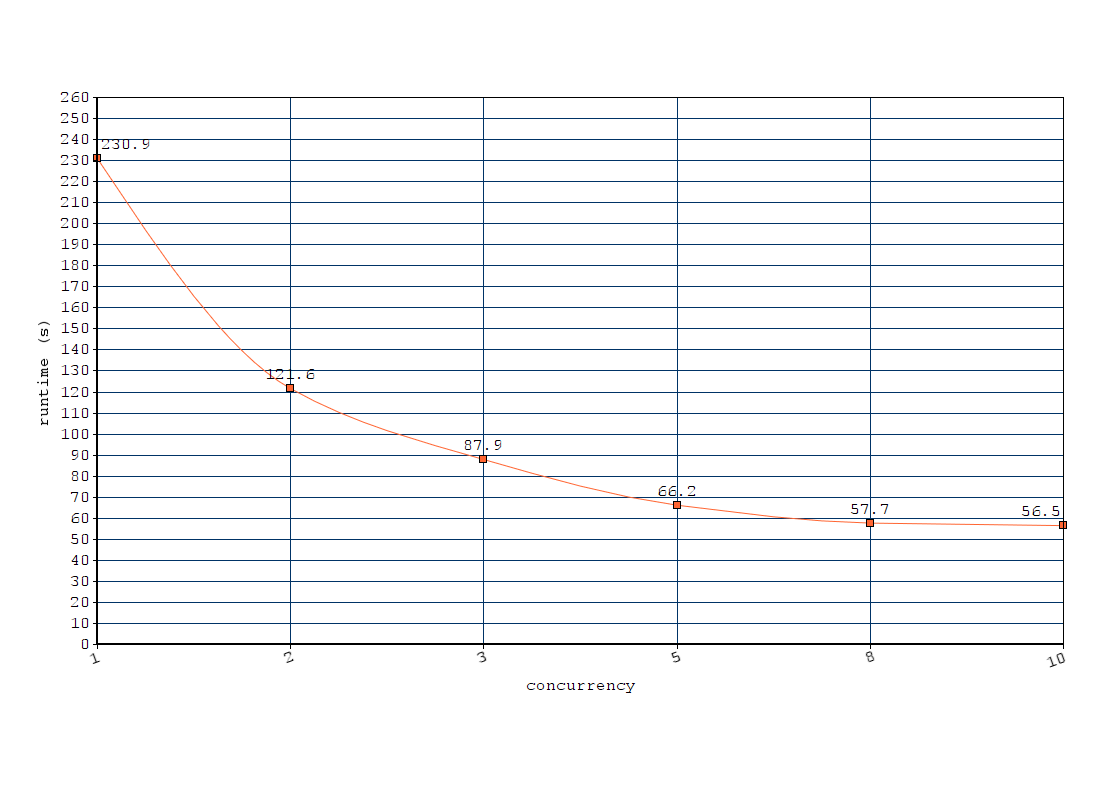
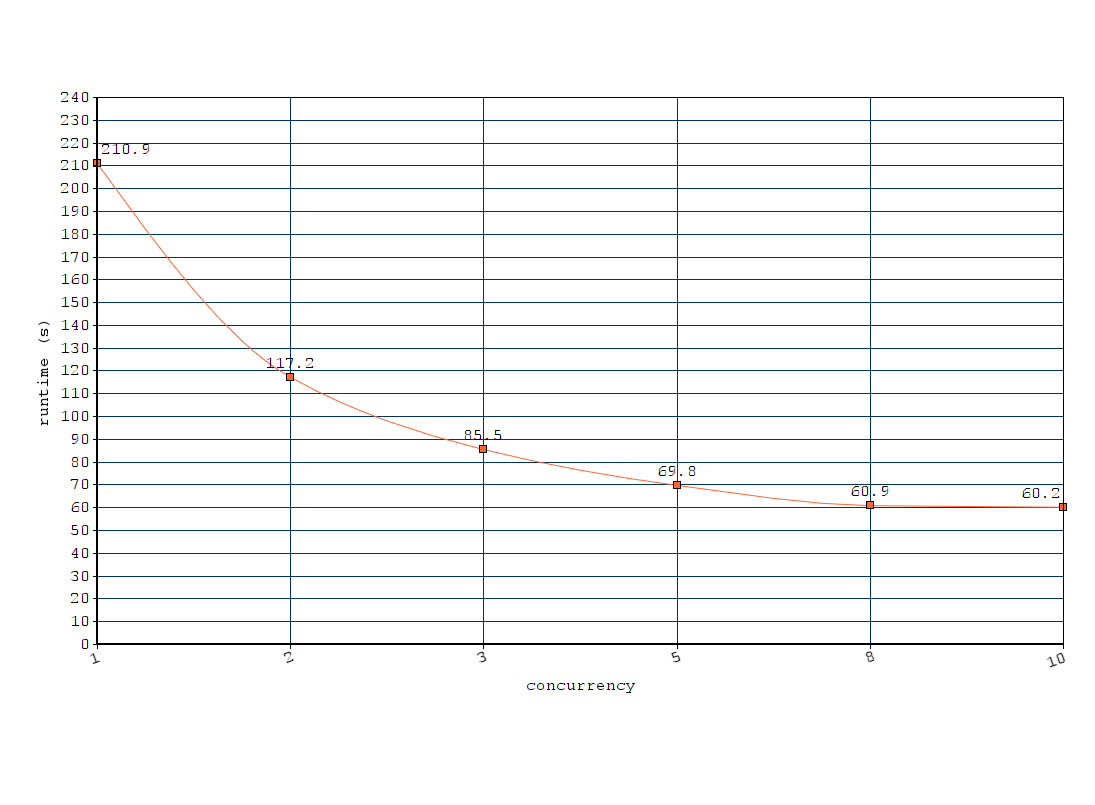
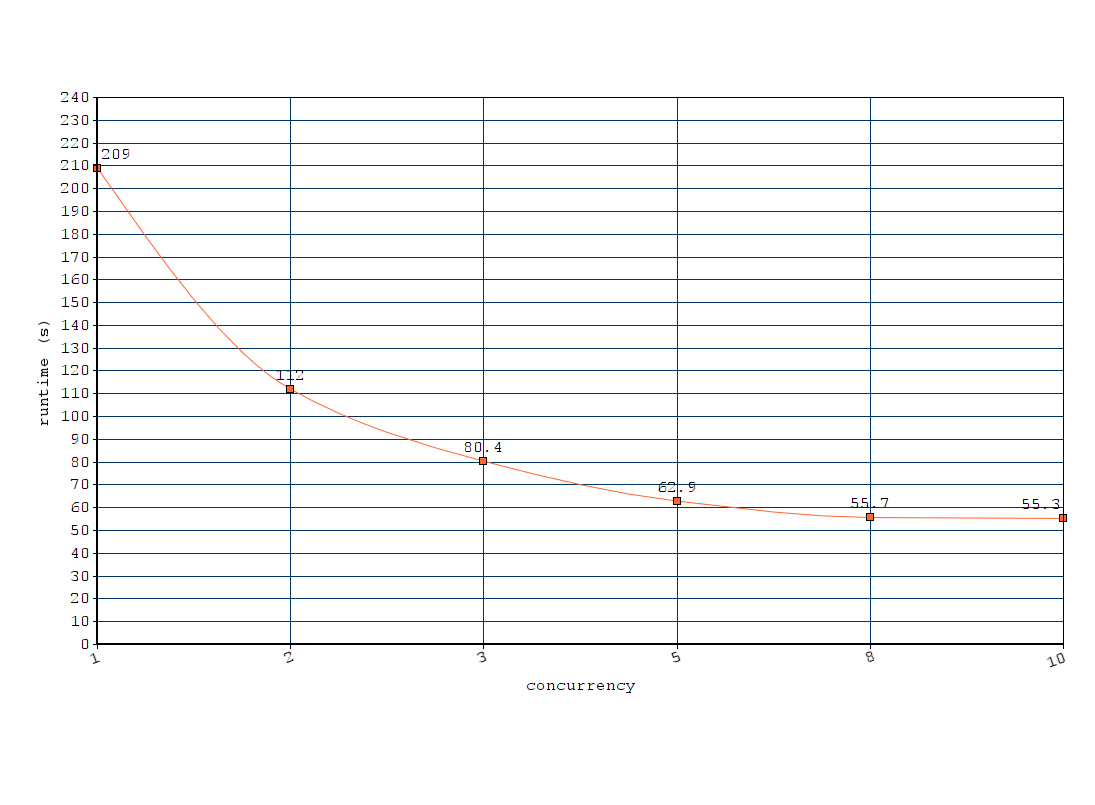
Benchmark results for processing 136 PDFs (3,443 pages total, ~25 pages per PDF) on Intel Core i7-4790K CPU 4.00GHz:
| Concurrency | Runtime (s) | s/PDF | PDF/s |
|---|---|---|---|
| 1 | 209.0 | 1.54 | 0.65 |
| 2 | 112.0 | 0.82 | 1.21 |
| 3 | 80.4 | 0.59 | 1.69 |
| 5 | 62.9 | 0.46 | 2.16 |
| 8 | 55.7 | 0.41 | 2.44 |
| 10 | 55.3 | 0.40 | 2.45 |
# Clone the repository
git clone https://github.com/kermitt2/grobid_client_python
cd grobid_client_python

# Create virtual environment
python -m venv venv
source venv/bin/activate  # On Windows: venv\Scripts\activate

# Install in development mode with test dependencies
pip install -e .[dev]
The project uses bump-my-version for version management:
# Install bump-my-version
pip install bump-my-version

# Bump version (patch, minor, or major)
bump-my-version bump patch

# The release will be automatically published to PyPI
git checkout -b feature/amazing-feature)pytest)git commit -m 'Add amazing feature')git push origin feature/amazing-feature)Distributed under the Apache 2.0 License. See LICENSE for more
information.
Main Author: Patrice Lopez (patrice.lopez@science-miner.com)
Maintainer: Luca Foppiano (luca@sciencialab.com)
grobidOrg/grobid-client-python is a public repo on GitHub by grobidOrg. Python client for GROBID Web services.
It declares the Apache-2.0 license on GitHub.
Its maker has not tagged a system, so it is unknown here. Its README says what it needs.
Open "Take it" on its page: Take My Repo writes an install plan for your machine and hands it to your AI agent (Claude Code, Codex or Cursor), which asks you before each step. Take My Repo has not tested it on any machine.
Its last change on GitHub was on 2026-11-10. Take My Repo does not judge from that whether it is maintained.
Nobody has reviewed it on Take My Repo yet, which says nothing about its quality.
A machine learning software for extracting information from scholarly documents
A Named-Entity Recogniser based on Grobid.