

ECC
The agent harness performance optimization system. Skills, instincts, memory, security, and research-first development for Claude Code, Codex, Opencode, Cursor and beyond.
- 310k
- JavaScript
- MIT
- 2 d ago
git-xargs is a command-line tool (CLI) for making updates across multiple Github repositories with a single command.
Repo gruntwork-io/git-xargs, read from GitHub 4 h ago. gruntwork-io has not joined Take My Repo.
gruntwork-io/git-xargs is a public repo on GitHub by gruntwork-io. git-xargs is a command-line tool (CLI) for making updates across multiple Github repositories with a single command. It declares the Apache-2.0 license on GitHub. It is written mainly in Go, has 1,140 stars and last changed on 2026-11-17. Nobody has reviewed it on Take My Repo yet, which says nothing about its quality. Read from GitHub on 2026-11-25.
The agent harness performance optimization system. Skills, instincts, memory, security, and research-first development for Claude Code, Codex, Opencode, Cursor and beyond.
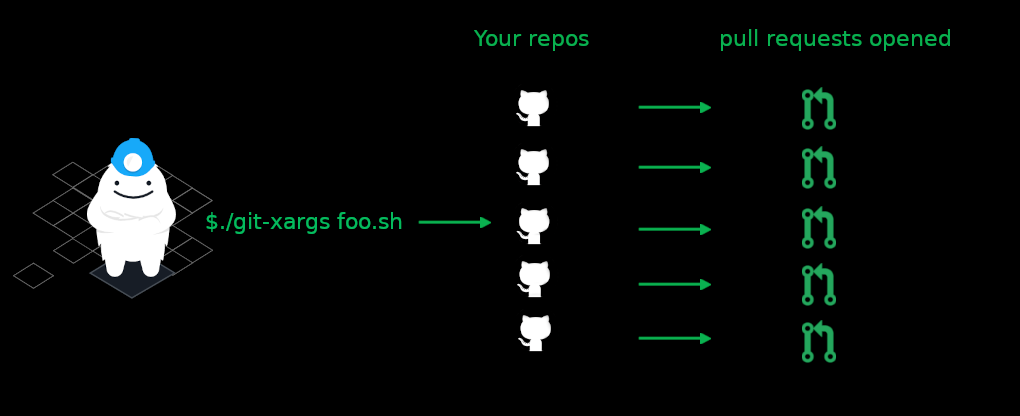
git-xargs is a command-line tool (CLI) for making updates across multiple GitHub repositories with a single command. You give git-xargs:
and git-xargs will:
Git-xargs leverages goroutines to perform the repo-updating work in parallel, so it is very fast.
For example, have you ever needed to add a particular file across many repos at once? Or to run a search and replace to change your company or product name across 150 repos with one command? What about upgrading Terraform modules to all use the latest syntax? How about adding a CI/CD configuration file, if it doesn't already exist, or modifying it in place if it does, but only on a subset of repositories you select?
You can handle these use cases and many more with a single git-xargs command.
As an example, let's use git-xargs to create a new file in every repo:
git-xargs \
  --branch-name test-branch \
  --github-org <your-github-org> \
  --commit-message "Create hello-world.txt" \
  touch hello-world.txt
Here's what it looks like in action:
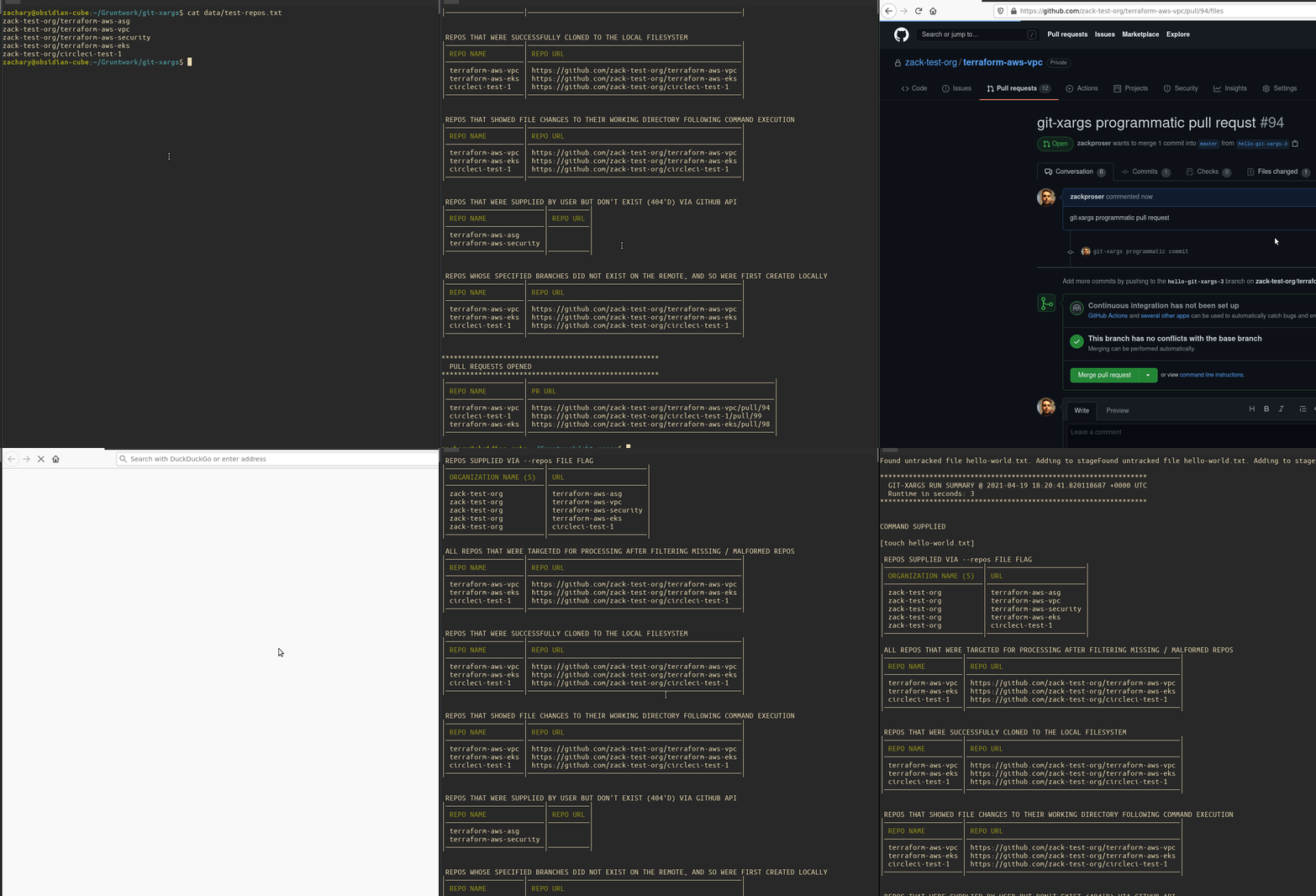
In this example, every repo in your org will have a new file named hello-world.txt written to it with the contents "Hello, World!". You'll then receive an easy-to-read printout of exactly what happened on STDOUT:
*****************************************************************
  GIT-XARGS RUN SUMMARY @ 2021-04-12 23:05:18.478435534 +0000 UTC
  Runtime in seconds: 4
*****************************************************************


COMMAND SUPPLIED

[touch hello-world.txt]

 REPOS SUPPLIED VIA --repos FILE FLAG
│────────────────────────│────────────────────────│
│ ORGANIZATION NAME (5)  │ URL                    │
│────────────────────────│────────────────────────│
│ zack-test-org          │ terraform-aws-asg      │
│ zack-test-org          │ terraform-aws-vpc      │
│ zack-test-org          │ terraform-aws-security │
│ zack-test-org          │ terraform-aws-eks      │
│ zack-test-org          │ circleci-test-1        │
│────────────────────────│────────────────────────│

 ALL REPOS THAT WERE TARGETED FOR PROCESSING AFTER FILTERING MISSING / MALFORMED REPOS
│───────────────────│────────────────────────────────────────────────────│
│ REPO NAME         │ REPO URL                                           │
│───────────────────│────────────────────────────────────────────────────│
│ terraform-aws-vpc │ https://github.com/zack-test-org/terraform-aws-vpc │
│ terraform-aws-eks │ https://github.com/zack-test-org/terraform-aws-eks │
│ circleci-test-1   │ https://github.com/zack-test-org/circleci-test-1   │
│───────────────────│────────────────────────────────────────────────────│


 REPOS THAT WERE SUCCESSFULLY CLONED TO THE LOCAL FILESYSTEM
│───────────────────│────────────────────────────────────────────────────│
│ REPO NAME         │ REPO URL                                           │
│───────────────────│────────────────────────────────────────────────────│
│ terraform-aws-eks │ https://github.com/zack-test-org/terraform-aws-eks │
│ circleci-test-1   │ https://github.com/zack-test-org/circleci-test-1   │
│ terraform-aws-vpc │ https://github.com/zack-test-org/terraform-aws-vpc │
│───────────────────│────────────────────────────────────────────────────│


 REPOS THAT SHOWED FILE CHANGES TO THEIR WORKING DIRECTORY FOLLOWING COMMAND EXECUTION
│───────────────────│────────────────────────────────────────────────────│
│ REPO NAME         │ REPO URL                                           │
│───────────────────│────────────────────────────────────────────────────│
│ terraform-aws-eks │ https://github.com/zack-test-org/terraform-aws-eks │
│ terraform-aws-vpc │ https://github.com/zack-test-org/terraform-aws-vpc │
│ circleci-test-1   │ https://github.com/zack-test-org/circleci-test-1   │
│───────────────────│────────────────────────────────────────────────────│


 REPOS THAT WERE SUPPLIED BY USER BUT DON'T EXIST (404'D) VIA GITHUB API
│────────────────────────│──────────│
│ REPO NAME              │ REPO URL │
│────────────────────────│──────────│
│ terraform-aws-asg      │          │
│ terraform-aws-security │          │
│────────────────────────│──────────│


 REPOS WHOSE SPECIFIED BRANCHES DID NOT EXIST ON THE REMOTE, AND SO WERE FIRST CREATED LOCALLY
│───────────────────│────────────────────────────────────────────────────│
│ REPO NAME         │ REPO URL                                           │
│───────────────────│────────────────────────────────────────────────────│
│ terraform-aws-eks │ https://github.com/zack-test-org/terraform-aws-eks │
│ terraform-aws-vpc │ https://github.com/zack-test-org/terraform-aws-vpc │
│ circleci-test-1   │ https://github.com/zack-test-org/circleci-test-1   │
│───────────────────│────────────────────────────────────────────────────│


*****************************************************
  PULL REQUESTS OPENED
*****************************************************
│───────────────────│────────────────────────────────────────────────────────────│
│ REPO NAME         │ PR URL                                                     │
│───────────────────│────────────────────────────────────────────────────────────│
│ circleci-test-1   │ https://github.com/zack-test-org/circleci-test-1/pull/82   │
│ terraform-aws-eks │ https://github.com/zack-test-org/terraform-aws-eks/pull/81 │
│ terraform-aws-vpc │ https://github.com/zack-test-org/terraform-aws-vpc/pull/77 │
│───────────────────│────────────────────────────────────────────────────────────│
If you are Homebrew user, you can install by running
$ brew install git-xargs
Download the correct binary for your platform. Visit the releases
page and download the correct binary depending on your system.
Save it to somewhere on your PATH, such as /usr/local/bin/git-xargs.
Set execute permissions. For example, on Linux or Mac, you'd run:
chmod u+x /usr/local/bin/git-xargs
Check it's working. Run the version command to ensure everything is working properly:
git-xargs --version
Ensure you have Golang installed and working properly on your system. Follow the official Golang install guide to get started.
Run go install to install the latest release of git-xargs:
go install github.com/gruntwork-io/git-xargs@latest
Alternatively, use go install to select a specific release of git-xargs:
go install github.com/gruntwork-io/git-xargs@v0.0.5
If you have Go 1.16 or earlier, you can use get
go get github.com/gruntwork-io/git-xargs
go get github.com/gruntwork-io/git-xargs@v0.0.5
Export a valid GitHub token. See the guide on Github personal access tokens for information on how to generate one. For example, on Linux or Mac, you'd run:
export GITHUB_OAUTH_TOKEN=<your-secret-github-oauth-token>
Setup authentication with your Github Enterprise server. To use a Github Enterprise server, set the GITHUB_HOSTNAME environment variable:
export GITHUB_HOSTNAME=<your-ghe-hostname.your-domain.com>
Provide a script or command and target some repos. Here's a simple example of running the touch command in
every repo in your GitHub organization. Follow the same pattern to start running your own scripts and commands
against your own repos!
git-xargs \
  --branch-name "test-branch" \
  --commit-message "Testing git-xargs" \
  --github-org <enter-your-github-org-name> \
  touch git-xargs-is-awesome.txt
The API for git-xargs is:
git-xargs [-flags] <CMD>
Where CMD is either the full path to a (Bash, Python, Ruby, etc) script on your local system or a binary. Note that, because the tool supports Bash scripts, Ruby scripts, Python scripts, etc, you must include the full filename for any given script, including its file extension.
In other words, all the following usages are valid:
git-xargs --repo gruntwork-io/cloud-nuke \
   --repo gruntwork-io/terraform-aws-eks \
   --branch-name my-branch \
   /usr/local/bin/my-bash-script.sh
git-xargs --repos ./my-repos.txt \
  --branch-name my-other-branch \
  touch file1.txt file2.txt
git-xargs --github-org my-github-org \
  --branch-name my-new-branch \
  "$(pwd)/scripts/my-ruby-script.rb"
git-xargs environment variables in commands or scriptsWhen executing commands or scripts, git-xargs will register the following environment variables for use by commands or scripts based on the arguments and flags provided:
| Env var | Value |
|---|---|
XARGS_DRY_RUN |
Whether the --dry-run flag was provided to git-xargs; options are true, false |
XARGS_REPO_NAME |
Name of the target repository being processed |
XARGS_REPO_OWNER |
Owner of the target repository being processed |
By default, git-xargs will conceal runtime errors as they occur because its log level setting is INFO if not overridden by the --loglevel flag.
To see all errors your script or command may be generating, be sure to pass --loglevel DEBUG when running your git-xargs command, like so:
git-xargs --loglevel DEBUG \
	--repo zack-test-org/terraform-aws-eks \
	--branch-name master \
	--commit-message "add blank file" \
	--skip-pull-requests touch foo.txt
When the log level is set to debug you should see new error output similar to the following:
Total 195 (delta 159), reused 27 (delta 11), pack-reused 17  Repo=terraform-aws-eks
DEBU[2021-06-29T12:11:31-04:00] Created branch                                Branc
h Name=refs/heads/master Repo=terraform-aws-eks
DEBU[2021-06-29T12:11:31-04:00] Error creating new branch                     Error
="a branch named \"refs/heads/master\" already exists" Repo=terraform-aws-eks
DEBU[2021-06-29T12:11:31-04:00] Error encountered while processing repo       Error
="a branch named \"refs/heads/master\" already exists" Repo name=terraform-aws-eks
git-xargs attempts to be a good citizen as regards consumption of the GitHub API. git-xargs conforms to GitHub's API integration guidelines.
In addition, git-xargs includes several features and flags to help you:
Distinct processing channels for expensive and non-expensive work
git-xargs distinguishes between work that is safe to perform in parallel, such as certain git operations, and work that must be done with consideration of resource constraints, such as issuing open pull requests to GitHub's API. Therefore, git-xargs is able to perform all concurrency-safe work as quickly as possible by leveraging goroutines, while treating the more expensive open pull request API calls separately.
Pull requests are handled on a separate channel so that they can be buffered and retried in accordance with rate limiting feedback git-xargs is receiving from GitHub's API.
This means that git-xargs performs all the work upfront that it can as quickly as possible, and then moves on to serially process the pull request jobs that have resulted from the concurrency-safe work of cloning repositories, making file changes, checking the git worktree, etc.
Limit amount of parallel git clones
GitHub has a rate limiting on GitHub clones. Which is why per default only 4 clones happen in parallel. This setting can be adjusted with the
--max-concurrent-clones flag. Setting it to 0 or lower means no limit is applied.
Automatic pull request retries when rate limited
By default, git-xargs will re-attempt opening a pull request that failed due to rate limiting. The --max-pr-retries flag allows you to specify how many times you'd like a given pull request to be re-attempted in case of failure due to rate limiting. By default, the value is 3, meaning that if you do not pass this flag, git-xargs will retry all rate-limit-blocked pull requests 3 times.
Automatic backoff when rate limiting is detected
When git-xargs detects that it has been rate limited by GitHub, it begins requeuing failed pull requests for retry, but with an additional, larger buffer of time in between the next attempt. This larger buffer of time is intended to allow GitHub rate limit status to return to baseline for the git-xargs client. The --seconds-to-wait-when-ratelimited flag specifies the number of seconds to wait when git-xargs detects it has been rate limited. Note that this extra buffer of time is in addition to the value specified by the --seconds-between-prs flag.
When they are provided by GitHub, git-xargs will instead use the values of any Retry-After
gruntwork-io/git-xargs is a public repo on GitHub by gruntwork-io. git-xargs is a command-line tool (CLI) for making updates across multiple Github repositories with a single command.
It declares the Apache-2.0 license on GitHub.
Its maker tagged it for macOS and Linux. That is declared by the maker; Take My Repo has not tested it.
Open "Take it" on its page: Take My Repo writes an install plan for your machine and hands it to your AI agent (Claude Code, Codex or Cursor), which asks you before each step. Take My Repo has not tested it on any machine.
A collection of useful .gitignore templates
Fair-code workflow automation platform with native AI capabilities. Combine visual building with custom code, self-host or cloud, 400+ integrations.
Reverse engineer anything with agents, from app behavior down to native binaries.
🙃 A delightful community-driven (with 2,500+ contributors) framework for managing your zsh configuration. Includes 300+ optional plugins (rails, git, macOS, hub, docker, homebrew, node, php, python, etc), 140+ themes to spice up your morning, and an auto-update tool that makes it easy to keep up with the latest updates from the community.
Its last change on GitHub was on 2026-11-17. GitHub counts 38 open issues and pull requests. Take My Repo does not judge from that whether it is maintained.
Nobody has reviewed it on Take My Repo yet, which says nothing about its quality.
Take My Repo cannot say: it does not audit code and has not run git-xargs. What is known comes from GitHub. It declares the Apache-2.0 license on GitHub. Its last change was on 2026-11-17. It has 1,140 stars, which measure popularity, not safety. Nobody has reviewed it on Take My Repo yet, which says nothing about its quality. Read the source before you run it. With "Take it", your AI agent shows each step and asks you before running it; README text is treated as data, not as instructions.


