tablemark ·
Generate markdown tables from JSON data.
Render arrays of objects as markdown tables, with configurable fancy output.
- Rename table headers and transform cell content
- Align columns to the left, center, or right (all columns or per column)
- Customize text casing for column headers (using
change-case)
- Auto-detect and handle ANSI styles and Unicode characters
- Wrap or truncate long cell contents or strip line breaks
Installation
pnpm add tablemark

# or
npm install tablemark

# or
yarn add tablemark

# or
bun add tablemark
Usage
import { tablemark } from "tablemark";
tablemark([
	{ name: "Bob", age: 21, isCool: false },
	{ name: "Sarah", age: 22, isCool: true },
	{ name: "Lee", age: 23, isCool: true }
]);

// | Name  | Age   | Is cool |
// | :---- | :---- | :------ |
// | Bob   | 21    | false   |
// | Sarah | 22    | true    |
// | Lee   | 23    | true    |
... displays as:
| Name |
Age |
Is cool |
| Bob |
21 |
false |
| Sarah |
22 |
true |
| Lee |
23 |
true |
API
tablemark (input: InputData, options?: TablemarkOptions): string
Arguments
Returns
string: the resulting markdown formatted table
If input is an empty array, an empty string is returned.
Throws
TypeError: when input is not iterable (e.g., an array)
TypeError: when an unknown column alignment option is provided
RangeError: when config.unknownKeyStrategy === "throw" and an unknown key in an object is encountered
[!NOTE]
The keys of the first encountered object are used for the table's headers.
By default, any other keys from successive objects will be ignored,
excluding those columns from the table. You can customize this behavior to
make this raise an error by using config.unknownKeyStrategy.
options.align
Set the horizontal alignment for all columns. Accepts "left", "center", or "right".
tablemark(
	[
		{ name: "Bob", age: 21 },
		{ name: "Sarah", age: 22 }
	],
	{ align: "center" }
);

// | Name  | Age |
// | :---: | :-: |
// | Bob   | 21  |
// | Sarah | 22  |
options.columns
Describe the columns of the table. Each column can be a simple string to rename the column or an object with properties to further customize the column's behavior. The following properties are available and will override behavior specified elsewhere in options:
name: Name of the column used as the title in the header row.align: Horizontal alignment of the column content.maxWidth: Maximum content width of this column.overflowHeaderStrategy: How to handle overflowing text in header cells. Defaults to "wrap".overflowStrategy: How to handle overflowing text in this column. Defaults to the root overflowStrategy.textHandlingStrategy: How to handle text in this column. Defaults to the root textHandlingStrategy.width: Fixed display width for the column, overriding both the root- and column-level maxWidth setting.
tablemark(
	[
		{ name: "Bob", age: 21, isCool: false },
		{ name: "Sarah", age: 22, isCool: true },
		{ name: "Lee", age: 23, isCool: true }
	],
	{
		columns: [
			"first name",
			{ name: "how old", align: "center" },
			"are they cool"
		]
	}
);

// | first name | how old | are they cool |
// | :--------- | :-----: | :------------ |
// | Bob        |   21    | false         |
// | Sarah      |   22    | true          |
// | Lee        |   23    | true          |
... displays as:
| first name |
how old |
are they cool |
| Bob |
21 |
false |
| Sarah |
22 |
true |
| Lee |
23 |
true |
options.countAnsiEscapeCodes
Control whether to count ANSI escape codes when calculating string width. The default is false, meaning ANSI codes are ignored. Setting this to true is useful when the output is not intended for a terminal, such as when generating a markdown table for an example in a README file.
const data = [
{ text: "\u001B[31mRed\u001B[0m", note: "Normal text" },
{ text: "\u001B[32mGreen\u001B[0m", note: "More text" }
];
tablemark(data, { countAnsiEscapeCodes: false });
// | Text | Note |
// | :---- | :---------- |
// | �[31mRed�[0m | Normal text |
// | �[32mGreen�[0m | More text |
tablemark(data, { countAnsiEscapeCodes: true });
// | Text | Note |
// | :------------- | :---------- |
// | �[31mRed�[0m | Normal text |
// | �[32mGreen�[0m | More text |
options.headerCase
Control the casing of headers derived from input object keys. The default is "sentenceCase". The options are:
"preserve": Keep the original case"camelCase": Example: twoWords"capitalCase": Example: Two Words"constantCase": Example: TWO_WORDS"dotCase": Example: two.words"kebabCase": Example: two-words"noCase": Example: two words"pascalCase": Example: TwoWords"pascalSnakeCase": Example: Two_Words"pathCase": Example: two/words"sentenceCase": Example: Two words"snakeCase": Example: two_words"trainCase": Example: Two-Words
tablemark([{ first_name: "Bob", last_name: "Smith" }], {
	headerCase: "constantCase"
});

// | FIRST_NAME | LAST_NAME |
// | :--------- | :-------- |
// | Bob        | Smith     |
options.lineBreakStrategy
Specify how to handle line breaks in cell content. The options are:
"preserve" (default): Keep line breaks"strip": Replace line breaks with spaces"truncate": Trim content at the first line break
tablemark([{ note: "Line 1\nLine 2" }], { lineBreakStrategy: "strip" });

// | Note          |
// | :------------ |
// | Line 1 Line 2 |
options.lineEnding
Set the string used at the end of each line. The default is \n (linefeed).
tablemark([{ name: "Bob" }], { lineEnding: "\r\n" });
options.maxWidth
Set options.maxWidth to wrap any content at that length onto a new
adjacent line:
tablemark(
	[
		{ star: false, name: "Benjamin" },
		{ star: true, name: "Jet Li" }
	],
	{ maxWidth: 5 }
);

// | Star  | Name  |
// | :---- | :---- |
// | false | Benja |
//           min
// | true  | Jet   |
//           Li
[!NOTE]
To output valid GitHub Flavored Markdown a
cell must not contain newlines. Consider replacing those with <br /> (e.g.,
using options.toCellText).
options.overflowHeaderStrategy
Control how overflowing text in header cells is handled. The options are the same as overflowStrategy. The default is "wrap".
options.overflowStrategy
Control how overflowing text in cells is handled. The options are:
"wrap": Wrap text to a new line"truncateStart": Trim overflowing content at the start and replace with …"truncateEnd" (default): Trim overflowing content at the end and replace with …
tablemark([{ desc: "This is a long description" }], {
	maxWidth: 17,
	overflowStrategy: "truncateStart"
});

// | Desc              |
// | :---------------- |
// | …long description |
options.padHeaderSeparator
Exclude padding around the header's dividing lines (which some formatters prefer).
tablemark(
	[
		{ name: "Bob", age: 21, isCool: false },
		{ name: "Sarah", age: 22, isCool: true },
		{ name: "Lee", age: 23, isCool: true }
	],
	{
		columns: [{ align: "left" }, { align: "center" }, { align: "right" }]
	}
);

// | first name | how old | are they cool |
// |:-----------|:-------:|--------------:|
// | Bob        |   21    | false         |
// | Sarah      |   22    | true          |
// | Lee        |   23    | true          |
... displays as:
| first name |
how old |
are they cool |
| Bob |
21 |
false |
| Sarah |
22 |
true |
| Lee |
23 |
true |
options.textHandlingStrategy
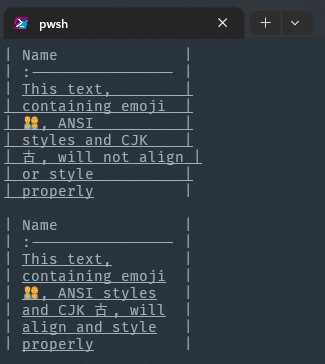
By default, tablemark attempts to detect and handle text containing characters
like emoji, halfwidth and
fullwidth
characters, and ANSI escape codes (like terminal colors and styles).
Other options, which are only recommended for very specific use cases, are:
"auto" (default): Automatically determine the best text handling strategy
based on the input data. This is the recommended option for most use cases."basic": Faster, but lacks support for properly wrapping text containing
certain emojis, halfwidth and fullwidth characters, and ANSI styles."advanced": Forces proper handling of emoji, halfwidth and fullwidth
characters, and ANSI styles, but is slow for large datasets.
To illustrate the difference, notice how the first example below doesn't
accurately align the | characters of the row containing the CJK and doesn't
apply the ANSI styles correctly while the second example does.