
openiap-commerce-protocol-example
Build a purchase-to-access backend from the OpenIAP Commerce Protocol, with runnable milestones and captured results.
- 0
- MIT
- 2 mo ago
Repo hyodotdev/openiap-commerce-protocol-example, read from GitHub 1 min ago. hyodotdev has not joined Take My Repo.
In short
hyodotdev/openiap-commerce-protocol-example is a public repo on GitHub by hyodotdev. Build a purchase-to-access backend from the OpenIAP Commerce Protocol, with runnable milestones and captured results. It declares the MIT license on GitHub. It is written mainly in JavaScript, has 0 stars and last changed on 2026-09-16. Nobody has reviewed it on Take My Repo yet, which says nothing about its quality. Read from GitHub on 2026-11-24.
OpenIAP Commerce Protocol example
A runnable purchase-to-access backend, built and reviewed with AI in six milestones. Follow a purchase through verification, ownership, access, and signed event delivery. Inspect the actual HTTP responses and database changes.
The backend uses the published openiap-commerce-protocol package. HTTP,
SQLite, and webhook signatures run locally; the store, users, and clock are
fictional fixtures. This is a learning example, not a production provider.
Quick start
Install Bun for the HTTP and SQLite runtime (tested with Bun 1.3.13). Use your favorite package manager for dependencies and scripts; npm is shown here:
git clone https://github.com/hyodotdev/openiap-commerce-protocol-example.git
cd openiap-commerce-protocol-example
npm install # or pnpm install, yarn install, bun install
npm test
npm start
Open http://127.0.0.1:5181, then click Run step 1 → and continue through
step 6. Each step changes real local state. The dashboard shows purchases,
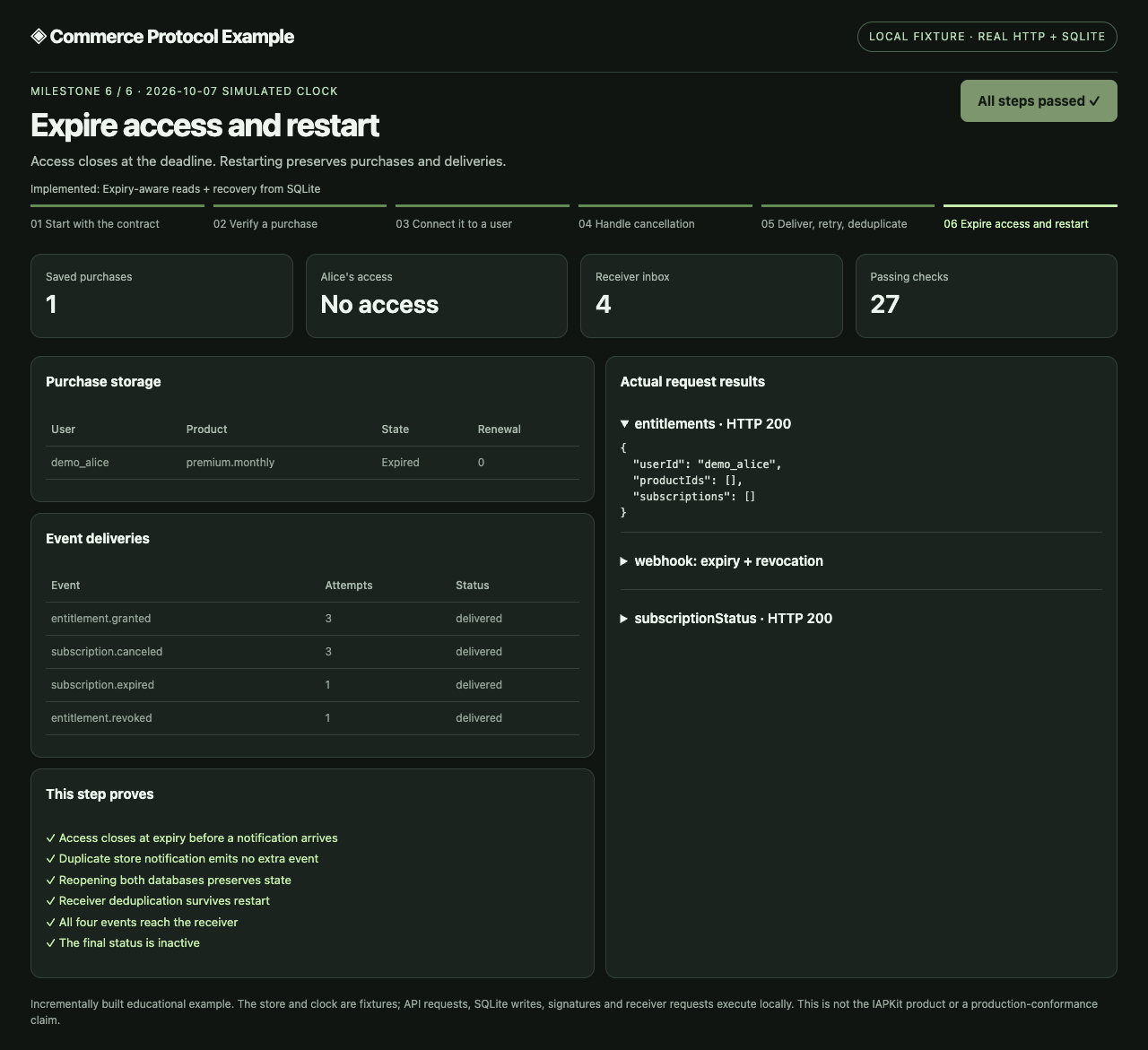
current access, delivery attempts, and expandable request/response details.
No store account, API key, OpenIAP checkout, or IAPKit account is required.
Modern Yarn uses the included node_modules linker.
The screenshot comes from an executed source checkpoint. See its run report and the complete build history.
What you will see
| Step | What changes | Result to check |
|---|---|---|
| 1. Contract | Load schemas; start with empty storage | No purchases or access yet |
| 2. Verify | Validate fixture evidence; save a purchase | Verification alone grants no access |
| 3. Bind | Attach the purchase to the backend-selected user | Alice gains Premium; Bob cannot claim it |
| 4. Cancel | Turn off renewal; queue an event | Paid access remains until expiry |
| 5. Deliver | Sign events; retry a failed receiver | A repeated delivery has one inbox effect |
| 6. Expire | Advance the clock; reopen SQLite | Access closes; ownership and delivery records remain |
Restarting npm start creates a fresh temporary database, so you can replay the
walkthrough. Step 6 reopens the existing databases inside the running process;
it does not simulate an OS crash or a new process recovering external secrets.
If port 5181 is occupied, run COMMERCE_LAB_PORT=5183 npm start.
Use the part you need
| Your role | Start here | What this example provides |
|---|---|---|
| Paywall / experience | Integration brief | Host purchase/result boundaries; no paywall UI implementation |
| Commerce provider | AI build brief | Fixture verifier, ownership/access rules, REST, SQLite, and delivery |
| Data / automation | Event receiver guide | A ready signed-event receiver with a durable inbox |
| Integrated platform | Integration brief | How the roles compose without splitting account authority |
client-bridge.mjs maps Apple/Google OpenIAP purchase fields into the installed
verification schema on the app backend. Run npm run demo:bridge to check it.
It does not perform a mobile purchase or authenticate store evidence. The
current client verifyPurchaseWithProvider helper uses IAPKit's own API; other
providers connect through the app's authenticated backend.
Receive events
npm run demo:consumer
This standalone check sends fictional purchase, renewal, cancellation, expiry, refund, and entitlement events over HTTP. It repeats deliveries, rejects changed signatures, and reopens the SQLite inbox. It needs no provider server.
For a persistent receiver, set COMMERCE_WEBHOOK_SECRET and run
npm run consumer. The endpoint is http://127.0.0.1:5182/webhooks/commerce.
See the receiver guide
for HTTPS proxy setup, database location, processing responsibilities, and
expected results. Event ingestion does not calculate revenue or grant access.
Build with AI, then check the result
Give BUILD.md to your AI for a backend, or INTEGRATE.md for an existing product. Ask it to implement one milestone, run it, inspect the screen and responses, fix a failure, and repeat that same check.
The build record contains independent source archives, patches, screenshots, and execution reports. The review log keeps the observed mistakes and corrections, including unfinished discovery in the early snapshots. This implementation grew from an earlier internal prototype; it was not generated from a blank project in one prompt. Task briefs are implementation notes, not model transcripts or editor recordings.
Verify or record a change
| Command | Checks |
|---|---|
npm test |
Current backend flow, failure cases, request mapper, and receiver |
npm run test:tooling |
Capture and patch tooling |
npm run verify:checkpoints |
Every archive, its exact patch chain, and an independent npm install/test |
npm run capture |
A new immutable source checkpoint and actual desktop/mobile screenshots |
Backend commands require Bun. Recording also requires Node.js/npm, Git, tar, and Google Chrome. The recording guide explains how to preserve a checkpoint and export evidence. GitHub CI runs the runtime, tooling, archive, and documentation-export checks.
What remains for production
Real store validation and sandbox purchases, login, user erasure, tenant isolation, GraphQL, public HTTPS delivery protections, and operational recovery are not implemented here. The backend advertises no complete profiles. Schema checks and the local walkthrough do not establish profile conformance.
Implement every obligation of your chosen profiles from the installed
SPEC.md; add store sandbox, isolation, deployment, and recovery tests.
IAPKit is a reference implementation, not a substitute for those checks.
MIT licensed. See LICENSE.
Questions
What is openiap-commerce-protocol-example?
hyodotdev/openiap-commerce-protocol-example is a public repo on GitHub by hyodotdev. Build a purchase-to-access backend from the OpenIAP Commerce Protocol, with runnable milestones and captured results.
Is openiap-commerce-protocol-example open source?
It declares the MIT license on GitHub.
Does openiap-commerce-protocol-example run on macOS, Windows or Linux?
Its maker has not tagged a system, so it is unknown here. Its README says what it needs.