devtoolset
Open-source & database-free & server-free developer tools navigator / 无需数据库无需服务器的开源开发者工具导航站
- 390
- MIT
- 11 mo ago
Repo iAmCorey/devtoolset, read from GitHub 10 min ago. iAmCorey has not joined Take My Repo.
In short
iAmCorey/devtoolset is a public repo on GitHub by iAmCorey. Open-source & database-free & server-free developer tools navigator / 无需数据库无需服务器的开源开发者工具导航站. It declares the MIT license on GitHub. It is written mainly in TypeScript, has 390 stars and last changed on 2025-12-13. Nobody has reviewed it on Take My Repo yet, which says nothing about its quality. Read from GitHub on 2026-11-22.
DevToolset
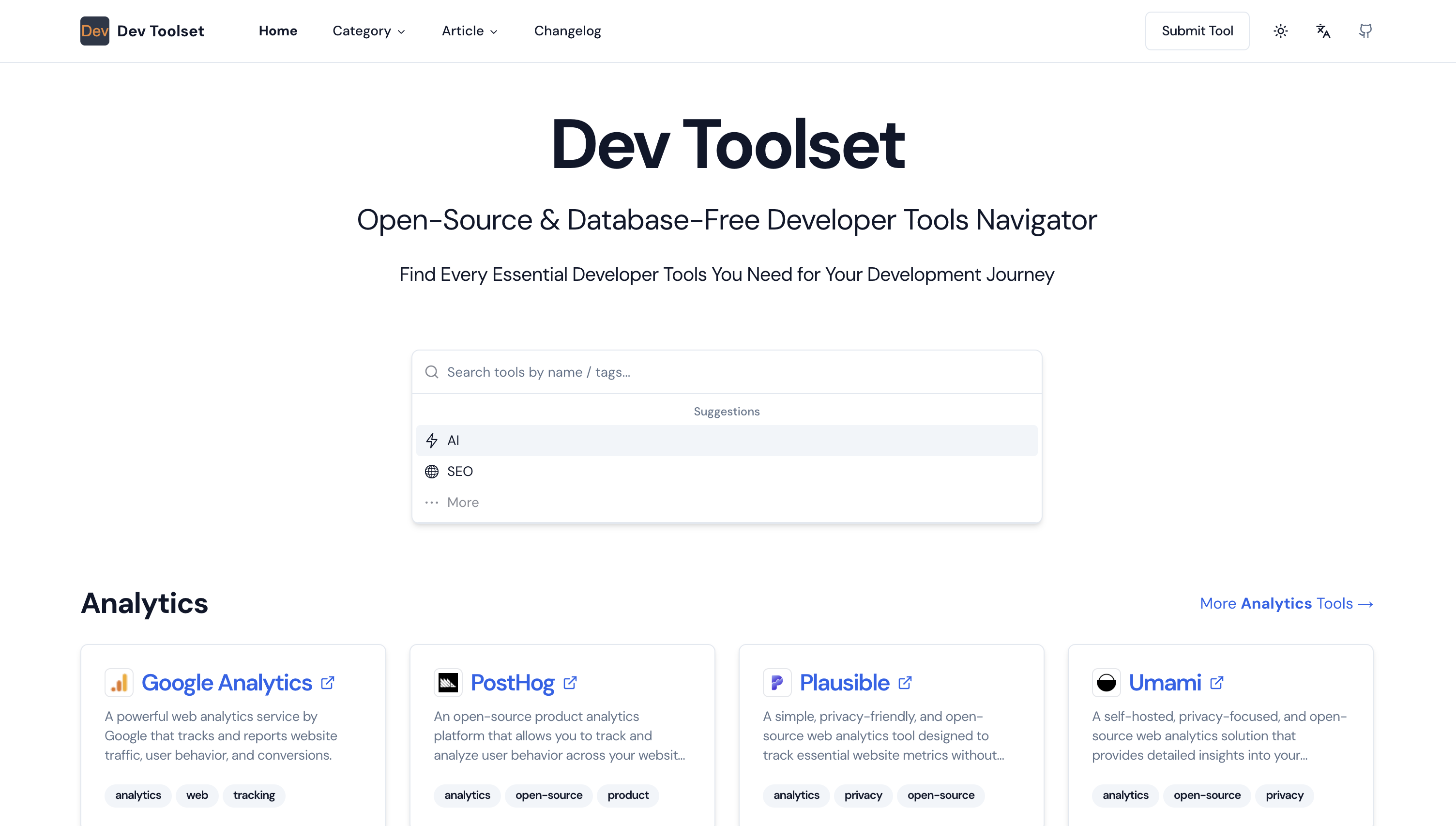
DevToolset is an open-source database-free developer tools navigator
Star History
Preview
Features
- Database-free Architecture: Utilizes GitHub for content storage and management.
- Dynamic Content: Renders content dynamically using Next.js server-side rendering.
- Markdown Support: Write your content in Markdown format for easy editing and version control.
- Admin Interface: Built-in admin panel for content management.
- Responsive Design: Fully responsive design using Tailwind CSS.
- SEO Friendly: Optimized for search engines with dynamic metadata.
- Easy Deployment: Simple deployment process to Vercel.
- Built-in Analytics Support: Integrated analytics support scripts, compatible with Google Analytics and Plausible Analytics.
- i18n: Support multiple languages and can be easily extended to support more languages.
- Dark Mode: Support dark mode and can be easily extended to support more themes.
- Ads Support: Support Google Adsense and can be easily extended to support more ads.
Tech Stack
- Next.js - Framework
- Tailwind CSS - CSS Framework
- Shadcn/UI - Component Library
- Vercel - Deployment
- Next-Intl - Internationalization
- Analytics - Google Analytics & Plausible Analytics & ...
- Ads - Google Adsense & ...
Adding New Developer Tools to DevToolset
Wanna add your site to DevToolset?
Two ways to submit your site
Submit your site via GitHub Issues for a free dofollow link.
Or you can also submit your site by change the jsonc file in the
data/json/[locale]folder and create a pull request. (Please read our Submission Guide for details on how to request inclusion)
Submit format
Follow the format below:
- name: Provide a brief title describing the tool or data you added.
- description: Clearly state what tool or data was added and in which category.
- url: Provide the url of the tool.
- category: Provide the category of the tool.
- tags: Provide serval tags of the tool. (3 tags at most)
- icon_url: Provide the url of the icon of the tool. (Optional) If not provided, the icon will be generated automatically.
Additional Notes
- Developer Tools Only: Please do not submit tools unrelated to development.
- No Affiliate Links: Do not include affiliate links.
- No Spam: Do not include spam.
- Accessible URL: Ensure the url is accessible.
Deploy your own DevToolset
Deploy on Vercel
Prerequisites
- Node.js (version 14 or later)
- npm/pnpm/yarn (comes with Node.js)
- Git
- GitHub account
- Vercel account (for deployment)
Installation
Clone the repository:
git clone https://github.com/iAmCorey/devtoolset
cd devtoolset
Install dependencies:
npm install
pnpm install
yarn
Create a
.env.localfile in the root directory and add the following:GITHUB_TOKEN=your_github_personal_access_token(Optional) GITHUB_OWNER=your_github_username(Optional) GITHUB_REPO=your_repo_name(Optional) ACCESS_PASSWORD=your_secure_access_password(Optional) JWT_SECRET=your_secret_key_here(Optional) NEXT_PUBLIC_GOOGLE_ANALYTICS_ID=your_google_analytics(G-xxx)(Optional) NEXT_PUBLIC_PLAUSIBLE_URL=your_plausible_data_domain(Optional) NEXT_PUBLIC_GOOGLE_ADSENSE_ID=your_google_adsense_id(Optional) DOMAIN=your_domain(localhost / YOUR_DOMAIN.tld)Set up your GitHub repository:
- Create a new repository on GitHub
- Create two folders in the repository:
data/json/[locale]anddata/md - In
data/json/[locale], create related jsonc file with an empty array:[]
Run the development server:
npm run dev
pnpm dev
yarn run dev
Visit http://localhost:3000 to see your DevToolset instance running locally.
Deployment
- Push your code to GitHub.
- Log in to Vercel and create a new project from your GitHub repository.
- Configure the environment variables in Vercel:
GITHUB_TOKEN(Optional)GITHUB_OWNER(Optional)GITHUB_REPO(Optional)ACCESS_PASSWORD(Optional)JWT_SECRET(Optional)NEXT_PUBLIC_GOOGLE_ANALYTICS_ID(Optional)NEXT_PUBLIC_PLAUSIBLE_URL(Optional)NEXT_PUBLIC_GOOGLE_ADSENSE_ID(Optional)DOMAIN(localhost / YOUR_DOMAIN.tld)
- Deploy the project.
For a detailed deployment guide, please refer to our Installation and Deployment Guide.
Usage
Mannually
- Tools: Change the jsonc file in the
data/json/[locale]folder. - Articles: Change the markdown file in the
data/mdfolder.
By The Admin Panel
(Need to configure the GITHUB related environment variables.)
- Access the admin panel by navigating to
/adminand using yourACCESS_PASSWORD. - Create and edit articles through the admin interface.
- Manage resources in the admin panel.
- All changes are automatically synced with your GitHub repository.
Changelog
See CHANGELOG.md for a detailed list of changes.
Contributing
We welcome contributions to DevToolset! Please read our Contributing Guide for details on our code of conduct and the process for submitting pull requests.
License
DevToolset is open-source software licensed under the MIT license.
Acknowledgements
DevToolset is built with the following tools and libraries:
We are grateful to the maintainers and contributors of these projects.
Contact Us
If you want a secondary development, want to customize this project or want to collaborate with us, please contact us.
Feel free to reach out if you have any questions or suggestions:
- Email: iamcoreychiu+devtoolset@gmail.com
- GitHub: iamcorey
- jike:
阿邱很行阿邱很行 - Wechat:
iAmCor3y(Please add a note when sending a friend request)
Support
If you find this project helpful, please consider giving it a ⭐ on GitHub!
If you want to donate or sponsor this project, it will be greatly appreciated.


Thank you for your support!
Questions
What is devtoolset?
iAmCorey/devtoolset is a public repo on GitHub by iAmCorey. Open-source & database-free & server-free developer tools navigator / 无需数据库无需服务器的开源开发者工具导航站.
Is devtoolset open source?
It declares the MIT license on GitHub.
Does devtoolset run on macOS, Windows or Linux?
Its maker has not tagged a system, so it is unknown here. Its README says what it needs.
How do I install devtoolset?
Open "Take it" on its page: Take My Repo writes an install plan for your machine and hands it to your AI agent (Claude Code, Codex or Cursor), which asks you before each step. Take My Repo has not tested it on any machine.
Is devtoolset still maintained?
Its last change on GitHub was on 2025-12-13. Take My Repo does not judge from that whether it is maintained.
What do people who ran devtoolset say?
Nobody has reviewed it on Take My Repo yet, which says nothing about its quality.