orm
The Prisma ORM: write your application in TypeScript with human-readable queries instead of SQL. Host your database on Prisma Postgres and your app on Prisma Compute.
- 48k
- TypeScript
- Apache-2.0
- 1 h ago

Store history data in SQL Database: MySQL, PostgreSQL or SQLite
Repo ioBroker/ioBroker.sql, read from GitHub 42 min ago. ioBroker has not joined Take My Repo.
ioBroker/ioBroker.sql is a public repo on GitHub by ioBroker. Store history data in SQL Database: MySQL, PostgreSQL or SQLite. It declares the MIT license on GitHub. It is written mainly in JavaScript, has 45 stars and last changed on 2026-11-23. Nobody has reviewed it on Take My Repo yet, which says nothing about its quality. Read from GitHub on 2026-11-24.
The Prisma ORM: write your application in TypeScript with human-readable queries instead of SQL. Host your database on Prisma Postgres and your app on Prisma Compute.

This adapter saves state history into SQL DB.
Supports PostgreSQL, mysql, Microsoft SQL Server and sqlite. You can leave port 0 if the default port is desired.
This adapter uses Sentry libraries to automatically report exceptions and code errors to the developers. For more details and for information how to disable the error reporting, see Sentry-Plugin Documentation! Sentry reporting is used starting with js-controller 3.0.
/var/run/mysqld/mysqld.sock. When set, the adapter connects through that socket and ignores Host and Port, which are hidden. Useful when the server runs on the same machine — it is faster than TCP — and it is the only way to reach a database on the Docker host from a container on a macvlan network.synchronous_commit=off, so a commit no longer waits until the write-ahead log is flushed to disk. This strongly reduces disk I/O and wear, e.g. on SD cards and consumer SSDs. If the PostgreSQL server crashes, the values stored in the last few hundred milliseconds can be lost; unlike fsync=off this setting cannot corrupt the database. Other clients of the same server are not affected.Most of these values can be pre-defined in the instance settings and are then pre-filled or used for the datapoint.
Use localhost\instance for the host and check TCP/IP connections enabled.
https://msdn.microsoft.com/en-us/library/bb909712(v=vs.90).aspx
is a "file"-DB and cannot manage too many events. If you have a big amount of data, use the real DB, like PostgreSQL and co.
SQLite DB must not be installed extra. It is just a file on disk, but to install it you require build tools on your system. For linux, just write:
sudo apt-get install build-essential
For windows install node.js with the "Automatically install the necessary tools..."-option and then rebuild the native SQLite module, e.g:
iobroker stop sql
iobroker rebuild sqlite3
iobroker start sql
You can install mysql on linux systems as following:
apt-get install mysql-server mysql-client

mysql -u root -p

CREATE USER 'iobroker'@'%' IDENTIFIED BY 'iobroker';
GRANT ALL PRIVILEGES ON * . * TO 'iobroker'@'%';
FLUSH PRIVILEGES;
If required, edit /etc/mysql/my.cnf to set bind to IP-Address for remote connecting.
Warning: iobroker user is "admin". If required, give limited rights to iobroker user.
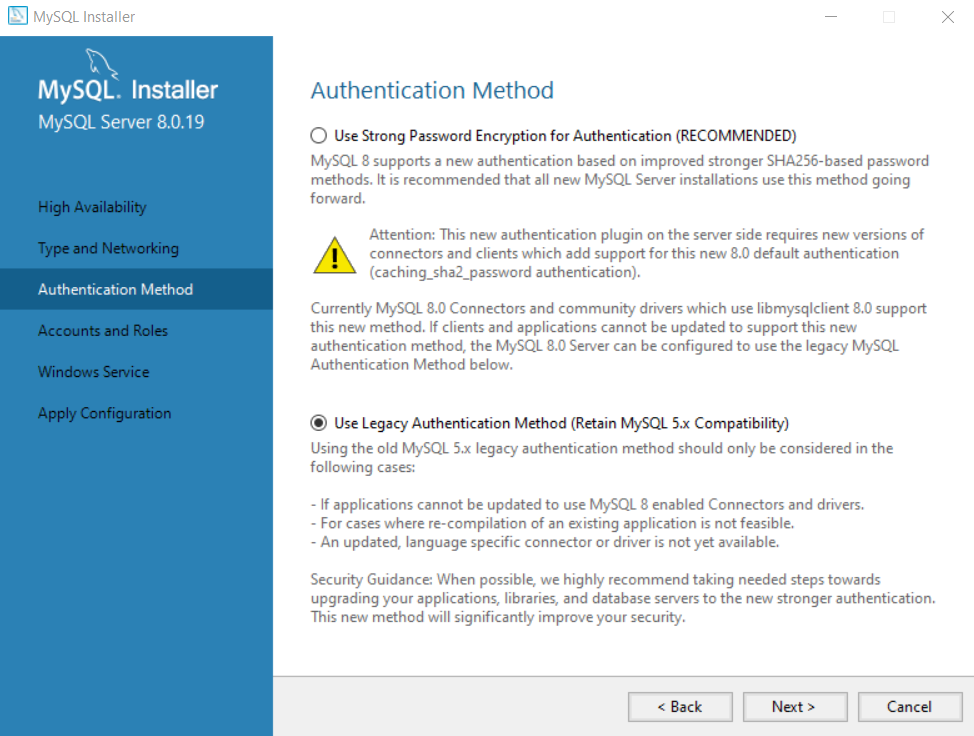
On the "windows" it can be easily installed via installer: https://dev.mysql.com/downloads/installer/.
Pay attention to the authentication method. The new encryption algorithm in MySQL 8.0 is not yet supported by node.js and you must select legacy authentication method.
Tables that the adapter creates now store every character (also emojis) and keep IDs apart that differ only in upper/lower case (alias.0.Licht and alias.0.licht). Tables that already exist are not changed automatically, because converting a large table takes a while and blocks it.
If you want this for an existing database: stop the SQL instance, make a backup of the database, and run these three commands, e.g. in phpMyAdmin (replace iobroker with the name of your database):
ALTER TABLE `iobroker`.datapoints MODIFY name TEXT CHARACTER SET utf8mb4 COLLATE utf8mb4_bin;
ALTER TABLE `iobroker`.sources MODIFY name TEXT CHARACTER SET utf8mb4 COLLATE utf8mb4_bin;
ALTER TABLE `iobroker`.ts_string MODIFY val TEXT CHARACTER SET utf8mb4;
Then start the instance again. Without this, everything keeps working as before; only values with emojis cannot be stored.
The default Database name is iobroker, but it can be changed in the configuration.
This table is a list of adapter's instances that wrote the entries. (state.from)
| DB | Name in query |
|---|---|
| MS-SQL | iobroker.dbo.sources |
| MySQL | iobroker.sources |
| PostgreSQL | sources |
| SQLite | sources |
Structure:
| Field | Type | Description |
|---|---|---|
| id | INTEGER NOT NULL PRIMARY KEY IDENTITY(1,1) | unique ID |
| name | varchar(255) / TEXT | instance of adapter, that wrote the entry |
Note: MS-SQL uses varchar(255), and others use TEXT
This table is a list of data points. (IDs)
| DB | Name in query |
|---|---|
| MS-SQL | iobroker.dbo.datapoints |
| MySQL | iobroker.datapoints |
| PostgreSQL | datapoints |
| SQLite | datapoints |
Structure:
| Field | Type | Description |
|---|---|---|
| id | INTEGER NOT NULL PRIMARY KEY IDENTITY(1,1) | unique ID |
| name | varchar(255) / TEXT | ID of variable, e.g. hm-rpc.0.JEQ283747.1.STATE |
| type | INTEGER | 0 - number, 1 - string, 2 - boolean |
Note: MS-SQL uses varchar(255), and others use TEXT
Values for states with type "number". ts means "time series".
| DB | Name in query |
|---|---|
| MS-SQL | iobroker.dbo.ts_number |
| MySQL | iobroker.ts_number |
| PostgreSQL | ts_number |
| SQLite | ts_number |
Structure:
| Field | Type | Description |
|---|---|---|
| id | INTEGER | ID of state from "Data points" table |
| ts | BIGINT / INTEGER | Time in ms till epoch. Can be converted to time with "new Date(ts)" |
| val | REAL | Value |
| ack | BIT/BOOLEAN | Is acknowledged: 0 - not ack, 1 - ack |
| _from | INTEGER | ID of source from "Sources" table |
| q | INTEGER | Quality as number. You can find description here |
Note: MS-SQL uses BIT, and others use BOOLEAN. SQLite uses for ts INTEGER and all others BIGINT.
The user can define additional to type number the functionality of counters. For this purpose, the following table is created:
| DB | Name in the query |
|---|---|
| MS-SQL | iobroker.dbo.ts_counter |
| MySQL | iobroker.ts_counter |
| PostgreSQL | ts_counter |
| SQLite | ts_counter |
Structure:
| Field | Type | Description |
|---|---|---|
| id | INTEGER | ID of state from "Data points" table |
| ts | BIGINT / INTEGER | Time in ms till epoch. Can be converted to time with "new Date(ts)" |
| val | REAL | Value |
This table stores the values when the counter was exchanged and the value does not increase, but failed to zero or lower value.
Values for states with type string.
| DB | Name in query |
|---|---|
| MS-SQL | iobroker.dbo.ts_string |
| MySQL | iobroker.ts_string |
| PostgreSQL | ts_string |
| SQLite | ts_string |
Structure:
| Field | Type | Description |
|---|---|---|
| id | INTEGER | ID of state from "Data points" table |
| ts | BIGINT | Time in ms till epoch. Can be converted to time with "new Date(ts)" |
| val | TEXT | Value |
| ack | BIT/BOOLEAN | Is acknowledged: 0 - not ack, 1 - ack |
| _from | INTEGER | ID of source from "Sources" table |
| q | INTEGER | Quality as number. You can find description here |
Note: MS-SQL uses BIT, and others use BOOLEAN. SQLite uses for ts INTEGER and all others BIGINT.
Values for states with type boolean.
| DB | Name in query |
|---|---|
| MS-SQL | iobroker.dbo.ts_bool |
| MySQL | iobroker.ts_bool |
| PostgreSQL | ts_bool |
| SQLite | ts_bool |
Structure:
| Field | Type | Description |
|---|---|---|
| id | INTEGER | ID of state from "Data points" table |
| ts | BIGINT | Time in ms till epoch. Can be converted to time with "new Date(ts)" |
| val | BIT/BOOLEAN | Value |
| ack | BIT/BOOLEAN | Is acknowledged: 0 - not ack, 1 - ack |
| _from | INTEGER | ID of source from "Sources" table |
| q | INTEGER | Quality as number. You can find description here |
ioBroker/ioBroker.sql is a public repo on GitHub by ioBroker. Store history data in SQL Database: MySQL, PostgreSQL or SQLite.
It declares the MIT license on GitHub.
Its maker has not tagged a system, so it is unknown here. Its README says what it needs.
Open "Take it" on its page: Take My Repo writes an install plan for your machine and hands it to your AI agent (Claude Code, Codex or Cursor), which asks you before each step. Take My Repo has not tested it on any machine.
Java 面试 & 后端通用面试指南,覆盖计算机基础、数据库、分布式、高并发、系统设计与 AI 应用开发
The Postgres development platform. Supabase gives you a dedicated Postgres database to build your web, mobile, and AI applications.
Persistent Context Across Sessions for Every Agent – Captures everything your agent does during sessions, compresses it with AI, and injects relevant context back into future sessions. Works with Claude Code, OpenClaw, Codex, Gemini, Hermes, Copilot, OpenCode + More
Stop renting your intelligence. Own it with AnythingLLM. Everything you need for a powerful local-first agent experience
The flexible backend for all your projects 🐰 Turn your DB into a headless CMS, admin panels, or apps with a custom UI, instant APIs, auth & more.
Its last change on GitHub was on 2026-11-23. Take My Repo does not judge from that whether it is maintained.
Nobody has reviewed it on Take My Repo yet, which says nothing about its quality.
Take My Repo cannot say: it does not audit code and has not run ioBroker.sql. What is known comes from GitHub. It declares the MIT license on GitHub. Its last change was on 2026-11-23. It has 45 stars, which measure popularity, not safety. Nobody has reviewed it on Take My Repo yet, which says nothing about its quality. Read the source before you run it. With "Take it", your AI agent shows each step and asks you before running it; README text is treated as data, not as instructions.