Automated Video Generator
🆓 Free • 🔓 Open Source • 🏠 Self-Hosted • 🤖 AI Text-to-Video
Turn any script into a narrated, stock-footage video in minutes.
No API key. No watermark. Runs 100% on your machine.
📖 What is this?
Automated Video Generator is a free, open-source, self-hosted pipeline that converts text scripts into polished MP4 videos. Give it a script — it fetches relevant stock visuals, generates natural voiceovers, synchronizes everything with Remotion, and exports a ready-to-share video.
No paid plans. No watermarks. No monthly limits. Just your machine, your scripts, and full control.
| 🎬 Input |
⚙️ Pipeline |
📦 Output |
Text script
or JSON job
or AI prompt |
Parse → Fetch media
→ Generate voiceover
→ Render with Remotion |
MP4 video
+ Thumbnail
+ Scene data |
✨ Demo
A real short generated by the pipeline (no re-render, no edits) — script in, MP4 out:
 ▶️ Autoplaying: a real short generated by this pipeline (no re-render, no edits) — script in, MP4 out.
 🎙️ Voiceover powered by Voicebox Kokoro Heart — realistic local AI narration. ✅ 32/32 quality checks passed on every output. 🔓 Free & open source.
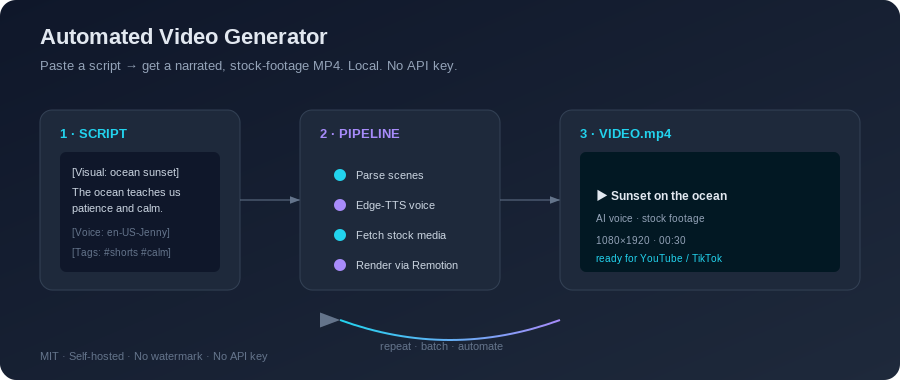 Script → AI voiceover + stock media → MP4. Fully local.
🚀 Quick Start (5 minutes)
Choose your path:
🎬 Your first video in 2 commands
No API key required to run — Openverse + free CC sources provide stock footage out of the box. Voiceover uses the vendored Voicebox backend (Kokoro by default) with Edge-TTS fallback; the Kokoro backend needs a one-time setup — point VOICEBOX_PYTHON at a torch/kokoro venv (e.g. C:/one/voicebox/.venv/Scripts/python.exe) or it auto-falls back to the built-in Edge-TTS/Kokoro engine. Encoding is automatic: Windows uses h264_mf (Media Foundation, fast) and other platforms use libx264; --gpu selects AMF/NVENC/QSV when present. For best results set PEXELS_API_KEY (free): Pexels is the recommended provider and is skipped in keyless mode, so keyless runs use lower-relevance free sources.
# 1. Install (one time)
npm install

# 2. Generate (reads input/scripts/input-scripts.json, writes output/<id>/<Title>.mp4)
npm run generate
That's it. The CLI reads input/scripts/input-scripts.json (a sample job is pre-included) and renders an MP4 with AI voiceover + stock visuals + burned-in captions. With the bundled sample, find it at output/pre7_productivity_tip/One Simple Trick To Beat Procrastination.mp4.
Prefer a GUI? Run npm run dev and open http://localhost:3001 — paste a script, click Generate Video.
Real Voicebox-narrated video from the pipeline. Script → voiceover + stock media → MP4, fully local.
🪟 Windows Desktop App
No Node.js, Python, or terminal required.
Download the latest Windows installer, double-click, and the app opens the web portal automatically. Everything is bundled.
📜 One-Click Launcher (Windows)
.\Start-Automated-Video-Generator.bat
Or the PowerShell version:
.\Start-Automated-Video-Generator.ps1
The launcher auto-installs Node.js and Python (via winget), creates .env, installs dependencies, and opens the portal at http://localhost:3001.
🛠️ Manual Setup
Prerequisites: Node.js 18+, Python 3.8+, npm
# 1. Clone
git clone https://github.com/itsPremkumar/Automated-Video-Generator.git
cd Automated-Video-Generator

# 2. Install Node dependencies
npm install

# 3. Install Python voice engine
pip install -r requirements.txt

# 4. Configure environment
cp .env.example .env
# Edit .env — add PEXELS_API_KEY (free, get one at pexels.com/api)
# No API key? Set OPENVERSE_ENABLED=true (it's the default)

# 5. (Optional) Local AI generation — ComfyUI, CogVideoX, Real-ESRGAN, rembg
#    Install the AI providers you want (all optional, all free, all offline):
#    pip install diffusers transformers accelerate torch        # CogVideoX (T2V)
#    pip install realesrgan basicsr                            # Real-ESRGAN (upscale)
#    pip install rembg                                         # Background removal
#    git clone https://github.com/comfyanonymous/ComfyUI.git  # ComfyUI (image/I2V)

# 6. Start the web portal
npm run dev
Open http://localhost:3001/ — paste a script, click generate, and watch it render.
🐳 Docker
Pre-built image (built + scanned by CI, pushed to GHCR):
docker run -p 3001:3001 \
  -v "$(pwd)/input:/app/input" \
  -v "$(pwd)/output:/app/output" \
  ghcr.io/itspremkumar/automated-video-generator
Or build locally (pinned node:20-bookworm, full npm ci, edge-tts in a
venv to satisfy PEP 668, platform linux/amd64, healthcheck on /api/health):
docker compose up --build
🚀 Production Deployment
The container is self-contained: it bundles the ffmpeg/ffprobe static
binaries and a Python venv with edge-tts for free, key-less narration.
No external services are required for the default pipeline.
Environment variables (all optional — sensible free defaults):
| Var |
Default |
Purpose |
PORT |
3001 |
Web portal / API port |
PEXELS_API_KEY |
(none) |
Free stock video. Without it, falls back to Openverse / Wikimedia / Internet Archive. |
YOUTUBE_API_KEY |
(none) |
YouTube metadata enrichment (optional). |
OPENVERSE_ENABLED |
true |
Use Openverse CC media when no API key is set. |
TTS_PROVIDER |
voicebox |
voicebox (default — vendored in-repo Kokoro/Chatterbox) or edge-tts (free, CPU). The pipeline auto-spawns the vendored backend. |
VOICEBOX_ENGINE |
(none) |
kokoro or chatterbox_turbo — only when TTS_PROVIDER=voicebox. |
VOICEBOX_PROFILE_ID |
(none) |
A Voicebox profile id (preset or cloned voice). |
Voicebox (in-repo vendored, default narrator).
Voicebox is vendored in-repo at src/speech/ (MIT, sourced from jamiepine/voicebox).
It is the default TTS provider — the pipeline auto-spawns it as python -m speech.main
using the in-repo venv. Kokoro (~800 MB VRAM) is the default narrator engine.
If the backend cannot start (missing venv, no GPU), the pipeline degrades gracefully
back to Edge-TTS. For voice cloning, set TTS_PROVIDER=voicebox and provide a
VOICEBOX_PROFILE_ID. See docs/VOICEBOX_SETUP.md.
Health & hardening:
- Healthcheck hits
GET /api/health (container HEALTHCHECK).
- No secrets are logged; output paths are sanitized against
../ traversal
at the dispatch chokepoint (src/agentic/operations/security.ts).
- CI runs
typecheck + test:unit + a Gitleaks secret scan + a Docker
build/push to GHCR on every push to main.
The MCP server lets AI agents (Claude Desktop, Claude Code, Cursor, etc.) create videos autonomously — it exposes 61 tools across 7 families, 13 resources, and 4 prompts over stdio.
📚 See docs/MCP_TOOL_REFERENCE.md for the full tool-by-tool contract (auto-generated from source via npm run gen:mcp-doc; CI verifies it's in sync via npm run verify:mcp-doc).
Quick connect (read-only safe mode — default):
{
    "mcpServers": {
        "automated-video-generator": {
            "command": "npx",
            "args": ["automated-video-generator"]
        }
    }
}
Or run it locally:
npm install
npm run mcp        # starts the MCP server on stdio
⚠️ Safe mode (important): By default the MCP server runs in safe mode — read tools (read_input_script, list_output_videos, health_check, etc.) work, but all write/mutation tools are blocked with ForbiddenError: safe mode. This protects your files from accidental changes by an agent.
To enable write tools (write_input_script, delete_*, upload_asset, update_env_config, run_pipeline_command, delete_output), set the flag:
# one-off
ALLOW_UNSAFE_MCP_TOOLS=1 npm run mcp

# or in your client config (env)
{
  "mcpServers": {
    "automated-video-generator": {
      "command": "npx",
      "args": ["automated-video-generator"],
      "env": { "ALLOW_UNSAFE_MCP_TOOLS": "1" }
    }
  }
}
Only enable ALLOW_UNSAFE_MCP_TOOLS for trusted agents — it grants filesystem write access to your project.
What the server provides:
- Tools (60):
write_input_script, read_input_script, delete_input_script, validate_input_script, upload_asset, delete_asset, list_output_videos, read_output_file, delete_output, generate_video, get_video_status, run_pipeline_command, list_jobs, get_batch_status, read_env_config, update_env_config, get_system_info, health_check, get_workspace_paths, list_public_files, list_voices, list_local_assets, search_free_video, download_free_video, agentic_plan, agentic_acquire, agentic_verify_all, list_pending_assets, get_asset_preview, approve_asset, reject_asset, agentic_gate, agentic_run, do_task, merge_videos, trim_video, crop_video, resize_video, rotate_video, extract_audio, split_video, add_captions, add_music, add_audio_track, localize_video, grade_video, slow_motion, speed_ramp, add_watermark, add_lower_third, add_progress_bar, derive_outputs, make_voiceover, download_image, download_video, remove_silence, detect_scenes, auto_reframe, reduce_noise, apply_brand_kit
- Resources (9): project overview, input scripts, input assets, input format docs, output videos, per-video detail, public tree, env/pipeline config
- Prompts (4):
create-marketing-video, create-youtube-short, batch-generate, debug-pipeline
🎯 Generate Your First Video
CLI Batch Mode
Create input/scripts/input-scripts.json:
[
    {
        "id": "my-first-video",
        "title": "3 Productivity Habits That Actually Work",
        "orientation": "portrait",
        "language": "english",
        "script": "Here are three productivity habits that will change your life. First, start your day with a clear plan..."
    }
]
Run:
npm run generate
Output: output/my-first-video/final.mp4 🎉
Publishing to social (opt-in)
After a batch run, you can publish the rendered MP4s to TikTok, Instagram, or YouTube via upload-post.com. This is opt-in — the batch CLI only posts when --post is passed AND the env vars are configured:





