
CodexPulse
A local-first macOS companion for Codex usage and task activity
- 1
- 5 wk ago
Repo iwecon/CodexPulse, read from GitHub 16 min ago. iwecon has not joined Take My Repo.
In short
iwecon/CodexPulse is a public repo on GitHub by iwecon. A local-first macOS companion for Codex usage and task activity. It declares no license on GitHub. Public does not mean open source: without a license, nobody is granted the right to reuse it. It is written mainly in Swift, has 1 stars and last changed on 2026-10-21. Nobody has reviewed it on Take My Repo yet, which says nothing about its quality. Read from GitHub on 2026-11-23.
Codex Pulse
English · 简体中文 · 繁體中文(香港) · 繁體中文(台灣) · 日本語 · 한국어
Codex Pulse is a macOS 26+ desktop accessory that shows local Codex, Claude Code, and OpenCode usage and task activity beside the Dock. Built with SwiftUI and AppKit, it reads local records without uploading usage data or modifying the originals.
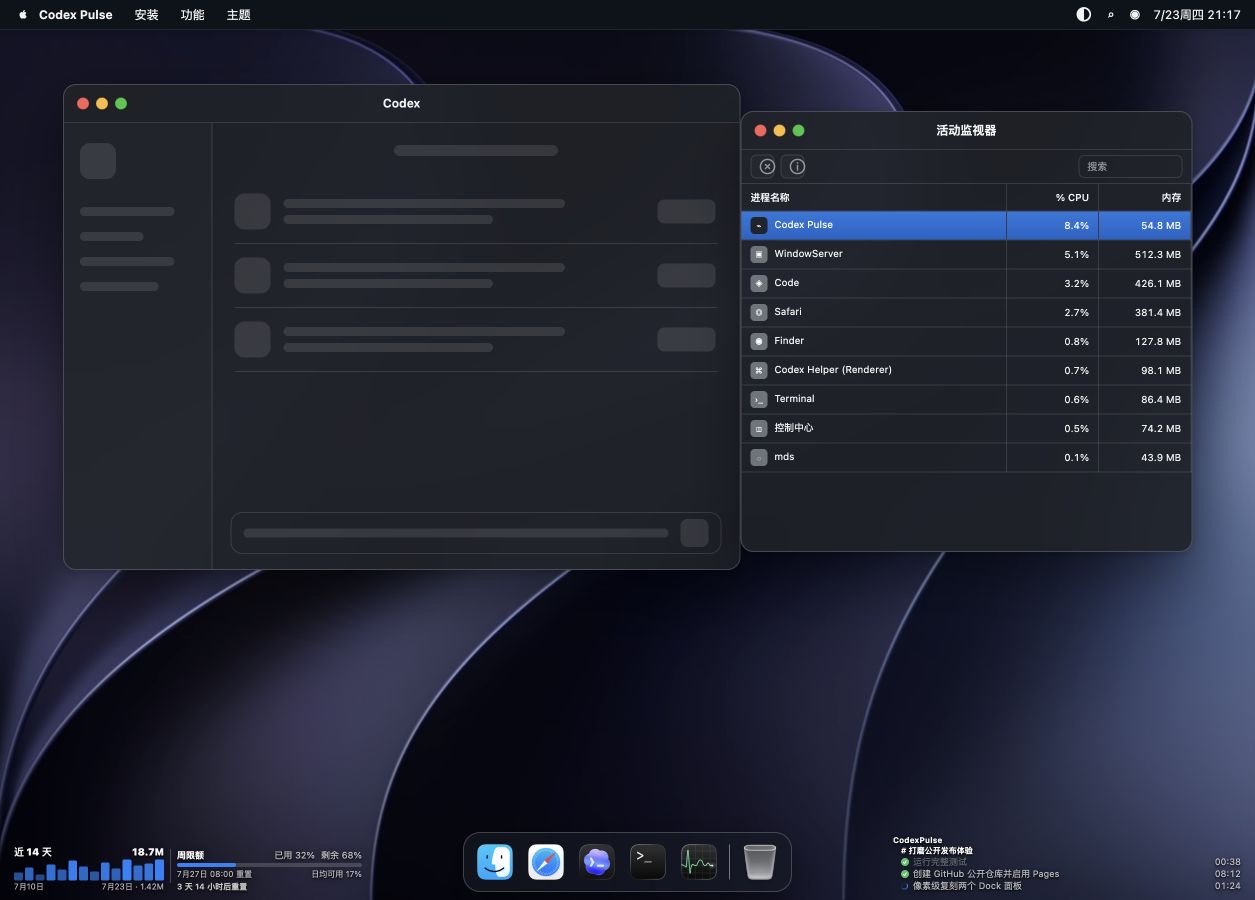
Product page and interactive demo · Download releases
Install
On macOS 26 or later, download the DMG for your Mac from Releases: Codex-Pulse-arm64.dmg for Apple silicon or Codex-Pulse-x86_64.dmg for Intel. Open it and copy Codex Pulse.app to Applications.
With Homebrew installed, you can instead use this repository's tap:
brew tap iwecon/codex-pulse https://github.com/iwecon/CodexPulse
brew install --cask iwecon/codex-pulse/codex-pulse
An alternative installer requires Node.js 18+ and npm:
npm install -g github:iwecon/CodexPulse
codex-pulse install
codex-pulse open
The npm commands work from any directory. Installing the CLI alone does not install the app; codex-pulse install downloads and mounts the release DMG and copies the app to ~/Applications/Codex Pulse.app. Add --force to replace an existing installation. See the installer CLI for its supported commands.
Use the panels
With multiple displays, both panels stay on the system primary display and do not follow the pointer or focused window. Changing the primary display or connecting/disconnecting displays updates their placement automatically.
The app has no Dock icon. Its transparent panels stay above desktop icons and below ordinary app windows, follow bottom, left, or right Dock placement, and support multiple Spaces.
| Panel | What it shows |
|---|---|
Usage Overview Panel (用量概览面板) |
A rolling 14-day token trend and per-tool totals, plus the Codex weekly quota when available. Tools with no usage in that window are hidden automatically. |
Task Activity Panel (任务活动面板) |
Active and recent tasks from all three tools, grouped by project and session, with status indicators and the latest user message. |
By default, usage appears on the left and tasks on the right of a bottom Dock; with a vertical Dock, usage appears above tasks. These names describe responsibilities even after you move the panels.
When a bottom Dock leaves too little room for a panel’s preferred width, that side’s panels automatically move above the Dock, keeping their side and stacking order. They return beside the Dock when space becomes available again.
The weekly quota defaults to the right of usage. Its position button cycles through right, above, below, and left; the choice is saved independently of the panel’s screen position. Above/below layouts expand the panel vertically. Hiding the quota or losing quota data collapses that extra space and hides the position button.
Hold the pointer still inside a panel for half a second to reveal its controls. Drag the resize edge or use the buttons to move panels and change their stacking order. The Usage Overview Panel also offers language selection, per-tool bar colors, weekly-quota visibility, and Photos wallpaper permission. The Task Activity Panel offers text alignment and a hide button. Preferences persist locally. The interface supports Simplified Chinese, Hong Kong and Taiwan Traditional Chinese, Japanese, Korean, and English; Simplified Chinese is the initial default.
Ordinary content is click-through. Codex session titles open the corresponding conversation in ChatGPT; Claude Code and OpenCode titles remain click-through. Text adapts to the wallpaper beneath each panel. Sampling uses local assets, never screen capture; Photos-library wallpapers use existing access unless you explicitly request permission through the control. Unavailable wallpaper assets fall back to system appearance without downloading images.
The default bar colors are Codex #038BF8 and Claude Code #E96B46 in both appearances; custom colors take precedence.
Only Codex provides local quota snapshots. Remaining quota is 100 - used_percent, using the newest account-level record. The footer's weekly token total is an estimate: tokens recorded in the quota window ÷ used_percent × 100, using the raw consumed percentage. The estimate holds steady within a percentage step and calibrates gradually as the percentage increases: five percentage points halve the gap to the new projection. Repeated polling adds no weight. Calibration stays in memory and restarts on relaunch, a new quota window, or corrected source totals. It is not an official token allowance and may omit activity from other devices or cloud sessions; missing or invalid inputs keep the used-only display. Hover the weekly-quota visibility control for the explanation.
A Codex turn with no log activity for 3 minutes appears paused and expires 10 minutes after its last activity; new activity resumes only a silence-inferred pause. Completed, explicitly paused, and terminated tasks remain for 10 minutes. Claude Code and OpenCode infer turns from local records and drop running turns after more than 12 minutes of session inactivity. A long silent tool call can therefore temporarily look paused or disappear.
A non-Debug .app configures launch at login on first launch and respects later disabling in System Settings. Debug builds and raw executables, including swift run, leave login items untouched.
Local data and refresh
No API key or source setup is needed beyond using the supported tools locally with their standard data locations:
| Source | Records read |
|---|---|
| Codex usage | ~/.codex/sessions/**/*.jsonl, ~/.codex/archived_sessions/**/*.jsonl |
| Codex task index | ~/.codex/state_*.sqlite and the session logs it references |
| Claude Code usage and tasks | ~/.claude/projects/**/*.jsonl |
| OpenCode usage and tasks | ~/.local/share/opencode/opencode.db, including WAL/SHM change detection |
Missing or unreadable sources affect only the corresponding tool. Usage aggregation covers the visible 14-day window and keeps derived data in memory only. Cold scans filter relevant files and rows; subsequent scans reuse in-memory state and process additions or changes. JSONL reading is chunked, and no derived usage database or disk cache is created. Both usage and task refresh, along with task-status animation, pause while the session is inactive or displays are asleep; they resume when both conditions clear.
Hide and restore task activity
Choose Hide Task Activity Panel in its controls, then Show Task Activity Panel in the Usage Overview Panel to restore it. Hiding persists across launches, cancels task monitoring, clears tasks, and releases task-only caches after cancelled reads exit. It also removes task views, links, controls, and wallpaper sampling regions. Usage scanning stays independent and may still read the same logs. Restoring keeps panel preferences and scans current records; hidden time counts toward expiry.
flowchart TD
    A[Launch or visibility change] --> B{Task panel hidden?}
    B -->|Yes| C[Cancel task loop and invalidate generation]
    C --> D[Clear tasks and release monitors and task views]
    D --> E[Keep usage panel and restore control]
    E -->|Show| B
    B -->|No| F{Session active and display awake?}
    F -->|No| G[Wait without polling]
    G -->|Activation or wake| F
    F -->|Yes| H[Create task monitors if needed and scan]
    H --> I{Generation current and still allowed?}
    I -->|Yes| J[Publish changed tasks and poll again]
    J --> F
    I -->|No| K[Discard result]
UsageModel.swift owns refresh eligibility and generations; TaskMonitoringSession.swift owns the three task monitors. A hidden launch never starts task monitoring. Object release does not guarantee that reclaimable allocator pages immediately disappear from the process footprint.
Develop and verify
Use macOS 26+, Xcode 26+ with a selected Swift 6.2+ toolchain, and the system SQLite 3 library. The Swift package has no external package dependencies. Run these commands from the repository root:
swift build
swift run "Codex Pulse"
swift test
For a Debug .app, use ./script/build_and_run.sh from the repository root. It stops an existing Codex Pulse process, rebuilds dist/Codex Pulse Debug.app, and launches it. The script also supports --debug, --logs, --telemetry, and --verify; see the script for details.
The test suite covers parsers, incremental scans, quota calculations, task lifecycle, panel geometry, wallpaper behavior, localization, and login eligibility. AGENTS.md records project-specific constraints and the changes that require the full suite or UI and memory checks.
For an opt-in, read-only task-memory check against your local sessions, run this from the repository root:
CODEXPULSE_LOCAL_TASK_MEMORY=1 swift test --filter TaskMonitoringMemoryTests
The ordinary suite skips this probe. It checks monitor release and hidden polling over three visibility cycles and reports physical footprint separately from object lifetime.
Code navigation
| Area | Entry points |
|---|---|
| App and panel controls | App.swift, DockPanelResizing.swift, CodexSessionLink.swift |
| Usage aggregation and models | UsageScanner.swift, Models.swift |
| Refresh and task lifecycle | UsageModel.swift, TaskMonitoringSession.swift, RefreshActivityGate.swift |
| Wallpaper appearance | WallpaperAppearance.swift, WallpaperSourceResolver.swift, AdaptiveTextColor.swift |
| Preferences and startup | AppLanguage.swift, ToolBarColorSettings.swift, LaunchAtLoginManager.swift |
| Product site and distribution | docs/index.html, Homebrew cask, npm package, release workflow |
Package and release
Questions
What is CodexPulse?
iwecon/CodexPulse is a public repo on GitHub by iwecon. A local-first macOS companion for Codex usage and task activity.
Is CodexPulse open source?
It declares no license on GitHub. Public does not mean open source: without a license, nobody is granted the right to reuse it.
Does CodexPulse run on macOS, Windows or Linux?
Its maker has not tagged a system, so it is unknown here. Its README says what it needs.
How do I install CodexPulse?
Open "Take it" on its page: Take My Repo writes an install plan for your machine and hands it to your AI agent (Claude Code, Codex or Cursor), which asks you before each step. Take My Repo has not tested it on any machine.