CamXploit
Security reconnaissance and assessment tool for identifying potentially exposed IP cameras by analyzing open ports, service configurations, and common misconfigurations.
- 1.2k
- Python
- AGPL-3.0
- 11 mo ago
Turn your Plex library into curated, themed virtual TV channels in Tunarr — a self-hosted web app with a *arr-style UI.
Repo jamesmattson/programmarr, read from GitHub 1 h ago. jamesmattson has not joined Take My Repo.
jamesmattson/programmarr is a public repo on GitHub by jamesmattson. Turn your Plex library into curated, themed virtual TV channels in Tunarr — a self-hosted web app with a *arr-style UI. It declares the MIT license on GitHub. It is written mainly in Python, has 37 stars and last changed on 2026-11-23. Nobody has reviewed it on Take My Repo yet, which says nothing about its quality. Read from GitHub on 2026-11-25.
Security reconnaissance and assessment tool for identifying potentially exposed IP cameras by analyzing open ports, service configurations, and common misconfigurations.
Turn your Plex library into themed virtual TV channels in Tunarr
Programmarr is a self-hosted web app that turns your Plex library into a curated lineup of themed virtual TV channels in Tunarr — with a web UI that feels like Sonarr or Radarr.
You compose the lineup in a Planner: pick the genres, decades, studios, directors, and actors you want, check the exact channels from a live, counted list, and deploy. It's all deterministic — no AI required — with an optional AI layer that discovers themed channels your filters miss (Heist Films, Time Travel, Sports Underdogs) and splits broad pools by tone (Feel-Good vs Raunchy Comedies).
Channels can also be self-maintaining: mark one "live" and Programmarr re-checks it against your library on a schedule and patches it in place — new episodes and new franchise films appear on their own, no redeploy.
Requires: Tunarr 1.x + Plex
Plex only. Programmarr reads your library metadata from the Plex API, so it needs a Plex-backed source in Tunarr. Jellyfin and Emby aren't supported yet — if a Tunarr has no Plex source, Programmarr will tell you so rather than failing mysteriously. Interested in Jellyfin support? Say so on the tracking issue — demand decides priority.
docker-compose.ymlservices:
programmarr:
image: ghcr.io/jamesmattson/programmarr:latest
container_name: programmarr
restart: unless-stopped
ports:
- "7979:7979"
volumes:
- ./data:/data
docker compose up -d
That's it — the image is pre-built on GHCR. No local build step needed, and nothing to clone.
http://<your-server-ip>:7979
First run shows an onboarding wizard — create a login, enter your Tunarr and Plex URLs, and hit Test connections to confirm Programmarr can actually reach both before you go any further.
Heads up on your first deploy. Programmarr's default deploy mode replaces the channels it manages. If you already have a hand-built Tunarr lineup, use Add/Edit mode rather than Nuke. Either way, Programmarr snapshots your existing lineup before deleting anything — see Backups below.
Paste this as a complete compose file in Apps → Custom App:
services:
programmarr:
image: ghcr.io/jamesmattson/programmarr:latest
container_name: programmarr
restart: unless-stopped
ports:
- "7979:7979"
volumes:
- /mnt/YourPool/AppData/programmarr/data:/data
Replace /mnt/YourPool/AppData/programmarr/data with a real path on your pool.
Programmarr only publishes a new image when a version is released — your container never changes on its own. When a new release is out, the app shows an "update available" banner in the top bar with a link to the release notes. Update when it suits you:
docker compose pull && docker compose up -d
Your data (config, channels, library export) lives in the mounted ./data volume and is
untouched by an update.
Prefer hands-off? You can add Watchtower to auto-pull releases — see "Optional: automatic updates with Watchtower" below. Because images now publish only on releases, Watchtower will only ever pull released versions, never in-progress work.
If you'd rather not think about updates at all, add Watchtower to your compose file. It checks for a new image on the configured interval and restarts the container automatically when one is available. Because Programmarr only publishes images on releases, Watchtower will only ever pull released versions — never work-in-progress.
services:
  programmarr:
    image: ghcr.io/jamesmattson/programmarr:latest
    container_name: programmarr
    restart: unless-stopped
    ports:
      - "7979:7979"
    volumes:
      - ./data:/data
watchtower:
image: containrrr/watchtower
container_name: watchtower
environment:
- DOCKER_API_VERSION=1.44
volumes:
- /var/run/docker.sock:/var/run/docker.sock
command: --interval 300 programmarr
restart: unless-stopped
Note: The
DOCKER_API_VERSION=1.44env var is required on newer Docker engines (TrueNAS, Docker Desktop 4.x+). Without it, Watchtower crash-loops with "client version 1.25 is too old".
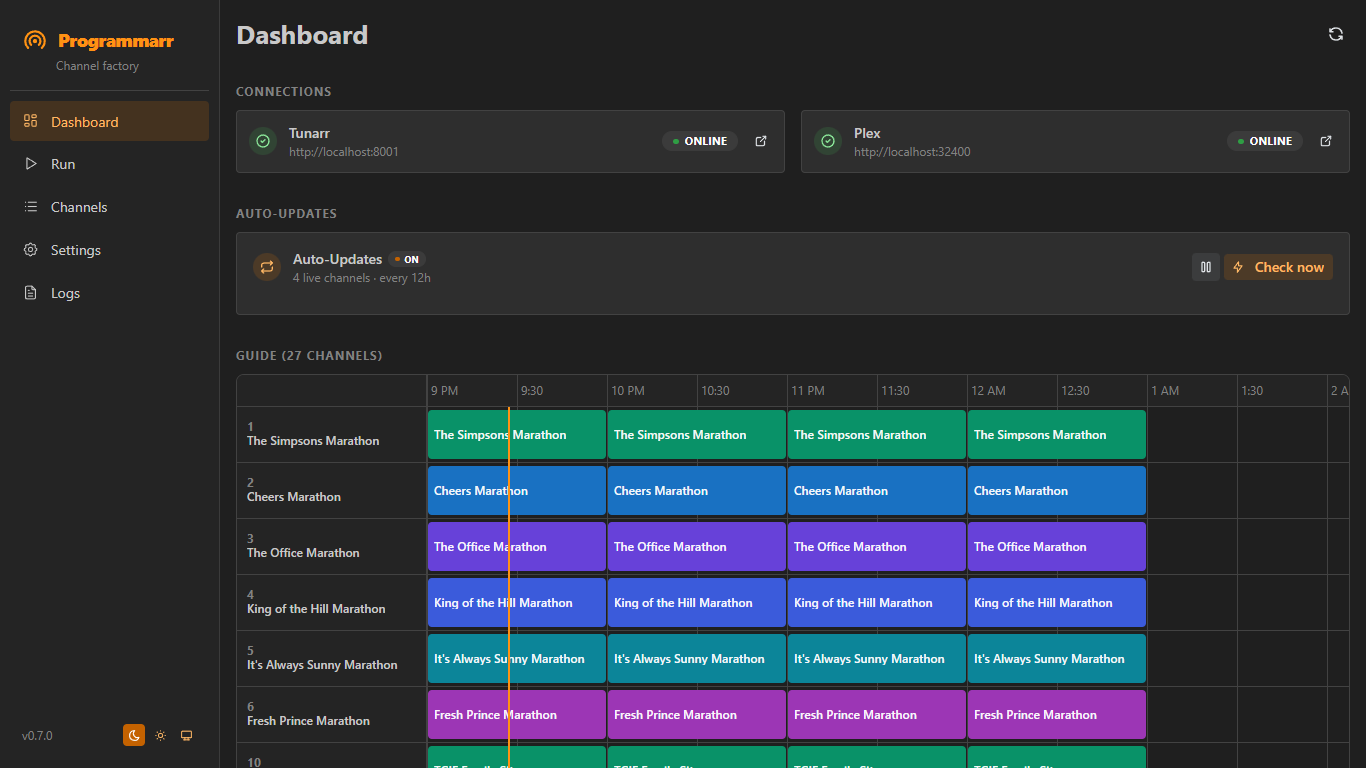
Dashboard — EPG guide grid, connection status, and live auto-update controls
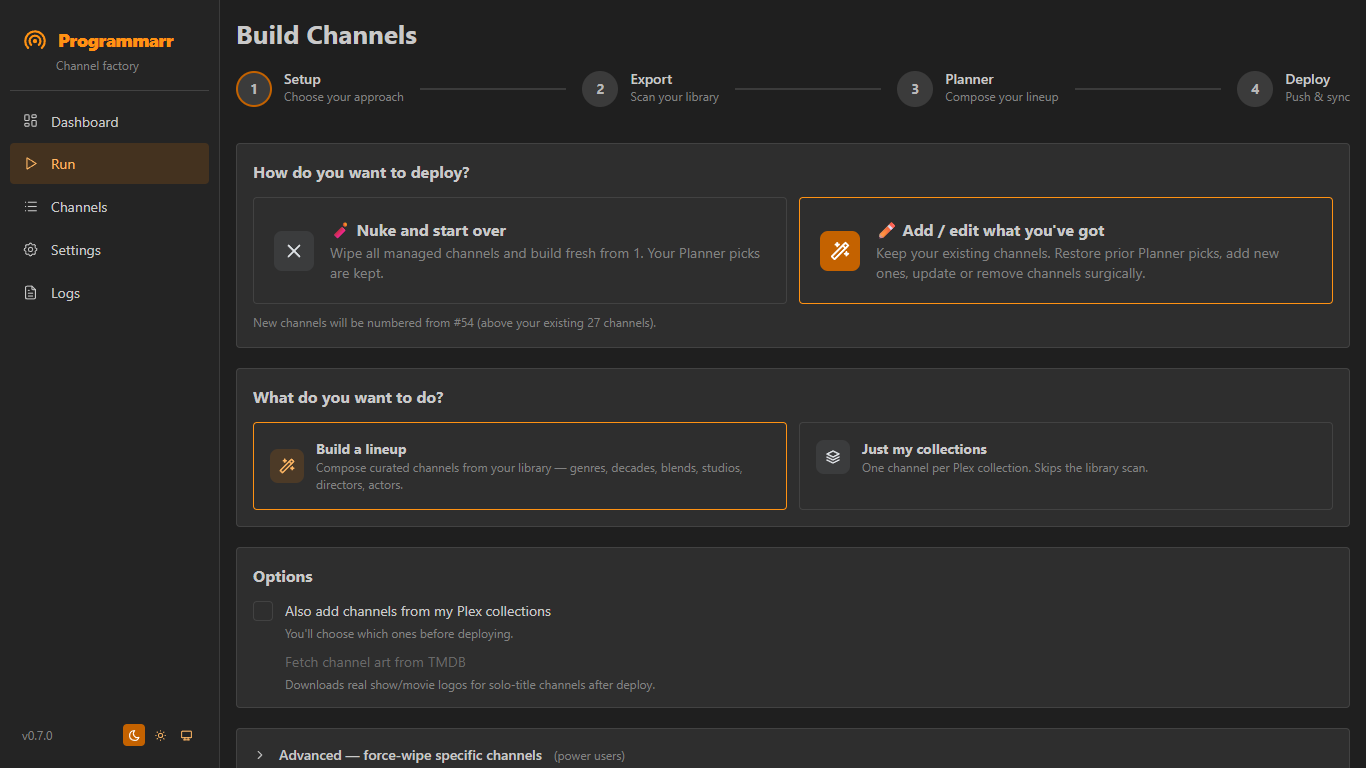
Build Channels — choose Nuke or Add/Edit mode, then scan → Planner → deploy in a guided stepper |
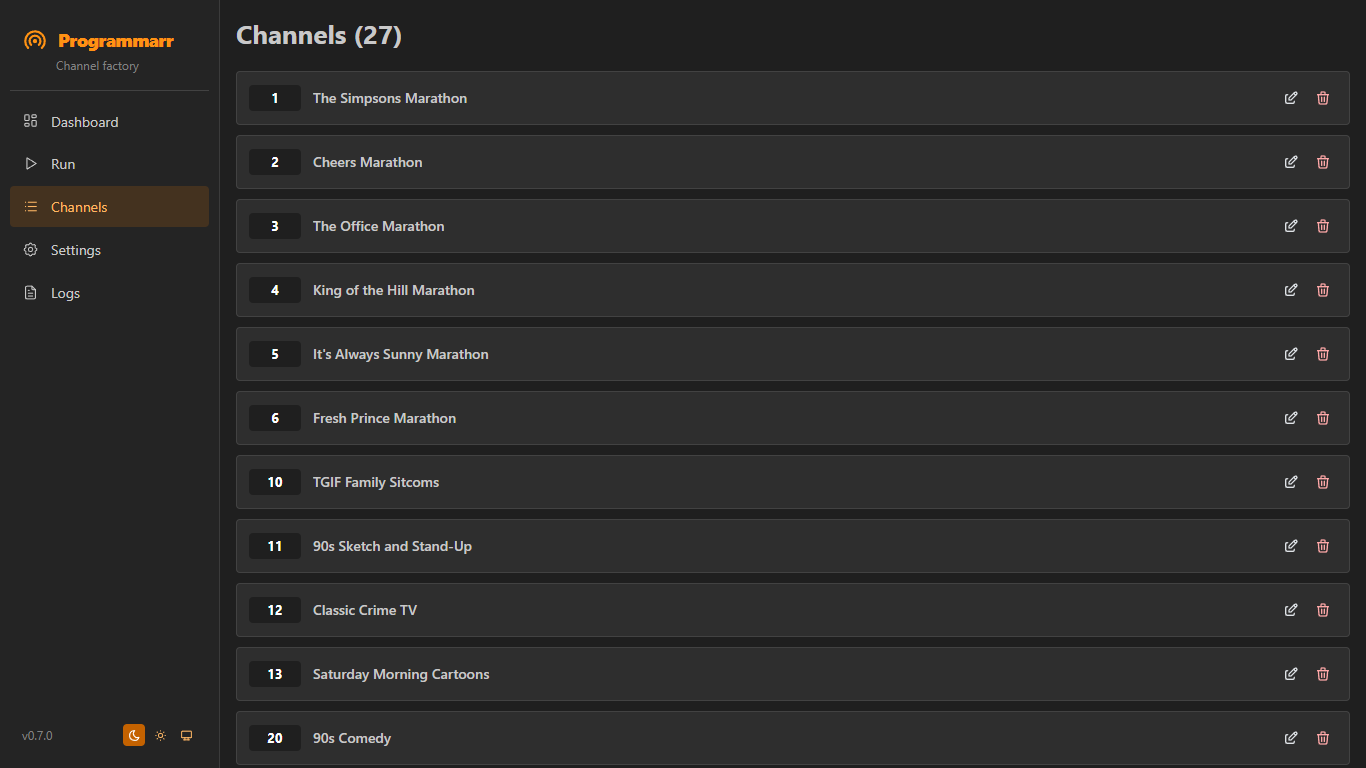
Channels — browse, edit, and delete all managed channels; click any row to open the editor |
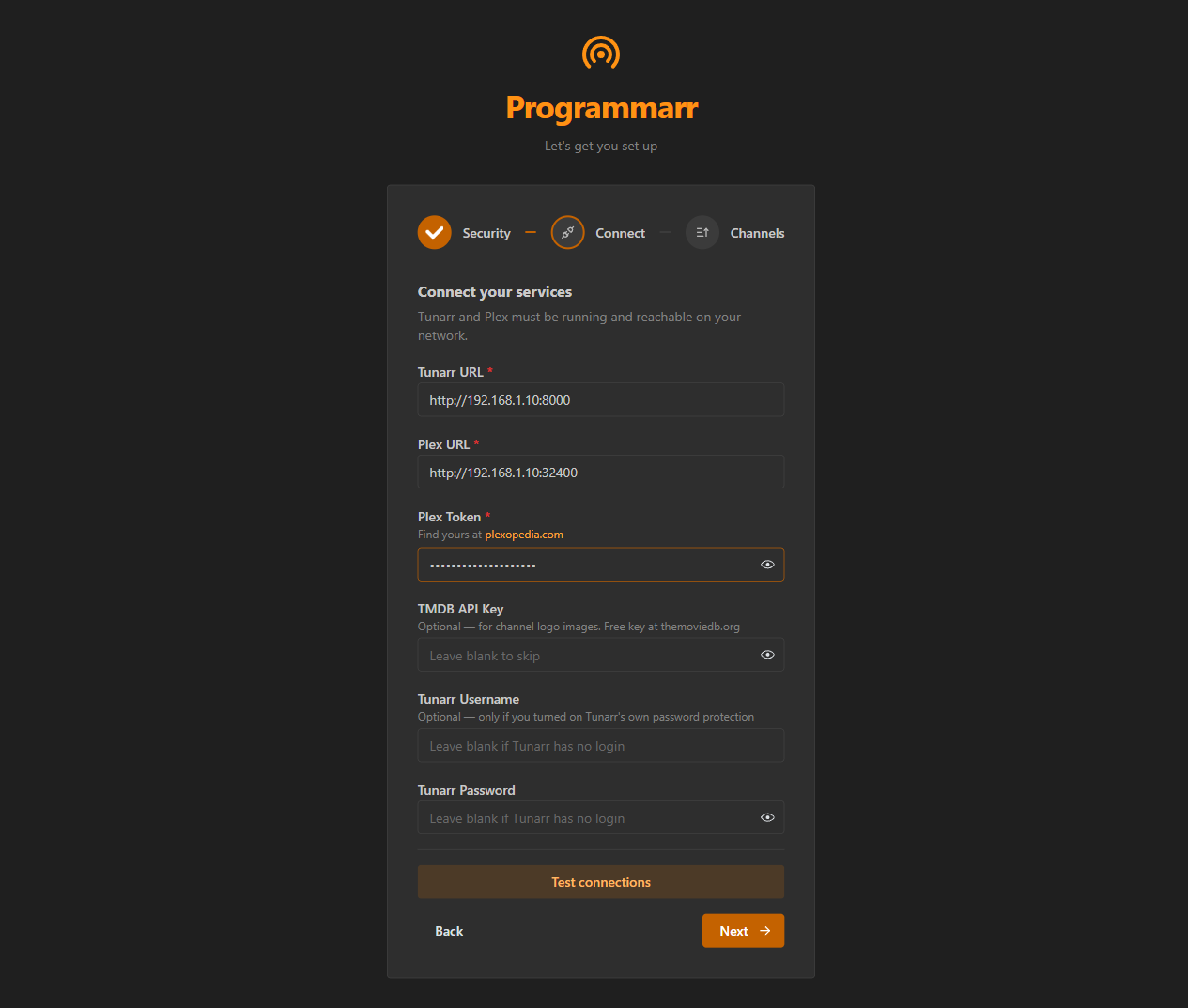
First-run setup wizard — three steps, and it tests your Tunarr and Plex connections before saving |
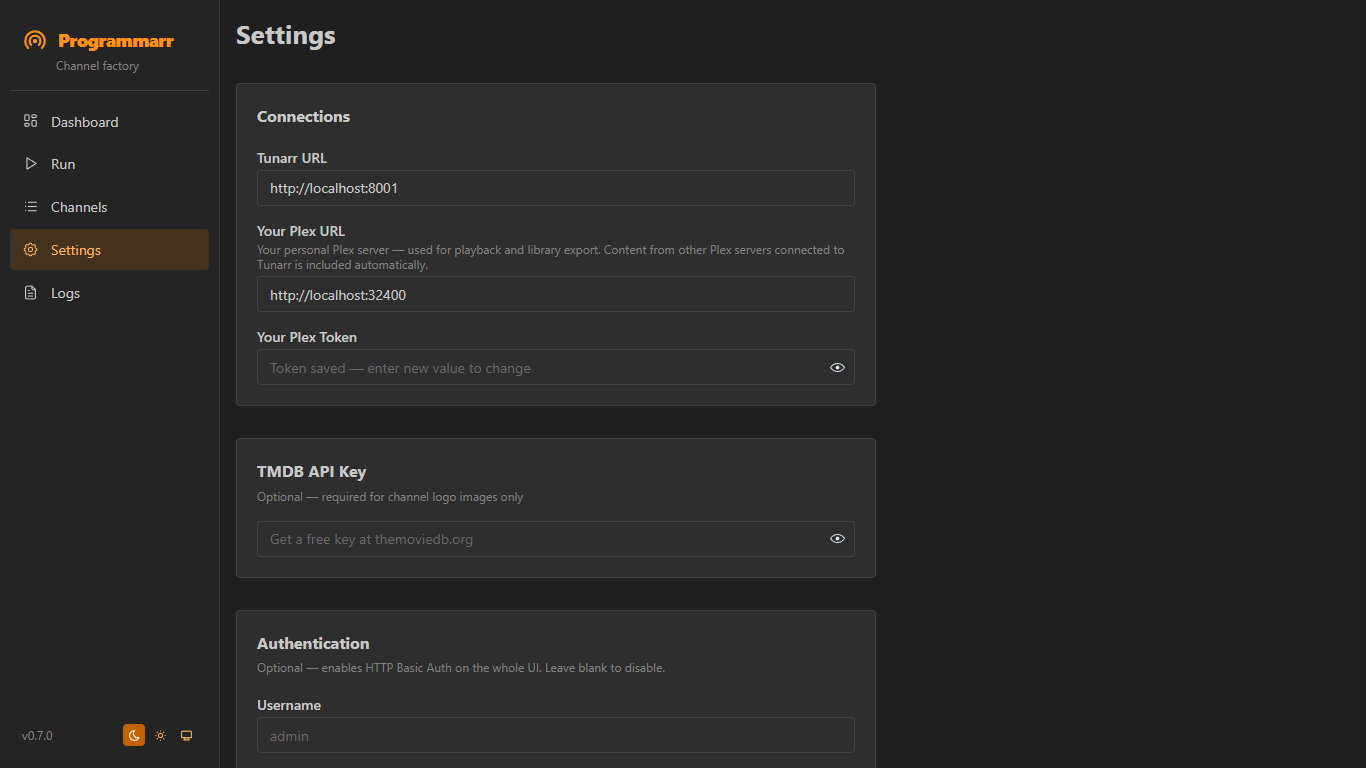
Settings — all connection config and optional auth in one place |
The heart of Programmarr. Instead of one mushy Comedy (140) channel, you build a lineup that feels hand-programmed — and you do it in a few clicks.
Pick which genres and decades are in play, and the Planner shows you a live, counted list of candidate channels. Check the ones you want:
| Candidate | Examples |
|---|---|
| TV Marathons | A 24/7 channel for any show — Cheers, The Office, It's Always Sunny |
| TV Blocks | Themed multi-show channels — Comedy TV, Crime TV |
| Genre × Decade | Tight era cuts — 90s Comedy, 80s Horror, 2000s Action |
| Sub-genres | Curated, named blends — Rom-Coms, Dark Comedies, Crime Thrillers |
| Studios / Directors / Actors | A24, Directed by Tarantino, Adam Sandler Movies |
Every section has Top 10 and Add all for fast picking, and folds away once you've handled it. Hit Build and the channels are written instantly — no AI, no waiting.
Flip one switch and an AI layer does the two things plain filters can't — seeded with the lineup you just built, and merged on top (it never duplicates what you have):
No API key needed — you copy a ready-made prompt into ChatGPT/Claude/Gemini and paste the result back.
Setup → Export → Planner → (AI) → (Collections) → Deploy. The deploy step dry-runs first, lets you review and renumber, then pushes to Tunarr and syncs the Plex guide — all in one click, with live output streamed to the browser. Plex collections (Kometa, Trakt, Letterboxd) can be folded in as their own channels along the way.
Channels are normally static snapshots — you build them, deploy them, and they go stale as your library grows. Mark a channel "live" and Programmarr keeps it fresh for you: on a schedule it re-resolves the channel against your current library and patches it in place, only when something actually changed.
Two everyday patterns:
Bad Boys) in the channel editor. Every matching film is pulled in, in release order, and a new sequel joins automatically when it appears. A live preview shows exactly what matches before you save, and you can exclude any false positives.Why "in place" matters: updates reuse the existing Tunarr channel — same channel number, same internal id — so Plex's Live TV / DVR mapping is never disturbed. No deleting, no re-adding the channel in Plex. An unchanged channel is a no-op, so there's no needless guide churn.
It ships off. Turn it on in Settings → Live Channels, flip the "Auto-update" switch on any channel you want maintained, and watch it from the Dashboard → Auto-Updates card (live count, last run, recent changes, pause, and a "Check now" button). Everything stays a recipe you can edit or revert at any time.
Before Programmarr deletes any Tunarr channel, it writes a compressed snapshot of everything it's about to remove — each channel plus its full programming — to your data directory:
data/tunarr_backup_20260819T195358Z.json.gz
On a 156-channel server that's about 12 MB and takes ~20 seconds. The 3 most recent are kept; older ones are removed automatically. Probe/dry runs never write one.
This is a safety net, not a feature — there's no restore button yet. If you need to go back, the file is plain JSON once unzipped, containing everything Tunarr's API needs:
gunzip -c data/tunarr_backup_20260819T195358Z.json.gz > lineup.json
Each entry has the original channel object (including its Tunarr id) and the raw
programming payload. If you ever need to recover a lineup, open an
issue with that file's structure
and I'll help — and if it happens to anyone, a proper restore command moves to the top of the list.
Everything is set through the UI. Config is stored in ./data/config.json (bind-mounted, never baked into the image).
| Field | Required | Notes |
|---|---|---|
| Tunarr URL | Yes | e.g. http://192.168.1.10:8000 |
| Plex URL | Yes | e.g. http://192.168.1.10:32400 |
| Plex Token | Yes | How to find yours |
| TMDB API Key | No | Free at themoviedb.org — only needed for channel logos |
These optional keys can be added directly to config.json (they're not in the UI). Most setups don't need them, and they're safe to leave out — Tunarr's defaults apply. They survive UI saves.
| Key | Default | Description |
|---|---|---|
tunarr_channel_group |
tunarr |
Group/folder all generated channels are assigned to in Tunarr |
tunarr_stream_mode |
hls |
Streaming mode for generated channels. One of hls, hls_slower, mpegts, hls_direct, hls_direct_v2 |
Channels are numbered sequentially from 1
jamesmattson/programmarr is a public repo on GitHub by jamesmattson. Turn your Plex library into curated, themed virtual TV channels in Tunarr — a self-hosted web app with a *arr-style UI.
It declares the MIT license on GitHub.
Its maker tagged it for macOS, Windows and Linux, or as Docker or cross-platform. That is declared by the maker; Take My Repo has not tested it.
Open "Take it" on its page: Take My Repo writes an install plan for your machine and hands it to your AI agent (Claude Code, Codex or Cursor), which asks you before each step. Take My Repo has not tested it on any machine.
FastAPI framework, high performance, easy to learn, fast to code, ready for production
Next-gen AI media server. One container replaces Sonarr, Radarr, Prowlarr, Bazarr, Jellyseerr and Jellyfin, with a web app, a native iPhone app, and an AI agent that gets things done. Free for personal use.
Collection of publicly available IPTV channels from all over the world
A list of Free Software network services and web applications which can be hosted on your own servers
This repository contains the code for the CVPR 2020 paper "Differentiable Volumetric Rendering: Learning Implicit 3D Representations without 3D Supervision"
Its last change on GitHub was on 2026-11-23. Take My Repo does not judge from that whether it is maintained.
Nobody has reviewed it on Take My Repo yet, which says nothing about its quality.
Take My Repo cannot say: it does not audit code and has not run programmarr. What is known comes from GitHub. It declares the MIT license on GitHub. Its last change was on 2026-11-23. It has 37 stars, which measure popularity, not safety. Nobody has reviewed it on Take My Repo yet, which says nothing about its quality. Read the source before you run it. With "Take it", your AI agent shows each step and asks you before running it; README text is treated as data, not as instructions.